STM32 Nucleo Boards: How to Choose the Right One
A practical selection guide to the STM32 Nucleo family: the three form factors, what the order code tells you, what the on-board ST-LINK actually does, and how Nucleo compares to Discovery kits and to Blue Pill and Black Pill boards.

23 Sep, 2026. 21 minutes read
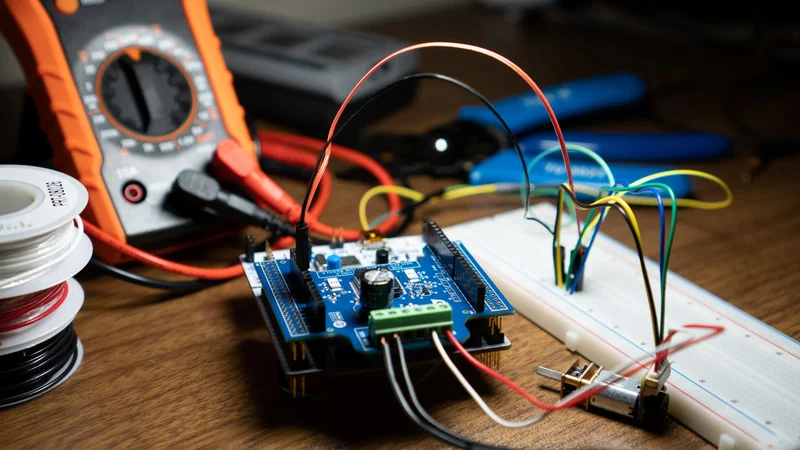
A Nucleo board with an expansion shield during bench testing
Key Takeaways
STM32 Nucleo boards come in three form factors that differ mainly by pin count and memory: Nucleo-32 (16 Kbytes to 256 Kbytes of flash), Nucleo-64 (32 Kbytes to 2 Mbytes) and Nucleo-144 (64 Kbytes to 4 Mbytes).[2][3][4]
Every board integrates an ST-LINK debugger and programmer, so you do not need a separate probe. ST-LINK/V2-1 and later also give you a mass storage interface and a Virtual COM port.[1][6]
The order code is readable: in NUCLEO-L452RE, R is the pin count (64) and E is the flash size (512 KB), though letter meanings can vary by series. [2]
Nucleo-64 carries Arduino Uno V3 and ST morpho headers; Nucleo-32 carries Arduino Nano V3 [3]; some Nucleo-144 boards add the ST Zio connector, which extends Arduino Uno V3.[1][4]
Pick the board by the STM32 you intend to ship, not by the board. The Nucleo range exists so that you can prototype on the same silicon family you will put on your own PCB.
Introduction
Choosing an STM32 Nucleo board is harder than it should be. STMicroelectronics lists 91 of them in its evaluation tools catalog, many separated by a single letter in the order code, and the product pages are written to describe one board rather than to help you choose between dozens.[1]
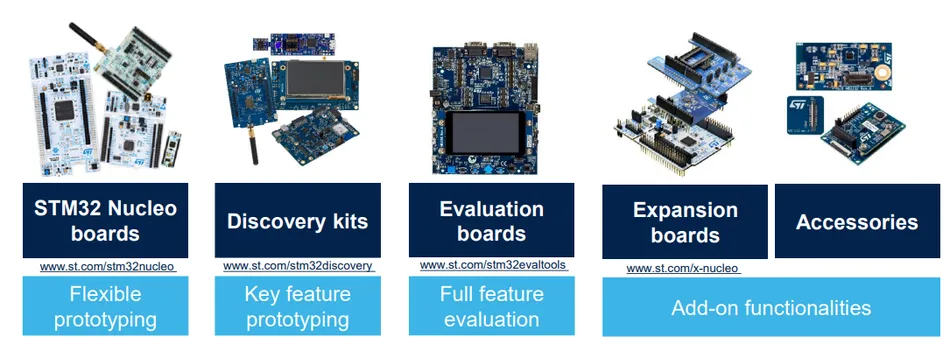
This guide takes the opposite approach. It treats the Nucleo range as a selection problem: what the form factors actually differ on, what the on-board debugger gives you, which headers you get, and when a Discovery kit or a low cost third party board is the better answer.
The advice here is aimed at engineers building real embedded systems rather than a blinking LED, so it covers the parts that bite later: power supply limits, solder bridge defaults that silently reroute a UART, and a software ecosystem that has changed significantly since most Nucleo tutorials were written.
What Is an STM32 Nucleo Board?
An STM32 Nucleo board is a low cost development board built around a single STM32 microcontroller, with a debugger already on the PCB. ST describes the range as a way for "anyone to try out new ideas and to create prototypes quickly with any STM32 MCU".[1]
Three things define the family. Every board integrates an ST-LINK debugger and programmer, which removes the need for a separate probe.[1] Every board exposes standard expansion headers, so shields move between boards of the same form factor.[1] And every board is supported by the STM32Cube software ecosystem.[2]
That combination is what "open development platform" means in ST's documentation.[2] The board is not a product in itself. It is a carrier that puts a specific STM32 microcontroller on standard connectors so you can evaluate it against your requirements.
The commercial logic matters for your decision. ST's evaluation tools catalog lists 91 Nucleo boards, 61 Discovery kits and 18 evaluation boards, plus 128 Nucleo expansion boards.[1] The Nucleo tier is the cheap, general purpose one, and its breadth is deliberate: there is a Nucleo for most STM32 product lines, so your prototype can use the same silicon as your production design.
Where Nucleo Sits Among Development Boards
Nucleo boards are aimed at general evaluation and prototyping across most STM32 MCU lines. Discovery kits are aimed at something narrower: ST describes them as solutions "to evaluate the application-specific features of STM32 MCUs and MPUs", and notes that several "come with application-specific features".[10]
In practice that means a Discovery kit typically arrives with application hardware already fitted, chosen to demonstrate one use case. A Nucleo board arrives with minimal application hardware, relying on headers and shields.
If you are still deciding between microcontrollers, FPGAs or single-board computers, see our guide to FPGA development boards and Arduino vs Raspberry Pi comparison.
The Three Nucleo Form Factors
The clearest way to narrow 91 boards is to start with the form factor, because it largely determines the package size, memory range and connector set ST groups the range into three.[2][3][4]
Form factor | Flash range | MCU package | Expansion connectors | User LEDs / buttons |
Nucleo-32 | 16 Kbytes to 256 Kbytes | 32-pin package | Arduino Nano V3 | 1 user LED, 1 reset button |
Nucleo-64 | 32 Kbytes to 2 Mbytes | LQFP64 on most boards; some use 32-, 48- or 68-pin packages | Arduino Uno V3, ST morpho | Typically 1 user LED, 1 user and 1 reset button (varies) |
Nucleo-144 | 64 Kbytes to 4 Mbytes | LQFP144, TFBGA225 or VFBGA264 | ST Zio or Arduino Uno V3, ST morpho | 3 user LEDs, 1 user and 1 reset button |
Flash, package, connector and LED details are from the Nucleo-32 and Nucleo-64 data briefs and the Nucleo-144 product documentation.[2][3][4]
Nucleo-32: When Board Size Is the Constraint
The Nucleo-32 boards put a 32-pin STM32 on an Arduino Nano V3 expansion connector, with a Micro-AB USB connector for the ST-LINK.[3] You get one user LED and one reset push-button, and no ST morpho header.[3]
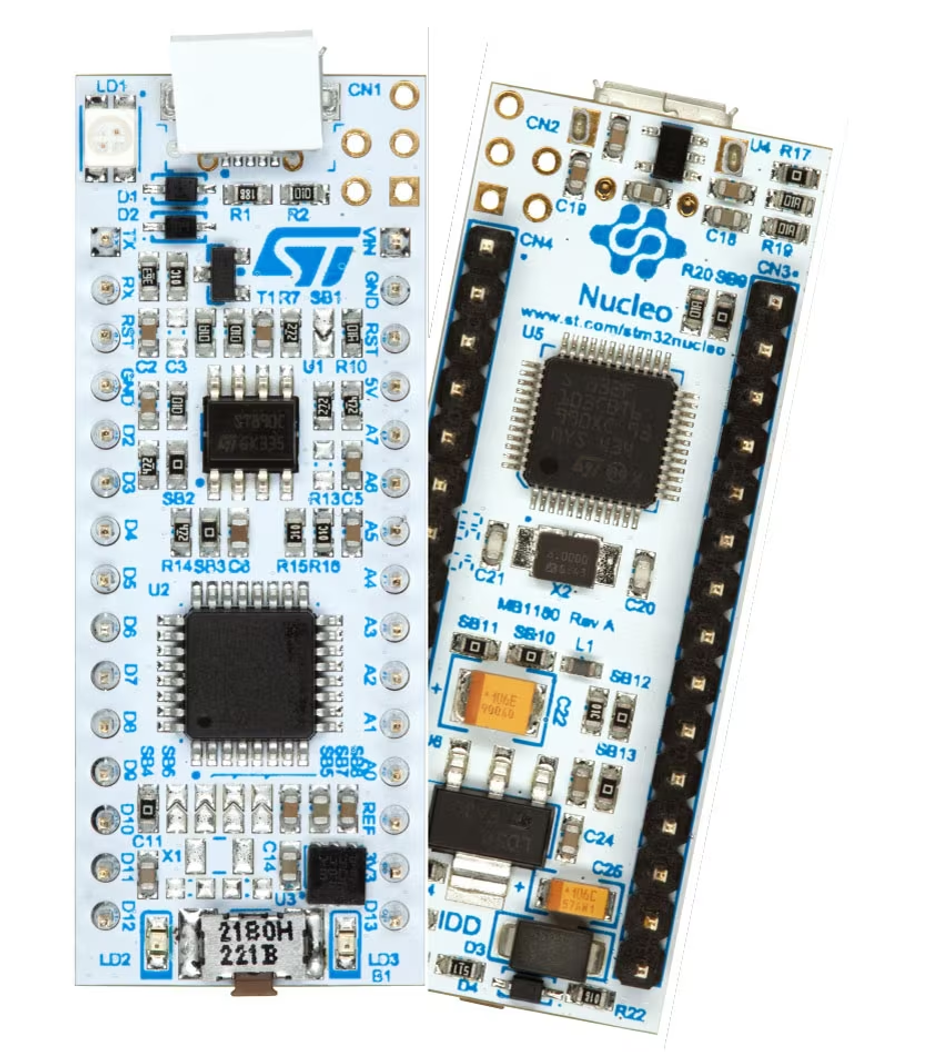
Choose this tier when the physical footprint matters or when the target device is genuinely small. The board's Nano form factor allows it to be plugged directly into a standard breadboard, which makes it well suited to quick prototyping with discrete components and sensors. The NUCLEO-L432KC carries an STM32L432KCU6 and the NUCLEO-F031K6 carries an STM32F031K6T6, both with ST-LINK/V2-1.[3]
The trade-off is I/O count. With a 32-pin microcontroller, far fewer signals are available than on a Nucleo-64, and all of them are routed through the Nano header. Note also that on some Nucleo-32 boards, solder bridges connect pairs of header pins by default for Arduino Nano compatibility; consult the user manual for the specific board before assigning those pins. .
Nucleo-64: The Default Choice
Nucleo-64 is the tier most engineers should start with, and it is where the widest selection sits. The boards carry an STM32 in an LQFP64 or LQFP48 package, an Arduino Uno V3 expansion connector, and ST morpho extension pin headers "for full access to all STM32 I/Os".[2]
Common features across the main Nucleo-64 range include one user LED shared with the Arduino connector, one user and one reset push-button, and a 32.768 kHz crystal oscillator.[2] Newer boards, such as the STM32WBA series, are documented separately and differ in package type, LEDs and buttons.
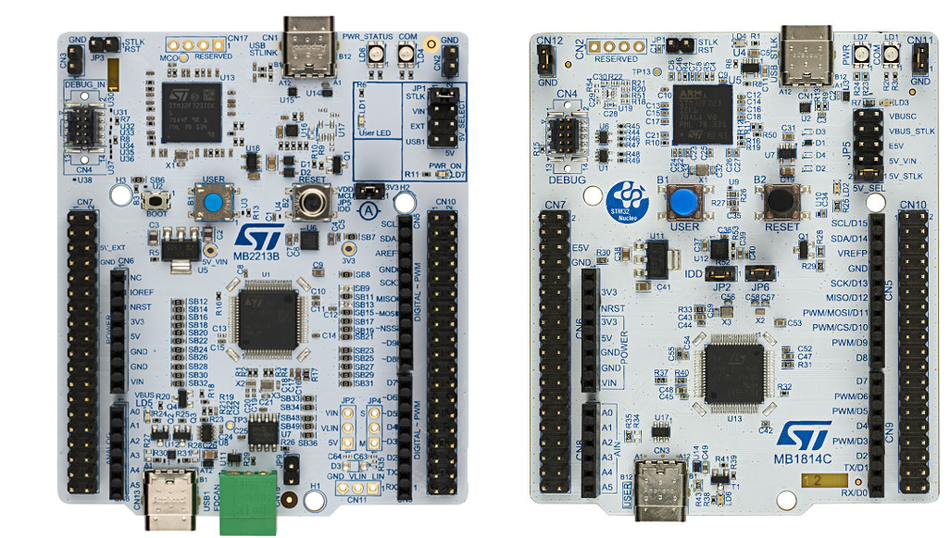
The familiar part numbers live here. The NUCLEO-F446RE, NUCLEO-F401RE, NUCLEO-F411RE and NUCLEO-L476RG are all Nucleo-64 boards built on the MB1136 reference and documented in user manual UM1724.[2] The NUCLEO-F446RE carries an STM32F446RET6 in an LQFP64 package, an Arm Cortex-M4 core with FPU running at up to 180 MHz, with 512 KB of flash and 128 KB of SRAM.[11]
That STM32F4 generation is why the NUCLEO-F446RE remains a common recommendation. An STM32F4 part leaves headroom for signal processing work and for the timers, SPI links and DMA driven transfers that production embedded systems tend to need, without moving to a larger board. More recent Nucleo-64 boards offer alternatives to the F4: the NUCLEO-H533RE runs a Cortex-M33 at up to 250 MHz with 512 KB of flash and 272 KB of SRAM, while the 2026 NUCLEO-C562RE brings the entry-level STM32C5 line and is the first board supported by STM32CubeMX2.
The ST morpho headers are a key advantage over Nucleo-32. On an STM32 Nucleo-64 development board they expose every I/O on the package, so peripherals that never fit the Arduino footprint, including spare timers and ADC channels, stay reachable with a jumper wire, although some pins are assigned to on-board functions such as SWD, the crystal oscillators and the ST-LINK Virtual COM port by default.[2][5]
Nucleo-144: Ethernet, Advanced Connectivity and High Pin Count
Nucleo-144 boards are for designs that need peripherals the smaller boards cannot expose. Features available on some boards in the tier include Ethernet compliant with IEEE-802.3-2002, USB Device, USB OTG full speed or USB SNK/UFP, plus connectors for a camera module FPC, Ethernet RJ45, an M.2 Key A serial memory connector and a CAN FD header.[4]
Recommended Reading: Understanding CAN Bus: A Comprehensive Guide
The expansion story changes here. Nucleo-144 boards carry an "ARDUINO Uno V3 connector, which is extended as part of ST Zio expansion connector on some boards", alongside ST morpho headers.[4] ST Zio is a superset: the Arduino Uno V3 footprint still works, with extra rows around it.
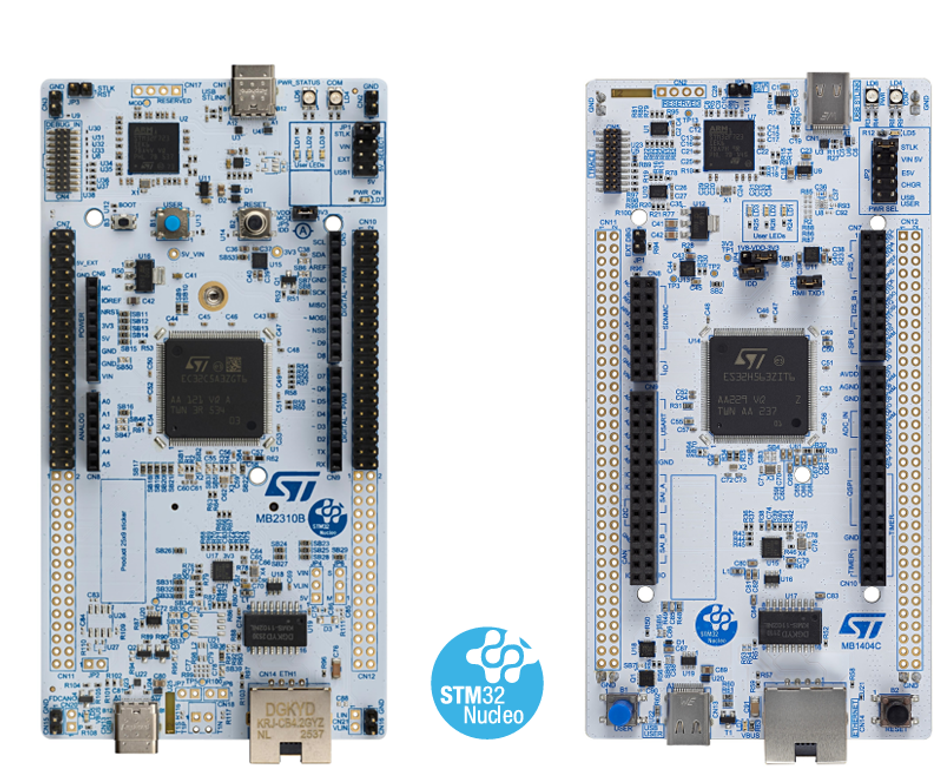
The NUCLEO-F767ZI is a representative example, described by ST as an "STM32 Nucleo-144 development board with STM32F767ZI MCU, supports Arduino, ST Zio and morpho connectivity".[19] If your design needs wired Ethernet, this is the tier to look at, but check that the specific board includes an RJ45 connector.
Recommended Reading: STM32 Microcontroller: Cores, Peripherals & Tools
How to Read a Nucleo Order Code
The form factor narrows the catalog to a tier. The order code narrows it to a part. Nucleo order codes are systematic, which makes the catalog far easier to search once you know the scheme. ST documents the codification as NUCLEO-XXYYZT.[2]
Field | Meaning | Example: NUCLEO-L452RE |
XX | MCU series in the STM32 32-bit Arm Cortex range | STM32L4 series |
YY | MCU product line within the series | STM32L452 |
Z | Package pin count: C for 48 pins, R for 64 pins | 64 pins |
T | Flash size: 6 = 32 KB, 8 = 64 KB, B = 128 KB, C = 256 KB, E = 512 KB, G = 1 MB, Z = 192 KB | 512 Kbytes |
-P suffix | STM32 has an external SMPS function | No SMPS |
-Q suffix | STM32 has an internal SMPS function | No SMPS |
All fields and the worked example are from the Nucleo-64 data brief.[2]
The overall structure is consistent, but pin-count letters can differ between data briefs, even within the same form factor, so check the brief for the specific board. On Nucleo-32 the flash letters start lower, with 4 for 16 Kbytes, because the tier goes down to smaller parts.[3]
Two suffixes are worth understanding because they change power behavior rather than pinout. A -P board carries an STM32 with an external SMPS function, and a -Q board carries one with an internal SMPS function.[2] ST notes that for compatible boards "the internal or external SMPS significantly reduces power consumption in Run mode".[2] If you are evaluating for a battery-powered design, check for this suffix first.
Some product lines add their own digit. On the sub-GHz STM32WL3x boards a trailing 1 or 2 encodes the frequency band: 1 for the 826 to 958 MHz high band, 2 for the 413 to 479 MHz low band.[9]
The On-Board ST-LINK: What You Actually Get
Once the form factor and the part are settled, the next thing that varies between boards is the debugger.
"Integrated debugger" undersells what is on the board. The ST-LINK section of a Nucleo is a second STM32 microcontroller running debug firmware; on the MB1136 Nucleo-64 boards it is an STM32F103CBT6.[5] ST confirms the general case: "The various ST-LINK implementations embed an STM32 32-bit microcontroller based on the Arm Cortex-M processor".[6]
The versions matter because they are not equivalent. ST-LINK/V2-1 was "an evolution of ST-LINK/V2, with the addition of USB interfaces (mass storage interface and Virtual COM port), and better power management control for the STM32 microcontroller in the application board".[6]
That mass storage interface is the drag-and-drop programming path, and the Virtual COM port is why printf over UART reaches your terminal with no extra hardware, once printf is retargeted to the UART connected to the ST-LINK. The older ST-LINK/V2, found on some early Discovery kits and on the standalone ST-LINK/V2 probe, provides neither. [6]
STLINK-V3 is the current generation. ST describes it as "the most recent and powerful ST-LINK generation", available as a standalone probe and also "embedded into demonstration boards (STLINK-V3E, and STLINK-V3EC managing a USB Type-C connection)", with "a specially developed multipath USB bridge function".[6] A separate STLINK-V3PWR probe adds the ability to provide and measure power to the target.[6]
Derivative | Generation | What it adds | Seen on |
ST-LINK/V2-1 | V2 | Mass storage, Virtual COM port, better target power management | NUCLEO-F446RE, NUCLEO-L476RG and most older Nucleo-64 boards |
STLINK-V2EC | V2 | Completes the V2 generation with a USB Type-C connection | NUCLEO-U031R8, NUCLEO-U083RC |
STLINK-V3E | V3 | Multipath USB bridge, embedded V3 performance | NUCLEO-G431RB, NUCLEO-G474RE, NUCLEO-G431KB |
STLINK-V3EC | V3 | V3 performance with a USB Type-C connection | NUCLEO-H533RE, NUCLEO-U545RE-Q |
Derivative descriptions are from TN1235.[6] Board assignments are from the ordering tables in the Nucleo-64 and Nucleo-32 data briefs.[2][3]
Across the main Nucleo-64 range, the on-board ST-LINK is one of ST-LINK/V2-1, STLINK-V3E, STLINK-V2EC or STLINK-V3EC, and in every case it provides "USB re-enumeration capability: mass storage, Virtual COM port, and debug port".[2]
The practical detail is the USB connector, because it decides which cable you need. The MB1136 generation of Nucleo-64 boards uses a Mini-B connector. Micro-B appears on the STM32G0 and STM32G4 boards and on the SMPS -P variants, and USB Type-C on the newest boards, including the STM32H5 and STM32U5 ones.[2] The connector is not consistent within a series, so check the ordering table for your specific order code rather than assuming.
Recommended Reading: USB-C Pinout In Depth: A Comprehensive Technical Guide for Engineers
Expansion Headers: Arduino, ST Morpho and ST Zio
The headers are what you will actually wire to, so they deserve more detail than the table gives.
Header compatibility is one of the main reasons a Nucleo is worth more than a bare chip on a breakout. ST's position is that boards "can easily be extended with many specialized application hardware add-ons", with Nucleo-64 carrying "Arduino Uno rev3 & ST morpho connectors" and Nucleo-32 carrying "Arduino Nano connectors".[1]
The two header sets do different jobs. The Arduino Uno V3 connector buys you the shield ecosystem. The ST morpho extension pin headers give "full access to all STM32 I/Os", including pins the Arduino footprint never had a place for.[2]
That distinction decides how you prototype. Use the Arduino header when an off-the-shelf shield exists. Use the morpho headers when you need a peripheral the Arduino pinout cannot reach, which is most of the time on a part with more than 48 pins.
The 3.3 V Versus 5 V Trap
Arduino header compatibility is mechanical and functional, not electrical. Nucleo boards run their STM32 from a 3.3 V rail, which is why ST specifies an external +3.3 V supply input of 3 V to 3.6 V and UM1724 states plainly that the I/Os of the STM32 are 3.3 V compatible rather than 5 V for Arduino Uno V3.[5] Many Arduino Uno shields, by contrast, were designed around 5 V signaling: on the Arduino UNO R3, the IOREF pin that shields read as their logic reference is connected to the board's 5 V rail. [18]
A shield that drives 5 V logic into a 3.3 V STM32 GPIO is a real risk. Many STM32 GPIOs are 5 V-tolerant when used as digital inputs, marked FT in the device datasheet, but pins configured as analog inputs and pins without that marking are not. Check the shield's signaling voltage and the tolerance of the specific pins before fitting it, not after. On the Nucleo side, the IOREF pin outputs 3.3 V, so shields that adapt their signaling to IOREF will follow the board.[5]
There is a related detail on the analog side. On MB1136 Nucleo-64 boards, solder bridge SB57 controls whether VDDA and VREF+ are tied to VDD, and turning it off lets VREF+ come "from pin 8 of CN5", which ST notes is "used for external VREF+ provided by ARDUINO shield".[5] ST also cautions that SB57 must be removed before fitting a shield that supplies VREF+ on that pin.[5] If you are chasing ADC accuracy from a shield with its own reference, that is the bridge involved.
Recommended Reading: Arduino UNO Pinout: Comprehensive Guide for Engineers and Students
Powering the Board Without Losing Your Debug Session
Power is where most bench problems start, and the symptoms rarely point at the cause.
Nucleo-64 boards offer flexible power supply options: ST-LINK USB VBUS or external sources.[2] The external ranges are specific, and getting them wrong produces confusing symptoms rather than obvious failures.
For a Nucleo-64, ST's power-up instructions specify an external supply between 7 V and 12 V on VIN, or 5 V on E5V.[5] The Zephyr Project's board documentation gives the same envelope for the NUCLEO-F446RE, listing USB VBUS or an external source at 3.3 V, 5 V or 7 to 12 V.[11] VIN current capability falls as voltage rises: 800 mA at 7 V, 450 mA up to 9 V and 250 mA up to 12 V.[5]
Two failure modes are worth knowing before you hit them.
Current limiting over USB. ST warns that if the power-up order is not respected and more than 300 mA is needed, "the PC may be damaged or the current supply can be limited by the PC. As a consequence, the board is not powered correctly".[5]
Failed enumeration. 300 mA is requested at enumeration, and ST notes there is "a risk that the request is rejected and the enumeration does not succeed if the PC cannot provide such current", leaving the board unpowered with LED LD3 off.[5]
Both failure modes have the same fix: set JP5 to pins 2–3, remove JP1, power the board from VIN or E5V first, confirm LD3 is lit, and only then connect USB.[5]
The 3.3 V input deserves its own warning. Feeding 3.3 V directly is allowed, in the range 3 V to 3.6 V on CN6 pin 4 or CN7 pins 12 and 16, but only when "ST-LINK part of PCB is cut or SB2 and SB12 OFF .[5] ST is explicit about the consequence: "When the STM32 Nucleo board is power supplied by +3.3V, the ST-LINK is not powered, thus the programming and debug features are unavailable".[5]
In the other direction, when the board is powered by USB, VIN or E5V, the +5 V pin on CN6 pin 5 or CN7 pin 18 can be used as an output supply for an Arduino shield or extension board.[5]
Software: STM32Cube, IDEs and the Mbed Trap
Every Nucleo board ships into the same software ecosystem. The boards come with "comprehensive free software libraries and examples available with the STM32Cube MCU Package", and support a wide choice of IDEs "including IAR Embedded Workbench, MDK-ARM, and STM32CubeIDE".[2]
STM32CubeIDE is ST's own environment and the default starting point. IAR Embedded Workbench and Keil MDK-ARM are the commercial alternatives, both listed by ST as Windows only.[2] ST also states that the STM32Cube packages "seamlessly work with a wide range of development environments including IAR EWARM, Keil MDK-ARM and GCC/LLVM-based IDEs".[1]
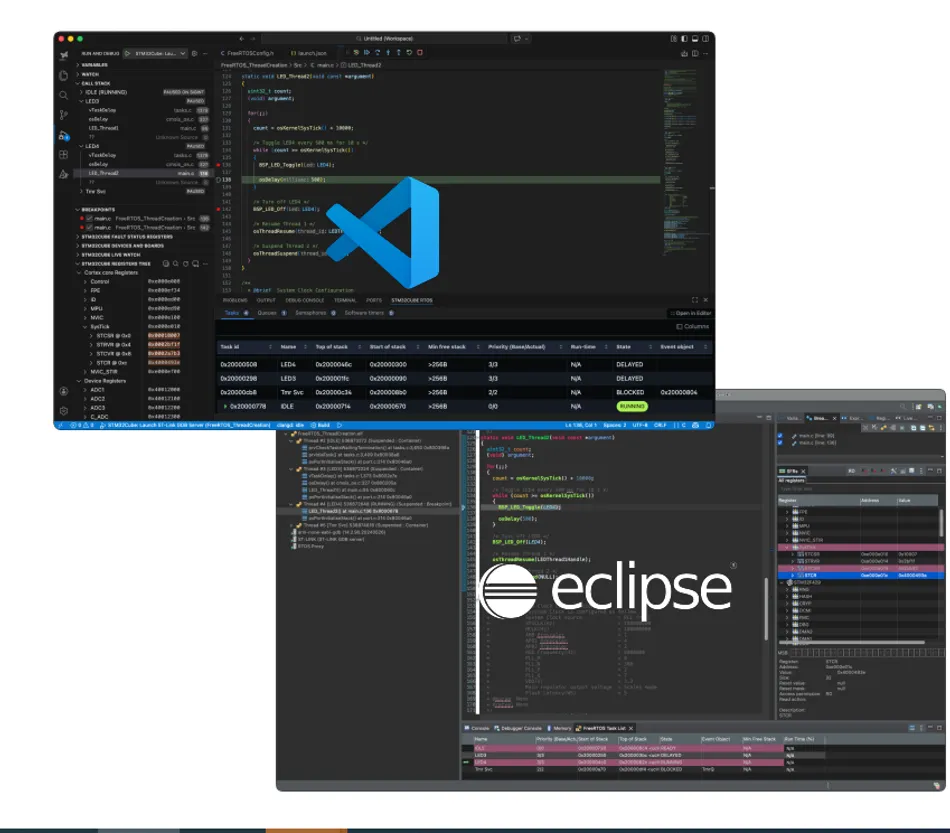
Underneath the IDE choice sits the STM32Cube MCU Package, which supplies the hardware abstraction layer. The stm32duino project, which adds STM32 support to the Arduino IDE, is built on exactly that foundation: "STM32Cube MCU Packages including: The HAL hardware abstraction layer, The Low-Layer (LL) APIs, CMSIS device definition for STM32".[17]
That is a useful route if you are coming from Arduino. The stm32duino core supports Nucleo 144, 64 and 32 variants along with Discovery and Eval boards, so an existing sketch can move onto a Nucleo with the same toolchain you already know.[17]
Mbed Is Gone, and Old Tutorials Have Not Noticed
This is the single most out-of-date piece of advice in circulation about Nucleo boards. Arm announced in July 2024 that "Mbed OS and the Mbed Platform will reach end of life in July 2026 , and that at that point "the Mbed website will be archived, and it will no longer be possible to build projects in our online tools".[15]
That date has now passed. The Arm Mbed GitHub organization states that "Mbed was sunsetted in July 2026 and it is no longer possible to build projects using our online tools", and that while Mbed OS remains open source and publicly available it "will no longer be actively maintained or supported by Arm".[16]
ST removed Mbed from its own Nucleo documentation well ahead of this. Revision 15 of the Nucleo-64 data brief, dated December 2021, records "Removed the references to Arm Mbed", and the Nucleo-32 data brief did the same in revision 9 in April 2026.[2][3]
The practical consequence is simple. Any Nucleo tutorial that tells you to compile in the Mbed online IDE is describing a workflow that no longer exists, and stale pointers persist across tutorial sites and older product material. Start with STM32CubeIDE, or with stm32duino if you want the Arduino toolchain.[17]
Nucleo Versus Discovery, Blue Pill and Black Pill
The honest comparison is not Nucleo against everything. It is Nucleo against three specific alternatives that engineers actually weigh.
Board | Typical MCU | Clock / flash / RAM | On-board debugger | Best for |
Nucleo-64 (NUCLEO-F446RE) | STM32F446RET6 | 180 MHz / 512 KB / 128 KB | Yes, ST-LINK/V2-1 | General prototyping with shields and full I/O access |
Discovery kit | Varies by kit | Varies by kit | Yes | Evaluating application-specific features that ship on the board |
Blue Pill | STM32F103C8T6 | 72 MHz / 64 KB / 20 KB | No, SWD header only | Cheap, throwaway, or high quantity hobby builds |
Black Pill (WeAct V2.0) | STM32F411CEU6 | 100 MHz / 512 KB / 128 KB | No, DFU or external SWD | More capable low cost board when you already own a debugger |
Nucleo-64 figures are from the Zephyr Project board documentation.[11] Discovery positioning is from ST.[10] Blue Pill figures are from the STM32-base project.[13] Black Pill figures are from Zephyr and from WeAct Studio's own repository.[12][14]
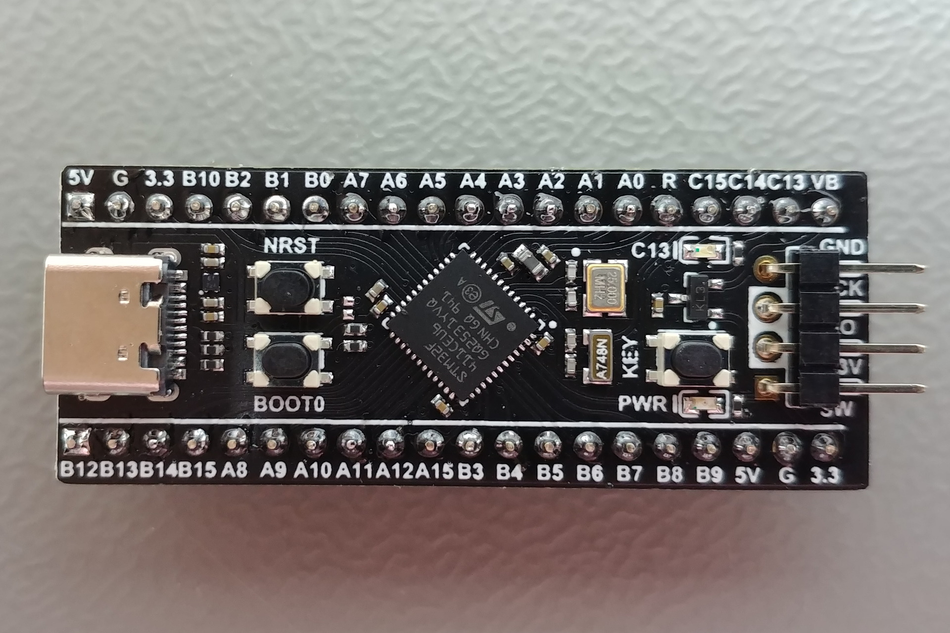
The debugger column is the decision. Zephyr's documentation of the WeAct Black Pill states plainly that the board lacks an integrated debugger, and that you program it through the ROM bootloader in DFU mode or through the SWD debug port with external hardware.[12] The Blue Pill is the same story, exposing SWDIO and SWCLK on PA13 and PA14 through a header.[13]
So the price comparison is misleading unless you already own a probe. A Nucleo includes the debugger; a Blue Pill does not, so a like-for-like comparison has to add the cost of a separate probe to the cheaper board.
Board-level quality variance is a second consideration. The STM32-base project documents a specific hardware issue on Blue Pill boards: "This board may have a wrong value of resistor on the USB D+ pin. Instead of a 1.5kOhm it has either a 10kOhm or 4.7kOhm resistor".[13] The D+ pull-up is what signals device presence and speed to a USB host, so a wrong value there can affect enumeration, and it is a manufacturing variance rather than a software problem.
None of this makes the low cost boards wrong. If you are building twenty units of something and already own an ST-LINK, a Black Pill with 512 KB of flash and a 100 MHz Cortex-M4 is a reasonable choice.[12][14] For a first board, or for anything you intend to debug seriously, the integrated ST-LINK is worth the difference.
Blue Pill and the STM32F103C8T6 have their own considerations around clock configuration and USB behavior that go beyond board selection. Wevolver covers that part separately in the article dedicated to the STM32F103, which is the better reference if the Blue Pill is what you are actually evaluating.
Wireless Nucleo-64 Boards
Several wireless families use the Nucleo-64 form factor and are easy to miss when browsing the catalog, because they keep the same headers while adding a radio. The STM32WBA and STM32WL3x families are the two worth knowing.
The STM32WBA Nucleo-64 boards carry a 2.4 GHz RF transceiver supporting Bluetooth specification v6.0, with an integrated PCB antenna. All but the NUCLEO-WBA52CG add IEEE 802.15.4-2015 PHY and MAC, supporting Thread, Matter and Zigbee.[8] The NUCLEO-WBA65RI provides 2 Mbytes of flash and 512 Kbytes of SRAM.[8] These boards keep the Arduino Uno V3 expansion connector and ST morpho headers, and add an on-board STLINK-V3 debugger.[8]
The STM32WL3x Nucleo-64 boards go sub-GHz instead. They carry a transceiver with a front end optimized for the 413 to 479 MHz or 826 to 958 MHz bands, supporting OOK, ASK, 2(G)FSK, 4(G)FSK, D-BPSK and DSSS modulations.[9] ST lists compatibility with WM-Bus, Sigfox, Mioty, KNX-RF and IEEE 802.15.4g, and the boards ship with an SMA antenna.[9]
If you are evaluating a wireless protocol rather than a microcontroller, start here rather than with a general purpose Nucleo plus a radio shield. The antenna and RF front end are already matched to the band.
How to Choose: A Selection Workflow
Work from the destination backwards. The board is a means of evaluating a microcontroller, so the microcontroller decision comes first.
Fix the STM32 series first. Decide on the series and product line from your requirements: core, peripherals, power budget and security features. The board follows from the part, and ST's own catalog is organized that way. [1]
Set the pin count and memory. This selects the form factor. A 32-pin package usually points at Nucleo-32, a 48- or 64-pin package at Nucleo-64, and LQFP144 or a BGA package at Nucleo-144. The wireless families are the exception: the STM32WBA boards use 48- and 68-pin QFN packages and the STM32WL3x boards go down to 32 pins, all in the Nucleo-64 form factor.[2][3][4][8][9]
Check the peripherals you cannot fake. Ethernet, CAN FD headers and camera interfaces are Nucleo-144 territory on most lines, while USB device support is available on many Nucleo-64 boards.[2][4] A radio means a wireless Nucleo-64.[8][9]
Read the order code back. Confirm the letters match what you intended: pin count in position Z, flash size in position T, and any -P or -Q SMPS suffix.[2]
Check the ST-LINK version and USB connector. Confirm you have the Virtual COM port you need for debug output, and order the right cable.[2][6]
Confirm expansion fits. If you plan to use a shield, verify the Arduino Uno V3 or Nano V3 footprint and the shield's signaling voltage.[1][18]
The step engineers skip is the first one. Buying the board that a tutorial used, then discovering the production part has a different peripheral set, costs more time than reading a selection table.
When the prototype works and you move to your own PCB, ST publishes the board design resources, including "schematics, EDA databases, manufacturing files, and the bill of materials" on each product page.[2] That is the natural handover point, and PCB layout guide covers what happens next.
Recommended Reading: STM32 Selection Guide: Choosing the Right Part for Your Design
Common Mistakes and Troubleshooting
Most first-week problems with a Nucleo are configuration, not hardware failure.
Your UART reaches the PC but not the Arduino header. This is the solder bridge default, and it surprises nearly everyone. On MB1136 Nucleo-64 boards, SB13 and SB14 are ON by default, connecting PA2 and PA3 to the ST-LINK microcontroller (other Nucleo boards use the same default under different bridge numbers) "to have USART communication between them".[5] SB62 and SB63 are OFF by default, which means PA2 and PA3 are "disconnected to D1 and D0 (pin 2 and pin 1) on ARDUINO connector CN9 and ST morpho connector CN10".[5]
To route that UART to the Arduino header instead, ST's table is explicit that SB62 and SB63 go ON and "SB13 and SB14 must be OFF".[5] You cannot have both at once on USART2, though ST describes connecting a different USART to the ST-LINK with flying wires between the ST morpho connector and CN3 if you still need a Virtual COM port.[5]
Nothing powers up from an external supply. Check the jumpers first: JP5 must be on pins 2–3 and JP1 removed. Then check the order of operations. ST's sequence puts the external source on VIN or E5V and the PC connection last, and warns that reversing it risks the board being supplied by VBUS first.[5]
Programming stopped working after you changed the power source. If you moved to a 3.3 V input, that is expected: the ST-LINK is not powered from the 3.3 V rail, so programming and debug features are unavailable.[5]
Your board behaves differently from a tutorial's board. Solder bridge configuration is per target, not universal. ST notes that "all STM32 Nucleo boards are delivered with the solder-bridges configured according to the target supported STM32", and that other bridges configure I/Os and power supply pins "for compatibility of features and pinout with STM32 supported".[5] Always read the user manual for your board reference, not a neighboring one.
You cannot find the right user manual. Board references are the key, not order codes. Most classic Nucleo-64 boards share the MB1136 reference and UM1724, while the STM32G4 boards use MB1367 and UM2505, and the STM32H5 boards use MB1814 and UM3121.[2] The data brief's ordering table maps every order code to its board reference and user manual.[2]
Conclusion
The STM32 Nucleo range is large because the STM32 catalog is large, and the boards are best treated as a way to get a specific microcontroller onto standard headers with a debugger attached. Once you read the order code and pick the form factor from pin count and memory, the choice narrows quickly.
For most engineers starting out, a Nucleo-64 board is the right default: it has the widest selection, both header sets, and full I/O access through the ST morpho pins.[2] Move to Nucleo-144 when you need Ethernet, USB OTG or high pin count, and to Nucleo-32 when board size drives the decision.[3][4]
Two things are worth double-checking before you order. Confirm the ST-LINK derivative and USB connector so you have the Virtual COM port and the right cable, and ignore any tutorial that routes you through the Mbed online compiler, which no longer exists.[6][16]
Frequently Asked Questions
What is an STM32 Nucleo board used for?
It is a low cost development board for evaluating and prototyping with a specific STM32 microcontroller. ST positions the range as a way to try out new ideas and create prototypes quickly with any STM32 MCU, using standard expansion connectors and an integrated debugger.[1]
Which STM32 Nucleo board should I buy first?
For most people, an STM32 Nucleo-64 development board. That tier offers the widest selection, carries both the Arduino Uno V3 connector and ST morpho headers for full I/O access, and covers flash sizes from 32 Kbytes to 2 Mbytes.[2] The NUCLEO-F446RE is a common starting point, with a 180 MHz Cortex-M4, 512 KB of flash and 128 KB of SRAM.[11]
What is the difference between Nucleo-32, Nucleo-64 and Nucleo-144?
Pin count, memory and connectors. Nucleo-32 uses a 32-pin STM32 with an Arduino Nano V3 connector, Nucleo-64 usually uses LQFP64 or LQFP48 with Arduino Uno V3 plus ST morpho, with the wireless boards using QFN packages from 32 to 68 pins, andNucleo-144 uses LQFP144 or BGA packages with the ST Zio connector on many boards and adds peripherals such as Ethernet and USB OTG.[2][3][4]
Do I need a separate programmer for an STM32 Nucleo board?
No. Every Nucleo board integrates an ST-LINK debugger and programmer, which ST states eliminates the need for a separate probe.[1] This is the main practical difference from Blue Pill and Black Pill boards, which have no on-board debugger.[12][13]
What is the ST morpho connector?
A pair of extension pin headers that give full access to all STM32 I/Os, on both Nucleo-64 and Nucleo-144 boards.[2][4] The Arduino Uno V3 connector only exposes the subset of pins that fit the Arduino footprint, so ST morpho connectivity is how you reach everything else.
Can I use Arduino shields with a Nucleo board?
Yes, mechanically and functionally, but check the voltage. Nucleo-64 boards carry the Arduino Uno V3 expansion connector and Nucleo-32 the Arduino Nano V3 connector.[1] Nucleo boards run their STM32 from a 3.3 V rail, so check the shield's signaling voltage and whether the STM32 pins involved are 5 V-tolerant before fitting it.[5]
Can I program a Nucleo board with the Arduino IDE?
Yes. The stm32duino project adds STM32 support to the Arduino IDE and covers Nucleo 144, 64 and 32 variants, built on the STM32Cube HAL and Low-Layer APIs.[17]
Is Mbed still an option for Nucleo boards?
No. Arm sunsetted Mbed in July 2026 and its online tools can no longer build projects, though Mbed OS remains open source and unmaintained.[15][16] ST removed Mbed references from its Nucleo data briefs starting in December 2021.[2][3]
What does the -Q or -P suffix on a Nucleo order code mean?
They indicate the SMPS arrangement. A -P board has an STM32 with an external SMPS function and a -Q board has one with an internal SMPS function, both of which reduce power consumption in Run mode on compatible boards.[2]
Are there Nucleo boards with wireless connectivity?
Yes, in the Nucleo-64 form factor. STM32WBA boards add a 2.4 GHz radio for Bluetooth v6.0, Thread, Matter and Zigbee, and STM32WL3x boards add a sub-GHz transceiver covering the 413 to 479 MHz and 826 to 958 MHz bands for protocols including WM-Bus, Sigfox, Mioty and KNX-RF.[8][9]
References
[1] STMicroelectronics, "STM32 Nucleo boards," product overview. [Online]. Available: https://www.st.com/en/evaluation-tools/stm32-nucleo-boards.html
[2] STMicroelectronics, "STM32 Nucleo-64 boards," data brief DB2196, Rev. 22, Feb. 2026. [Online]. Available: https://www.st.com/resource/en/data_brief/nucleo-c031c6.pdf
[3] STMicroelectronics, "STM32 Nucleo-32 boards," data brief DB2638, Rev. 9, Apr. 2026. [Online]. Available: https://www.st.com/resource/en/data_brief/nucleo-f031k6.pdf
[4] STMicroelectronics, "NUCLEO-F429ZI," product page. [Online]. Available: https://www.st.com/en/evaluation-tools/nucleo-f429zi.html
[5] STMicroelectronics, "STM32 Nucleo-64 boards (MB1136)," user manual UM1724, Rev. 17, Sep. 2025. [Online]. Available: https://www.st.com/resource/en/user_manual/um1724-stm32-nucleo64-boards-mb1136-stmicroelectronics.pdf
[6] STMicroelectronics, "Overview of ST-LINK derivatives," technical note TN1235, Rev. 7, Jan. 2025. [Online]. Available: https://www.st.com/resource/en/technical_note/tn1235-overview-of-stlink-derivatives-stmicroelectronics.pdf
[7] STMicroelectronics, "STM32 Nucleo boards — Documentation," document index. [Online]. Available: https://www.st.com/en/evaluation-tools/stm32-nucleo-boards/documentation.html
[8] STMicroelectronics, "STM32WBA Nucleo-64 boards," data brief DB4872, Rev. 6, Feb. 2026. [Online]. Available: https://www.st.com/resource/en/data_brief/nucleo-wba55cg.pdf
[9] STMicroelectronics, "STM32WL3x Nucleo-64 boards," data brief DB5352, Rev. 3, Feb. 2026. [Online]. Available: https://www.st.com/resource/en/data_brief/nucleo-wl33cc1.pdf
[10] STMicroelectronics, "STM32 discovery kits," product overview. [Online]. Available: https://www.st.com/en/evaluation-tools/stm32-discovery-kits.html
[11] Zephyr Project, "ST Nucleo F446RE," board documentation. [Online]. Available: https://docs.zephyrproject.org/latest/boards/st/nucleo_f446re/doc/index.html
[12] Zephyr Project, "WeAct Studio Black Pill V2.0," board documentation. [Online]. Available: https://docs.zephyrproject.org/latest/boards/weact/blackpill_f411ce/doc/index.html
[13] STM32-base Project, "STM32F103C8T6 — Blue Pill," board page. [Online]. Available: https://stm32-base.org/boards/STM32F103C8T6-Blue-Pill.html
[14] WeAct Studio, "WeActStudio.MiniSTM32F4x1," product literature repository, GitHub. [Online]. Available: https://github.com/WeActStudio/WeActStudio.MiniSTM32F4x1
[15] Arm, "Mbed OS," product page. [Online]. Available: https://www.arm.com/products/development-tools/embedded-and-software/mbed-os
[16] Arm Mbed, GitHub organization page. [Online]. Available: https://github.com/ARMmbed
[17] stm32duino, "Arduino_Core_STM32: Arduino core support for STM32 based boards," GitHub. [Online]. Available: https://github.com/stm32duino/Arduino_Core_STM32
[18] Arduino, "Arduino UNO R3," product reference manual, SKU A000066. [Online]. Available: https://docs.arduino.cc/resources/datasheets/A000066-datasheet.pdf
[19] STMicroelectronics, "NUCLEO-F767ZI," product page. [Online]. Available: https://www.st.com/en/evaluation-tools/nucleo-f767zi.html
in this article
1. Key Takeaways2. Introduction3. What Is an STM32 Nucleo Board?4. The Three Nucleo Form Factors5. How to Read a Nucleo Order Code6. The On-Board ST-LINK: What You Actually Get7. Expansion Headers: Arduino, ST Morpho and ST Zio8. Powering the Board Without Losing Your Debug Session9. Software: STM32Cube, IDEs and the Mbed Trap10. Nucleo Versus Discovery, Blue Pill and Black Pill11. Wireless Nucleo-64 Boards12. How to Choose: A Selection Workflow13. Common Mistakes and Troubleshooting14. Conclusion15. Frequently Asked Questions16. References