What Is SPI? How the Serial Peripheral Interface Works
SPI, or Serial Peripheral Interface, is a synchronous, full-duplex serial communication protocol used to connect a controller to one or more peripherals.

Last updated on 03 Aug, 2026. 17 minutes read
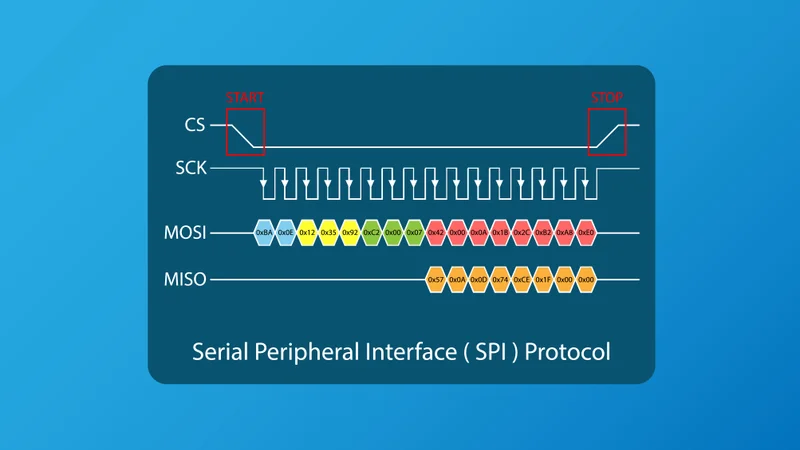
Serial Peripheral Interface (SPI)
Key Takeaways
SPI is a short-distance, synchronous serial interface commonly used between microcontrollers and peripherals such as sensors, flash memory, displays, ADCs, DACs, and RF modules.[1]
SPI incorporates programmable registers for adjusting communication configurations, and modes.[2]
Compared with I2C and UART, SPI offers high throughput and deterministic timing, but it uses more pins and is less suitable for long cable runs.[3]
Standard SPI uses four signals: SCLK for the clock, MOSI or SDO for controller-to-peripheral data, MISO or SDI for peripheral-to-controller data, and CS or SS for device selection.[4]
Modern microcontrollers and AVRs provide ready-to-use libraries and interfaces for seamless SPI communication.[5]
SPI is usually full-duplex, meaning the controller can transmit and receive one bit on every clock cycle.[6]
SPI does not include built-in device addressing, so multi-peripheral systems usually need one chip-select line per peripheral or a daisy-chain topology.[7]
Dual SPI, Quad SPI, and Octal SPI widen the data path for higher memory and display bandwidth without requiring a proportional increase in clock frequency.[8]
Introduction
The Serial Peripheral Interface (SPI) is a common board-level communication bus in embedded systems. It is used when a controller needs a fast, simple, low-overhead connection to one or more peripheral integrated circuits. Typically, SPI is used in memory devices such as serial NOR flash, EEPROMs, peripherals like ADCs, DACs, MEMS sensors, and display units such as touchscreen controllers, display controllers, digital potentiometers, motor drivers, audio codecs, and wireless transceivers.[1]
If you're wondering what is SPI and why it's popular, it's because of how closely it maps with data movement in digital hardware. The controller generates a clock. On each clock edge, bits shift across one or more data lines. A chip-select signal frames the transaction and tells the peripheral when to pay attention. There is no address arbitration, no mandatory packet structure, and no required acknowledgement bit at the protocol level. This makes SPI efficient, easy to implement in hardware, and capable of high clock rates over short PCB traces.[1]
This guide explains what is SPI, how SPI communication works from the signal level upward. It covers the four core signals, controller and peripheral terminology, topologies, clock modes, full-duplex transfers, worked byte-level timing, multi-I/O variants such as QSPI, and practical design guidance for embedded hardware and firmware.
What Is SPI?
SPI is a synchronous serial bus for communication between a controller and one or more peripherals. "Synchronous" means that the communicating devices share a clock signal. "Serial" means that data is transferred bit by bit rather than across a wide parallel bus. "Peripheral interface" reflects its original and still-dominant use case: connecting a processor or microcontroller to nearby peripheral chips.[1]
Classic SPI has one controller, previously called the master, and one or more peripherals, previously called slaves. Modern documentation increasingly uses controller/peripheral terminology instead of master/slave terminology. You may still see both sets of names in datasheets, development kits, and legacy code. The electrical functions are the same regardless of naming.[2]
A standard SPI transmission begins when the controller asserts a chip-select line, usually by driving it low. The controller then toggles the serial clock. With each clock period, one bit is shifted from the controller to the peripheral, and one bit may be shifted from the peripheral to the controller. When the transaction is complete, the controller deasserts chip select.
Why SPI Is Used in Embedded Systems
SPI is especially useful when a design needs deterministic, low-latency data exchange between chips on the same PCB or across a short board-to-board connection. Since the controller supplies the clock, there is no need for start bits, stop bits, or baud-rate recovery as in UART. Since each peripheral is selected by a hardware chip-select signal, there is no mandatory address field as in I2C.[1]
This low protocol overhead is one reason SPI is widely used for memory and converters. A controller can issue a flash read command, clock out an address, and then continuously clock data back from the memory. Similarly, a microcontroller or an ESP can read high-sample-rate ADC data without the address and acknowledgement overhead of I2C.[3]
SPI is also flexible. Many controllers support configurable clock polarity, clock phase, bit order, frame size, and clock divider settings. That flexibility allows one SPI controller to communicate with different classes of devices, provided the firmware reconfigures the bus settings correctly between transactions.[1]
The Four SPI Signals
Standard SPI uses four main signals: clock, controller data output, controller data input, and chip select. Different vendors use different pin names, so engineers should always map names by signal direction rather than by acronym alone.[4]
Signal | Common names | Direction in standard SPI | Purpose |
SCLK | SCK, CLK, serial clock | Controller to peripheral | Clock generated by the controller to synchronize bit transfers |
MOSI | SDO, COPI, PICO, SIMO | Controller to peripheral | Data sent from the controller to the peripheral |
MISO | SDI, CIPO, POCI, SOMI | Peripheral to controller | Data sent from the peripheral to the controller |
CS | SS, CSN, SSN, chip select, slave select | Controller to peripheral | Selects the target peripheral and frames the transaction, commonly active low |
SCLK - Serial Clock
SCLK is generated by the controller. It defines when bits are shifted and sampled. Unlike UART, SPI does not require both devices to independently agree on an exact baud rate before communication. The peripheral follows the clock supplied by the controller, as long as the frequency and timing meet the peripheral's datasheet specifications.
The clock has two important configuration parameters: idle state and sampling edge. These are expressed through CPOL and CPHA, which define the SPI mode.[3] Incorrect clock mode is one of the most common causes of garbled SPI data
Controller Data Out
Output data from controller is commonly called Master Out, Slave In (MOSI). In modern terminology, the same signal may be called SDO, COPI, or PICO, meaning data travels from the controller to the peripheral. It carries commands, addresses, register values, configuration bits, and write data.
For example, when a microcontroller writes a configuration register in an accelerometer, it typically sends a register address followed by one or more data bytes on MOSI while chip select is asserted.
Controller Data In
The input to controller from slave devices is also called MISO, which traditionally means Master In, Slave Out. In modern terminology, it may be called SDI, CIPO, or POCI, meaning data travels from the peripheral to the controller. It carries read data, status bits, conversion results, or response bytes.
In a multi-peripheral SPI bus, only the selected peripheral should actively drive MISO. Non-selected peripherals usually place their MISO pins in a high-impedance state. If two devices drive MISO at the same time, bus contention can corrupt data and, in severe cases, stress output drivers.
Chip Select Function
Chip select identifies which peripheral is active. It is most often active low, so a transaction begins when CS goes low and ends when CS returns high. Some datasheets call the same signal SS, CSN, CSNR or SSN.[2]
CS is not only a device selection signal. It often resets the peripheral's internal SPI state machine, marks byte boundaries, latches a command, or triggers conversion of received bits into an internal register write. Some devices require CS to remain low across an entire multi-byte command. Others allow CS to toggle between bytes.

How SPI Communication Works
Shift Registers and Bit Timing
At the hardware level, SPI can be understood as a pair of shift registers connected in a loop. The controller shift register drives data onto MOSI while reading data from MISO. The peripheral shift register reads MOSI while driving MISO. Each clock event shifts the next bit.
In an 8-bit transfer, the controller sends eight clock cycles. During those eight cycles, eight bits move from the controller to the peripheral and eight bits can move from the peripheral to the controller. The controller may ignore the received byte during a write operation, and the peripheral may output dummy data during a command phase. Electrically, however, the exchange can still occur simultaneously.
Most SPI devices transfer the most significant bit first, but SPI itself does not require MSB-first operation. Some devices use LSB-first ordering. Many microcontrollers allow firmware to select the bit order in the SPI peripheral configuration.[8]
Frame length also varies. Eight-bit frames are common, but 16-bit, 24-bit, and 32-bit transfers are also widely used. Precision ADCs may output 24-bit conversion values. Display controllers may use 16-bit color data. Some devices treat a complete command as a continuous stream of bytes rather than separate frames.
Full-Duplex Operation
Classic four-wire SPI is full-duplex.[6] The controller transmits on MOSI and receives on MISO at the same time. This is possible because the two data lines are separate and unidirectional.
Full-duplex behavior is useful but sometimes misunderstood. Many SPI peripherals do not return meaningful data during the first command byte. For example, a memory device may need to receive a read command and address before it can output stored data. During those initial bytes, MISO may contain zeros, ones, a status byte, or undefined data.
SPI Communication Example
Consider a simple SPI temperature sensor with an 8-bit register map. Assume the sensor uses SPI mode 0, MSB-first data, and an active-low CS pin. The controller wants to read register 0x12, and the sensor returns one data byte, 0x5A.
A common transaction could look like this:
Step | CS | MOSI | MISO | Description |
1 | High | Idle | High impedance | No transaction is active |
2 | Low | Read command/address begins | First response bits may be dummy | Controller selects the sensor |
3 | Low | 0x92 | Dummy or status byte | Controller sends a read bit plus register address 0x12 |
4 | Low | 0x00 | 0x5A | Controller sends a dummy byte to generate clocks, sensor returns register data |
5 | High | Idle | High impedance | Transaction ends and the sensor releases MISO |
In this example, 0x92 represents a device-specific command format where the most significant bit indicates a read and the lower seven bits contain the register address. Other devices use different command encodings, so this byte is illustrative.
With SPI mode 0, SCLK idles low. Data is sampled on the rising edge and changed on the falling edge. During the first byte, the controller places the MSB of 0x92 on MOSI before the first active sampling edge. On each rising edge, the sensor samples MOSI. On each falling edge, the controller prepares the next bit. At the same time, the sensor may shift out dummy or status bits on MISO.
During the second byte, the controller sends 0x00 only to keep the clock running. The sensor places the MSB of 0x5A on MISO in time for the controller to sample it on the next rising edge. After eight more clock cycles, the controller has received the complete byte 0x5A. CS then returns high, ending the transaction.
This example shows three practical SPI principles: chip select frames the transaction, clock edges define when bits are valid, and reads often require dummy writes to generate clock cycles.
Suggested Reading: How Does SPI Work? A Comprehensive Guide for Digital and Hardware
SPI Modes
SPI timing is defined by clock polarity (CPOL) and clock phase (CPHA).
- CPOL defines the idle level of SCLK. If CPOL is 0, the clock idles low. If CPOL is 1, the clock idles high.
- CPHA defines which clock edge is used to sample data. If CPHA is 0, data is sampled on the first active clock edge after chip select becomes active. If CPHA is 1, data is sampled on the second clock edge.[4]
Together, CPOL and CPHA create four SPI modes.
SPI mode | CPOL | CPHA | Clock idle state | Sampling edge | Shifting edge |
Mode 0 | 0 | 0 | Low | Rising edge | Falling edge |
Mode 1 | 0 | 1 | Low | Falling edge | Rising edge |
Mode 2 | 1 | 0 | High | Falling edge | Rising edge |
Mode 3 | 1 | 1 | High | Rising edge | Falling edge |
Mode 0 is common, but there is no universal default. Some sensors and converters use mode 3. Others specify mode 1 or mode 2. The only reliable source is the peripheral datasheet.
A CPOL or CPHA mismatch can produce symptoms that look like random data corruption, bit shifts, or consistently wrong register values. For example, sampling on the wrong edge may capture data while it is still transitioning. In other cases, every byte appears shifted by one bit because the first bit was sampled too early or too late.[4]
SPI Bus Topologies
Single Controller - Single Peripheral
The simplest SPI topology connects one controller to one peripheral using SCLK, MOSI, MISO, and CS. This is common for a single sensor, EEPROM, ADC, or display module.[1]
This topology is easy to route and easy to debug. There is no shared MISO contention, no chip-select decoding, and no need to change SPI settings unless the device supports multiple modes. Many datasheet timing diagrams implicitly describe this case.
In small systems, a single-peripheral SPI bus may be preferable even when other serial buses are available. It provides fast transfers with predictable timing and very little firmware overhead.
Multiple Peripherals with Independent Chip Selects
A common SPI architecture uses shared SCLK, MOSI, and MISO lines with a separate CS line for each peripheral. The controller selects exactly one device at a time.
Line | Connection in independent-CS topology |
SCLK | Shared from controller to all peripherals |
MOSI | Shared from controller to all peripherals |
MISO | Shared from all peripherals back to controller, with only the selected device driving |
CS1, CS2, CS3 | One dedicated chip-select line per peripheral |
This topology is straightforward and deterministic. The controller pulls CS1 low to communicate with peripheral 1, then returns it high before selecting another device. The inactive peripherals ignore SCLK and MOSI and release MISO.
Another practical issue is that different peripherals on the same bus may require different SPI modes or maximum clock frequencies. Firmware must reconfigure CPOL, CPHA, bit order, and clock divider before selecting each device. A common error is communicating with a slow sensor using the high clock rate previously configured for a flash device.
Daisy-Chain SPI
In daisy-chain SPI, multiple peripherals are connected in series. The controller's data output feeds the first peripheral. The first peripheral's output feeds the next peripheral's input, and so on. The last peripheral's output returns to the controller. All devices share the same clock and chip-select signal.[7]
The chain behaves like a long shift register. If four devices each require 8 bits, the controller sends 32 clock pulses to update or read the entire chain. Data intended for the last device must pass through the preceding devices first.[7]

Daisy-chain SPI can reduce chip-select pin count, which is useful for LED drivers, shift registers, digital isolators, and some motor-control or power-management devices. It also keeps the number of controller GPIOs low when many similar devices must be updated together.
The trade-offs are latency and command complexity. The controller must send enough bits for every device in the chain, even if only one device needs an update. Fault isolation is also harder because a bad connection or failed device can disrupt communication with downstream devices.
3-Wire SPI and Multi-I/O Variants
3-Wire SPI
Some devices use a 3-wire SPI variant with SCLK, CS, and a single bidirectional data line. The shared data line may be called SDIO, DIO, or SI/SO depending on the vendor.
This reduces pin count but removes true full-duplex operation. The bus must switch direction between write and read phases. Firmware may need to reconfigure a pin from output to input during a transaction, or the hardware SPI peripheral must support half-duplex mode.
3-wire SPI is common in space-constrained devices and register-oriented sensors. It can be useful when a microcontroller has limited pins, but engineers must pay close attention to turnaround timing so the controller and peripheral do not drive the shared data line simultaneously.
Dual SPI, Quad SPI, and Octal SPI
SPI has evolved beyond the original single-bit data path. Multi-I/O variants use two, four, or eight data lines to increase throughput.
Variant | Data lines | Common use | Key advantage |
Standard SPI | 1 output plus 1 input | Sensors, registers, ADCs, simple memory | Simple full-duplex operation |
Dual SPI | 2 bidirectional data lines | Serial flash memory | Higher read bandwidth than standard SPI |
Quad SPI, QSPI | 4 bidirectional data lines | External NOR flash, displays, execute-in-place memory | High bandwidth with moderate clock rates |
Octal SPI, OSPI | 8 bidirectional data lines | High-performance external memory | Very high throughput for embedded processors and MCUs |
Quad SPI is especially important in modern embedded systems. Many microcontrollers use QSPI flash for code storage, graphics assets, fonts, configuration data, or filesystem storage. Some processors support execute-in-place, often called XIP, where instructions are fetched directly from external QSPI flash instead of first being copied into internal RAM.[8]
Octal SPI extends the same idea to eight data lines and is used where embedded systems need more external memory bandwidth without moving to a full parallel memory bus. Some devices also support double data rate operation, where data transfers on both rising and falling clock edges.[8] DDR operation increases throughput but tightens setup, hold, skew, and trace-length requirements.

Suggested Reading: GDDR6 vs GDDR7: A Technical Comparison of Graphics Memory
Comparison of SPI, I2C, and UART Interfaces
SPI, I2C, and UART are all serial interfaces, but they solve different engineering problems. SPI is usually best for high-speed chip-to-chip communication over short distances. I2C is useful when many low-speed peripherals share a two-wire bus.[3]
UART is useful for asynchronous point-to-point communication, debug consoles, GNSS modules, cellular modules, and links where a shared clock is inconvenient.
Feature | SPI | I2C | UART |
Wires | Typically 4 for one peripheral, plus one CS per additional independent peripheral | 2 shared wires, SDA and SCL | 2 main wires, TX and RX, plus optional flow control |
Clocking | Synchronous, controller provides SCLK | Synchronous, controller provides SCL | Asynchronous, no shared clock |
Duplex | Full-duplex in standard 4-wire SPI | Half-duplex | Full-duplex point-to-point |
Addressing | No in-band address, device selected by CS | In-band device addresses | No bus addressing in basic UART |
Typical speed | Often from hundreds of kHz to tens of MHz, higher in some systems | Commonly 100 kHz, 400 kHz, 1 MHz, or several MHz in high-speed variants | Commonly 9.6 kbps to several Mbps, depending on devices and link quality |
Multi-device support | Yes, using multiple CS lines or daisy-chain | Yes, using addresses on shared bus | Not inherently, usually point-to-point |
Hardware complexity | Simple protocol, more pins | More protocol overhead, fewer pins | Simple framing, no shared clock |
Typical use | Flash memory, displays, ADCs, DACs, high-speed sensors | Low-speed sensors, EEPROMs, RTCs, board management | Debug ports, serial modules, device-to-device links |
The best choice depends on the system constraint.
- SPI is best-suited when throughput and deterministic timing matter more than pin count.[3]
- I2C is suitable when pin count matters and the required bandwidth is minimal.
- UART is preferred when two devices need a simple asynchronous link, especially across connectors or modules.
Recommended Reading: I2C vs SPI vs UART: A Comprehensive Comparison
Practical SPI Configuration on a Microcontroller
Configuration Parameters
Most microcontrollers include one or more hardware SPI controllers. Although register names differ by vendor, the configuration flow is broadly similar.
Parameter | What to configure | Why it matters |
Pin mux | Assign SCLK, MOSI, MISO, and CS pins | SPI pins may share package pins with GPIO, UART, I2C, PWM, or ADC functions |
Direction | Configure output, input, or alternate-function mode | Incorrect pin direction can prevent data transfer or cause contention |
SPI mode | Set CPOL and CPHA | Must match the peripheral timing requirement |
Bit order | MSB-first or LSB-first | Must match the peripheral data format |
Frame size | Commonly 8, 16, 24, or 32 bits | Must match commands and data words |
Clock divider | Set SCLK frequency | Must not exceed peripheral limits or board signal-integrity limits |
Chip select | Manual GPIO or hardware-controlled CS | Must satisfy setup, hold, and transaction framing requirements |
Interrupts or DMA | Optional transfer handling | Improves efficiency for long transfers or high data rates |
The typical firmware sequence is to enable the peripheral clock, configure the pin multiplexing, set the SPI mode and frequency, configure data frame size and bit order, assert chip select, perform the transfer, then deassert chip select.
Choosing Clock Speed
Start with the peripheral datasheet maximum SCLK frequency, then derate for the actual board, voltage, temperature, trace length, and loading. A flash memory on a compact PCB may operate reliably at tens of megahertz or higher. A sensor on a cable or a noisy motor-control board may require a much slower clock.[1]
A conservative bring-up strategy is to start at a low SPI clock, verify correct command and response behavior, then increase the frequency while observing signal quality and error rate. If errors appear only at high speed, the root cause may be insufficient setup time, poor grounding, excessive trace capacitance, ringing on SCLK, or an overly slow peripheral output driver.
Managing Multiple Devices
When multiple SPI peripherals share a bus, firmware should treat bus configuration as part of each device transaction. Before asserting a device's chip select, set that device's required mode, bit order, frame size, and clock speed. After the transfer, deassert chip select before selecting another peripheral.[4]
In an RTOS, protect shared SPI buses with a mutex or driver-level lock. Without arbitration, two tasks may attempt to use the same SPI controller simultaneously, causing interleaved chip-select and data activity.
Debugging SPI with a Logic Analyzer or Oscilloscope
SPI failures are often visible if you capture all four signals at once. A logic analyzer is usually the fastest tool for checking protocol-level behavior. Connect probes to SCLK, MOSI, MISO, and CS, then configure the decoder with the expected CPOL, CPHA, bit order, and word size.
Check the basics first. Here is a checklist:
Does CS go low before the first clock edge?
Does it stay low for the entire command?
Is the clock frequency within the device specification?
Are the decoded MOSI bytes the command and address you expected?
Does MISO remain high impedance when the device is not selected?
Does the response byte appear one byte later than expected because the device requires dummy clocks?
An oscilloscope is better for analog problems. Use it to inspect critical electrical characteristics like SCLK ringing, overshoot, slow edges, crosstalk, and setup or hold margin at the receiver.[9] If the logic analyzer shows occasional incorrect bytes at high speed, the oscilloscope may reveal that the sampling edge occurs while the data line is still settling.
Common SPI debugging symptoms include:
All zeros or all ones on MISO, often caused by an unpowered peripheral, wrong chip-select pin, missing pull-up, or MISO not configured correctly.
Bytes shifted by one bit, often caused by the wrong CPHA setting.
Correct data at low speed but failures at high speed, often caused by signal integrity or timing margin.
One device works but another fails on the same bus, often caused by different SPI modes, chip-select requirements, or maximum clock rates.
Bus contention on MISO, caused by two peripherals driving the line simultaneously.
Advantages and Limitations of SPI
Advantages | Limitations |
High throughput with low protocol overhead: SPI achieves high data transfer rates because it does not require mandatory address fields, acknowledgements, or start/stop bits.[1] | Higher pin count: A standard SPI connection requires four signals, and each additional independently selected peripheral typically requires its own chip-select (CS) line. |
Full-duplex communication: The standard four-wire SPI interface allows simultaneous transmission and reception of data, making it suitable for register reads, streaming converters, and devices that return status while receiving commands.[6] | No built-in addressing: Standard SPI does not include device addressing. Device selection is performed using dedicated chip-select lines or daisy-chain positioning.[7] |
Simple hardware implementation: SPI interfaces can be implemented using basic shift registers, counters, and control logic, making them common in microcontrollers, FPGAs, ASICs, and mixed-signal ICs.[10] | No built-in acknowledgement or error detection: The base SPI protocol does not provide acknowledgements, arbitration, or error detection.[10] |
Flexible timing: SPI supports four clock modes, allowing devices to select the clock edge relationship that best matches their internal timing requirements.[1] | Controller-driven communication: Peripheral devices cannot normally initiate communication.[1] |
Scalability with multi-I/O variants: Extensions such as QSPI and Octal SPI provide higher bandwidth and enable SPI to support high-speed external memory interfaces. | Limited suitability for long distances: High-speed SPI communication over long cables is susceptible to signal skew, reflections, noise, and ground potential differences, making it most suitable for short-distance connections.[10] |
Common SPI Applications
SPI appears across embedded systems because it offers a useful balance of speed, simplicity, and low latency.
Serial Flash Memory
Serial flash memory is one of the most important SPI use cases. Microcontrollers often use SPI, QSPI, or Octal SPI NOR flash for boot code, firmware storage, logs, graphics, or filesystems.[11]
Data Converters
Data converters use SPI because ADCs and DACs often need predictable timing. A controller can clock conversion results from an ADC or update a DAC output with precise transaction timing.[2]
Display Units
Displays and touch controllers use SPI for configuration and pixel or touch data. Smaller TFTs and OLEDs often expose SPI because it is simpler than a full parallel interface and faster than many low-speed alternatives.[10]
Communication Modules
Communication modules use SPI for packet and register access. Wi-Fi, Bluetooth, sub-GHz radio, Ethernet controller, and NFC chips may use SPI as a host interface.[2]
Recommended Reading: SPI Protocol: Revolutionizing Data Communication in Embedded Systems
Conclusion
SPI is a synchronous, usually full-duplex serial protocol for short-distance communication between a controller and peripherals. A standard SPI bus uses SCLK, MOSI, MISO, and CS to move bits with minimal protocol overhead and deterministic timing. The controller selects a peripheral, provides the clock, transmits command or data bits, and often receives response bits at the same time.
For engineers, successful SPI design depends on details: correct CPOL and CPHA mode, correct bit order and frame length, valid chip-select timing, suitable clock frequency, clean signal routing, and proper debugging. SPI's simplicity is also the reason datasheet interpretation matters so much. There is no single universal SPI packet format, speed, or timing mode.
Frequently Asked Questions
1. What is SPI?
SPI, or Serial Peripheral Interface, is a synchronous serial communication protocol used to connect a controller, such as a microcontroller, to one or more peripherals. It uses a clock signal, chip-select signal, and separate data lines for transmitting and receiving, which allows standard four-wire SPI to operate in full duplex.
2. What are the 4 SPI signals?
The four standard SPI signals are SCLK, MOSI, MISO, and CS. SCLK is the serial clock generated by the controller. MOSI, also called SDO or controller data out, carries data from the controller to the peripheral. MISO, also called SDI or controller data in, carries data from the peripheral to the controller. CS, also called SS or chip select, selects the active peripheral and frames the transaction.
3. What are SPI modes, CPOL, and CPHA?
SPI modes define the clock polarity and clock phase used during data transfer. CPOL sets whether the clock idles low or high. CPHA sets whether data is sampled on the first or second clock edge. The four combinations are mode 0, mode 1, mode 2, and mode 3. The correct mode must match the peripheral datasheet.
4. Which is better between SPI vs I2C?
SPI is usually better for high-speed, low-latency communication with devices such as flash memory, displays, ADCs, and fast sensors. I2C is usually better when pin count is limited and several low-speed peripherals can share the same two wires. SPI typically uses more pins but provides higher throughput and full-duplex communication. I2C uses fewer pins and includes device addressing, but it is generally slower and half-duplex.
5. How fast is SPI?
SPI speed depends on the controller, peripheral, voltage, board layout, and signal integrity. Many embedded systems use SPI clocks from hundreds of kilohertz to tens of megahertz. Some microcontrollers, memories, and FPGA-based systems operate faster, especially with Quad SPI or Octal SPI. The safe speed is the lower of the peripheral's rated maximum and what the PCB design can support reliably.
6. Can multiple devices share one SPI bus?
Yes. Multiple peripherals can share SCLK, MOSI, and MISO if each device has its own chip-select line and only the selected device drives MISO. Devices can also be connected in a daisy chain if they support that topology. Independent chip-select wiring is easier to understand and debug, while daisy-chain wiring reduces pin count at the cost of latency and more complex transfers.
7. Is SPI good for long-distance communication?
SPI is usually best for short-distance communication on the same PCB or between nearby boards. It can sometimes be used over short cables at reduced speed, but it does not include differential signaling, arbitration, or error correction. For longer distances or noisy environments, engineers typically use protocols such as RS-485, CAN, Ethernet, or USB.
References
Analog Devices, “Introduction to SPI Interface.” [Online]. Available: https://www.analog.com/en/resources/analog-dialogue/articles/introduction-to-spi-interface.html.
Texas Instruments, KeyStone Architecture Serial Peripheral Interface User Guide, SPRUGP2A. [Online]. Available: https://www.ti.com/lit/ug/sprugp2a/sprugp2a.pdf.
City Tech OpenLab, I2C Bus. [Online]. Available: https://openlab.citytech.cuny.edu/cet4982/files/2014/03/I2C_Bus.pdf.
Saleae Support, “Using the SPI Analyzer.” [Online]. Available: https://support.saleae.com/protocol-analyzers/analyzer-user-guides/using-spi.
Arduino, “SPI Library.” [Online]. Available: https://docs.arduino.cc/language-reference/en/functions/communication/SPI/.
The Linux Kernel, “SPI framework.” [Online]. Available: https://www.kernel.org/doc/html/v5.2/driver-api/spi.html.
Analog Devices, “Daisy-Chaining SPI Devices.” [Online]. Available: https://www.analog.com/en/resources/technical-articles/daisychaining-spi-devices.html.
STMicroelectronics, AN4760: Quad-SPI Interface on STM32 Microcontrollers and Microprocessors. [Online]. Available: https://www.st.com/resource/en/application_note/an4760-quadspi-interface-on-stm32-microcontrollers-and-microprocessors-stmicroelectronics.pdf.
Total Phase, “What Is SPI Protocol? How to Debug SPI Communication.” [Online]. Available: https://www.totalphase.com/blog/2020/07/what-is-spi-protocol-how-to-debug-spi-communication/?srsltid=AfmBOoqye_b0D2aZobBia25bDiuPa1rTQ2pzRIYaQCIeZ6CE4eSYZC6a.
Keysight, “What Is SPI? The Basics of Serial Peripheral Interface.” [Online]. Available: https://www.keysight.com/used/us/en/knowledge/glossary/oscilloscopes/what-is-spi-the-basics-of-serial-peripheral-interface
JEDEC, JESD251: xSPI Standard Overview. [Online]. Available: https://www.jedec.org/standards-documents/docs/jesd251.
in this article
1. Key Takeaways2. Introduction3. The Four SPI Signals4. How SPI Communication Works5. SPI Modes6. SPI Bus Topologies7. 3-Wire SPI and Multi-I/O Variants8. Comparison of SPI, I2C, and UART Interfaces9. Practical SPI Configuration on a Microcontroller10. Debugging SPI with a Logic Analyzer or Oscilloscope11. Advantages and Limitations of SPI12. Common SPI Applications13. Conclusion14. Frequently Asked Questions15. References