STM32 Microcontroller: Cores, Peripherals & Tools
An explainer of how the STM32 Microcontroller family is organized, what the underlying Arm Cortex-M cores actually give you, and how the development ecosystem works.

27 Aug, 2026. 12 minutes read
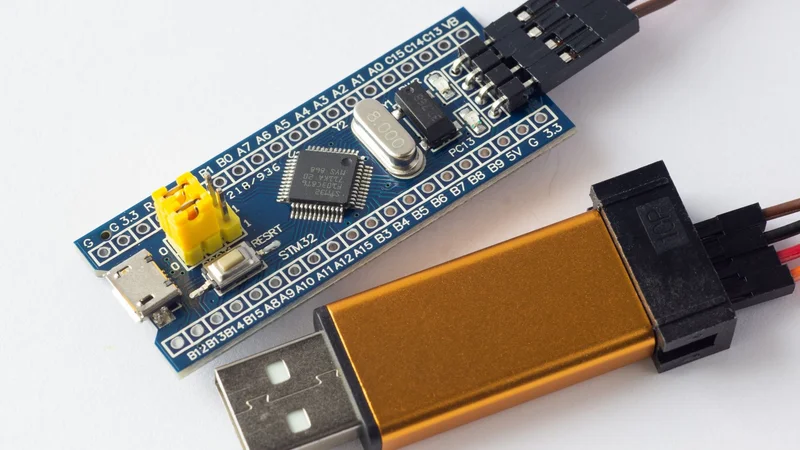
Programming board of STM32
Key Takeaways
The STM32 microcontroller family from STMicroelectronics spans more than 1600 devices built on Arm Cortex-M cores, split into mainstream, high-performance, ultra-low-power, and wireless categories.
Core choice drives capability more than clock speed does. Cortex-M0+ parts trade DSP instructions and floating point for power and cost, while Cortex-M4, M7, and M33 add signal processing, caches, and hardware security, respectively.[4][5]
Clock speeds run from 32 MHz on the STM32L0 to 600 MHz on the STM32H7, with flash from 8 KB to 4 MB, so the family covers battery sensors and graphics-heavy controllers from one architecture.[1]
STM32 commonality simplifies migration and software reuse, but migration is not guaranteed to be drop-in compatible. Pin assignments, peripherals, clock trees, DMA, interrupts, memory maps, and device-specific drivers must be reviewed for each target MCU.
Introduction
If you are choosing a 32-bit MCU for a new product, the STM32 microcontroller family is almost certainly on your shortlist. STMicroelectronics has built it into one of the broadest Arm Cortex-M portfolios available, with over 1600 STM32 microcontrollers in the catalog as of 2026.[1]
That breadth is the point, and it is also the problem. The same family name covers a 48 MHz Cortex-M0+ part costing well under a dollar and an 800 MHz Cortex-M55 device with a neural processing unit.
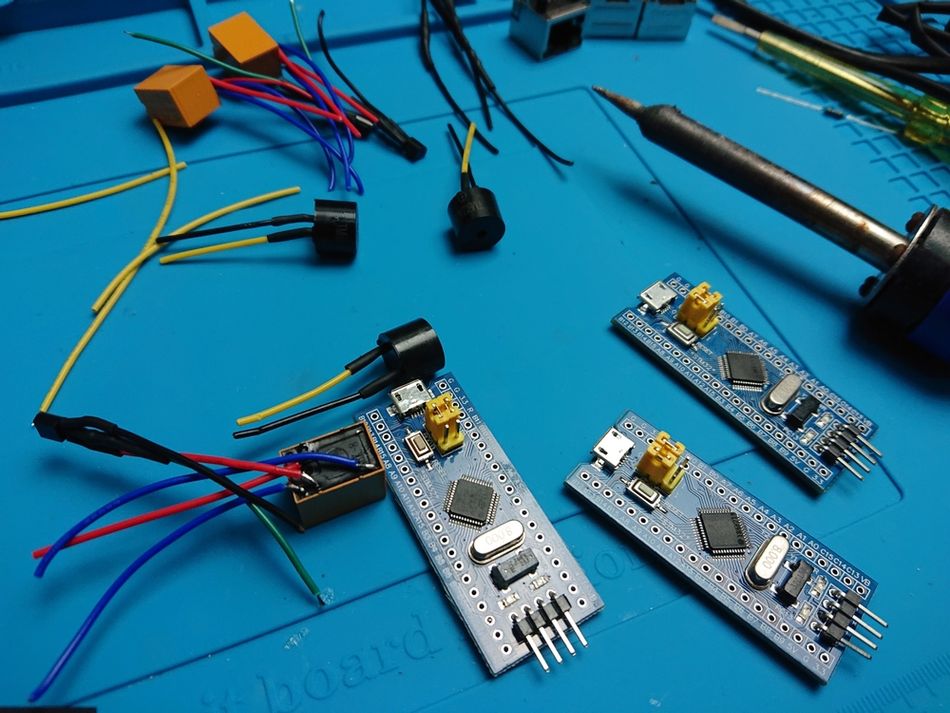
This guide explains how the STM32 Microcontroller family is organized, what the underlying cores actually give you, and how the development ecosystem works. It stays at family level: if you already know you want an STM32 microcontroller and need to pick a specific part number, see the companion STM32 family selection guide.
What is an STM32 Microcontroller?
An STM32 microcontroller is a 32-bit MCU built by STMicroelectronics around a licensed Arm Cortex-M processor core. Each device integrates the core, flash memory, SRAM, and a peripheral set onto a single chip.[6]
That combination has made STM32 parts a default choice in professional embedded systems, where a single vendor and toolchain covering a wide performance range reduces both design risk and engineering time.
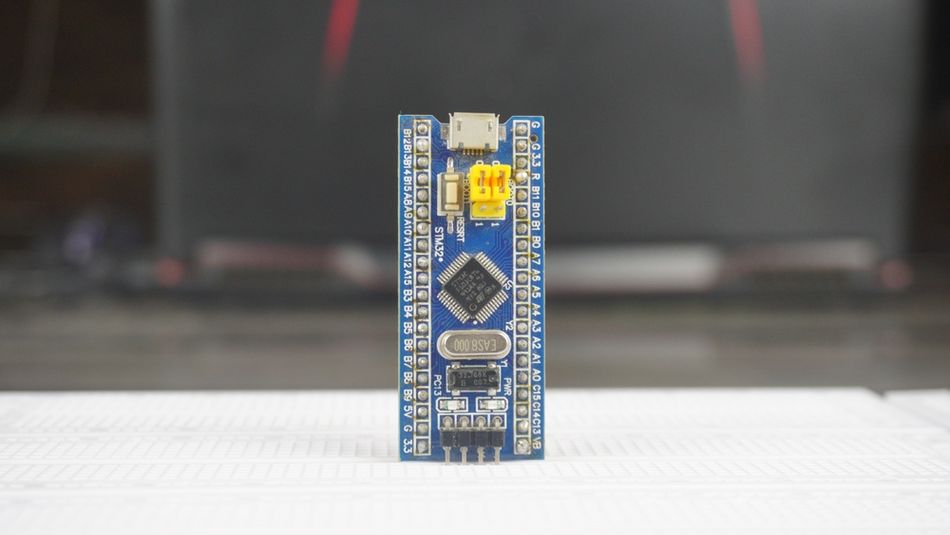
The distinction from a microprocessor matters here. A microprocessor runs application code from external memory and typically boots a full operating system, whereas an MCU executes from on-chip flash memory with deterministic timing.
ST licensed the Cortex-M3 core in October 2006 and announced the first STM32 F1 series parts in June 2007.[6] The family has since expanded across eight core types and several process nodes. [9]
ST also sells STM32 MPUs (the MP1 and MP2 lines), which pair one or two Arm Cortex-A cores; running Linux via an onboard MMU with a companion Arm Cortex-M core on the same die for real-time tasks, alongside the Cortex-M-only MCU portfolio.[6] Those are a different design proposition and sit outside this guide. For the parallel-vs-sequential trade-off against an entirely different device class, see Wevolver's FPGA vs MCU guide.
Recommended Reading: Microcontroller vs Microprocessor: A Comprehensive Guide to Their Differences and Applications
The Arm Cortex-M Cores Behind STM32
Every STM32 series inherits its fundamental capabilities from its Arm core. Picking a series is largely a decision about which core you need.
Core | What it adds | STM32 series using it |
Cortex-M0 | Smallest, lowest-cost 32-bit option. No FPU, no DSP instructions. | STM32F0 |
Cortex-M0+ | More efficient pipeline than M0, best energy per instruction. | STM32C0, STM32G0, STM32L0, STM32U0, STM32WB0 |
Cortex-M3 | Full Thumb-2, better interrupt handling. No FPU. | STM32F1, STM32F2, STM32L1 |
Cortex-M4 | DSP, SIMD, and MAC instructions plus a single-precision FPU. | STM32F3, STM32F4, STM32G4, STM32L4, STM32WB, STM32WL, STM32L4+, STM32WL, |
Cortex-M7 | Superscalar pipeline, L1 instruction and data cache, double-precision FPU. | STM32F7, STM32H7 |
Cortex-M33 | Armv8-M with TrustZone hardware isolation, MPU, DSP and SIMD. | STM32C5, STM32H5, STM32L5, STM32U3, STM32U5, STM32WBA |
Cortex-M55 | Helium vector extensions, paired with ST's NPU for edge AI. | STM32N6
|
Cortex-M85 | Highest-performance Cortex-M core; Helium (MVE) vector extension for major DSP/ML gains over Cortex-M7, TrustZone, and PACBTI for control-flow attack mitigation. | STM32V8 |
STM32WB, STM32WL, and STM32H7 are dual-core parts: WB/WL pair the listed core with a separate Cortex-M0+ radio co-processor, and H7 pairs its Cortex-M7 with an optional Cortex-M4 co-processor.
STM32L1 is documented on ST's site and remains listed under the ultra-low-power series, but does not appear in ST's current flagship portfolio comparison grid; check the official website for current availability before specifying it in a new design.
Why the Core Matters More than the Clock
The Cortex-M4 is built on the Armv7-M architecture and integrates DSP, SIMD, and MAC instructions alongside a floating-point unit that Arm states delivers a tenfold acceleration of single-precision floating-point operations.[4] For control loops running PID or filtering, that is worth more than a higher clock speed on a core without an FPU.
The Cortex-M33 moves to Armv8-M and adds TrustZone, which Arm describes as hardware-enforced isolation for trusted software.[5] If your product needs a hardware root of trust to meet an IoT security standard, that requirement alone narrows you to the M33-based series.
Cortex-M7 parts add L1 caches and a superscalar pipeline. This buys throughput but introduces cache coherency considerations that Cortex-M4 designs never have to think about, which is a real engineering cost when you are debugging DMA transfers.
ST's own framing of this trade-off is direct: the standardized Cortex-M architecture lets engineers "easily port their code from one MCU series to the other," choosing the right balance of "energy efficiency, computation performance, security and range of peripherals" for their system.[9]
The STM32 Portfolio: Four Categories
ST organizes the MCU portfolio into four groups: mainstream, high-performance, ultra-low-power, and wireless. As of ST's current product selector, the portfolio spans 1,644 devices across these categories: 553 mainstream, 515 high-performance, 480 ultra-low-power, and 96 wireless.[13] Each group trades off differently on performance, power, and cost, and the series within a group share enough architecture that picking a category is often the harder decision than picking the specific part.
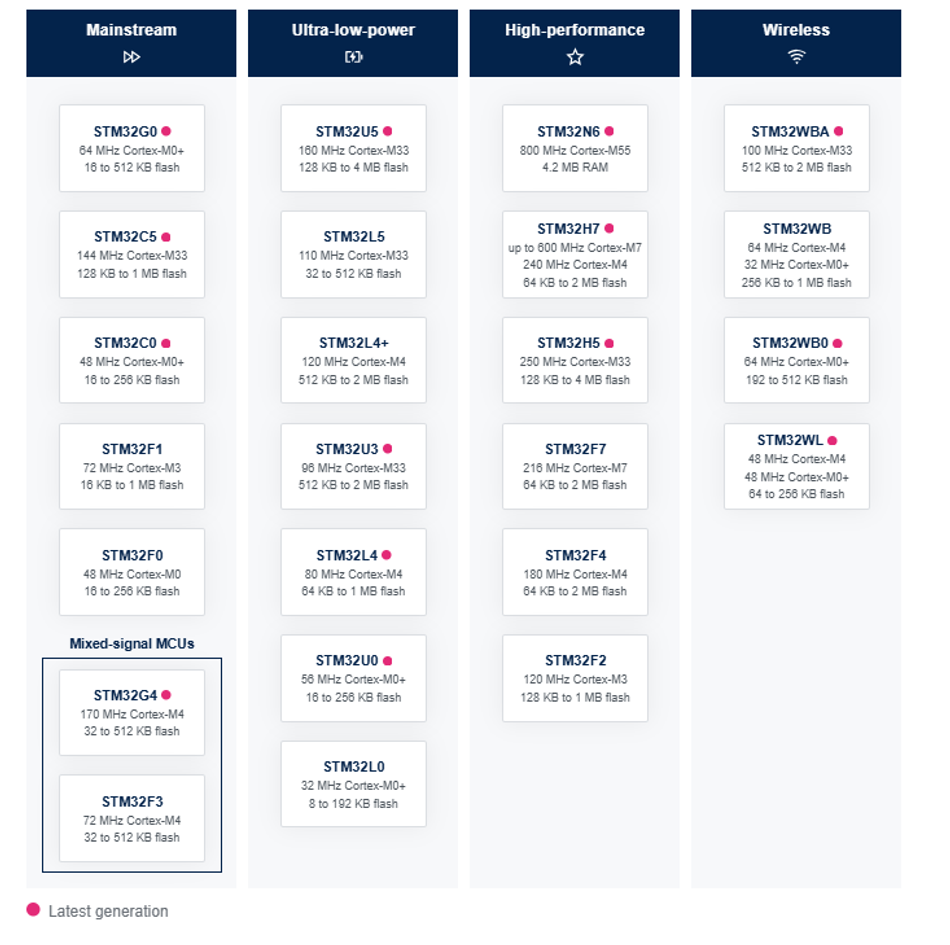
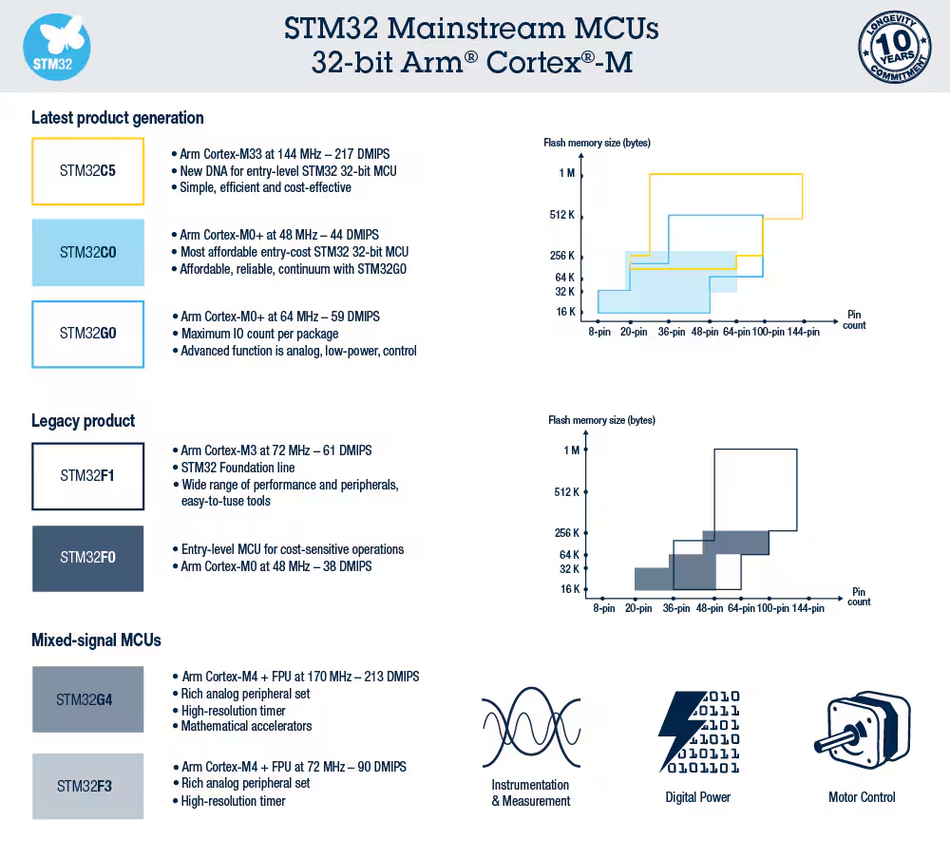
Mainstream
General-purpose parts covering the bulk of embedded designs.
Series | Core and clock speed | Flash Memory | Positioning |
STM32C0 | 48 MHz Cortex-M0+ | 16 to 256 KB | Lowest-cost entry point, competes with 8-bit parts |
STM32C5 | 144 MHz Cortex-M33 | 128 KB to 1 MB | Newer entry-level line with TrustZone, from $0.64 |
STM32F0 | 48 MHz Cortex-M0 | 16 to 256 KB | Legacy low-cost line |
STM32F1 | 72 MHz Cortex-M3 | 16 KB to 1 MB | The original series, still widely used |
STM32F3 | 72 MHz Cortex-M4 | 32 to 512 KB | Mixed-signal, integrated op-amps and fast ADCs |
STM32G0 | 64 MHz Cortex-M0+ | 16 to 512 KB | Modern value replacement for F0 |
STM32G4 | 170 MHz Cortex-M4 | 32 to 512 KB | Motor control and digital power, CORDIC and FMAC accelerators |
The STM32G4 deserves a specific note. It carries CORDIC and FMAC hardware accelerators for trigonometric and filtering math, which is why it appears so often in field-oriented motor control designs.[6]
High-performance
The F and H series, plus the N6, for the heaviest compute, memory, and graphics workloads in the family.
Series | Core and clock speed | Flash Memory | Positioning |
STM32F2 | 120 MHz Cortex-M3 | 128 KB to 1 MB | Legacy performance line |
STM32F4 | 180 MHz Cortex-M4 | 64 KB to 2 MB | The workhorse, enormous community support |
STM32F7 | 216 MHz Cortex-M7 | 64 KB to 2 MB | Cortex-M7 with caches |
STM32H5 | 250 MHz Cortex-M33 | 128 KB to 4 MB | Performance plus TrustZone security |
STM32H7 | Up to 480 MHz Cortex-M7, 240 MHz Cortex-M4 (some newer H7S/H7R variants reach 600 MHz) | 64 KB to 2 MB | Fastest Cortex-M line, dual-core variants available |
STM32N6 | 800 MHz Cortex-M55 | 4.2 MB RAM, no internal Flash (code runs from external Octo‑SPI NOR in “load‑and‑run” mode) | Edge AI with a neural processing unit |
The STM32N6 is the first STM32 MCU with an integrated NPU, but unlike other high‑performance STM32s it has no internal Flash; instead, firmware is executed from external Octo‑SPI NOR flash in a load‑and‑run architecture. [12]
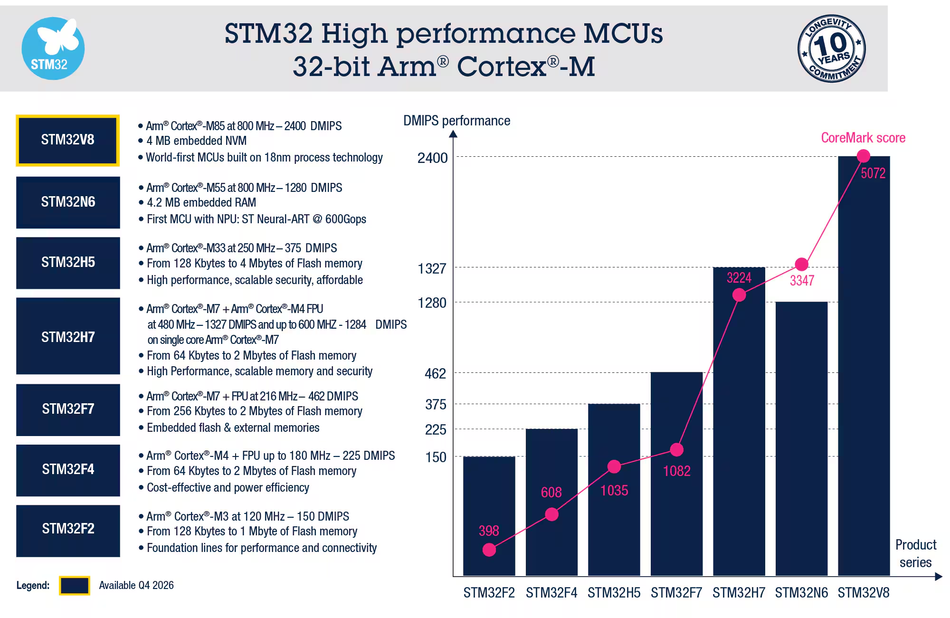
The STM32H7 series is the flagship. Dual-core variants pair a Cortex-M7 running up to 480 MHz (some newer H7S/H7R variants reach 600 MHz) with a 240 MHz Cortex-M4, which lets you keep a hard real-time control loop on one core while user interface or communications code runs on the other.
Ultra-low-power
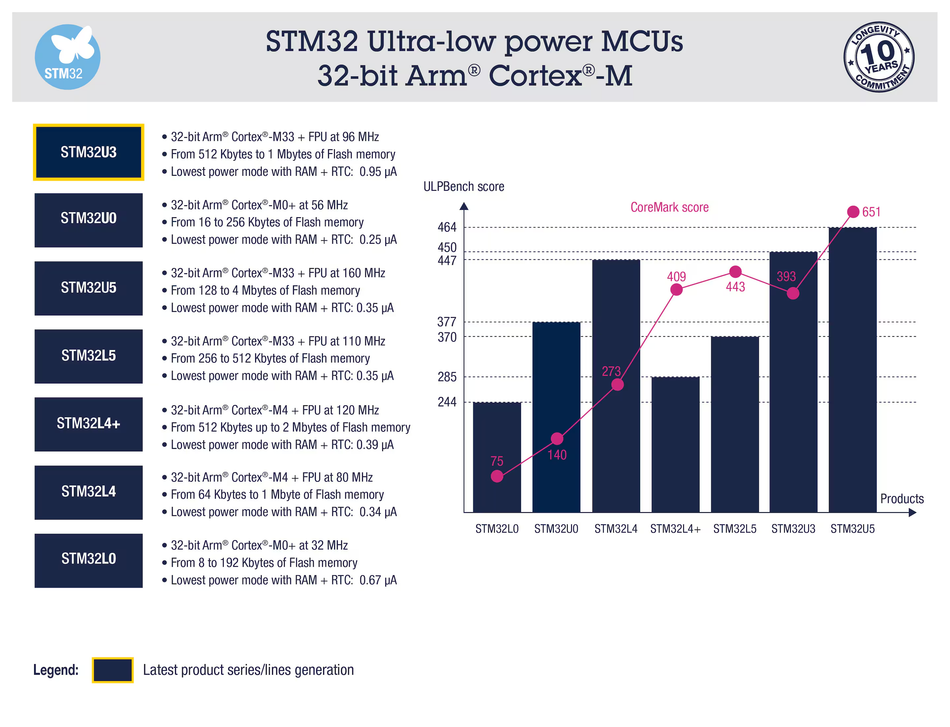
The L and U series, built to run for years on a coin cell or energy-harvested supply.
Series | Core and clock speed | Flash Memory | Positioning |
STM32L0 | 32 MHz Cortex-M0+ | 8 to 192 KB | Entry ultra low power |
STM32L4 | 80 MHz Cortex-M4 | 64 KB to 1 MB | The mainstream low-power choice |
STM32L4+ | 120 MHz Cortex-M4 | 512 KB to 2 MB | More memory and performance than STM32L4 series parts |
STM32L5 | 110 MHz Cortex-M33 | 32 to 512 KB | Low power with TrustZone |
STM32U0 | 56 MHz Cortex-M0+ | 16 to 256 KB | Modern entry low-power line |
STM32U3 | 96 MHz Cortex-M33 | 512 KB to 2 MB | Newer mid-range low-power part |
STM32U5 | 160 MHz Cortex-M33 | 128 KB to 4 MB | Flagship low power, built on a 40 nm process |
For battery-powered designs the U series generally beats the older L series, combining a finer process node with more aggressive low-power modes.[8]
Wireless
The STM32Wx parts integrate a radio transceiver and an MCU into a single system-on-chip, covering both the sub-GHz band and 2.4 GHz.[2]
Series | Core and clock speed | Protocols |
STM32WB | 64 MHz Cortex-M4 plus 32 MHz Cortex-M0+ | Bluetooth LE, IEEE 802.15.4, Zigbee, Thread, Matter |
STM32WB0 | 64 MHz Cortex-M0+ | Bluetooth LE, optimized for battery life |
STM32WBA | 100 MHz Cortex-M33 | Bluetooth LE, IEEE 802.15.4, Zigbee, Thread, Matter, Aliro |
STM32WL | 48 MHz Cortex-M4 plus 48 MHz Cortex-M0+ | LoRaWAN, Sigfox, W-MBUS, mioty, Wi-SUN |
The architectural split is worth understanding. On dual-core wireless parts the radio stack runs on a dedicated Cortex-M0+ while your application owns the Cortex-M4, so protocol timing cannot be broken by application code.[2]
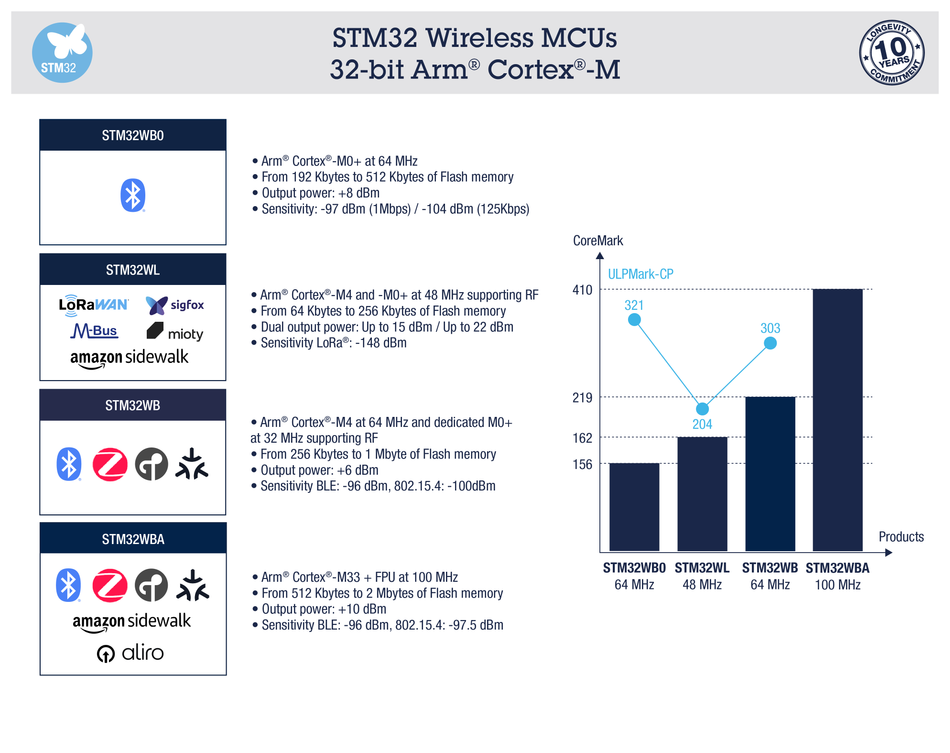
STM32WB is built on a 90 nm process and STM32WBA on 40 nm, which is the main reason the newer series achieves better power figures.[2]
STM32 Peripherals
The peripheral set is where most of your firmware effort actually goes. Across the family you can expect GPIO, timers, ADC, DAC, DMA, and a standard set of serial interfaces.
GPIO pins are grouped into ports with configurable alternate functions, so most pins can be mapped to several different peripherals.
Timers range from basic counters to advanced-control timers with complementary outputs and dead-time insertion, which is what makes three-phase motor drive practical. See Wevolver's guide to PWM signals for the underlying concept.
ADC blocks are 12-bit on most series, with the STM32F3 adding four simultaneous-sampling ADCs and four integrated op-amps for mixed-signal work, and the STM32G4 pushing effective resolution up to 16-bit via hardware oversampling. [6]
DMA controllers move data between peripherals and memory without CPU involvement, which is essential once you are streaming ADC samples or driving a display.
Serial interfaces cover SPI, I2C, and UART on essentially every part, with CAN and CAN FD on many mainstream, high-performance, and G-series parts targeting industrial and automotive use.
Recommended Reading: I2C vs SPI vs UART: A Comprehensive Comparison
The STM32Cube Ecosystem
Hardware breadth would not matter much without tooling, and the STM32Cube ecosystem is a large part of why teams commit to the family.
STM32CubeMX
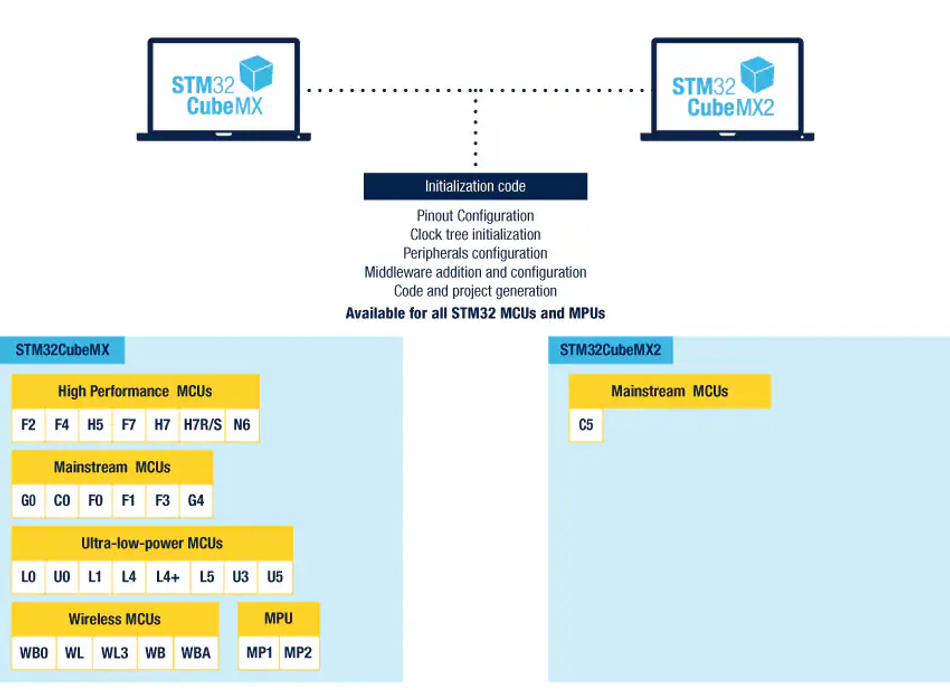
STM32CubeMX is a graphical configuration tool. You select a part, assign pins and peripherals, configure the clock tree visually, and it generates initialization code. [10] For a family where clock configuration involves multiple PLLs and prescalers, this saves a genuine amount of time.
CubeMX also exposes a power consumption calculator, which is useful early in a low-power design before you have hardware to measure. [11]
STM32CubeIDE
STM32CubeIDE is ST's free C and C++ IDE, running on Windows, Linux, and macOS.[3] This IDE now ships in two variants, and the distinction matters if you are setting up a toolchain in 2026:
The original Eclipse-based STM32CubeIDE, launched in 2019, which supports all STM32 MCUs and MPUs.[3]
STM32CubeIDE for VS Code, launched in 2025, aimed at teams that want stronger C/C++ editing, CI/CD integration, and extensibility.[3]
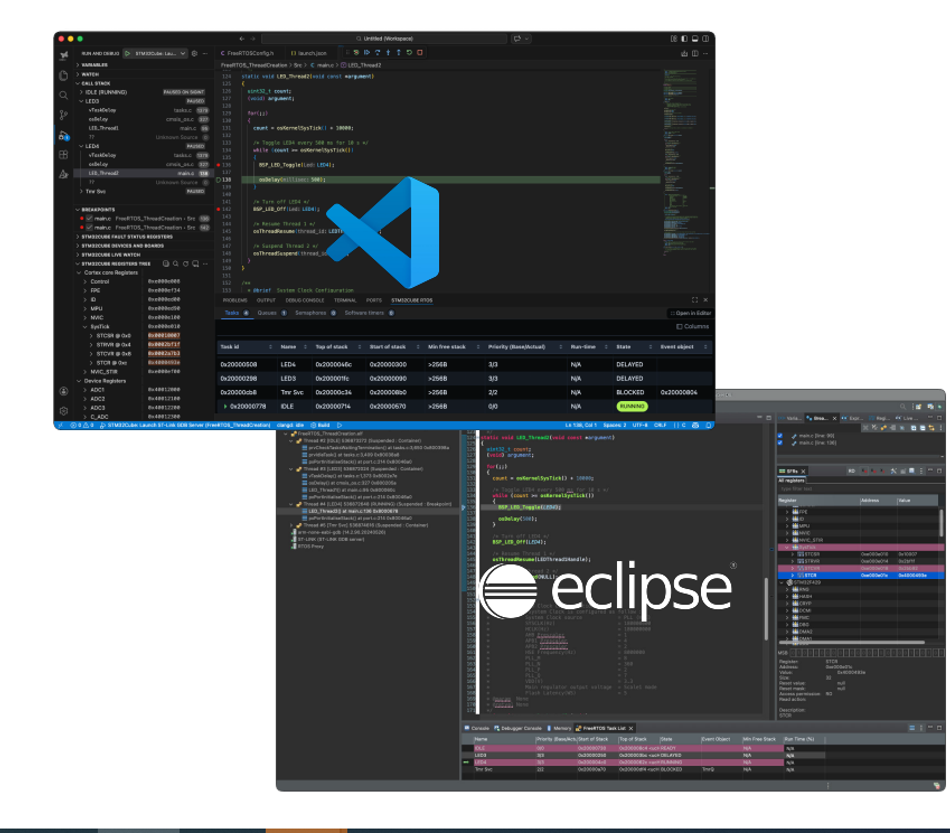
ST has stated it is focusing resources on the VS Code variant to make it the primary IDE platform.[3] If you are starting a long-lived project now, that is worth factoring into your toolchain decision.
Both support GCC and Clang toolchains, and both work with ST-LINK and SEGGER J-Link debug probes.[3]
Alternatives to the ST Toolchain
You are not locked in. The independent STM32-base project uses the GNU Arm Embedded Toolchain directly, and notes that PlatformIO, the Arduino-compatible STM32duino core, and the open-source libopencm3 library are all practical routes.[7]
Bare-metal register programming remains common where you need full control or minimal footprint, and an RTOS such as FreeRTOS is well supported when your application outgrows a superloop.
In practice, STM32 programming splits into three layers you can mix freely: ST's HAL for portability across series, the low-layer APIs for tighter control, and direct register access where a driver is performance critical. Whichever IDE you settle on, that layering stays the same.
Programming and Debugging Hardware
ST-LINK is the standard debug probe, connecting over SWD. Official development boards include an on-board ST-LINK, so no external hardware is needed. Budget third-party boards generally do not, and you will need a separate probe.[7]
Recommended Reading: Microcontroller Programming: Mastering the Foundation of Embedded Systems
Development Boards and Getting Started
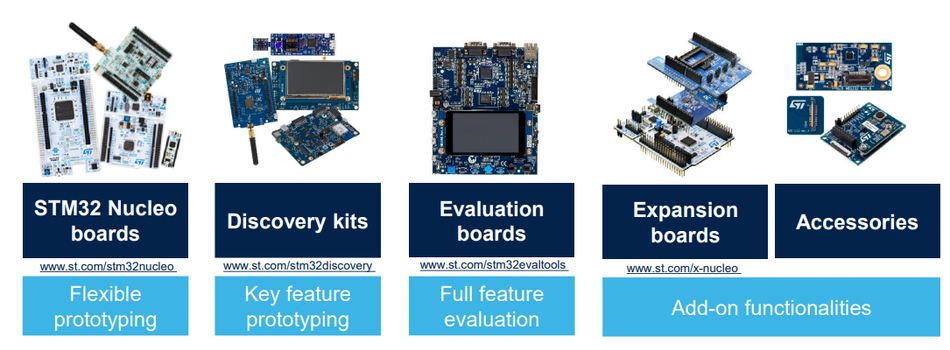
Four board categories matter in practice:
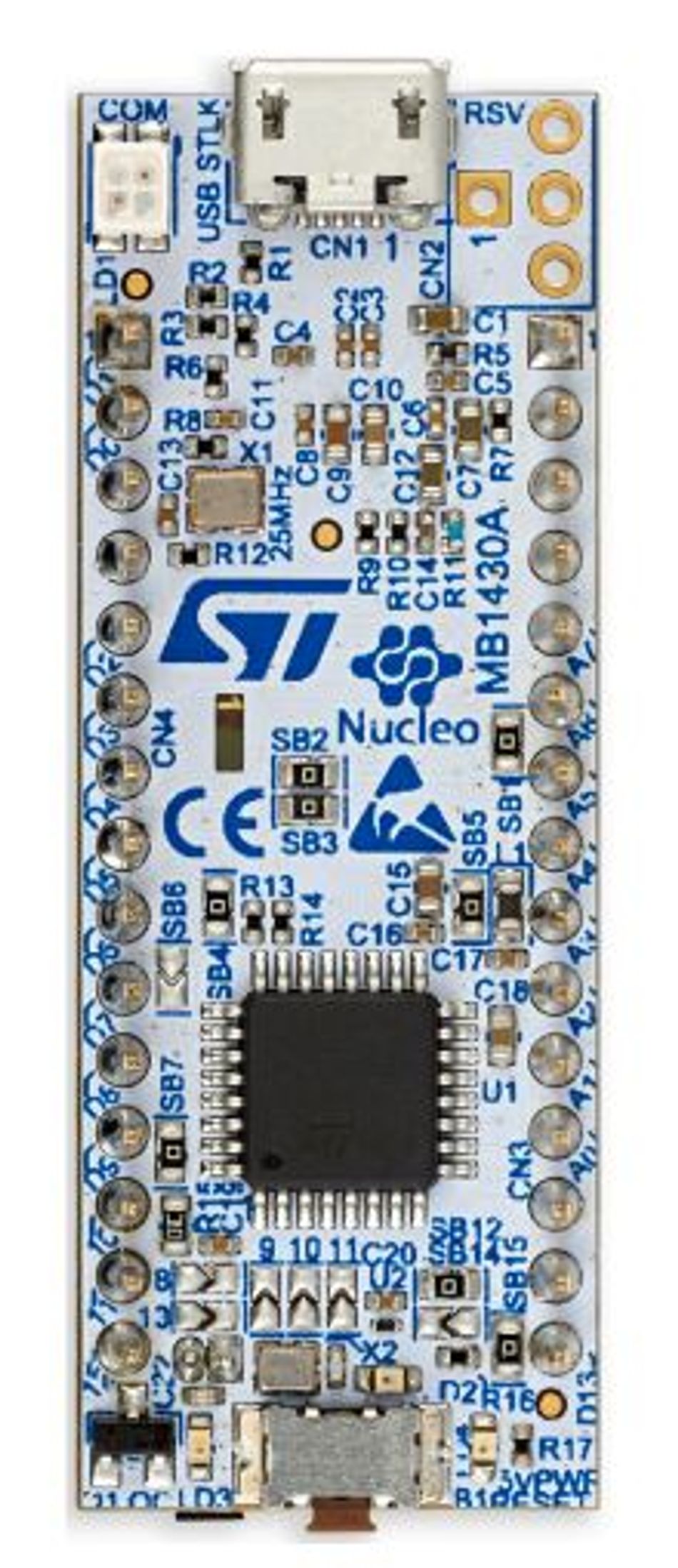
Nucleo boards are ST's mainstream development boards, with an integrated ST-LINK debugger and Arduino-compatible headers alongside ST morpho connectors.[7]
Discovery kits target specific series and add peripherals such as displays, sensors, or audio codecs for evaluating a particular capability.
Evaluation boards are the most complete tier — full pin access and expansion connectors for evaluating a specific part in near-production conditions, one step up from Discovery kits in scope and price.
Blue Pill and Black Pill are inexpensive third-party boards. The Blue Pill uses the STM32F103C8T6 and remains the cheapest way onto the platform, though the Black Pill requires a separate ST-LINK for flashing and debugging.[7] Be aware that STM32F103 clones and remarked parts are common on these boards, so they are better suited to learning than to production.
For a first project, the STM32-base project recommends the STM32F1 and STM32F4 series specifically because both have been available a long time and have a large body of community material behind them.[7] That is a reasonable argument for learning, though it is not the right basis for choosing a part for a new product.
Choosing Across the Family
Selection at family level comes down to which constraint dominates your design:[8]
Raw performance: the high-performance series, with STM32H7 at the top.
Battery life: the ultra-low-power L and U series.
Security certification: any Cortex-M33 series, for TrustZone.
Integrated wireless: the STM32Wx series, matched to your protocol.
Unit cost: STM32C0 and STM32G0 at the entry point.
The practical advantage of the family is that these are not one-way doors. Because peripherals, HAL drivers, and tooling are largely consistent across series, moving a design from an STM32G0 to an STM32G4 after a requirement change is far less disruptive than switching vendor, though driver init and clock configuration will still need to be regenerated.
Common Mistakes and Limitations
Treating clock speed as the headline number. A 170 MHz STM32G4 with CORDIC will beat a nominally faster general-purpose part on field-oriented control math. Match the accelerators to the workload.
Underestimating RAM. Flash memory sizes are quoted prominently but RAM is often the binding constraint, particularly with a graphics framebuffer or a network stack.
Ignoring the cache on Cortex-M7. DMA transfers and cached memory interact in ways that produce intermittent, hard-to-reproduce bugs if cache maintenance is not handled correctly.
Assuming every peripheral is usable at once. Alternate function mapping means peripherals contend for pins. Check this in STM32CubeMX before committing to a package.
Designing around a legacy series. The STM32F1 and STM32F0 remain popular and well documented, but newer equivalents such as the STM32G0 generally offer better performance per unit cost.
Conclusion
The STM32 family's value is not any single device. It is that one architecture, one toolchain, and one set of drivers scale from a 32 MHz battery sensor to a 600 MHz dual-core controller, with a migration path between them.
For your next design, work core-first: decide whether you need DSP instructions, floating point, hardware security, or integrated radio, and the category follows. The specific part number is the last decision, not the first.
Frequently Asked Questions
What is an STM32 microcontroller used for?
STM32 microcontrollers are used across industrial automation, motor control, medical devices, consumer electronics, and IoT products. The breadth of the portfolio means the same family covers everything from simple sensor nodes to graphics-capable controllers.
Is STM32 better than Arduino?
They are not directly comparable. Arduino is a board and software ecosystem, and some Arduino-compatible boards use STM32 parts. STM32 devices generally offer far more peripheral capability and performance, at the cost of a steeper learning curve, though the STM32duino core lets you use Arduino tooling with STM32 hardware.[7]
Does STM32 use C or C++?
Both. STM32CubeIDE is a C and C++ environment, and ST's HAL and low-layer drivers are written in C.[3] [6] Most production firmware is C, with C++ used where its abstractions justify the overhead.
What is the difference between the STM32 F series and G series?
The G series is the more modern mainstream line. The STM32G0 is positioned as a value replacement for the STM32F0, and the STM32G4 supersedes the STM32F3 for mixed-signal and motor-control work, adding CORDIC and FMAC accelerators and a 170 MHz clock speed.[1][6]
Which STM32 is the most powerful?
Within the Cortex-M MCU portfolio, the STM32H7 reaches 600 MHz on a Cortex-M7 core, and the STM32N6 runs an 800 MHz Cortex-M55 with a neural processing unit for edge AI workloads.[1]
Can STM32 run Linux?
Cortex-M-based STM32 MCUs do not run full Linux; they run bare-metal firmware or an RTOS. ST's STM32MP1 and STM32MP2 microprocessors use Cortex-A cores and do run Linux.[6]
What is the cheapest STM32?
The STM32C0 series is ST's lowest-cost entry point, positioned to compete with 8-bit microcontrollers, with the newer STM32C5 series starting at $0.64 for the smallest-flash variant at 10k units.[1][8]
References
[1] STMicroelectronics, "STM32 32-bit Arm Cortex MCUs." [Online]. Available: https://www.st.com/en/microcontrollers-microprocessors/stm32-32-bit-arm-cortex-mcus.html
[2] STMicroelectronics, "STM32 wireless MCUs." [Online]. Available: https://www.st.com/en/microcontrollers-microprocessors/stm32-wireless-mcus.html
[3] STMicroelectronics, "STM32CubeIDE." [Online]. Available: https://www.st.com/en/development-tools/stm32cubeide.html
[4] Arm Ltd., "Cortex-M4." [Online]. Available: https://www.arm.com/products/silicon-ip-cpu/cortex-m/cortex-m4
[5] Arm Ltd., "Cortex-M33." [Online]. Available: https://www.arm.com/products/silicon-ip-cpu/cortex-m/cortex-m33
[6] "STM32," Wikipedia. [Online]. Available: https://en.wikipedia.org/wiki/STM32
[7] STM32-base project, "Getting started with STM32." [Online]. Available: https://stm32-base.org/guides/getting-started.html
[8] J. Teel, "How to Select the Best STM32 Microcontroller for Your Project," Predictable Designs. [Online]. Available: https://predictabledesigns.com/how-to-select-the-best-stm32-microcontroller-for-your-project/
[9] STMicroelectronics, "Arm 32-bit microcontrollers." [Online]. Available: https://www.st.com/content/st_com/en/arm-32-bit-microcontrollers.html
[10] STMicroelectronics, "STM32CubeMX." [Online]. Available: https://www.st.com/en/development-tools/stm32cubemx.html
[11] STMicroelectronics, "Introduction to STM32CubeMX," ST wiki. [Online]. Available: https://wiki.st.com/stm32mcu/wiki/Introduction_to_STM32CubeMX
[12] STMicroelectronics, "How to create an STM32N6 FSBL load and run," ST Community. [Online]. Available: https://community.st.com/t5/stm32-mcus/how-to-create-an-stm32n6-fsbl-load-and-run/ta-p/768206
[13] STMicroelectronics, "STM32 32-bit Arm Cortex MCUs — Product selector." [Online]. Available: https://www.st.com/en/microcontrollers-microprocessors/stm32-32-bit-arm-cortex-mcus/products.html
in this article
1. Introduction2. What is an STM32 Microcontroller?3. The Arm Cortex-M Cores Behind STM324. The STM32 Portfolio: Four Categories5. STM32 Peripherals6. The STM32Cube Ecosystem7. Development Boards and Getting Started8. Choosing Across the Family9. Common Mistakes and Limitations10. Conclusion11. Frequently Asked Questions12. References