What Is ROS? The Robot Operating System Explained for Engineers
ROS is not an operating system. It is the open-source middleware and toolset that much of the robotics industry builds on, and this guide explains what is ROS, how it works, what changed in ROS 2, and when you should use it.

08 Nov, 2026. 19 minutes read

Robot Operating System
Key Takeaways
Definition - ROS (Robot Operating System) is an open-source set of software libraries and tools for building robot applications, maintained by Open Robotics and governed through the Open Source Robotics Alliance since 2024.
Graph Architecture and DDS Middleware - The ROS 2 system is a graph of nodes that exchange strongly typed messages over topics, services and actions, with discovery, transport and Quality of Service provided by DDS middleware.
ROS 1 Deprecation and ROS 2 LTS Distributions - ROS 1 reached end of life on May 31, 2025. New projects should start on a ROS 2 long-term support distribution such as Jazzy Jalisco (supported to May 2029) or Lyrical Luth (supported to 2031).
Toolchain and Software Libraries - The ecosystem around ROS (Gazebo, RViz, MoveIt, Nav2, micro-ROS, ROS-Industrial, Isaac ROS) is a large part of why engineers choose it: you reuse tested drivers, planners and simulation tools instead of writing them.
Architectural Trade-offs and Certification - ROS is the right choice for multi-sensor, multi-process robots that need introspection and reuse; it is a poor fit for single-microcontroller products or safety-certified control loops unless you add micro-ROS, a real-time operating system and a variant built for certification work.
Introduction
If you ask "what is ROS", the one-line answer from the project itself is that the Robot Operating System is an open-source collection of libraries and tools for building robot applications. It runs on a host operating system such as Linux and gives engineers a way to connect software components called nodes.
ROS 2 is a middleware based on a strongly typed, anonymous publish/subscribe mechanism that allows message passing between different processes. Everything else in the ROS ecosystem, from robotics software libraries to simulation tools, is built on that communication layer, which is why it is a common starting point for robotics projects, from student builds to commercial fleets.
ROS is not an operating system. It is the open-source middleware and toolset that much of the robotics industry builds on, and this guide explains what is ROS, how it works, what changed in ROS 2, and when you should use it.
Short History: From Stanford to the Open Source Robotics Alliance
ROS grew out of work at Stanford, borrowing heavily from Morgan Quigley's "switchyard" system for the Stanford Artificial Intelligence Robot (STAIR), and work on ROS proper started in November 2007 as the development environment for the PR2 robot at Willow Garage. The first official distribution, ROS Box Turtle, was released on 2 March 2010. [2][3]
In April 2012, Willow Garage created the Open Source Robotics Foundation (OSRF), which became the primary maintainer of ROS in February 2013 and has operated under the name Open Robotics since 2017. [2]

The original ROS tools and client libraries were released under the BSD license, and ROS 2 is distributed under the Apache 2.0 license. [2][10] Both are permissive open-source software licenses, so ROS core can ship inside commercial robots without forcing the product's own software to be open-sourced. The individual packages carry their own licenses.
In March 2024, the OSRF announced the Open Source Robotics Alliance (OSRA), a new initiative to ensure the long-term stability and health of its open-source projects. The OSRA manages ROS, Gazebo, Open-RMF and the infrastructure that supports them through a Technical Governance Committee that oversees one Project Management Committee per project, using a mixed membership and meritocratic model.
Inaugural platinum members were Intrinsic, NVIDIA and Qualcomm Technologies, with further companies at the gold, silver and associate tiers. For anyone evaluating ROS for a product, this means the project is now funded through paid memberships and governed through a committee structure with industry participation, while the OSRF board keeps final oversight. [4]
Recommended Reading: What is Robotics? Comprehensive Guide to its Engineering Principles and Applications
How ROS 2 Works: The Architecture
Modern ROS means ROS 2. The sections below describe ROS 2, with ROS 1 differences called out where they matter.
The ROS Graph and Nodes
ROS 2 comprises a network of executable processes called nodes, which interact with each other through topics, services, and actions defined within the overall ROS graph architecture. [5]
The node is a participant in that graph, which uses a client library to communicate with other nodes. Nodes can communicate with other nodes within the same process, in a different process, or on a different machine. These are typically the units of computation in a ROS graph, and each node should do one logical thing.

The mobile robot or arm of any complexity runs many nodes: one per camera, one for the LIDAR driver, one for localization, one for motion planning, one for talking to the actuators. The single node is often a complex combination of publishers, subscribers, service servers, service clients, action servers and action clients at the same time, and nodes can expose configurable parameters to change behavior at runtime. [6]
Connections between nodes are established through a distributed discovery process. But the discovery is not centralized as it was in ROS 1. [11] In practice, this means there is no ROS master to start first, which is one of the biggest practical differences between the two generations.
Topics: Publish and Subscribe for Sensor Data
Topics are one of the three primary styles of interface in ROS 2, and they should be used for continuous data streams, like sensor data and robot state.
The topic is a named bus. There may be zero or more publishers and zero or more subscribers on any particular topic, and when data is published by any publisher, all subscribers receive it. The system is anonymous: a subscriber does not generally know or care which publisher sent the data, so you can swap a real LIDAR driver for a recorded bag file or a simulator without changing the consumer. [7]

Messages are strongly typed. The type of each field is enforced, and the core message types carry defined semantics: the IMU message, for example, contains a three-dimensional vector for angular velocity, with each dimension specified in radians per second. This is what makes a camera driver from one vendor interoperable with a perception package from another, across robotic platforms that share nothing but the message definitions.
Topics also make recording trivial. The ros2 bag record command creates a new subscriber on whatever topic you name, without interrupting the flow of data to the rest of the system. Recording a drive and replaying it on a workstation is a common way to develop and regression-test perception code. [7]
Services: Request and Response
In ROS 2, a service is a remote procedure call: a node calls another node, which does a computation and returns a result. Services are expected to return quickly, because the client is generally waiting on the result. They should never be used for longer-running processes, especially ones that may need to be preempted. [8]
There should be only one service server per service name, while any number of clients can use it. The typical uses are querying a map, triggering a calibration routine or changing a mode.
Actions: Long-Running Tasks with Feedback
The action is a long-running remote procedure call with feedback and the ability to cancel or preempt the goal. The example is a high-level state machine telling the navigation subsystem to travel to a waypoint, which may take seconds or minutes, with the navigation stack reporting progress and the caller free to cancel. [9]

The actions carry overhead for setting up and monitoring the connection, so short calls belong in services instead. Nav2's task servers for computing a path, control effort or a behavior communicate with its behavior tree over action servers and services.
Topic: Many-to-many publish and subscribe pattern, anonymous and strongly typed. Use it for continuous streams like sensor data, robot state, and commands at a fixed rate. Avoid it for anything that needs a reply.
Service: One server to many clients with a request and response pattern. Use it for quick queries and mode changes where the client waits. Avoid it for long computations or anything that may need canceling.
Action: One server to many clients supporting goal, feedback, result, and cancellation. Use it for navigation goals, manipulation plans, and multi-second tasks. Avoid it for short calls where setup overhead dominates.
Parameters, Launch Files and Client Libraries
Beyond the three interfaces, the basic concept set includes discovery, parameters, introspection with command line tools, launch, and client libraries. [5] ROS 2 launch files can be written in XML, YAML or Python; the choice is mostly developer preference, but Python gives you a full scripting language when a launch file needs flexibility that XML and YAML cannot provide. Parameters follow one unified approach, with changes published so that other entities are notified. [13]
The ROS 2 code base is layered. Language-specific client libraries sit on top of a common C library (rcl), which sits on the ROS middleware abstraction (rmw), which in turn is implemented against interchangeable middleware vendors. [10] The two client libraries maintained by the core project are rclcpp for C++ and rclpy for Python.
This is the direct answer to a common question: yes, ROS 2 works with Python, and Python and C++ nodes interoperate on the same graph because the serialization and transport live below both.
Middleware: DDS, RMW and Quality of Service
ROS 2 is built on top of DDS/RTPS as its middleware, which provides discovery, serialization and transportation. To use a DDS implementation with ROS 2, an rmw package implements the abstract ROS middleware interface against the vendor's API.
Fast DDS is the default RMW and is packaged with the binary releases, so it works with no extra steps; Cyclone DDS has full support and is enabled by installing an additional package; Connext has full support with its RMW in the binaries, but Connext itself is installed separately; GurumDDS is on the same footing with community support. For a robot distributed across several computers, using the same ROS 2 distribution and middleware implementation reduces the risk of cross-vendor compatibility problems. [10][11]
The payoff of DDS is Quality of Service (QoS). QoS policies control how publishers offer data and what subscribers expect to receive. Reliability determines whether delivery is best-effort or reliable. History and depth govern how many samples an endpoint retains. For a LIDAR stream, the sensor-data profile uses best-effort delivery and a short queue because a current scan is generally more useful for obstacle detection than a backlog of older readings. [12]
In ROS 1, any publisher and subscriber with the same type on the same topic would connect; that is no longer true.
Recommended Reading: Robotics Programming: Methods, Languages and Tools
ROS 1 vs ROS 2: What Changed and Why?
ROS 1 was designed around the PR2 and its assumptions: a single robot, workstation-class computational resources on board, no real-time requirements, excellent network connectivity, and research applications, mostly in academia. [3]
ROS 2 design rationale lists the use cases ROS 1 had not been built for: teams of multiple robots, small embedded platforms, real-time systems, non-ideal networks, production environments, and prescribed patterns for structuring systems. [3]

The ROS 2 paper in Science Robotics states the production problems plainly. ROS 1 was not designed with many necessary production-grade features, and security, network topology and system up-time were not prioritized; it had a single point of failure (the ROS master), relied on a bespoke protocol built on TCP and UDP, and had no built-in security. ROS 2 was built on DDS to provide best-in-class security, embedded and real-time support, and multi-robot communication. [10]
Aspect | ROS 1 | ROS 2 |
Discovery | Central Master (Single Point of Failure) | Distributed Discovery via DDS, No Master |
Transport | Custom TCPROS and UDPROS | DDS/RTPS through an abstract rmw Layer; Vendor is Swappable |
Quality of Service | Queue Size, TCP or UDP, Latching | History, Depth, Reliability, Durability, Deadline, Lifespan, Liveliness, Lease |
Security | None Built In | DDS-Security via SROS 2: Authentication, Access Control, Encryption |
Real Time | Not Designed for It | Real-Time Nodes possible on a Proper RTOS with Real-Time-Safe User Code |
Embedded | Workstation-Class Assumption | micro-ROS on Microcontrollers |
Nodes per Process | One (Nodelets for In-Process Composition) | Multiple (Composable Component Nodes) |
Launch Files | XML | XML, YAML or Python |
License | BSD | Apache 2.0 |
Status | End of Life: May 31, 2025 | Active, New Distribution every May |
The ROS 1 era is over… Noetic Ninjemys was the last ROS 1 release. The ROS Project Management Committee voted in April 2025 to set its end-of-life date to May 31, 2025, the same day Ubuntu 20.04 reached end of standard support, noting that 80 percent of the community had already switched to ROS 2. [14]
Canonical offers an extended maintenance option for five years beyond that date for fleets that cannot migrate yet. [15]
Recommended Reading: Bringing Edge AI Control to Robotics
ROS 2 Distributions and Support Windows
The ROS distribution is a versioned set of ROS packages, akin to a Linux distribution. Once a distribution is released, the project tries to limit changes to the core packages to bug fixes and non-breaking improvements so you can work against a stable codebase. The new ROS 2 distribution is released every year in late May, timed to World Turtle Day on May 23.
Releases alternate between long-term support (LTS) distributions, supported for five years, and non-LTS distributions, supported for about a year and a half. Each LTS distribution lists one Ubuntu LTS release among its Tier 1 platforms, the tier run through the project's test suite and continuous integration jobs frequently.
Distribution | Released | End of life | Type | Tier 1 Ubuntu |
Lyrical Luth | May 22, 2026 | May 31, 2031 | LTS | Ubuntu 26.04 |
Kilted Kaiju | May 23, 2025 | December 31, 2026 | Non-LTS | Ubuntu 24.04 |
Jazzy Jalisco | May 23, 2024 | May 31, 2029 | LTS | Ubuntu 24.04 |
Iron Irwini | May 23, 2023 | December 4, 2024 | Non-LTS | Ubuntu 22.04 |
Humble Hawksbill | May 23, 2022 | May 31, 2027 | LTS | Ubuntu 22.04 |
Rolling Ridley | June 2020 | N/A | Development | N/A |
Lyrical Luth is the latest LTS, with support until 2031, targeted at Ubuntu 26.04 and Windows 11; Jazzy Jalisco targets Ubuntu 24.04 and Windows 10. [1] Rolling Ridley is the staging area for future stable distributions; it is continuously updated, can include breaking changes, and the project recommends that most people use the most recent stable distribution instead. Nodes are not guaranteed to communicate across distributions, so a fleet should run one distribution.
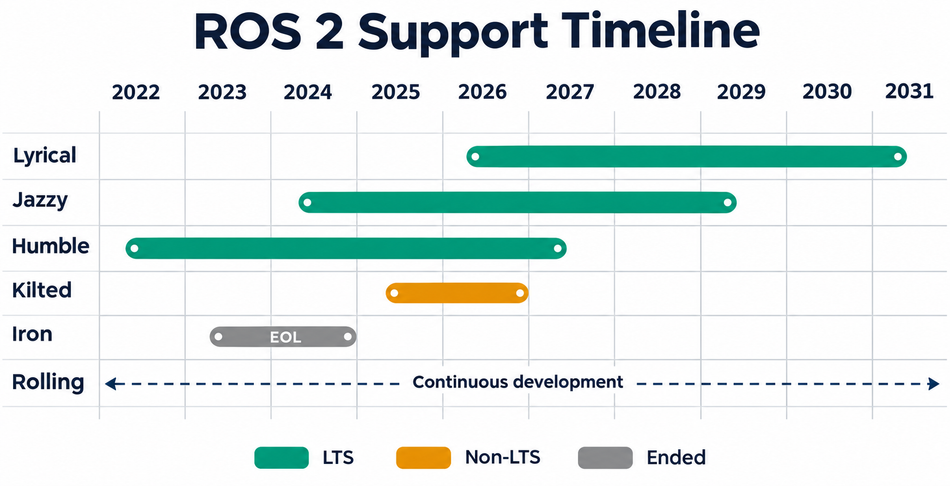
The 2025 ROS Metrics Report, Humble accounted for 48.53 percent of all ROS downloads and Jazzy for 24.45 percent. If you are starting today, Jazzy or Lyrical is the safe choice: both are LTS, Jazzy already carried about a quarter of all downloads before Lyrical existed, and Lyrical has the longest support window.
The ROS Ecosystem: Tools and Software Libraries
The communication layer is a small part of why engineers use ROS. The larger part is the ecosystem of robotics software that speaks it.
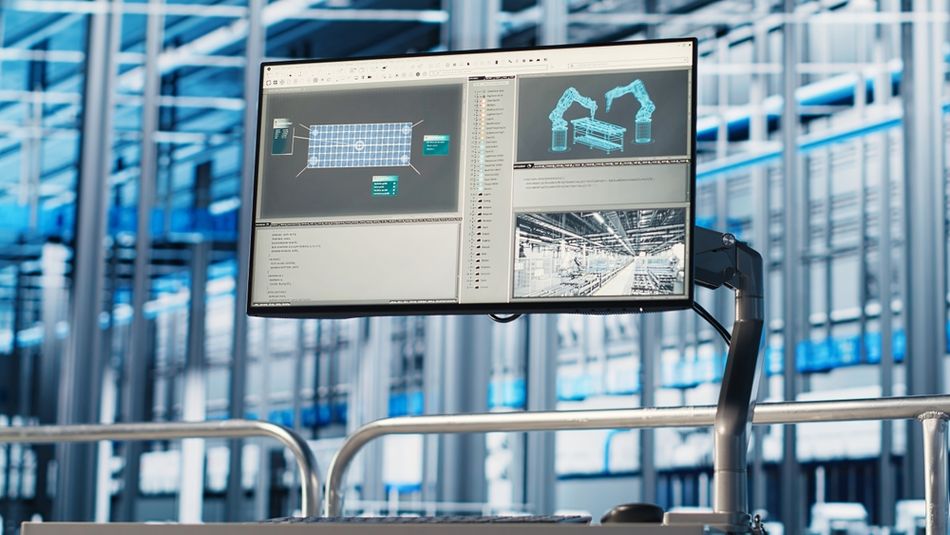
Gazebo (Simulation): Gazebo Sim is an open-source robotics simulator with high-fidelity physics, rendering and sensor models. It can access multiple physics engines through Gazebo Physics, can use rendering engines such as OGRE v2 through Gazebo Rendering, and simulates laser range finders, 2D and 3D cameras, Kinect-style depth sensors, contact sensors, force-torque sensors, IMUs and GPS.
The ros_gz packages bridge Gazebo Transport and ROS topics bidirectionally and provide launch files for running Gazebo with ROS, with each ROS 2 distribution paired to specific Gazebo releases (Jazzy with Harmonic, Kilted with Ionic, Lyrical with Jetty, among others). The simulation tools let you test navigation and perception before touching hardware.
RViz (Visualization): RViz is the 3D visualizer for the ROS framework. Its built-in displays cover the robot model in its current pose, the tf transform hierarchy, laser scans and point clouds, camera images, occupancy-grid maps and paths from the navigation stack, and its tools can set an initial pose or a navigation goal from the screen. It is usually the first tool you open when a robot misbehaves.
URDF (Robot Description): URDF (Unified Robot Description Format) is an XML file format for specifying the geometry and organization of a robot in ROS, and the official tutorials build one up from visual, movable, physical and collision properties. The same description drives the robot model in RViz, is converted for simulation in Gazebo, and, with an SRDF, defines the kinematic model MoveIt plans against.
MoveIt (Manipulation): MoveIt is the motion planning framework for ROS 2, an open-source manipulation platform for developing commercial applications, prototyping designs and benchmarking algorithms, with PickNik Inc leading development under a BSD-3-Clause license. Its package set includes motion planners such as OMPL, STOMP and CHOMP.
Nav2 (Navigation): Nav2 is the professionally supported successor of the ROS Navigation Stack, and its maintainers describe it as a production-grade autonomy framework trusted by more than 300 companies. It uses behavior trees to orchestrate many independent modular servers, and provides perception, planning, control, localization, visualization and behaviors. Its main users are autonomous mobile robots (AMRs) in warehouses, factories and outdoor sites.
rosbridge (Web and Non-ROS Clients): rosbridge provides a JSON interface to ROS, so any client that can send JSON can publish or subscribe to topics and call services over WebSockets or TCP. It is one common way for browser dashboards and fleet-management tools to talk to robots.
micro-ROS (Microcontrollers): micro-ROS puts ROS 2 onto microcontrollers, bridging the gap between resource-constrained microcontrollers and the larger processors in a robot. It offers a microcontroller-optimized client API supporting the major ROS concepts, integrates with ROS 2, and supports multiple real-time operating systems including FreeRTOS, Zephyr and NuttX, with commercial support from eProsima. The project is explicit that microcontrollers are used for hardware access, hard low-latency real-time, and power saving, and that micro-ROS itself is not developed to safety standards.
If you want to know where the ecosystem is heading, ROSCon talks are the place to look.
Recommended Reading: From Prototype to Deployment: Designing Motion Systems for Real-World Robotics
Real Time and Security in ROS 2
Two capabilities separate ROS 2 from ROS 1 for production use.
Real Time: Real-time software guarantees correct computation at the correct time. Hard real-time systems treat a missed deadline as a system failure, soft real-time systems try to meet deadlines but do not fail if they miss one, and firm real-time systems treat late results as invalid.
ROS 2 makes real-time nodes possible when running on a proper RTOS with carefully written user code: setup and teardown need not be real-time safe, but interaction with ROS interfaces during operation should be. [13] The design guidance names the RT_PREEMPT patch for the Linux kernel, Xenomai, RTAI and QNX among the options, and on microcontrollers, micro-ROS runs on an RTOS. ROS 2 does not make your code real-time by itself.
Security: SROS 2 (Secure ROS 2) is the collective set of features and tools in ROS 2 that enable integration with DDS-Security. Of the five plugins the DDS-Security 1.1 specification defines (authentication, access control, cryptography, logging, data tagging), ROS 2 uses the first three.
The sros2 package provides the tooling: you create a keystore, generate keys and certificates for each security enclave, and set three environment variables so the middleware can locate the material and enable or enforce security. The enclave holds runtime security artifacts for the participants that share it, so permissions are granted per enclave rather than per node.

Nodes then communicate with authentication and encryption, but only once this is configured, and secure communication between different DDS vendors is not supported.
ROS in Industrial Robotics, AMRs and Space
ROS started in academic research, but its growth is now in industry.
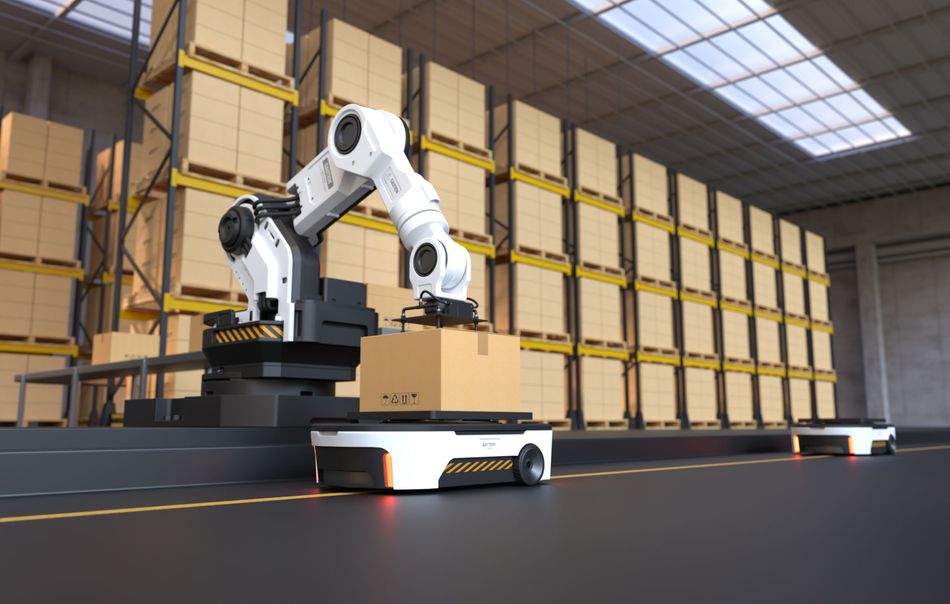
Industrial Manipulators: ROS-Industrial is an open-source project that extends ROS to manufacturing. It began as a collaboration between Yaskawa Motoman, Southwest Research Institute (SwRI) and Willow Garage, with the repository initiated in January 2012, and developed common interfaces for industrial robot arms, sensors, grippers and automation equipment alongside calibration, perception, motion planning and process automation.
Autonomous Mobile Robots: The typical AMR application splits into nodes for interfacing with cameras and LIDAR, localizing, planning motion, managing executive behavior and communicating with actuators, with Nav2 as the navigation layer. GPU acceleration makes multi-camera perception pipelines practical on the embedded computers that AMRs and humanoids carry.
Space: Open Robotics reported in 2022 that Robonaut 2 by NASA ran ROS-based software on the International Space Station, the first confirmed use of ROS in space, and that multiple Astrobee free-flyers on the ISS were built on ROS.
The same post introduced Space ROS, developed with Blue Origin and NASA as a variant of ROS 2 designed to satisfy the strict verification and validation requirements aerospace software must meet before mission-critical use. It is a framework aimed at that verification work, not a certification in itself.
Recommended Reading: Lidar SLAM: How It Works, Key Algorithms, and How to Implement It
When ROS Is the Right Choice (and When It Is Not)
ROS 2 is worth considering when a robot needs several software components to work together.

The decision depends on how much engineering effort its drivers, planning tools, and debugging tools can save, and whether the system can meet its timing, networking, and hardware requirements.
Mobile Robots and Industrial Arms — Strong Fit: The mobile robot that combines LIDAR, cameras, and wheel encoders can use Nav2 for navigation. An arm that needs to reach a target while avoiding fixtures can use MoveIt for motion planning. In both cases, the team can reuse existing drivers and test the planned motion in simulation before running it on hardware.
Research Prototypes — Strong Fit: ROS makes it easier to change one component and measure the effect. For example, engineers can record a drive with ros2 bag, replay the same sensor data through two obstacle detectors, and compare their outputs in RViz. Using the same recording makes it easier to tell whether a difference came from the algorithm or from drive conditions.
Fleets on Unreliable Wi-Fi — Good Fit with Network Tuning: ROS 2 lets engineers choose delivery settings for each data stream. The remote viewer can use best-effort delivery for camera images, where a fresh frame matters more than recovering an old one. Fleets using DDS should also test discovery traffic on the actual wireless network. Using a common ROS 2 distribution and middleware implementation simplifies troubleshooting.
Standalone Microcontrollers — Limited Fit: micro-ROS is useful when a resource-constrained controller needs to exchange messages with a larger ROS 2 system through an agent. For a standalone controller that reads local inputs and drives local outputs, conventional firmware generally requires less memory and fewer dependencies.
Hard Real-Time Motor Control — Conditional Fit: The motor controller must meet its deadline on every cycle. Meeting that requirement depends on the operating system, scheduling, and the control-loop code. One practical design keeps the time-critical loop on a dedicated controller while ROS 2 sends setpoints and collects diagnostic data.
Safety-Certified or Flight Software — Conditional Fit: Start with the assurance evidence the application requires. Space ROS provides a foundation for aerospace verification work, but the engineering team still needs to verify its software, hardware, and configuration against the applicable mission requirements.
Simple Devices — Limited Fit: The controller that reads one temperature sensor and switches on a fan can handle the entire task in a small program. ROS becomes useful if that device later needs to share readings with a robot, accept remote commands, or participate in system-wide diagnostics.
The trade-off is overhead against reuse. ROS 2 adds DDS discovery traffic, serialization, a general-purpose host computer and a sizeable dependency tree.
Recommended Reading: Designing Collaborative Robots: Maximizing Productivity and Safety
Getting Started with ROS 2
You can have a ROS 2 system running on a laptop in an afternoon. The sequence most engineers follow:
Install an LTS distribution on a platform it targets: Jazzy Jalisco on Ubuntu 24.04 or Windows 10, or Lyrical Luth on Ubuntu 26.04 or Windows 11; other systems are supported to varying degrees. [1] Ubuntu has the widest package coverage.
Read the Basic Concepts pages on interfaces, nodes, discovery, parameters, command line introspection, launch and client libraries. [5] Then work through the beginner tutorials.
Write your first node in Python or C++, publish a topic, and watch it with the introspection tools.
Add a robot description, load it in RViz, and simulate the robot in Gazebo through the ros_gz bridge before buying hardware.
Bring in Nav2 for a mobile base or MoveIt for an arm, then tune QoS profiles for your sensor data once you move to a real network. [12]
Record bags of real sensor data early with ros2 bag record, which subscribes to the topics you name without disturbing the running system. [7] Replaying them lets you develop perception without a robot on the bench.
Common Mistakes and Troubleshooting
Mismatched QoS: The publisher offering best effort will never connect to a subscriber requesting reliable. [12] Once a topic is listed, but a subscriber receives nothing, check the node log for an incompatible-QoS warning and compare the profiles on both sides. The best-effort setting for the sensor data profile is right for a camera and wrong for a command topic that must not drop a stop message.
Mixing Distributions or RMW Vendors across Machines: Communication across distributions is not supported, and cross-vendor communication is not guaranteed. [11] Standardize the fleet.
Using a Service for a Long Task: Services are meant to return quickly, with the client generally waiting on the result; a navigation goal or any other long-running task belongs in an action with feedback and cancellation. [8][9]
Leaving Security Off in Deployment: SROS 2 gives you authentication, access control and encryption, but only once you create a keystore, generate enclaves, and enable it through the environment variables.
Conclusion
So, what is ROS? It is the open-source communication layer, package ecosystem and toolset that much of the robotics industry builds on, now in its second generation. ROS 2 replaced the single master and custom transport of ROS 1 with DDS middleware, Quality of Service control, built-in security hooks and support for embedded and real-time use, and the community has followed: ROS 2 accounts for more than nine in ten ROS downloads.
For engineers, the practical takeaways are simple. Start on a ROS 2 LTS distribution, treat QoS as a design decision rather than a default, keep one distribution and one middleware vendor across a fleet, and lean on Gazebo, RViz, Nav2 and MoveIt before writing your own. ROS will not write your robot's software for you, but it removes most of the plumbing that stood between a sensor and a working behavior.
Frequently Asked Questions
Q. What does ROS stand for?
A. ROS stands for Robot Operating System. Despite the name, it is not an operating system but a set of software libraries and tools for building robot applications that runs on top of a host OS, usually Ubuntu Linux.
Q. What is ROS used for?
A. ROS is used to build robot applications of every kind, from research platforms to commercial mobile robots and manipulators. It provides drivers, algorithms and developer tools. On top of that sit the higher-level stacks for navigation (Nav2), manipulation (MoveIt), simulation (Gazebo) and visualization (RViz).
Q. What exactly is ROS 2?
A. ROS 2 is a complete redesign of ROS built on DDS middleware. It removes the central master, adds Quality of Service control, security through DDS-Security, multi-node processes and embedded support, and is the only actively supported line now that ROS 1 reached end of life in May 2025.
Q. Does ROS 2 work with Python?
A. Yes. The client libraries of ROS 2 sit on a shared C core and middleware layer. The two maintained by the core project are rclcpp for C++ and rclpy for Python, so nodes in both languages run side by side on the same graph. Launch files can be written in Python as well as XML or YAML.
Q. How does ROS work?
A. A ROS 2 application is a graph of nodes. Nodes publish and subscribe to typed messages on topics for streaming data, call services for quick request-and-response operations, and use actions for long tasks with feedback. Discovery, transport and delivery guarantees are handled by the DDS middleware underneath.
Q. Does NASA use ROS?
A. Open Robotics reported in 2022 that Robonaut 2 ran ROS-based software on the ISS, and that the Astrobee free-flyers were built on ROS. Space ROS was being developed with NASA and Blue Origin as a variant of ROS 2 aimed at aerospace verification and validation requirements.
Q. Which ROS 2 distribution should I use?
A. Use the current LTS. Jazzy Jalisco (Ubuntu 24.04, supported to May 2029) is the established LTS; Lyrical Luth (Ubuntu 26.04, supported to 2031) is the newest. Avoid Rolling for anything but development against the next release.
Q. Is there a ROS 3?
A. The published roadmap of the project continues the ROS 2 line: the next distribution listed after Lyrical Luth is Makoa Mata-mata, scheduled for May 2027. ROS 2 is the current major version, and its yearly distributions are where new capabilities land.
References
[1] ROS Documentation. Robot Operating System (ROS) [Cited 2026 November 05] Available at: Link
[2] Wikipedia. Robot Operating System (ROS) [Cited 2026 November 05] Available at: Link
[3] ROS Documentation. Why ROS 2? [Cited 2026 November 05] Available at: Link
[4] Open Robotics. Announcing the Open Source Robotics Alliance [Cited 2026 November 05] Available at: Link
[5] ROS Documentation. Basic Concepts, ROS 2 Documentation (Jazzy) [Cited 2026 November 05] Available at: Link
[6] ROS Documentation. Nodes, ROS 2 Documentation (Jazzy) [Cited 2026 November 05] Available at: Link
[7] ROS Documentation. Topics, ROS 2 Documentation (Jazzy) [Cited 2026 November 05] Available at: Link
[8] ROS Documentation. Services, ROS 2 Documentation (Jazzy) [Cited 2026 November 05] Available at: Link
[9] ROS Documentation. Actions, ROS 2 Documentation (Jazzy) [Cited 2026 November 05] Available at: Link
[10] Research. Robot Operating System 2: Design, Architecture, and Uses In The Wild [Cited 2026 November 05] Available at: Link
[11] ROS Documentation. Different ROS 2 Middleware Vendors, ROS 2 Documentation (Jazzy) [Cited 2026 November 05] Available at: Link
[12] ROS Documentation. Quality of Service settings, ROS 2 Documentation (Jazzy) [Cited 2026 November 05] Available at: Link
[13] ROS Documentation. Changes Between ROS 1 and ROS 2, ROS 2 Design [Cited 2026 November 05] Available at: Link
[14] Open Robotics. ROS Noetic End-of-Life: May 31, 2025 [Cited 2026 November 05] Available at: Link
[15] UBUNTU. ROS Noetic is EOL: Take Action to Maintain Fleet Security [Cited 2026 November 05] Available at: Link
in this article
1. Key Takeaways2. Introduction3. Short History: From Stanford to the Open Source Robotics Alliance4. How ROS 2 Works: The Architecture5. ROS 1 vs ROS 2: What Changed and Why?6. ROS 2 Distributions and Support Windows7. The ROS Ecosystem: Tools and Software Libraries8. Real Time and Security in ROS 29. ROS in Industrial Robotics, AMRs and Space10. When ROS Is the Right Choice (and When It Is Not)11. Getting Started with ROS 212. Common Mistakes and Troubleshooting13. Conclusion14. Frequently Asked Questions15. References