Star Topology: How It Works, Pros, Cons, and Uses
What is star topology? See how a star network works, its advantages and disadvantages, extended and hub-and-spoke variants, and why Wi-Fi is a star.

Last updated on 23 Oct, 2026. 23 minutes read
Star Topology
Introduction
Computer networks have become an integral part of modern-day communication, allowing us to connect and share information with each other from different parts of the world. One of the critical components of a network is its topology, which determines the way devices are interconnected. Among the various network topologies available, the star topology has gained widespread adoption due to its simplicity, flexibility, and scalability. In a star topology, all devices are connected to a central hub, making it easy to add, remove, or troubleshoot individual devices without affecting the rest of the network. This blog will introduce star topology, provide a clear definition of its characteristics, and discover why the star topology truly shines!
What is Star Topology
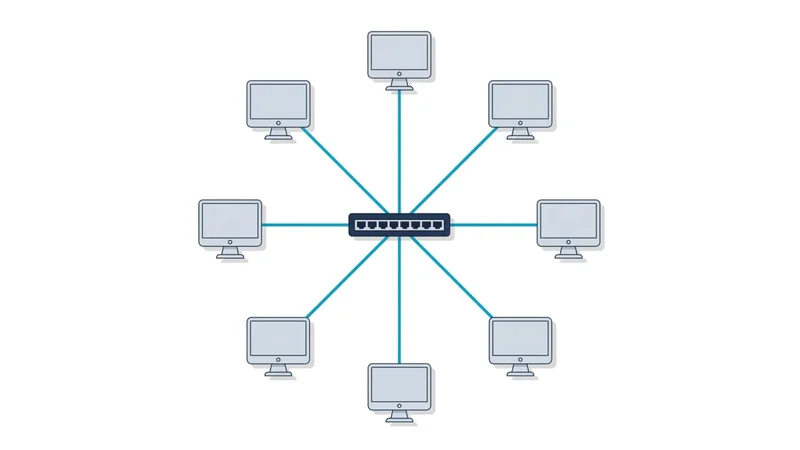
Star topology is a network topology, most commonly used in local area networks, in which each node has a separate point-to-point link to a central device rather than connecting to other nodes directly. All communication between nodes is relayed through that central device. [1][9]
The name comes from its physical appearance: the links radiate outward from the center like the points of a star.[9] Because the links are independent, a break in one cable affects only the node it serves, but the central device is a single point of failure for the entire network.[1][2]
Recommended Reading: Types of Network Topology in Computer Networks
Key Components of a Star Topology Network
To fully understand how a star topology network operates, it's essential to become familiar with its key components. In this section, we will delve into the critical elements that make up a star topology network, including the central node, peripheral nodes, and network media.
Central Node
The central node in a star topology serves as the primary connection point for all peripheral nodes. Every transmission between two peripheral devices is relayed through it. Depending on the specific requirements of the network, various types of devices can function as a central node.
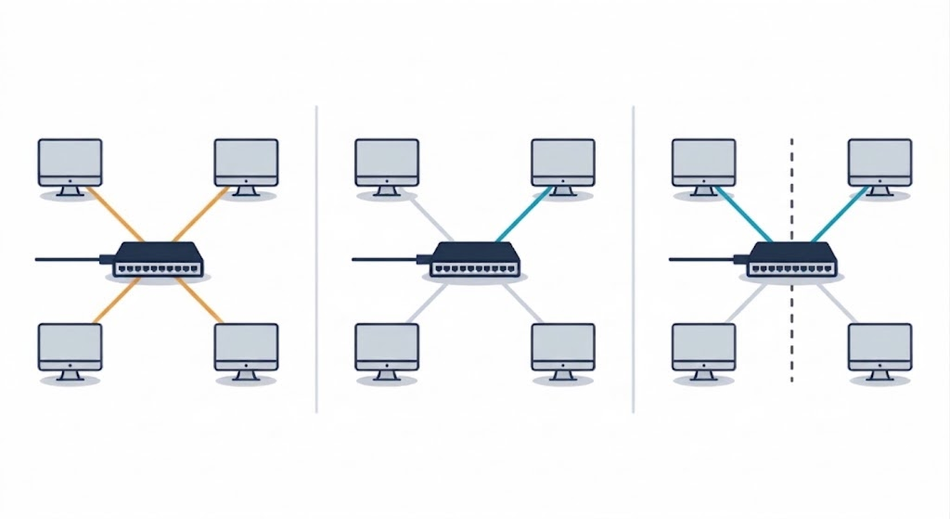
Switches. A switch operates at the data link layer (Layer 2) and forwards frames based on their destination MAC address.[12] It builds its MAC address table by recording the source MAC of each incoming frame together with the port it arrived on, then uses that table to send each frame only to the port where the destination resides. If the destination MAC is not yet in the table, or the frame is a broadcast or multicast, the switch floods it out all other ports. Because each port forms its own collision domain and modern links run full-duplex, collisions are eliminated rather than merely reduced, and every port receives the full link bandwidth. [11], [12]
Hubs. A hub operates at the physical layer (Layer 1) and performs no management of traffic at all. It simply regenerates an incoming signal and repeats it out of every port except the one it arrived on[11]; it cannot read addresses, so each receiving NIC must discard frames not addressed to it.[11] All connected devices share one collision domain and the total bandwidth, operating in half-duplex with CSMA/CD. [11]Hubs were cheaper than switches in their day but have been obsolete since the early 2000s and survive mainly as legacy or packet-capture equipment. [12]
Routers. A router operates at the network layer (Layer 3) and forwards packets between different networks using IP addresses and a routing table.[12] Most small-office and home routers are integrated units combining a router, a multi-port switch, and often a wireless access point, which is why a single box commonly sits at the center of a home star network.
Wireless access points. An AP forms a star in which the links are radio associations rather than cables.[7] Every client communicates through the AP, which bridges the wireless clients onto the wired network. The logical structure is identical to a cabled star; only the medium differs.
Legacy central devices. Older networks used multiport repeaters (functionally equivalent to hubs) and Multi-station Access Units (MAUs) in Token Ring, which were wired as a physical star while passing tokens in a logical ring. [12]
Peripheral Nodes
Peripheral nodes are the devices that connect to the central node in a star topology network, forming the network's outer edges. These nodes can include a wide range of devices, such as computers, servers, printers, and other network-capable devices.
There are several key aspects of peripheral nodes in a star topology network:
Direct connections: Each peripheral node has its own dedicated link to the central node, typically a twisted-pair Ethernet cable (Cat5e/Cat6), though fibre is used for longer runs and uplinks, and wireless clients associated with an access point form the same structure without a cable. The link is logically dedicated rather than physically unbroken — in most installations it runs through a wall outlet and patch panel before reaching the port. Each node requires its own NIC, cable run, and port on the central device, so a star consumes considerably more cabling than a bus serving the same number of devices.
Isolation of failures: Because each peripheral node has its own dedicated cable and its own port on the central device, a fault at one node does not spread to the others. [1]For instance, if a peripheral device's network interface card (NIC) malfunctions, it won't disrupt the communication between the central node and the other peripheral devices. This isolation is strongest on a switched star. On a hub, all nodes share one collision domain, so a jabbering NIC degrades the entire segment, and even with a switch, a node generating a broadcast storm affects every device in the broadcast domain. The containment also works in one direction only: a failure of the central node itself takes down the whole network
Scalability: Adding or removing peripheral nodes in a star topology network is relatively simple, as it only requires connecting or disconnecting the device from the central node. This flexibility allows a network to grow or shrink as needed without affecting the entire network's overall structure. The limits are the port count on the central device — once exhausted, a second switch must be cascaded by uplink, producing an extended star (tree) [1] rather than a pure star — and the 100 m per-segment maximum for twisted pair. [3]On a hub, each added node further divides the shared bandwidth; on a switch, per-port bandwidth is unaffected, but the uplink to the rest of the network can become a bottleneck.
Traffic path: Peripheral nodes never exchange data directly. Every transmission between two nodes crosses two links — into the central device and back out — which adds a forwarding delay and requires the central device to have sufficient switching capacity for the aggregate load.
Network Media
Network media, also known as transmission media, enables data transmission between the central node and peripheral nodes. The choice of network media can significantly impact the network's performance, reliability, and overall cost. There are several types of network media commonly used in star topology networks, including:
Twisted Pair Cables
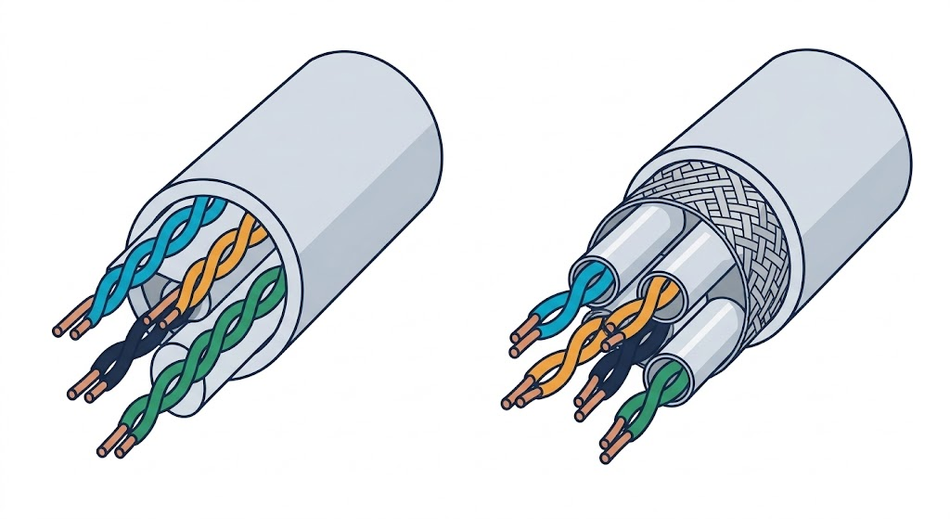
Twisted pair cables are one of the most popular network media choices for star topology networks. They consist of pairs of copper wires twisted together, with each pair carrying a balanced signal. Twisting the wires helps reduce electromagnetic interference and crosstalk between adjacent pairs. [12] Twisted pair cables come in two primary types:
Unshielded Twisted Pair (UTP): UTP cables are the most common type of twisted pair cables and are widely used in Ethernet networks. They are relatively inexpensive, easy to install, and can support data transfer speeds ranging from 10 Mbps on Category 3 cable(10BASE-T)[12] to 10 Gbps on Category 6A, over the same 100 m maximum channel length.[3]
Shielded Twisted Pair (STP): STP cables feature additional shielding around individual pairs, around all pairs collectively, or both, providing better protection against electromagnetic interference.[12] This shielding can lead to improved data transmission quality, especially in environments with a high level of electrical noise. However, STP cables are generally more expensive as the shield must be correctly bonded and grounded; an improperly grounded shield can perform worse than UTP.
Coaxial Cables
Coaxial cable is a legacy bus-topology medium (10BASE2/10BASE5)[11] and is not used for star-wired LANs. Coaxial cables consist of a central copper conductor surrounded by a layer of insulation, a shielding layer, and an outer protective jacket. Due to their shielding, coaxial cables are more resistant to electromagnetic interference compared to unshielded twisted pair; shielded twisted pair generally outperforms them.
Fiber Optic Cables
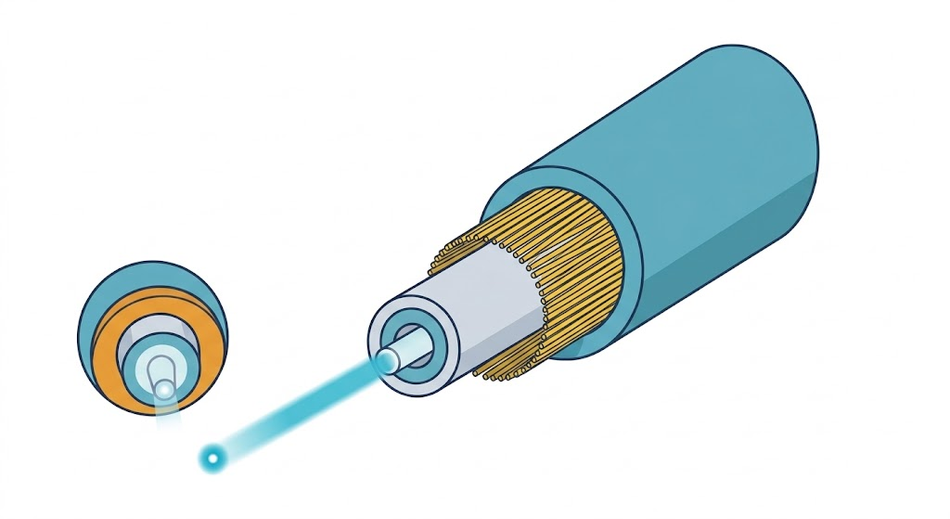
Fiber optic cables transmit data using pulses of light, which travel through strands of glass or plastic fibers. Fiber optic cables offer several advantages over copper-based network media, including higher data transfer speeds, longer transmission distances, and immunity to electromagnetic interference.[12] Multimode fibre reaches roughly 400–550 m; single-mode reaches tens of kilometres. [11] However, fiber optic cables are more expensive to terminate and splice and require specialized equipment for installation and maintenance.
Wireless Media
Wireless media use radio waves rather than a physical conductor to carry data between the central node and peripheral nodes. In a Wi-Fi network (IEEE 802.11) operating in infrastructure mode, every client associates with a wireless access point, and all traffic passes through it, forming a logical star identical in structure to a cabled one. Clients do not communicate with each other directly.
Wireless media remove the cost and labour of cable runs and allow nodes to move freely within coverage, but differ from cabled links in several respects. The medium is shared rather than dedicated, so all associated clients contend for the same airtime and the available bandwidth is divided among them, with collisions avoided through CSMA/CA rather than eliminated as on a full-duplex switch port.[7][12] Range depends on frequency band, transmit power, and obstructions, typically tens of metres indoors. Because the signal propagates beyond the physical premises, encryption such as WPA2 or WPA3 is required rather than optional.
How Star Topology Works: Data Transmission and Communication
To gain a deeper understanding of star topology networks, it's crucial to explore how data transmission and communication occur within these systems. In this section, we will go through the data flow in a star topology network and discuss how central and peripheral nodes manage communication.
Data Flow in Star Topology
In a star topology network, data flow is centralized, with the central node acting as the primary intermediary for all communication between peripheral nodes.[1], [12] This centralization has several implications for how data is transmitted and received within the network:
Point-to-point connections: Each peripheral node has a direct, point-to-point connection to the central node. [1]This connection enables a switch at the centre to manage all data transmission between peripheral nodes, ensuring a high level of control and organization in the network's communication process.
Data transmission through the central node: When a peripheral node wants to send data to another node in the network, it first transmits the data to the central node. The central node then forwards the data to the intended recipient by repeating the signal out of all other ports or by intelligently forwarding it to the specific destination (in the case of a switch). If the destination MAC is not yet in its table, or the frame is a broadcast or multicast, the switch floods it out all other ports.
Collision avoidance: On a switched star, each port forms its own collision domain, and full-duplex links eliminate collisions entirely[11], [12]; on a hub-based star, all nodes share one collision domain, and collisions remain as likely as on a bus [11]. The result is more efficient data transmission and reduced network congestion.
Fault isolation: Since each peripheral node has its own dedicated link and port, any faults or issues affecting one node are less likely to spread to other nodes in the network [1]. This isolation helps maintain the network’s overall stability and performance, even in the face of individual node failures. A failure of the central node, however, disables the entire network [1], [2].
Collision and Collision Domains
In computer networks, collisions occur when two or more data frames are transmitted simultaneously on a shared medium, resulting in a garbled signal that is unintelligible to the receiving nodes [11].
What are Collision Domains?
A collision domain is a segment of a network where data frames can collide while being transmitted. In a shared media environment, such as a bus topology or a hub-based network, all devices share the same communication medium, creating a single, large collision domain [11], [12]. In these networks, the risk of data collisions is high, leading to decreased network performance and efficiency.
Collisions in Star Topology
In a star topology network, the risk of collisions is significantly reduced when a switch is used at the centre. With a switch, each port forms its own collision domain, isolating the devices and preventing collisions from spreading across the network [11], [12]. All ports nevertheless remain in a single broadcast domain unless VLANs or a router separate them [12].
The Role of Switches in Collision Domains
Unlike hubs, which repeat the incoming signal out of all other ports, switches intelligently forward data to the intended recipient [11], [12]. By doing so, switches effectively create separate collision domains for each connected device, eliminating collisions on full-duplex links and improving overall network performance.
In a star topology network using switches, the central node (the switch) maintains a MAC address table to determine the appropriate destination for each incoming data frame, which it builds by recording the source MAC of each incoming frame against the port it arrived on [12]. When a frame arrives at the switch, the switch checks the MAC address table and forwards the frame only to the correct destination port, effectively isolating the devices and minimizing collision risk. If the destination MAC is not in the table, or the frame is a broadcast or multicast, the switch floods it out to all other ports.
Broadcast, Unicast and Multicast Communication
In computer networks, communication can take several forms, with unicast, broadcast, and multicast being the three standard methods [12]. Understanding the differences between these communication types and their roles in star topology networks is crucial for grasping the overall functioning of these systems.
Broadcast Communication
In broadcast communication, a node sends a single data frame that is intended for all other nodes within a network segment [12]. This method of communication is useful when the sender needs to share information with multiple recipients simultaneously. However, broadcasting can also lead to increased network congestion and reduced performance, as all nodes must process the transmitted data, even if it is not relevant to them. In a hub-based star, every frame reaches all devices regardless of its destination address, but this is signal repetition at Layer 1, not broadcast communication; each NIC discards frames not addressed to it [11].
Key aspects of broadcast communication:
- Data frames are sent to all nodes within a network segment (destination MAC FF:FF:FF:FF:FF:FF).
- Useful for sharing information with multiple recipients simultaneously.
- Can lead to increased network congestion and reduced performance, since every node must process the frame regardless of relevance.
Unicast Communication
In contrast to broadcast communication, unicast communication involves the transmission of data frames from a sender node to a single recipient node. This targeted method of communication is more efficient than broadcasting, as only the intended recipient processes the transmitted data, reducing network congestion and improving overall performance. In a star topology network using switches, unicast communication is the primary method of data transmission, with the switch intelligently forwarding frames to the appropriate destination based on the recipient’s MAC address [12].
Key aspects of unicast communication:
- Data frames are sent to a single recipient node.
- More efficient than broadcast communication, as only the intended recipient processes the transmitted data.
- Reduces network congestion and improves overall performance.
Multicast Communication
In multicast communication, a sender transmits a single frame addressed to a defined group of recipients rather than to one node or to all of them. Group members are identified by a multicast MAC address, and only those nodes that have joined the group process the frame [12]. This makes multicast more efficient than broadcast where the same data is genuinely needed by several nodes but not all — streaming video, market data feeds, and service-discovery protocols are typical uses.
In a star topology, a switch floods multicast frames out all ports by default, so the bandwidth saving is lost unless IGMP snooping is enabled. With snooping active, the switch inspects IGMP membership messages, learns which ports have interested listeners, and forwards the frames only to those ports [12].
Key aspects of multicast communication:
- Frames are sent to a defined group of nodes within a network segment.
- More efficient than broadcast when data is needed by several nodes but not all.
- Requires IGMP snooping on the switch, or it is flooded like a broadcast.
Types of Star Topology
In this section, we will delve deeper into the two classifications of hub-based star, active and passive; and note that modern stars use switches, to which the distinction does not apply. While both variations share a similar basic design, they differ in their functionality and the way they handle network traffic. Understanding the differences between active and passive star topologies is crucial to selecting the right type for your network’s requirements. The later subsections then cover the larger designs built from stars: extended and hierarchical stars, hub-and-spoke networks, and how to read a star topology diagram.
Active Star Topology
The active star topology utilizes an active hub to serve as the central device, which performs additional functions in passing communication signals compared to a passive hub. Unlike a passive hub, an active hub can regenerate or reprocess communication signals, making it function as a repeater [11].
It renews sender communication signals and repeats them out of all other ports, thereby restoring the strength of the communication signal [11]. An active hub requires its own electrical power supply to do this. Apart from this, the active hub works in the same way as a passive hub. Using an active hub to create a star network is more suitable for networks with longer cable lengths and a larger number of nodes. A third variant, the intelligent or smart hub, is an active hub with added management and monitoring functions, such as per-port statistics and the ability to disable a faulty port [12].
Passive Star Topology
To create a passive star topology, a passive hub is used as the central device in a computer network to receive and transmit signals from the sender to other stations. Unlike an active hub, a passive hub does not intervene in the signal passing process and lacks the ability to regenerate or reprocess communication signals. It therefore requires no power supply, but the incoming signal strength is divided among the attached ports [10].
If a passive hub is used to design a star network, it acts as the central device to receive a data message from the sender and pass it to all the connected nodes. Once received, the nodes check the destination address and keep the message if it matches their own address [12]. This type of network is not suitable for large computer networks and long-distance networks, since the signal attenuates with each split and is never regenerated [10].
Extended and Hierarchical Star Topology
When one star is not enough, you connect several stars to a higher-level central hub, and each stage becomes a star of its own. This design is often called an extended or hierarchical star. ATIS’s definition of a tree topology describes this shape: it “resembles an interconnection of star networks”, with each peripheral node transmitting to and receiving from one other node only, toward a central node. The same glossary, though, gives two connected star networks as its example of a hybrid topology, so the labels overlap [1].
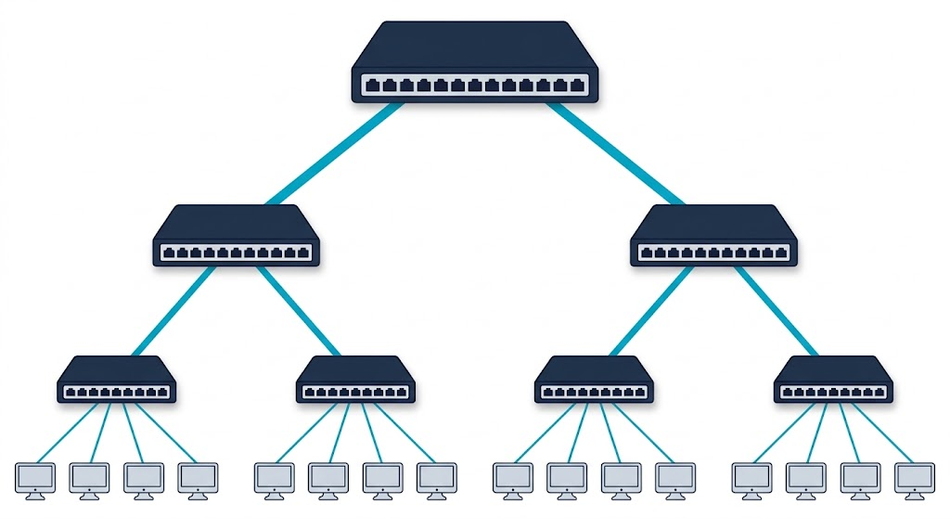
Structured cabling in buildings follows this pattern. ANSI/TIA-568.1-E defines a hierarchical cable system architecture in which a main cross-connect is connected via a star topology across backbone cabling to intermediate and horizontal cross-connects, and the horizontal cabling then extends in a star topology to individual work areas [4]. Revision E, published in 2020, superseded the 2015 revision D; the architecture itself is unchanged. Note that the generic standard, ANSI/TIA-568.0-E, uses distributor nomenclature (Distributor A, B and C, and the Equipment Outlet) in place of the main, intermediate and horizontal cross-connect terms used in the commercial-building document [4]. A hierarchical campus LAN typically has an access layer that connects endpoints, a distribution layer that aggregates access layers, and a core layer that connects distribution layers in large networks [5]. In the traditional design with Layer 2 at the access layer, Cisco recommends restricting each Layer 2 VLAN to a single wiring closet or access uplink pair, to reduce the topology loops that Spanning Tree Protocol must block [5].
The failure behavior scales up with the design. A failed link still isolates the node behind it, and a failed transmission path inside a distributed central node partitions two or more stations from the rest of the network [1].
Hub-and-Spoke Topology
Hub-and-spoke applies the star pattern to whole networks instead of single devices; Microsoft’s own diagram shows the hubs and spokes forming “a star-like hub-spoke pattern” [6]. In Microsoft’s Azure reference architecture, a hub virtual network serves as the central connection point for many spoke virtual networks and hosts shared services such as the firewall and VPN gateway, while each spoke isolates its own workloads. Microsoft describes hub-and-spoke as the network topology that its Cloud Adoption Framework for Azure recommends [6].
The star’s trade-offs carry over. Peering connections between virtual networks are nontransitive, so spokes do not reach each other automatically: traffic between two spokes either passes through a firewall or central router in the hub, which adds a hop, or needs a direct peering between those spokes, which avoids the extra hop and which Microsoft recommends to minimize latency [6]. Microsoft also advises checking that the shared services in the hub, such as the firewall’s bandwidth, scale as you add spokes [6].
Reading a Star Topology Diagram
A star topology diagram draws the central network device, usually a switch or hub, in the middle and one line to each peripheral node. Each line is a dedicated link, so the diagram shows at a glance that a broken line isolates only the node at its end, and a failed gateway at a branching point cuts off the branches behind it [1], [2].
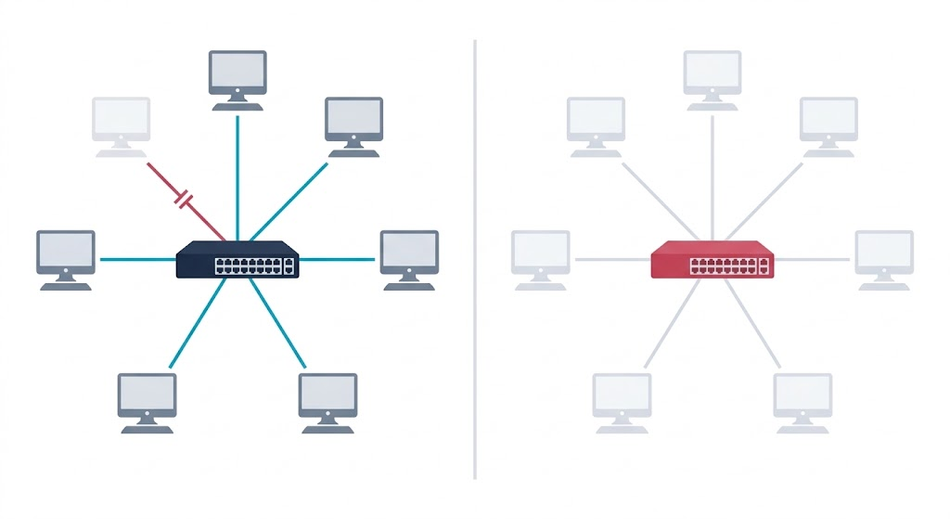
In a simple star, the central node is that branching point, which is why it is described below as a single point of failure. For an extended star, draw each second-level switch as the center of its own small star, with one uplink back to the core. For hub-and-spoke, draw the hub network in the middle with the spoke networks around it, and mark any direct spoke-to-spoke peering as an extra line.
Advantages and Disadvantages of Star Topology
While star topology offers several benefits in terms of network performance and management, it also comes with certain drawbacks. To make informed decisions about network design, it’s crucial to understand both the advantages and disadvantages of star topology.
Advantages
Ease of Installation and Maintenance: In a star topology network, peripheral nodes connect directly to the central node, simplifying the installation process. Additionally, the centralization of network management makes it easier for administrators to identify and troubleshoot issues [12].
Scalability: Star topology networks are highly scalable, as adding or removing peripheral nodes does not disrupt the existing connections, up to the port count of the central device; beyond that, a further switch must be cascaded, producing an extended star [1].
Fault Isolation: In a star topology network, if one peripheral node fails, the other nodes remain unaffected, and communication can continue [1]. This holds on a switched star; on a hub, a continuously transmitting NIC degrades the whole segment [11].
Reduced Collision Risk: When a switch is used as the central node, each port forms its own collision domain, and full-duplex links eliminate collisions, unlike shared-media designs such as bus topology or a hub-based star [11], [12].
Improved Network Performance with Switches: When switches are used as the central node in a star topology network, unicast frames are delivered only to the destination port rather than to every attached device [12].
Disadvantages
Despite its numerous advantages, star topology networks also have certain drawbacks that must be considered when planning network architecture. These disadvantages include:
Dependency on the Central Node: In a star topology network, the central node plays a crucial role in facilitating communication between peripheral nodes. If the central node fails, the entire network becomes inoperable, making it a single point of failure [1], [2]. To mitigate this risk, network administrators must implement redundancy measures, such as redundant or stacked switches, dual uplinks with link aggregation, and redundant power supplies [5].
Higher Costs: The need for a central node and individual connections between peripheral nodes and the central node can lead to higher costs in terms of hardware, cabling, and maintenance. This factor may make star topology a less attractive option for small organizations with limited budgets.
Cable Length Limitations: Due to the point-to-point connections in a star topology network, the total installed cabling can quickly add up, especially in large networks, raising costs. Separately, signal degradation and reduced performance occur where an individual link exceeds the maximum length for the chosen medium [11]. For twisted-pair Ethernet, ANSI/TIA-568 cabling standards limit a horizontal channel to 100 m, made up of a 90 m permanent link and a total of 10 m of patch cable [3].
Increased Configuration Demands: Centralized management eases troubleshooting, but a managed central switch requires configuration skills that a passive medium does not; VLANs, spanning tree, port security, and monitoring must all be set up and maintained correctly for the network to perform as intended [5], [12].
Potential Performance Bottleneck: In a star topology network using hubs, repetition of every frame to all ports can lead to network congestion and reduced performance [11]. While using switches can alleviate this issue, it may still represent a potential performance bottleneck if the central node’s switching capacity or its uplink is not adequately provisioned for the aggregate load [5].
Single Broadcast Domain: All ports on the central device remain in one broadcast domain unless VLANs or a router separate them, so broadcast traffic still reaches every node regardless of the point-to-point links [12].
Star Topology vs Bus, Ring, Mesh, and Tree Topologies
How does a star network topology compare with the alternatives? The table below sums up how each topology connects its nodes and what one failed link does to it.
| Topology | How nodes connect | Effect of one failed link | Links needed for n nodes |
|---|---|---|---|
| Star | Each peripheral node links only to one central node | Isolates only the node on that link | One per peripheral node |
| Bus | All nodes share a single bus | Can split the nodes into isolated groups; on a coaxial bus, the resulting unterminated ends usually bring down the whole segment | One shared cable |
| Ring | Every node in the ring network has exactly two branches | A single break disconnects a simple ring; dual counter-rotating rings survive one break | n |
| Mesh (full) | A direct path between every pair of nodes | Other paths remain | n(n−1)/2 |
| Tree | Stars connected toward a central node | Isolates a node, or partitions a group of stations | n−1 |
The definitions and failure effects follow the ATIS Telecom Glossary and Kuphaldt’s Lessons in Electric Circuits [1], [2]. Choose a star when you want easy moves, adds, and changes and can protect the central network device; choose a dual ring or a mesh when no single link failure may stop communication. Wevolver covers each alternative in depth: ring topology, mesh topology, bus topology, and an overview of all types of network topology.
Star Topology in Real-World Applications
Star topology is a widely used network architecture in various industries and applications, thanks to its flexibility, fault isolation, and ease of management, though every deployment must account for the central node as a single point of failure [1], [2]. This section will explore some of the most common real-world scenarios where star topology networks are utilized, showcasing their benefits and versatility. The most widespread examples are the ones users encounter daily: the office Ethernet LAN, where a switch in a wiring closet serves every desk, and the home network, where a combined router and access point serves wired and wireless clients alike [3], [5].
Industrial and IoT Applications
In industrial settings and the realm of the Internet of Things (IoT), star topology networks have become increasingly popular due to their ability to support a large number of devices while providing a stable and easily managed infrastructure. Here are some examples of how star topology is used in industrial and IoT applications:
Manufacturing: In a manufacturing facility, star topology networks can connect numerous machines, sensors, and control systems, enabling seamless communication and data transfer between devices. Centralized monitoring and control make it easier for operators to track the performance of machines, identify bottlenecks, and optimize production processes. Plant floors do not use star topology exclusively, however: ring architectures such as Device Level Ring (DLR), Ethernet ring protection, and PRP/HSR are chosen specifically to survive a single failure, and legacy fieldbuses such as PROFIBUS and Modbus RTU are buses [12].
Smart Buildings and Home Automation: In smart buildings and home automation systems, star topology networks allow for the integration of various devices, such as HVAC systems, lighting controls, and security systems. The central switch or access point carries the traffic; the automation controller that acts on it is a separate device at the application layer. Note that the dominant home-automation protocols, Zigbee, Z-Wave and Thread, are mesh networks; it is the Wi-Fi and wired devices that form a star [7], [12]. The same pattern extends to building energy management, with generators, solar panels and storage systems reporting to a central node for performance monitoring, anomaly detection and usage optimisation.
Transportation Systems: Star topology networks are also used in transportation systems, such as traffic management and railway signaling. In these scenarios, the central node plays a critical role in coordinating and managing data communication between peripheral nodes, such as traffic lights, road sensors, and railway point machines, ensuring smooth operation and safety. Safety-critical signalling, however, is built on redundant architectures such as dual rings or duplicated paths rather than a plain star [1].
IoT Device Networks: As IoT devices become more prevalent, star topology is one of two dominant patterns for connecting a vast array of devices, such as smart appliances, wearable technology, and environmental sensors. These networks can efficiently handle the data transmission demands of numerous devices while allowing for centralized management and control. Bluetooth Low Energy piconets, Wi-Fi, cellular IoT such as NB-IoT, and LoRaWAN (a star-of-stars) all follow the star pattern, while Zigbee, Thread, Z-Wave, and Wi-SUN use mesh for greater range and resilience [7], [8].
Recommended Reading: How Wi-SUN FAN Improves Connected Infrastructures
Troubleshooting and Maintenance
Most faults in a star network fall into a few categories, and the topology itself narrows the search: a problem affecting one node is local to its link, while a problem affecting everyone points at the central device [1].
Common faults
- One node down. Cable, connector, NIC, or a dead switch port. Swap the node to a known-good port and cable to localise it.
- Whole network down. Central device power, overheating, or exhausted PoE budget [11].
- Intermittent or slow single link. Speed/duplex mismatch, a run over 100 m, or EMI from nearby power cabling [3], [11]. Check per-port error counters for CRC errors and late collisions.
- General slowness. Uplink oversubscription or a broadcast storm, not the individual links [12].
- Misconfiguration. VLAN misassignment and IP conflicts; check recent changes in the logs first [5].
Preventive measures
- Redundancy where it matters: stacked or redundant switches, dual uplinks, redundant PSUs, UPS [5].
- Back up the central device’s configuration so a replacement can be restored quickly.
- Label cable runs and keep port documentation current [4].
- Monitor port errors and firmware versions.
Conclusion
In summary, star topology is a widely used network topology that offers several advantages, such as centralized management, ease of troubleshooting, and simple expansion capabilities, offset by the configuration skill a managed central switch demands. The key components of a star topology network include the central node and peripheral nodes connected through various types of network media. Data transmission in a star topology follows a specific flow, eliminating collisions on full-duplex switched links, and supporting unicast, broadcast, and multicast communication.
Despite its benefits, star topology also has some disadvantages, including dependency on the central node and higher cabling costs. However, its versatile nature makes it suitable for various real-world applications, including office networks, home networks, and industrial and IoT applications. By following best practices and preventive maintenance measures, network administrators can maintain a reliable and high-performing star topology network.
FAQs
1. What is star topology?
Star topology is a network topology where all peripheral nodes (devices) are connected to a central node, such as a hub, switch, or router [1]. A switch or router at the centre manages data transmission and communication between peripheral nodes; a hub simply repeats the incoming signal out of all other ports [11], [12].
2. What are the advantages of star topology?
Advantages of star topology include easy installation and expansion, simple fault isolation, centralized management, and a separate collision domain per switch port [11], [12].
3. What are the disadvantages of star topology?
Disadvantages of star topology include higher cabling costs, dependency on the central node, and potential scalability limitations due to the central node’s capacity [1], [2].
4. How does data transmission work in a star topology?
In a star topology, data is transmitted from the source peripheral node to the central node, which then forwards the data to the destination peripheral node. A hub instead repeats it to all ports, and a switch floods frames whose destination MAC is unknown, as well as broadcast and multicast frames [11], [12]. The process eliminates collisions on full-duplex switched links and supports unicast, broadcast, and multicast communication.
5. What are some real-world applications of star topology?
Star topology is used in various real-world applications, including office networks, home networks, and industrial and IoT applications [3], [5], [8]. Its versatility makes it suitable for a wide range of network requirements.
6. Is Wi-Fi a star topology?
Infrastructure-mode Wi-Fi works as a star, with the wireless access point as the central hub: when one station sends to another, the frame goes first to the access point and then from the access point to the destination [7]. Stations can also form an independent BSS without an access point, an ad hoc arrangement rather than a star, a mode typically used for short-lived networks with a small number of stations [7].
7. Is star topology still used?
Yes. Wired LANs have long been designed so that every end device sits within 100 m of a telecommunications room, and endpoints connect to the network at the access layer, typically through a network switch [3], [5]. Infrastructure Wi-Fi is a star around the access point, and LoRaWAN IoT networks use a star-of-stars topology in which gateways act as a transparent bridge to a central network server [7], [8].
8. How does a star topology compare to a mesh topology?
A star gives each peripheral node a single link to the central node, so it needs few links but depends on the center. A full mesh topology gives every pair of nodes a direct path, which removes that dependency but needs n(n−1)/2 links for n nodes; for example, 45 links for 10 nodes [1]. See the comparison table above.
9. What happens when a link or the central node fails in a star topology?
A failed link between a peripheral node and the central node isolates only that peripheral node from the others [1]. A failed gateway at a branching point can cut off the branches behind it [2]. In a simple star, the central node is that branching point, so its failure stops the entire network, which is why redundancy measures such as redundant or stacked switches, dual uplinks, and redundant power supplies are recommended above [5].
References
[1] ATIS, “Network topology,” ATIS Telecom Glossary. [Online]. Available: https://glossary.atis.org/glossary/network-topology/
[2] T. R. Kuphaldt, “Network topology,” in Lessons in Electric Circuits, Volume IV: Digital, sec. 14.6, CircuitBread, rev. Nov. 6, 2021. [Online]. Available: https://www.circuitbread.com/textbooks/lessons-in-electric-circuits-volume-iv-digital/digital-communication/network-topology
[3] CCCA New Technology and Trends Committee, “Going the distance: What you need to know about breaking the 100-meter distance limitation,” Cabling Installation & Maintenance, Sep. 20, 2022. [Online]. Available: https://www.cablinginstall.com/cable/article/14281909/going-the-distance-what-you-need-to-know-about-breaking-the-100-meter-distance-limitation
[4] “ANSI/TIA-568,” Wikipedia. [Online]. Available: https://en.wikipedia.org/wiki/ANSI/TIA-568
[5] Cisco Systems, “Campus LAN and wireless LAN solution design guide,” Cisco Validated Design, May 4, 2020. [Online]. Available: https://www.cisco.com/c/en/us/td/docs/solutions/CVD/Campus/cisco-campus-lan-wlan-design-guide.html
[6] Microsoft, “Hub-spoke network topology in Azure,” Azure Architecture Center, Microsoft Learn, Apr. 2026. [Online]. Available: https://learn.microsoft.com/en-us/azure/architecture/networking/architecture/hub-spoke
[7] M. Ergen, “IEEE 802.11 tutorial,” Dept. Elect. Eng. Comput. Sci., Univ. California, Berkeley, CA, USA, Jun. 2002. [Online]. Available: https://ptolemy.berkeley.edu/projects/ofdm/ergen/docs/ieee.pdf
[8] LoRa Alliance, “What is the LoRaWAN specification.” [Online]. Available: https://lora-alliance.org/about-lorawan-old/
[9] Computer Hope, “Star topology,” Dec. 6, 2024. [Online]. Available: https://www.computerhope.com/jargon/s/startopo.htm
[10] I. M. I. Habbab, M. Kavehrad, and C.-E. W. Sundberg, “Protocols for very high-speed optical fiber local area networks using a passive star topology,” J. Lightw. Technol., vol. 5, no. 12, pp. 1782–1794, Dec. 1987.
[11] IEEE Standard for Ethernet, IEEE Std 802.3-2022, Jul. 2022. doi: 10.1109/IEEESTD.2022.9844436.
[12] A. S. Tanenbaum, N. Feamster, and D. J. Wetherall, Computer Networks, 6th ed. Hoboken, NJ, USA: Pearson, 2021.
in this article
1. Introduction2. Key Components of a Star Topology Network3. How Star Topology Works: Data Transmission and Communication4. Types of Star Topology5. Advantages and Disadvantages of Star Topology6. Star Topology in Real-World Applications7. Troubleshooting and Maintenance8. Conclusion9. FAQs10. References