What Is Zigbee? How the Low-Power Mesh Protocol Works
Zigbee explained for engineers: IEEE 802.15.4 radio, mesh routing, device roles, Cluster Library, security, Wi-Fi coexistence, battery life and Zigbee 4.0.

28 Nov, 2026. 24 minutes read

Key Takeaways
Zigbee is a Connectivity Standards Alliance (CSA) specification that builds a network layer, an application framework and security on top of the IEEE 802.15.4 physical and MAC layers.[1] In the 2.4 GHz band it uses 16 channels, each 2 MHz wide and spaced 5 MHz apart, at 250 kbps.[2][3]
A Zigbee network has at most one coordinator, routers that relay traffic and stay awake, and end devices that relay nothing and, when sleepy, poll a parent for their messages.[4]
Zigbee PRO routes with routing tables and on-demand route discovery, and adds many-to-one and source routing for networks that send most traffic to one gateway.[5][6]
Frames are protected with AES in CCM* mode and 128-bit keys.[1] The weak point has been key distribution under the public ZigBeeAlliance09 key, which Revision 23 key negotiation addresses.[1][7]
Zigbee is not discontinued. The CSA released Zigbee 4.0, whose specification set includes the Zigbee Core R23.2 specification, in November 2025, and opened certification for its sub-GHz brand, Suzi, in September 2026.[8][9]
Introduction
Zigbee is an open standard low-power wireless standard for building a wireless mesh network of small, low-data-rate devices such as smart lights, switches, sensors, thermostats, and smart meters. Its devices relay messages for each other, so a node that cannot reach its destination directly sends through one or more intermediate nodes.[10]
The Connectivity Standards Alliance, which creates open global standards for the Internet of Things, maintains Zigbee and was called the Zigbee Alliance until its 2021 rebrand.[11] It reports more than a billion Zigbee chipsets sold and Zigbee products deployed in smart homes and commercial buildings, and the UK Government selected Zigbee Smart Energy as the mesh network that connects devices in the home to the utility network.[12]
In the smart home, Home Assistant configures Zigbee through its Zigbee Home Automation (ZHA) integration, or lets you install your own controller, such as Zigbee2MQTT.[13] If you design with Zigbee, debug a Zigbee network or are choosing between Zigbee and its alternatives, this guide works up the stack from the radio, with the figures you need for each decision.
What Is Zigbee?
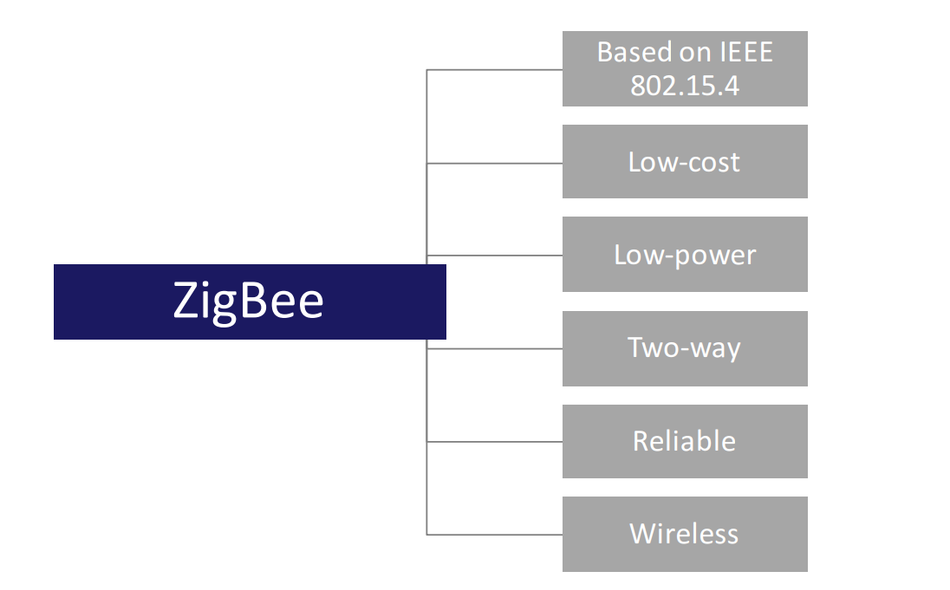
Zigbee is a wireless networking standard for connecting large numbers of small, low-power smart home devices: light bulbs, wall switches, door locks, motion sensors, thermostats, utility meters. Its defining trait is the mesh. Instead of every device talking directly to a central hub, mains-powered devices relay messages for one another, so coverage grows as you add hardware rather than straining against the limits of a single radio.
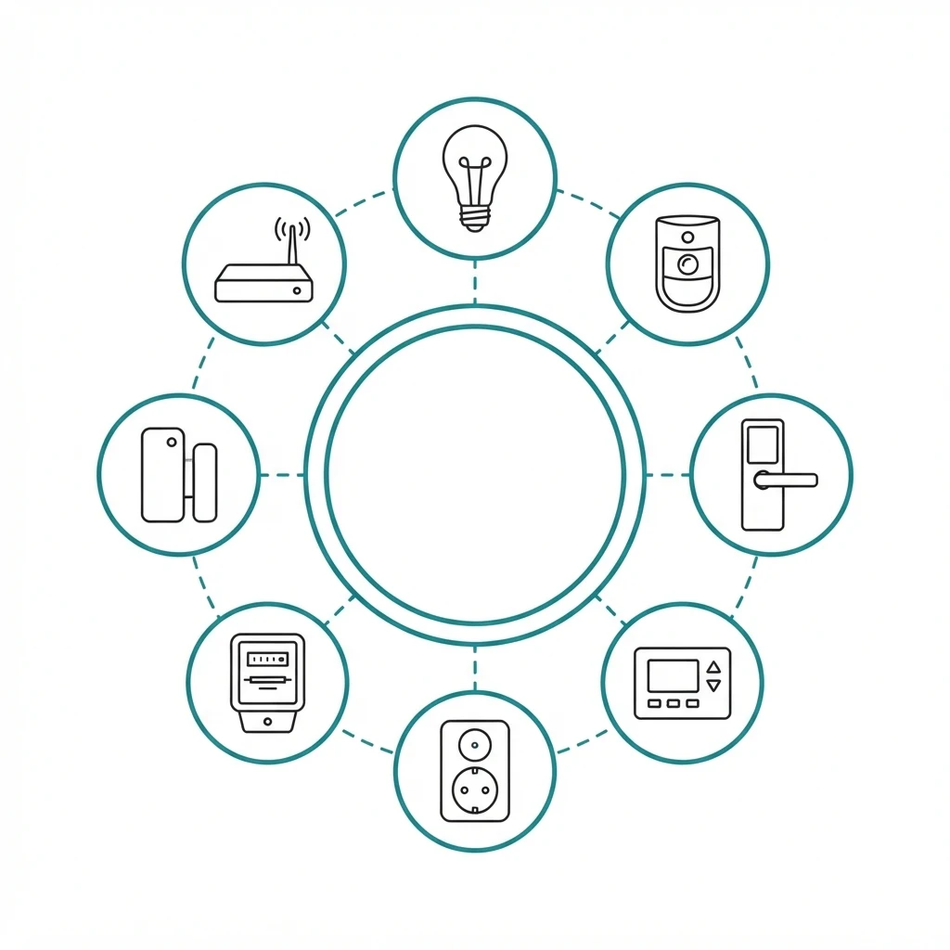
Two organizations build it. The radio itself comes from IEEE 802.15.4, which specifies the physical layer (the frequency band, the channels, the modulation) and the medium access control sub-layer (how devices take turns transmitting without talking over each other). Everything above the radio comes from the Connectivity Standards Alliance: how a device joins a network and gets an address, how messages find their way across multiple hops, how traffic is encrypted, and a shared vocabulary that lets certified products from different manufacturers actually understand one another.[1][12]
In practice, that looks like this. A house has a hub, a dozen smart bulbs, and a battery-powered sensor out in the garage. The bulbs are plugged into mains power and stay permanently awake, so they can pass traffic along for other devices. When the sensor detects motion, it hands its message to whichever bulb is nearest, and that bulb relays it onward until it reaches the hub. The sensor never has to be within radio range of the hub at all, and it can run for a year or more on a single battery, depending on how often it reports, because it spends almost all of its time asleep.
A single physical device can present several independent functions, each on its own numbered endpoint. A smart plug might expose its on/off switch on one endpoint and its energy meter on another, so a controller can read power consumption without touching the switch.[1]
The payoff of all this standardization is interoperability. Because device behaviour is described in a common library of clusters and attributes, and products are certified against it, a bulb from one vendor responds correctly to a switch from another. The Alliance puts the installed base at more than a billion Zigbee devices worldwide, and Zigbee 4.0 remains backward compatible with Zigbee 3.0 and Smart Energy, so that base is not stranded by the upgrade.[8]
Recommended Reading: What is a Motion Sensor and How Does it Work
Zigbee at a glance
Parameter | Zigbee |
Current version | Zigbee 4.0, released 18 November 2025, built on the Core R23.2 specification[8] |
Lower layers | IEEE 802.15.4 physical and MAC layers[1] |
Main band | 2.4 GHz worldwide, 16 channels numbered 11 to 26[2] |
Data rate | 250 kbps at 2.4 GHz[3] |
Sub-GHz option | Zigbee 4.0 adds a European 800 MHz and a North American 900 MHz PHY; the sub-GHz feature is branded Suzi[8][16] |
Topologies | Star and mesh[1] |
Device roles | One coordinator, any number of routers and end devices[4] |
Addressing | 16-bit network address, with the coordinator always at 0x0000[1] |
Security | AES-128 with CCM*, using network and link keys. Zigbee 4.0 adds cryptographic agility and stronger key management, including dynamic link keys[1][8] |
Application layer | Zigbee Cluster Library, with Base Device Behavior[19][20] |
Zigbee Device Types: Coordinator, Router and End Device
Every Zigbee network is built from three kinds of devices, and the division exists because of power. A device wired into mains electricity can keep its radio on permanently and spend energy forwarding other devices’ traffic. A device running on a coin cell cannot, so it sleeps and relies on a powered neighbour to hold its messages until it wakes. Zigbee formalizes that asymmetry into three roles: one coordinator, any number of routers, and any number of end devices.[4]
Role | What it does | Power and radio |
Coordinator (ZC) | Forms the network: scans the channels, selects one, and selects an extended PAN ID. Always holds the fixed network address 0x0000. Once the network is running, it also relays traffic like any router.[4] | Permanently powered, receiver continuously listening[17] |
Router (ZR) | Relays traffic on behalf of other devices and extends the network’s reach. Can also run its own application functions, exactly as an end device does.[4][17] | Permanently powered, not designed to sleep[4][17] |
End device (ZED) | A leaf node. Communicates only through its parent and never relays for anyone else.[4] | Non-sleepy end devices stay powered; sleepy end devices shut the radio down when idle[4] |
Each of the three roles carries a practical consequence worth drawing out, taking them in the order above.
Trust Center and Network Manager
Beyond forming the network, the Zigbee coordinator holds one responsibility no other device can take on. When a network starts in centralized security mode, the coordinator is the only device that can be designated the Trust Center, the authority that holds the network’s security settings and decides which devices are authorized to join.[4] The specification also defines a network manager, which monitors and corrects problems such as conflicting PAN IDs and moves the network to a different channel when interference makes the current one unusable.[4]
Which Devices Act as Routers
In practice the router role follows the power supply rather than the product category. Almost every mains-powered Zigbee device acts as a router, with one common exception: most mains-powered relays built to work without a neutral wire, which have too small a power budget to spare. To stabilize a weak network, the community-maintained Zigbee2MQTT documentation suggests adding a dedicated Zigbee router, or simply a mains-powered device such as a Philips Hue lamp.[21]
Placement matters as much as count. Silicon Labs recommends aiming for a balanced network in which every node has more than one viable path back, while avoiding clusters of routers packed closely enough to interfere with one another.[4]
Sleepy End Devices and Polling
The word “sleepy” in the table above carries most of the practical weight of the end device role. A sleepy end device switches its radio off whenever it has nothing to do, which means it cannot be reached on demand. Instead it polls. It wakes, asks its parent whether anything is waiting, collects whatever has been buffered for it, and goes back to sleep. Until it asks, the parent sends it nothing.[4] Nordic’s example Zigbee light switch application polls its parent every three seconds.[17]
Two consequences follow. Broadcasts are an unreliable way to reach a sleeping device, because the parent may discard the buffered message before the device next wakes.[5] And the polling interval is what sets battery life, as the power section explains.
How Zigbee Mesh Networking Works
A Zigbee network has no map of itself. No device is told the layout in advance, and no path to a destination exists until something needs to be sent there. The network discovers paths on demand, keeps score of the links it is using, and repairs a route when one fails. Zigbee uses four routing mechanisms to do it, and a single application will usually rely on several at once, since some devices talk to each other while others report to a central hub.[5]
The Shape of the Network
In a star, every end device communicates with the coordinator directly, which makes that hub a potential bottleneck and limits range to its own radio reach. In a full mesh topology every participating node is router-capable, so any node can relay for any other and it is unlikely that a single device becomes a point of failure. A hybrid sits between the two: several star networks, each with a router as its hub, with the hubs meshed together.[10]
Recommended Reading: Network Topology: 7 Types and How to Choose One
Joining and Addressing
Finding a network begins with IEEE 802.15.4 active scans across a set of channels the product defines.[20] The scan is a beacon request, a single hop broadcast that crosses PAN ID boundaries, so every 802.15.4 device in range hears it. Routers and coordinators answer with beacons identifying their network and indicating whether they are currently accepting joins, which is how the newcomer rules candidates in or out.[38]
Zigbee PRO then assigns the device an address stochastically, at random, rather than using the tree addressing of the older Zigbee stack, where an address encoded the device’s depth in a hierarchy.[18] The coordinator itself always holds 0x0000, and in a centralized network it is the only device that can be the Trust Center, which manages the network’s security settings and authorizations.[4]
Table Routing and Route Discovery
Zigbee PRO normally routes ordinary unicasts by table: each router holds a routing table and forwards a frame to whichever neighbour that table names as the next hop. Source routed frames, covered further down, are the exception.[18][5]
Discovery starts when a node has a unicast to send and no route for it. It broadcasts a route request asking the destination to reply. Every device that relays the request records the neighbour it heard it from, which leaves a trail of temporary reverse-path entries. Those entries are short lived by design and are not meant to be reused. When the request arrives, the destination may have several possible next hops back toward the source, and the specification leaves the selection policy to the implementation; Silicon Labs’ stack uses a weighting algorithm to favour the apparently most reliable path. The destination then sends a unicast route response back along the temporary trail, and each device it passes builds a permanent route from it.[5]
Cost accumulates on the way out, and it is deliberately pessimistic. A relay looks up the sender in its neighbor table, and if that entry carries a nonzero outgoing cost, it adds the larger of the incoming and outgoing costs to the request’s path cost field before retransmitting. If there is no entry at all, or the outgoing cost is zero, the request is discarded rather than forwarded on a link whose reverse direction is unproven.[5]
Routes do not live forever. An entry unused for a timeout, one minute in EmberZNet 3.0 and later, is marked reusable and may be overwritten, and if a relay has no free table entry the message is reported undeliverable.[5]
Scoring Links, in Both Directions
A radio link can be good in one direction and poor in the other, because noise floor, receiver sensitivity and transmit power all differ at the two ends. Routing has to account for both.[5]
Each router keeps a neighbor table holding, for every router neighbour, an average incoming link quality, an outgoing cost, and an age. The incoming figure is an exponentially weighted moving average of the link quality indicator across all packets received from that neighbour, converted to a cost by lookup. The outgoing cost is not measured locally at all: it is the incoming cost that neighbor reports back. A neighbor with a nonzero outgoing cost is a two-way link, and one without is one-way.[5]
That reporting happens through link status messages, which routers send every 16 seconds with 2 seconds of jitter, as one-hop broadcasts with no retries. Each message lists the sender’s non-stale neighbors with an incoming cost from 1 to 7 and an outgoing cost from 0 to 7, where 0 means not yet known. A router that has no two-way links at all sends them roughly eight times more often, so a newly powered node establishes two-way links quickly. This exchange is what lets Zigbee PRO detect asymmetric links and steer route discovery away from them.[5]
When a Route Fails
If a unicast that requested an acknowledgment is not acknowledged, the sender can repair the route. Repair follows the same steps as discovery, with one difference: the failed node does not take part, so the replacement path is necessarily different from the one that broke. Where no alternative path exists, the sender is told that delivery failed.[5]
Repair is not automatic by default in Silicon Labs’ stack. The message has to be sent with both retry and route discovery options enabled, and the stack retries delivery before attempting repair.[5]
Reaching Many Devices at Once
Two mechanisms send one message to many destinations, and both are expensive.
A broadcast goes to every device in the network, repeated by all router-capable devices to ensure delivery. It is a reliable way to reach everything, and that is the problem: repeated broadcasts crowd out other traffic, so they should be used sparingly.[5] Broadcasts are also unreliable for reaching a sleeping device, because the parent buffers the message for its sleeping child and may drop it before the child wakes to collect it.[5]
A multicast is the filtered version: devices join a group and only members receive the message, although non-members still relay it. A light switch sending an on command to a bank of ten lights is the typical case. Multicast messages are never acknowledged, and because the delivery mechanism is still broadcast-based, the same advice about overuse applies.[5]
When Traffic Converges on One Hub
Most networks have a node that everything talks to, typically a gateway collecting status from every device. Silicon Labs calls it a concentrator.[6] Under ordinary table routing, that device and its immediate neighbours would need routing table space for a next hop to every device in the network, which is a problem on memory-limited hardware.[5]
Many-to-one routing inverts the direction of discovery. A single many-to-one route request creates a route from each router back to the concentrator, replacing the need for each router to initiate its own discovery. Each router ends up with one route table entry pointing inward, flagged to distinguish it from an ordinary route.[5][6]
The return direction uses source routing. Messages travelling inward carry a route record that logs the hops taken, and the concentrator stores those sequences reversed in a source route table. Its own outgoing messages then carry the full relay list in the network header, so the relays along the way need no table entry for the destination at all. The cost of this is memory at the concentrator, which is why there are two kinds: a low RAM concentrator is only guaranteed to buffer the most recent source route, so nodes must send a route record before every transmission to it, whereas with more memory available nodes can stop sending route records once one has been received.[5][6]
Retries and Limits
Delivery is retried at three layers on three different timescales, so a transient problem is absorbed close to where it happened.
Layer | What triggers a retry | Figures (Silicon Labs stack) |
MAC | A failed clear channel assessment, or a missing MAC acknowledgment from the next hop. Broadcasts retry only on channel assessment failure, since they are not acknowledged at MAC level | Up to five transmission attempts, with maximum retry time for complete failure around 37 ms[5] |
NWK | A MAC-layer failure. The network layer then retries on a longer timescale, aimed at interference lasting 1 to 500 ms | Unicast retries continue for up to 500 ms. Broadcasts are re-sent every 500 ms, up to three transmissions including the original, or until neighbours are heard rebroadcasting[5] |
APS | An optional end-to-end acknowledgment from the destination, enabled per message by the application | Not available for broadcasts[5] |
Two practical notes sit alongside that table. Distance is bounded by a hop limit set to twice the configured maximum network depth. In Silicon Labs’ stack that depth defaults to 15 for Zigbee PRO, giving 30 hops, and either value can be overridden.[39] And after a reported delivery failure, an application should wait longer than usual before retrying, since retrying into a congested network makes congestion worse.[5]
Zigbee Cluster Library and Zigbee 3.0
Clusters, Attributes and Commands
In the Zigbee Cluster Library, a cluster is a set of messages used to send and receive related commands and data over a Zigbee network. A temperature cluster carries what is needed to report temperature, an on/off cluster what is needed to switch something.
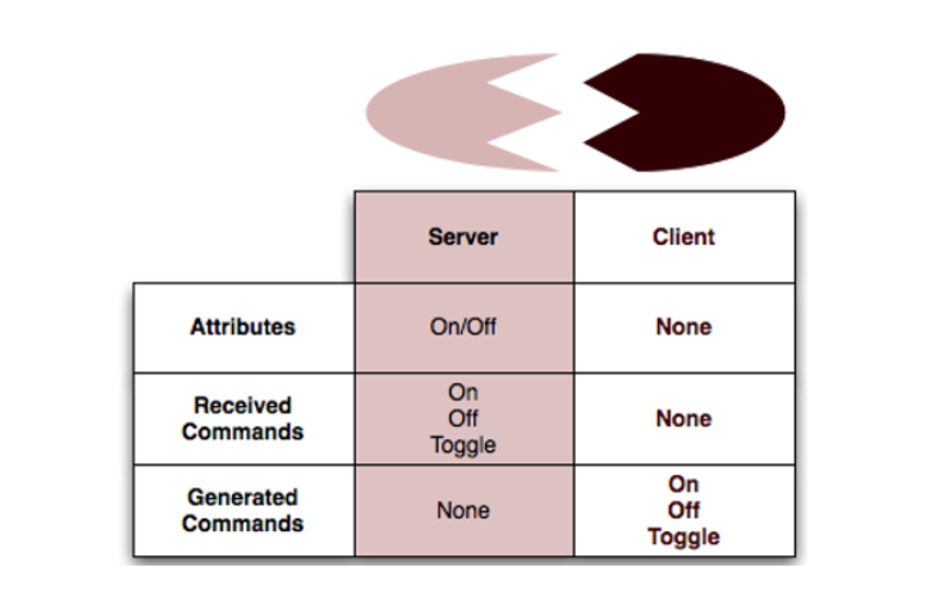
Each cluster is divided into two ends, a client end and a server end. The client end sends messages that the server end may receive, and it may also receive messages the server sends, so the two ends are always complementary. Client does not mean subordinate or response-only.[19]
Attributes are the data. Each one has a 16-bit identifier that is unique only within its cluster end, a declared data type, read-only or read/write access, a default value, and a statement of whether support is mandatory or optional.[19]
Commands are the actions. Each has an 8-bit identifier, unique within its cluster end, and a payload format that depends on the command. Global commands are not tied to any cluster, and the library names eight of them: Read Attributes, Write Attributes, Write Attributes Undivided, Configure Reporting, Read Reporting Configuration, Discover Attributes, Report Attributes, and Default Response. Cluster-specific commands are defined inside each cluster, along with their payloads and support requirements, and apply only to that cluster.[19]
Two examples make the pattern concrete. In the On/Off cluster the server receives three commands, OFF, ON and TOGGLE. All three are mandatory, none carries a payload, and the client generates them. In the Temperature Measurement cluster, MeasuredValue is attribute 0x0000, a signed 16-bit integer, read-only, mandatory, with a default of 0 and a range running between MinMeasuredValue and MaxMeasuredValue.[19]
Vendors can extend the library. Manufacturers may add manufacturer-specific commands or attributes to existing clusters, or define entirely new clusters, which must use cluster IDs in the range 0xFC00 to 0xFFFE. A manufacturer-specific command is marked by a bit in the ZCL header, and the header also carries a manufacturer code issued by the Connectivity Standards Alliance, which keeps extensions from colliding with each other or with standard items.[19]
Versioning is handled by one attribute. ClusterRevision, identifier 0xFFFD, is a global attribute defined for every cluster instance. It is an unsigned 16-bit read-only value, incremented for each major change to a cluster’s specification, and devices can read it from one another to decide how to communicate. Global attributes were introduced in revision 6 of the ZCL.[19]
Zigbee 3.0 and the Base Device Behavior
Before Zigbee 3.0, applications sat on separate application profiles, among them Home Automation, Smart Energy and Zigbee Light Link.[20] Zigbee 3.0 unites all of those different application profiles into one common application layer, with the result that two Zigbee 3.0 products from different application domains can interoperate on the same network. The documentation’s example is a light switch and a garage door opener working on one network.[20]
Silicon Labs calls the Base Device Behavior specification perhaps the most important new document in the Zigbee 3.0 suite. It defines mandatory and optional application-layer behaviour for any Zigbee product, in areas including network commissioning, network security, ZDO command handling, reporting, MAC data polling and persistent data, and those are not the only ones. It also defines four commissioning methods: Touchlink commissioning, classical network joining, classical network formation, and finding and binding. They run in a defined order, but each is optional for a device.[20] Zigbee 4.0 updates the Base Device Behavior to version 3.1.[8]
Zigbee Green Power
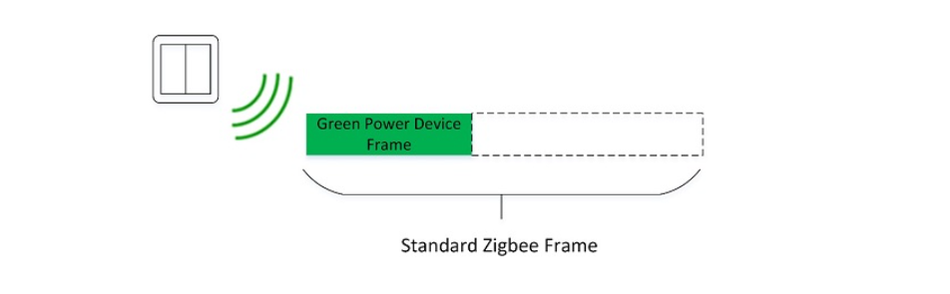
Zigbee Green Power is included in the Zigbee 3.0 specification, and it lets battery-less energy-harvesting devices and ultra-long-life battery devices join Zigbee PRO networks securely. Typical devices are switches, sensors, detectors and buttons.[22]
Three device types make it work. A Green Power Device is self-powering and energy-harvesting, communicates using a compact message format, and is not an end device: it cannot receive commands. A Green Power Proxy is a fully compliant Zigbee device that additionally translates Green Power frames into Zigbee Cluster Library frames, acting as the intermediate node between the device and the sinks. A Green Power Sink is anything that can be controlled by, or receive data from, a Green Power device, such as a light.[23]
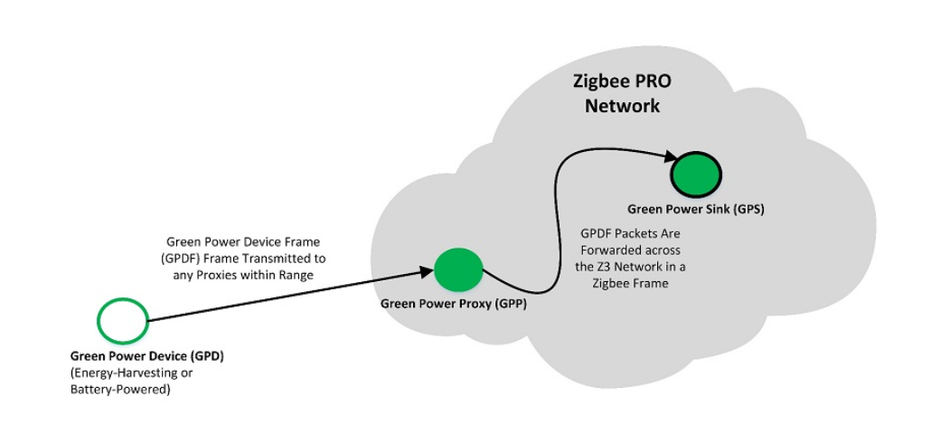
Green Power devices are strictly one-way once in use, though they may optionally support bidirectional exchange during pairing. Their frames are shorter than a standard Zigbee frame, and a proxy forwards them wrapped in a ZCL command, which is sometimes called tunneling.[23]
Zigbee Security: Keys, the Trust Center and a Known Weakness
Keys and the Trust Center
Zigbee security rests on symmetric keys, and all Zigbee keys are 128 bits long. One network-wide key, held by every authorized device, encrypts network-layer messages using AES-128. The network and auxiliary headers travel in the clear but are authenticated, the payload is both authenticated and encrypted, and a 4-byte message integrity code is appended so alteration can be detected.[40]
Above that sit link keys. APS link keys are peer-to-peer keys that two devices must establish before exchanging APS-secured data, and there are two kinds: a trust center link key, shared between a device and the trust center and used for APS command messages with it, and an application link key, shared between two ordinary nodes, either preconfigured or requested through the trust center.[40]
Who authorizes a join depends on how the network was formed. In a trust center network, a central trust center authenticates every new device. A joining device is admitted temporarily, and the trust center can send it the network key, order its removal, or ignore it. Ordinary messages between two devices do not involve the trust center. In a distributed trust center network there is no central authority at all, and any router can authorize and authenticate a joining device. That is simpler to set up and slightly less secure, and the choice is fixed when the network forms: it cannot be changed afterwards.[40]
The Default Link Key Problem
The weak point was never the cipher. It was how the network key reaches a device that does not yet have one.
Zigbee defines a well-known default link key, ZigBeeAlliance09, that a trust center can use for initial joining. Silicon Labs’ own documentation calls it insecure and says it should not be used to transport anything important, that encrypting the network key with it leaves a window of vulnerability until that key is replaced, and that it should be used only for initial joining and only briefly.[41]
The alternative is an out-of-band secret. An installation code is an arbitrary value of 6, 8, 12 or 16 bytes followed by a 16-bit CRC, hashed with AES-MMO into a 128-bit result that becomes the device’s preconfigured trust center link key. The code and the device’s EUI64 have to be conveyed outside the network, since the device is not on it yet.[41]
What the Black Hat 2015 Research Showed
Tobias Zillner and Sebastian Strobl of Cognosec presented the practical consequences at Black Hat USA 2015.[7]
They assessed a home automation system, a smart lighting solution and a Zigbee-enabled door lock, and found that every device assessed used a pairing procedure that let an outsider sniff the network key. In the light bulbs and door locks, vendors had implemented the default trust center link key fallback. Obtaining that key was treated as total compromise: for the Home Automation profile the paper says the confidentiality of the whole network communication can be considered compromised, and an attacker could get complete control of the system.[43]
The profile’s own Default Link Key Join flag enables the default-key join as a startup fallback, which the paper calls a critical risk because the network key may be sent under a publicly known key, and notes the impact is wider because HVAC systems and door locks use the same profile. On why vendors did this, the paper points to compatibility and cost pressures leading to poor implementation of security controls.[43]
Two further findings matter. In the home automation system the network key could not be reset or changed, and no automatic key rotation could be identified over an eleven month observation period. And the sniffing window is narrow, so the paper’s answer is to jam the device, which leads the user to re-pair it and reopens the window. Jamming is described as easy.[43]
A separate attack needed no keys at all. Sending a reset to factory default command to a light bulb makes it connect to the first network available, without user interaction and without anyone pressing a button, because it continuously sends beacon requests looking for a network to join.[43]
How Joining Was Hardened
Zigbee 3.0 closed the window the default key opens. A Zigbee 3.0 device must request an updated trust center link key after joining, and even a device that joined using an installation code key has that key replaced. The replacement only happens if both the trust center and the joining device support Zigbee 3.0; otherwise the original joining key is kept.[41]
Revision 23 moved the protection earlier, before the network key is ever sent. Dynamic link keys, introduced in R23, use elliptic curve Diffie-Hellman negotiation to establish unique link keys securely over an insecure channel and to authenticate a device before it joins, which lets the trust center hold the network key as long as possible.[41]
The scheme is Secured Passphrase Ephemeral Key Exchange with Curve25519. It can be combined with installation codes, a new Authentication Token, or variable-length passphrases to authenticate devices, and at minimum it protects against passive attacks on network keys. R23 also lets the trust center delay sending the network key while it queries the joining device about its capabilities before authorizing it, which is the Device Interview. A Set Configuration request can additionally enable a restricted mode that limits how much unencrypted traffic can change a device’s state.[42]
Zigbee 4.0 packages and extends this. The Alliance describes comprehensive security updates implementing cryptographic agility, and names Dynamic Link Key, Restricted Mode, Secured Channel, Trust Center Swap Out and Advanced Frame Counter Synchronization, the last of which it says prevents replay attacks.[8]
What Actually Ships
Specification and product are not the same thing, and the gap is worth stating plainly.
The Connectivity Standards Alliance requires Zigbee 3.0 devices built on Zigbee PRO R23 or R23.2 platforms to run the core stack in R22 behavior mode during product certification. In that mode the stack disables R23-specific features, dynamic link key negotiation among them.[25]
So the mechanism designed to remove the default-key window exists in the specification, is implemented in shipping stacks, and is switched off in the configuration products certify in. Several items the Alliance presents as Zigbee 4.0 security tools, Restricted Mode among them, were already defined in the R23 core.[42][8]
Zigbee vs Thread, Matter, Bluetooth Mesh and Z-Wave
Thread shares Zigbee's 802.15.4 radio but uses IPv6, Bluetooth Mesh relays messages over a Bluetooth Low Energy stack, Z-Wave uses a different radio standard (ITU-T G.9959), and Matter is an IP-based connectivity protocol whose first release runs over Ethernet, Wi-Fi and Thread.[3][35][32][33][34]
Feature | Zigbee | Thread | Bluetooth Mesh | Z-Wave and Z-Wave Long Range |
Radio and network layer | IEEE 802.15.4; 250 kbps at 2.4 GHz, plus sub-GHz bands; Zigbee NWK with 16-bit addresses[1][3] | IEEE 802.15.4 at 250 kbps in the 2.4 GHz band; IPv6[3][35] | Bluetooth Low Energy stack[32] | ITU-T G.9959 at 9.6, 40 or 100 kbps; Long Range at a fixed 100 kbps[33] |
Topology and routing | Star or mesh; table routing with on-demand discovery, plus many-to-one and source routing[1][5][6] | Mesh with an elected Leader and border routers to Wi-Fi or Ethernet[3] | Managed flooding limited by a TTL field, with relays and Friend nodes; directed forwarding also defined[32] | Z-Wave: mesh. Long Range: star.[33] |
Published scale figures | Hop limit of twice the configured maximum network depth; 30 hops with Silicon Labs’ Zigbee PRO default depth of 15[39] | Silicon Labs: the Thread Domain model scales to tens of thousands of Thread devices in one deployment, combining connectivity technologies[35] | Bluetooth SIG glossary: 32,767 elements; 127 hops[32] | 232 nodes; Long Range up to 4,000[33] (Silicon Labs’ SDK 8.0 is engineered for 1,024)[44] |
Recommended Reading: Wireless Technologies Reshape Industrial Automation
How to Build a Reliable Zigbee Network
Most of the practices above reduce to a short checklist:
Plan routers first. End devices relay nothing, so coverage depends on routers; give every node redundant paths without crowding routers together.[4]
Fix the channel before pairing, using the Wi-Fi survey and channel map above, because changing it later may force re-pairing.[21]
Isolate the coordinator radio on a USB extension cable, away from USB 3.0 devices, as Home Assistant's support pages advise for its Connect ZBT-1 adapter.[13][27]
Keep broadcasts rare. Every router relays each broadcast, and permit-join requests are typically sent as broadcasts to all routers.[5][18]
Secure joining. Require install codes or authenticated Revision 23 key negotiation at the Trust Center instead of accepting joins under the default key, confirm that devices perform the Zigbee 3.0 trust center link key update, which replaces the joining key even when an install code was used[41] , and keep pairing windows short, since the 2015 key extraction worked only during pairing.[1][7]
Protect the factory reset path, which the 2015 device hijacking exploited without physical access.[7]
Check certification mode. The Alliance requires Zigbee 3.0 products built on R23 platforms to certify in R22 behaviour mode, which disables dynamic link key negotiation.[25]
For diagnosis, Silicon Labs notes that the link-quality data in neighbor tables can help with troubleshooting, and Zigbee2MQTT can return a map of your network including its routes.[5][21]
Conclusion
Zigbee is a complete low-power mesh stack on the IEEE 802.15.4 radio: a network layer that routes around failed links, a Cluster Library that lets devices from different vendors interoperate, and a security model whose known weak point has been key distribution rather than the AES cipher.
For your designs, the levers are enough mains-powered routers, a channel clear of the local Wi-Fi, a deliberate poll interval and a Trust Center that refuses default-key joins. Zigbee 4.0 carries those foundations forward with stronger joining security and sub-GHz reach through Suzi, while bridges connect existing Zigbee devices to Matter.
Frequently Asked Questions
What is Zigbee?
Zigbee is a low-power wireless standard that links bulbs, switches, sensors and locks into a self-organizing mesh. The radio comes from IEEE 802.15.4; the Connectivity Standards Alliance adds the routing, security and shared language that let different vendors’ devices work together.[1][12]
Does Zigbee work without internet or Wi-Fi?
Yes. A Zigbee network runs entirely locally and does not use IP at all, so devices keep talking to each other with the internet down.[4][18] You need internet only for a hub’s remote or cloud features.
Is Zigbee discontinued?
No. The CSA released Zigbee 4.0 and Suzi on 18 November 2025 and opened Suzi certification on 2 September 2026.[8][9] Silicon Labs says Zigbee 3.0 remains valid for at least 18 months, with certification.
What is replacing Zigbee?
Nothing outright. Matter, also from the CSA, runs over Ethernet, Wi-Fi and Thread, and existing Zigbee devices reach it through bridges.[34][37] Zigbee continues with Zigbee 4.0 and Suzi.[8]
Is Zigbee the same as Matter?
No. Matter is IP-based and runs over Ethernet, Wi-Fi and Thread; Zigbee is a full stack with its own radio and no IP.[34][18] They are complementary, and bridges connect the two.[37]
Is Zigbee better than Wi-Fi?
For battery-powered sensors and switches, usually yes; for anything streaming data, no. TI estimates about 3.15 years on a CR2032 coin cell for a Zigbee switch polling every 5 seconds, at 250 kbps and up to +20 dBm.[24][2]
Zigbee vs Z-Wave: what is the difference?
Different radios. Zigbee runs 802.15.4 at 250 kbps, mostly at 2.4 GHz; Z-Wave uses ITU-T G.9959 at 9.6 to 100 kbps in sub-GHz spectrum, avoiding Wi-Fi interference but with less throughput.[1][33] Classic Z-Wave caps at 232 nodes.[33]
What frequency does Zigbee use?
Zigbee uses 2.4 GHz worldwide, in 16 channels numbered 11 to 26 between 2405 and 2480 MHz.[2] Zigbee adds sub-GHz support at 800 MHz in Europe and 900 MHz in North America.[16]
What is the range of Zigbee?
Up to 60 m indoors and up to 1,200 m outdoors in line of sight, depending on power, antenna and building.[31] The mesh extends coverage further by relaying through intermediate nodes.[10]
How many devices can a Zigbee network support?
In practice, memory and traffic set the limit, not addresses: child tables, routing tables and broadcast load all bite long before the 16-bit address space does.[6][1] Silicon Labs advises sizing the source route table to available RAM and network size.[6]
Do I need a Zigbee hub?
In practice yes, for most setups. A centralized-security network needs a coordinator acting as Trust Center, which the CSA says can be a hub, gateway, smart speaker (such as an Amazon Echo) or electricity meter.[4][16] Distributed networks let any router admit devices.[40]
Is Zigbee secure?
Yes, with one historical caveat. Zigbee uses AES in CCM* mode with 128-bit keys; the real weakness was key distribution, exploited in 2015 via the default ZigBeeAlliance09 key during pairing.[40][43] Install codes or Revision 23 key negotiation close that gap.[41][42]
References
[1] Connectivity Standards Alliance, “Zigbee specification, revision 23,” Zigbee Document 05-3474-23, Mar. 15, 2023. [Online]. Available: https://csa-iot.org/wp-content/uploads/2023/04/05-3474-23-csg-zigbee-specification-compressed.pdf
[2] Silicon Laboratories, “Wi-Fi impact on Bluetooth and 802.15.4 radios,” Wi-Fi Coexistence Fundamentals, v1.0.1. [Online]. Available: https://docs.silabs.com/coexistence/1.0.1/multiprotocol-wifi-coexistence-fundamentals/02-wi-fi-impact-on-bluetooth-and-802-15-4-radios
[3] Silicon Laboratories, “Thread technology overview,” Thread Fundamentals, v2.7.3. [Online]. Available: https://docs.silabs.com/openthread/2.7.3/thread-fundamentals/02-thread-technology-overview
[4] Silicon Laboratories, “Network node types,” Zigbee Fundamentals, v9.1.1. [Online]. Available: https://docs.silabs.com/zigbee/9.1.1/zigbee-fundamentals/03-network-node-types
[5] Silicon Laboratories, “Zigbee routing concepts,” Zigbee Fundamentals, v9.1.1. [Online]. Available: https://docs.silabs.com/zigbee/9.1.1/zigbee-fundamentals/04-zigbee-routing-concepts
[6] Silicon Laboratories, “Many-to-one and source routing,” Zigbee Concepts: Networking, v9.0.1. [Online]. Available: https://docs.silabs.com/zigbee/9.0.1/zigbee-concepts-network/many-to-one
[7] T. Zillner and S. Strobl, “ZigBee exploited: The good, the bad and the ugly,” presented at Black Hat USA, Las Vegas, NV, USA, Aug. 6, 2015. [Online]. Available: https://www.blackhat.com/docs/us-15/materials/us-15-Zillner-ZigBee-Exploited-The-Good-The-Bad-And-The-Ugly.pdf
[8] Connectivity Standards Alliance, “The Connectivity Standards Alliance announces Zigbee 4.0 and Suzi: Empowering the next generation of secure, interoperable IoT devices,” Nov. 18, 2025. [Online]. Available: https://csa-iot.org/newsroom/the-connectivity-standards-alliance-announces-zigbee-4-0-and-suzi-empowering-the-next-generation-of-secure-interoperable-iot-devices/
[9] Connectivity Standards Alliance, “Suzi product certification is now open,” Sep. 2, 2026. [Online]. Available: https://csa-iot.org/newsroom/suzi-product-certification-is-now-open/
[10] Silicon Laboratories, “Zigbee mesh networking,” Zigbee Fundamentals, v9.1.1. [Online]. Available: https://docs.silabs.com/zigbee/9.1.1/zigbee-fundamentals/02-zigbee-mesh-networking
[11] Connectivity Standards Alliance, “The Zigbee Alliance rebrands as Connectivity Standards Alliance,” May 11, 2021. [Online]. Available: https://csa-iot.org/newsroom/connectivity-standards-alliance/
[12] Connectivity Standards Alliance, “Zigbee: The full-stack solution for all smart devices.” [Online]. Available: https://csa-iot.org/all-solutions/zigbee/
[13] Nabu Casa, “Forming a new Zigbee network with Home Assistant Connect ZBT-1.” [Online]. Available: https://support.nabucasa.com/hc/en-us/articles/26123541989661
[14] IEEE Standard for Low-Rate Wireless Networks, IEEE Standard 802.15.4-2024, Dec. 12, 2024. [Online]. Available: https://ieeexplore.ieee.org/document/10794632
[15] C.-J. M. Liang, N. B. Priyantha, J. Liu, and A. Terzis, “Surviving Wi-Fi interference in low power ZigBee networks,” in Proc. 8th ACM Conf. Embedded Networked Sensor Systems (SenSys ‘10), Zurich, Switzerland, Nov. 2010, pp. 309–322. [Online]. Available: https://cs.uwaterloo.ca/~brecht/courses/856/readings/interference/zigbee-wifi-interference.pdf
[16] Connectivity Standards Alliance, “Zigbee PRO 2023 improves overall security while simplifying experience,” Apr. 12, 2023. [Online]. Available: https://csa-iot.org/newsroom/zigbee-pro-2023-improves-overall-security-while-simplifying-experience/
[17] Nordic Semiconductor, “About Zigbee protocol,” Zigbee R22 Add-On for nRF Connect SDK. [Online]. Available: https://nrfconnectdocs.nordicsemi.com/addons/zigbee-r22/latest/about.html
[18] Silicon Laboratories, “The Zigbee stack,” Zigbee Fundamentals, v9.1.1. [Online]. Available: https://docs.silabs.com/zigbee/9.1.1/zigbee-fundamentals/05-the-zigbee-stack
[19] Silicon Laboratories, “Zigbee Cluster Library,” Zigbee Fundamentals, v9.1.1. [Online]. Available: https://docs.silabs.com/zigbee/9.1.1/zigbee-fundamentals/06-zigbee-cluster-library
[20] Silicon Laboratories, “Zigbee 3.0,” Zigbee Fundamentals, v9.1.1. [Online]. Available: https://docs.silabs.com/zigbee/9.1.1/zigbee-fundamentals/08-zigbee-3-0
[21] Zigbee2MQTT, “Improve network range and stability,” updated May 2026. [Online]. Available: https://www.zigbee2mqtt.io/advanced/zigbee/02_improve_network_range_and_stability.html
[22] Silicon Laboratories, “Green Power fundamentals: Overview,” v9.1.1. [Online]. Available: https://docs.silabs.com/zigbee/9.1.1/green-power-fundamentals/01-overview
[23] Silicon Laboratories, “Green Power fundamentals: Device types,” v9.1.1. [Online]. Available: https://docs.silabs.com/zigbee/9.1.1/green-power-fundamentals/03-device-types
[24] S. McClain, “Z-Stack end device power consumption measurement with the SimpleLink wireless MCU family,” Texas Instruments, Dallas, TX, USA, Appl. Rep. SWRA625B, Aug. 2018, rev. Feb. 2020. [Online]. Available: https://www.ti.com/lit/swra625
[25] Nordic Semiconductor, “ZBOSS library certification,” Zigbee R23 Add-On for nRF Connect SDK. [Online]. Available: https://nrfconnectdocs.nordicsemi.com/addons/ncs-zigbee/latest/zboss/certification.html
[26] D. Sikdar, “Zigbee 4.0 brings security, commissioning, and efficiency improvements,” Silicon Laboratories, Dec. 15, 2025. [Online]. Available: https://www.silabs.com/blog/zigbee-4-0-improves-security-commissioning-and-efficiency
[27] Nabu Casa, “Connectivity issues due to interference.” [Online]. Available: https://support.nabucasa.com/hc/en-us/articles/26124431414557-Connectivity-issues-due-to-interference
[28] NXP Laboratories UK, “Co-existence of IEEE 802.15.4 at 2.4 GHz,” Appl. Note JN-AN-1079, rev. 1.1, Nov. 8, 2013. [Online]. Available: https://www.nxp.com/docs/en/application-note/JN-AN-1079.pdf
[29] Silicon Laboratories, “Configuring Wi-Fi coexistence,” Zigbee and OpenThread Coexistence with Wi-Fi, v9.1.1. [Online]. Available: https://docs.silabs.com/zigbee/9.1.1/zigbee-openthread-coexistence-wifi/02-configuring-wi-fi-coexistence
[30] Texas Instruments, “Zigbee battery life calculator.” [Online]. Available: https://software-dl.ti.com/simplelink/esd/simplelink_cc13xx_cc26xx_sdk/latest/exports/docs/zigbee/Z-STACK-CALC.html
[31] Digi International, “Digi XBee 3 Zigbee 3.0 datasheet,” Doc. 91004131 A16, 2020. [Online]. Available: https://cdn.sparkfun.com/assets/4/d/b/9/3/XB3-24Z8UM_datasheet.pdf
[32] Bluetooth SIG, “Bluetooth mesh networking glossary of terms.” [Online]. Available: https://www.bluetooth.com/learn-about-bluetooth/feature-enhancements/mesh/mesh-glossary/
[33] Silicon Laboratories, “Z-Wave overview,” Z-Wave and Z-Wave Long Range Performance Report, v7.24.3. [Online]. Available: https://docs.silabs.com/z-wave/7.24.3/z-wave-performance-report/overview
[34] Connectivity Standards Alliance, “Matter arrives, bringing a more interoperable, simple and secure Internet of Things to life,” Oct. 4, 2022. [Online]. Available: https://csa-iot.org/newsroom/matter-arrives/
[35] Silicon Laboratories, “Thread fundamentals: Overview,” v2.7.3. [Online]. Available: https://docs.silabs.com/openthread/2.7.3/thread-fundamentals/01-overview
[36] Connectivity Standards Alliance, “Matter: The smart home standard.” [Online]. Available: https://csa-iot.org/all-solutions/matter/
[37] C. Ice, “Building bridges between Zigbee and Matter,” NXP Semiconductors, Apr. 30, 2025. [Online]. Available: https://www.nxp.com/company/about-nxp/smarter-world-blog/BL-BUILDING-BRIDGES-BETWEEN-ZIGBEE-AND-MATTER
[38] Silicon Laboratories, “Network activities (form, join, rejoin, leave),” Zigbee Concepts, v9.0.0. [Online]. Available: https://docs.silabs.com/zigbee/9.0.0/zigbee-concepts/network-activities
[39] Silicon Laboratories, “Stack configuration defaults, sl_zigbee_configuration_defaults.h,” Zigbee Stack API, v8.1.0. [Online]. Available: https://docs.silabs.com/zigbee/8.1.0/zigbee-stack-api/sl-zigbee-configuration-defaults-h
[40] Silicon Laboratories, “Zigbee security: Concepts,” v8.2.1. [Online]. Available: https://docs.silabs.com/zigbee/8.2.1/zigbee-security/02-concepts
[41] Silicon Laboratories, “Zigbee security: Standard security,” v8.2.2. [Online]. Available: https://docs.silabs.com/zigbee/8.2.2/zigbee-security/03-standard-security
[42] Silicon Laboratories, “Introduction to Zigbee R23,” v7.3.1. [Online]. Available: https://docs.silabs.com/zigbee/7.3.1/zigbee-r23-introduction/
[43] T. Zillner, “ZigBee exploited: The good, the bad and the ugly,” Cognosec, Vienna, Austria, white paper v1.0, Aug. 6, 2015. [Online]. Available: https://www.blackhat.com/docs/us-15/materials/us-15-Zillner-ZigBee-Exploited-The-Good-The-Bad-And-The-Ugly-wp.pdf
[44] Silicon Laboratories, “Z-Wave SDK 8.0 is engineered for 1024-node scale.” [Online]. Available: https://www.silabs.com/blog/z-wave-sdk-8-0-is-engineered-for-1024-node-scale
in this article
1. Key Takeaways2. Introduction3. What Is Zigbee?4. Zigbee Device Types: Coordinator, Router and End Device5. How Zigbee Mesh Networking WorksZigbee Cluster Library and Zigbee 3.07. Zigbee Security: Keys, the Trust Center and a Known Weakness8. Zigbee vs Thread, Matter, Bluetooth Mesh and Z-Wave9. How to Build a Reliable Zigbee Network10. Conclusion11. Frequently Asked Questions12. References