Bluetooth Mesh: How It Works, Architecture and Limits
How Bluetooth mesh works: managed flooding, node features, provisioning, security keys, Mesh 1.1, measured latency, and how it compares with Zigbee and Thread.

20 Nov, 2026. 24 minutes read
Key Takeaways
Bluetooth mesh is a Bluetooth SIG standard that lets Bluetooth LE devices communicate many-to-many instead of one-to-one. It is a networking layer, not a new radio. Adopted in 2017, now at Mesh Protocol 1.1.1 (November 2025). [1][2]
Messages travel by managed flooding. Relay nodes rebroadcast them on the three BLE advertising channels, capped by a TTL field and filtered by a message cache. Mesh 1.1 added directed forwarding as a second delivery method, not a replacement. [1][3][4]
Security is mandatory and cannot be switched off. Every message is encrypted and authenticated twice, at the network layer and the application layer, both with AES-128-CCM. That split is what lets a node relay traffic it has no permission to read. [5][9]
The published limits are generous. The practical ones are not. The spec allows 32,767 elements and 127 hops, but simulations show the protocol is prone to broadcast storms in dense deployments, and in Silicon Labs’ benchmark, Bluetooth mesh showed the largest latency increase of the three technologies as networks grew. [2][3][6][7]
Bluetooth mesh relays generally require mains power or a substantial battery. A relay on a 2,400 mAh battery lasts about 7.2 days. Low-power nodes are the exception, and their lifetime swings with the receive window: 0.87 months at 255 ms, 17.1 months at 1 ms. [9][4][10]
Bluetooth mesh is worth evaluating if you are specifying lighting control or building sensors. It runs on the same Bluetooth LE radios already in phones and tablets, and it needs no central hub. There are trade-offs. Flooding survives node failures but spends shared airtime. Security is mandatory, so key management becomes part of the job. And the small advertising packets cap throughput.
This guide covers the architecture, provisioning, security, Mesh 1.1, and the measured latency, scalability, and battery life. [1][4][5][9]
What Is Bluetooth Mesh?
Bluetooth mesh is a networking standard from the Bluetooth Special Interest Group (SIG) that lets Bluetooth LE devices communicate many-to-many. It is not a new radio. The full Bluetooth LE stack sits underneath, and mesh adds its own layers on top. 120 SIG member companies worked on it, well above the SIG’s norm. [1][32]
Version 1.0 was adopted in July 2017. The 1.1 enhancements arrived on 19 September 2023, when the specification was renamed from Mesh Profile to Mesh Protocol. Version 1.1.1, from November 2025, folds in errata and adds no features. [2][13]
Check your hardware before anything else. Mesh runs on core specification 4.0 and higher, but only products designed to be upgradable can gain it in the field, and that depends on factors like the memory available in the Bluetooth chip. [9]
Bluetooth Mesh vs Bluetooth LE
Most Bluetooth LE devices talk point to point, in what the core specification calls a piconet. A phone can pair with a heart rate monitor and a fitness tracker, but those two cannot reach each other. Mesh relays instead, which extends range well past any single node’s radio. [1]
Aspect | Point-to-point Bluetooth LE | Bluetooth mesh |
One-to-one, a piconet | Many-to-many network topology with relaying | |
How data moves | Over a connection between two devices | Broadcast over LE advertising and scanning; GATT only for proxy access |
Security | Optional; the designer decides | Mandatory, cannot be reduced |
Phone access | Direct, through GATT | Through a proxy node exposing GATT |
Mesh is the third of Bluetooth LE’s three topologies. Point-to-point handles data transfer in products like fitness trackers, broadcast handles one-to-many sharing such as indoor navigation and asset tracking, and mesh handles networks of tens, hundreds or thousands of devices. [14]
One buying note: Some researchers use “BLE mesh” for the SIG standard, but proprietary BLE mesh schemes that are not interoperable with it still ship today. Silicon Labs’ own mesh SDK offers Bluetooth mesh over advertising extensions and documents it as a proprietary, non-compliant extension. Check what a product actually implements. [15][3]
Recommended Reading: The Difference Between Classic Bluetooth and Bluetooth Low Energy
How Bluetooth Mesh Works
What is Managed Flooding?
Managed flooding is how Bluetooth mesh moves a message between nodes without routing tables. A node publishes a message, every node in radio range receives it, and nodes with the Relay feature re-broadcast it so it travels further. Copies arrive by different paths, and only the first to arrive is processed. [1][4]
Five controls stop that from becoming a broadcast storm.
Control | What it does |
Selective relaying | Only nodes with the Relay feature forward messages. The SIG says around five percent of nodes is normal, and expects those to be mains-powered |
TTL | Each message carries a Time To Live value that caps hops. Set TTL to 3, and the message is relayed at most three times. A relay forwards only if TTL is above 1, and subtracts 1 each time |
Message cache | Every node stores recently seen messages and drops a repeat immediately, before running security checks on it |
Heartbeats | Nodes send periodic heartbeats, so receivers can work out how many hops away the sender is. That is how you choose a TTL instead of guessing |
Subnets | Traffic on a subnet stays on it, unless a Mesh 1.1 subnet bridge forwards it [33] |
[1][2][4][6][9][13][17]
Relaying costs the node work. Each relay decrypts and authenticates the message at the network layer, subtracts 1 from the TTL, then re-encrypts and re-authenticates it with the same network key. The application payload is never touched, which is why a relay can forward a message it has no permission to read. [2][5]
Recommended Reading: Bluetooth Mesh: A Glossary for Developers
Why does Bluetooth mesh use flooding instead of routing?
Flooding gives redundancy that routing cannot. There is no path to repair when a node fails, because another copy of the message is already in flight. Hernández-Solana and colleagues argue flooding is the right choice when traffic is urgent, the network is small, or the layout changes often. The SIG’s own argument is maintenance: relays act independently, so moving a device needs no reconfiguration anywhere else. [4][15]
The cost is airtime. TTL limits how far a message travels but cannot aim it, so messages spread in every direction and use capacity in parts of a building that have no interest in them. Messages are small, and there are three advertising channels, but wherever nodes hear each other, that capacity is shared and finite. The SIG says plainly that it becomes the limiting factor on how far a network scales. [4]
What is directed forwarding?
Directed forwarding is a second delivery method added in Mesh 1.1, where only the nodes that move a message closer to its destination relay it. Every other node ignores the message. It does not replace managed flooding, and a network can use either. [4][13]
Paths are set two ways. A configuration tool can fix them, or the nodes can discover them:
The path origin sends a PATH_REQUEST message to the all-directed-forwarding-nodes address.
Each directed forwarding relay rebroadcasts it, so the request spreads across the network.
A node ignores a request arriving weaker than its configured RSSI threshold, which keeps poor links out of the path.
A metric tracks the cost of each sequence of nodes as the request spreads.
At the destination, PATH_REPLY messages travel back and write a forwarding table entry at every node along the way.
One path can hold several lanes, which are alternative node sequences to the same destination, and the metric prefers lanes that share no nodes. Paths expire, with a default lifetime of 24 hours. [4]
Addressing: unicast, group and virtual
Bluetooth mesh uses three address types: unicast for a single element, group for a set of elements, and virtual for a set identified by a label. Every address is 16 bits, and the source address of a message is always unicast.
Type | Range | How many | Points at |
Unicast | 0x0001–0x7FFF | 32,767 | One element |
Group | 0xC000–0xFFFF | 16,384 | A set of elements |
Virtual | 0x8000–0xBFFF | 16,384 hashes | A set, via a Label UUID |
The 32,767 figure is the element ceiling for an entire network, because a unicast address is only 15 bits wide.
Virtual addresses work differently from the other two. Each one is a hash of a 128-bit Label UUID that you generate yourself, with no central registry. Only 16,384 hashes exist, but each can stand for millions of UUIDs, which is why the spec calls the count very large instead of giving a number. [1][2][6]
Group addresses are split into two ranges. The SIG reserves 0xFF00 to 0xFFFF for fixed group addresses and leaves the other 16,128 for you. The 2020 developer guide defined four fixed addresses: all-proxies, all-friends, all-relays and all-nodes. Mesh Protocol 1.1.1 defines seven, adding all-directed-forwarding-nodes, all-ipt-nodes and all-ipt-border-routers. Only the first of those three does anything yet, as the spec attaches no behaviour to the two IPT addresses. [1][2][6]
Publish and subscribe
Publishing is sending a message to an address. Subscribing is configuring a node to process messages sent to a given address. Together they are what makes a mesh network cheap to extend.
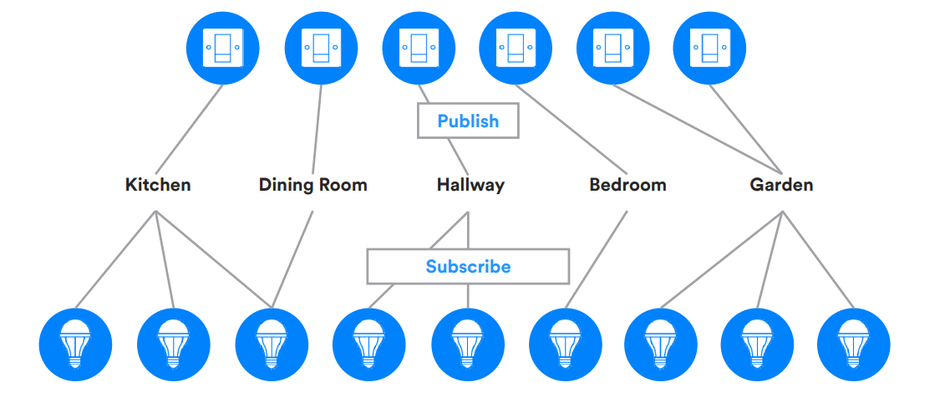
A light switch publishes to a group address for the kitchen. Every light subscribed to that address responds. Adding a light means provisioning it and adding the subscription, and no other node changes. [1]
Scenes extend the same idea. A scene is a stored set of states that a single message or a scheduled time can recall, identified by a 16-bit non-zero Scene Number. A network can hold up to 65,535 of them. [6][12]
Recommended Reading: Mesh Network: How It Works, Protocols, and Trade-offs
Bluetooth Mesh Architecture
Nodes, elements and models
A node is a device that has joined a mesh network. Before it joins, it is an unprovisioned device, and provisioning converts one into the other, covered below.
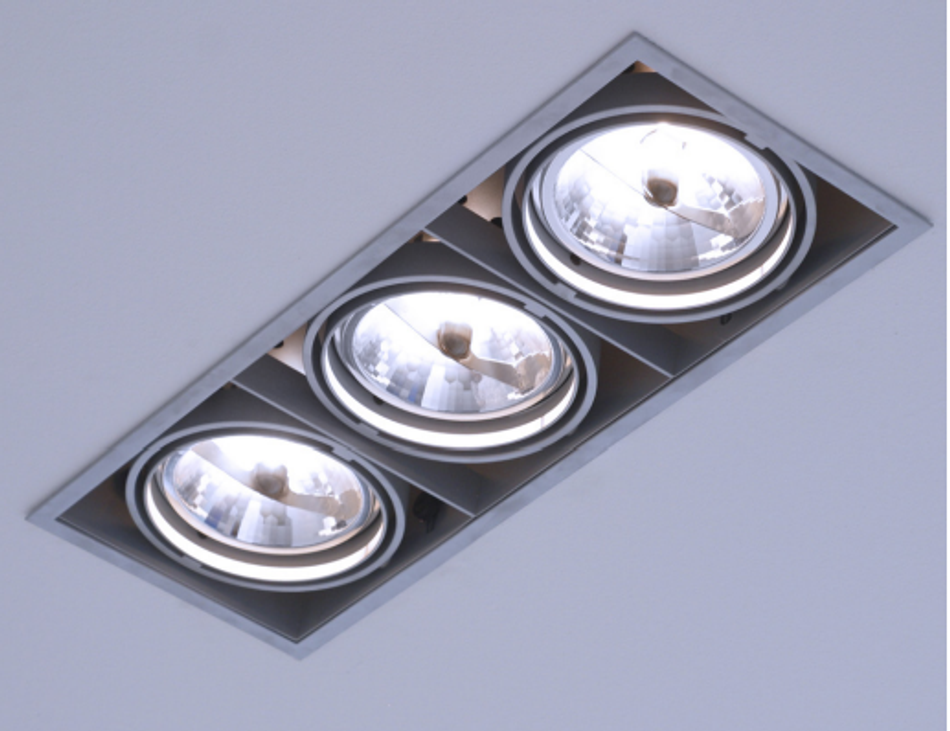
Elements are the independently controllable parts of a node. An LED fixture with three lights joins as one node with three elements. Each element gets its own unicast address, so your element count decides how many addresses your product consumes. A node has one primary element and up to 254 secondary ones, and that structure is fixed for the life of the node. [1][2]
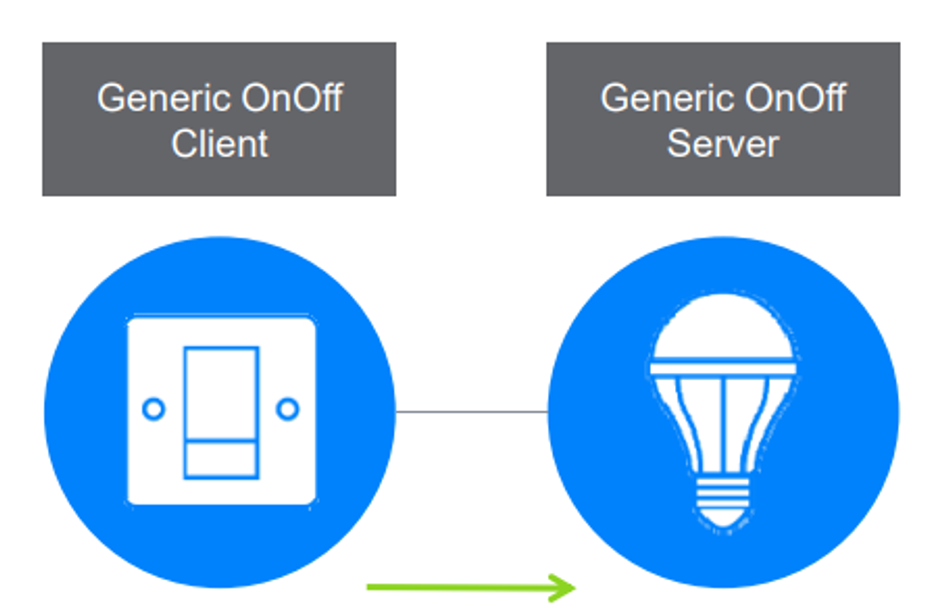
Models define what an element actually does. There are three kinds:
A server model holds states and defines the messages and behavior around them.
A client model holds no states. It sends GET, SET and STATUS messages against a server model’s states.
A control model contains both.
Models are immutable. Behavior cannot be added or removed, so the only permitted way to meet a new requirement is to extend an existing model. [1]
That is why generic states matter. The Mesh Model specification defines reusable states such as Generic OnOff and Generic Level, which let lights, fans and power sockets work without anyone inventing a new model. States can also be bound to each other: setting Generic Level to zero sets Generic OnOff to off. The models are grouped into generics, sensors, time and scenes, and lighting. [1][12]
Messages come in two kinds. Acknowledged messages require a response, and because the sender may resend one, they must be idempotent: receiving it twice has to do what receiving it once does. Unacknowledged messages require no response.
Most traffic should be unacknowledged. The SIG says that pattern scales far better, with reliability coming from configuring nodes to retransmit instead. Acknowledged messages are mainly for configuring a node. [1]
Node features: Relay, Proxy, Friend and Low Power
Every node can send and receive messages. Four features are optional, and each can be switched on or off independently. Whether you enable them determines your power budget, because relays and Friend nodes have to keep listening.
Feature | What it does | Power cost | Ref |
Relay | Receives and retransmits mesh messages over the advertising bearer, which is what makes larger networks possible | Stays in receive mode. Darroudi measured 13.9 mA while scanning | [6][10] |
Proxy | Moves messages between the GATT and advertising bearers | Lets phones and other LE devices with no mesh stack reach the network | [1][6] |
Friend | Stores messages for a Low Power Node and delivers them when it polls | Always listening, like a relay. The SIG expects Friends to be power-rich | [4][6] |
Low Power | Runs at a heavily reduced receive duty cycle, paired with a Friend | For battery devices. Sleeps between polls, so responses can be slow | [1][5][6] |
Friendship: Friend and Low Power nodes
A battery sensor still has to receive the occasional configuration message, and listening all the time would drain it. The Friend stores messages addressed to the Low Power Node and hands them over when the LPN polls, setting a More Data flag so the LPN keeps polling until the queue is empty. The SIG calls it probably the most significant optimization mechanism in a mesh network. [1][6]
Three constraints matter at design time. The Low Power feature does nothing on its own: friendship is established by the LPN broadcasting a Friend Request and a nearby node answering with a Friend Offer, so an LPN with no willing Friend in range stays unserved. The PollTimeout, set by the device vendor rather than the network administrator, can run to just under four days, which is why an LPN’s response latency can be very high. And messages that do not fit the Friend’s queue are dropped, so a long PollTimeout paired with a short queue loses traffic silently. [2][5]
LPNs also cannot relay, because relaying needs continuous scanning. [17]
Battery Life in Practice
Darroudi and colleagues modelled a Low Power Node on a Nordic nRF51422 with a 235 mAh battery, the capacity of a CR2032 coin cell:
A data message every 10 seconds gives up to 15.6 months. With no data messages, the lifetime approaches 21.4 months, set by sleep current.
At a 10-second PollTimeout the receive window dominates: 17.1 months at 1 ms, 0.87 months at 255 ms.
The backbone is the real constraint. On the same hardware, a Friend or relay node on a 2,400 mAh battery lasts 7.2 days. The authors conclude that Bluetooth mesh technology cannot be considered a general-purpose IoT technology, because it only suits scenarios where the backbone can be properly powered. Baert and colleagues reached the same view in 2018: the technology is not suited to a network made entirely of power-limited nodes. [10][17]
How do phones connect?
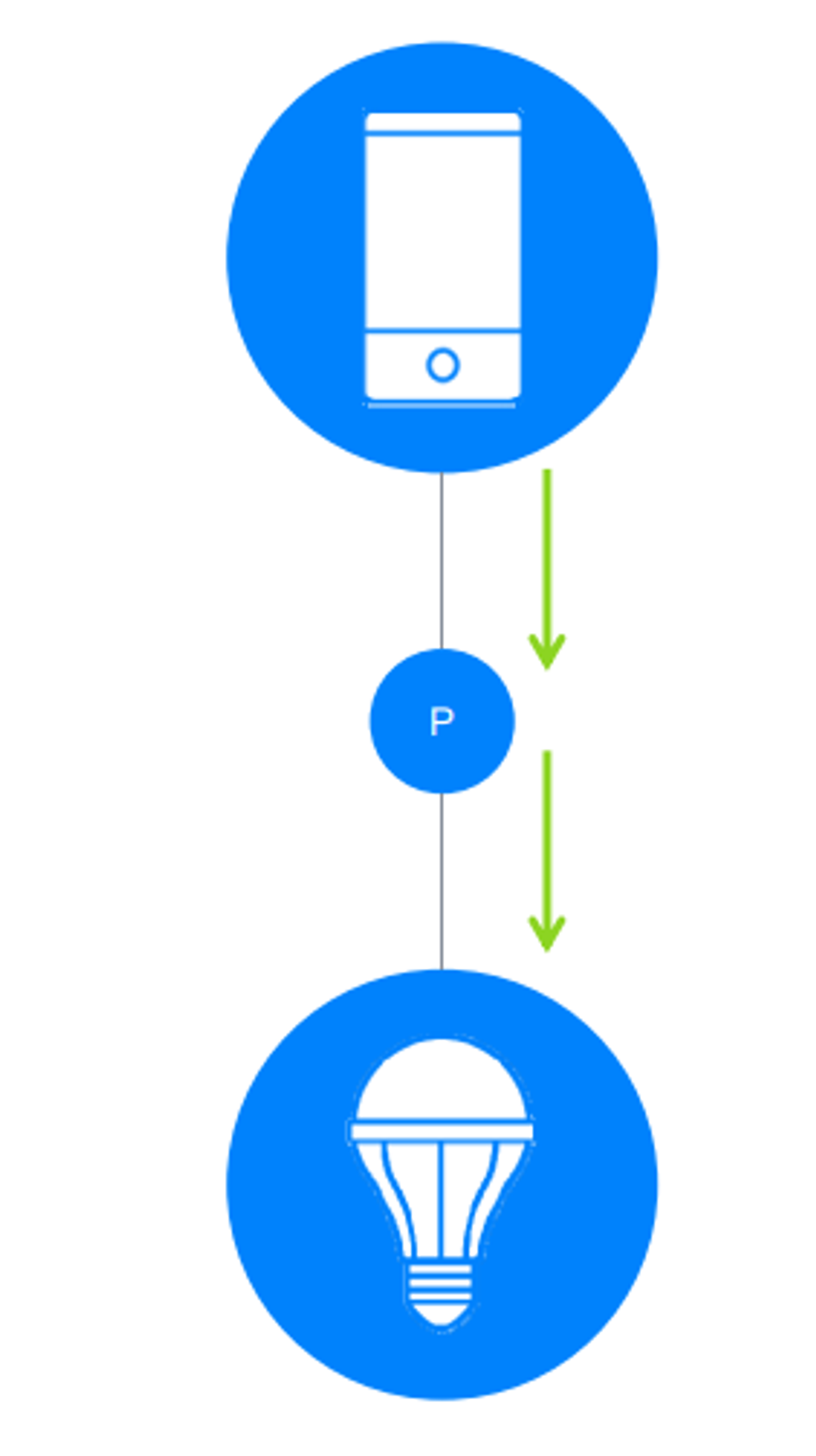
Phones have Bluetooth LE but no mesh stack, so a proxy node exposes a GATT interface and translates between Proxy Protocol PDUs and mesh PDUs. Mesh 1.1 added an on-demand version where the proxy stays silent until a phone broadcasts a Solicitation PDU. Since a valid solicitation requires the network key, that also makes proxy nodes harder for an attacker to spot. [1][13]
The Protocol Stack
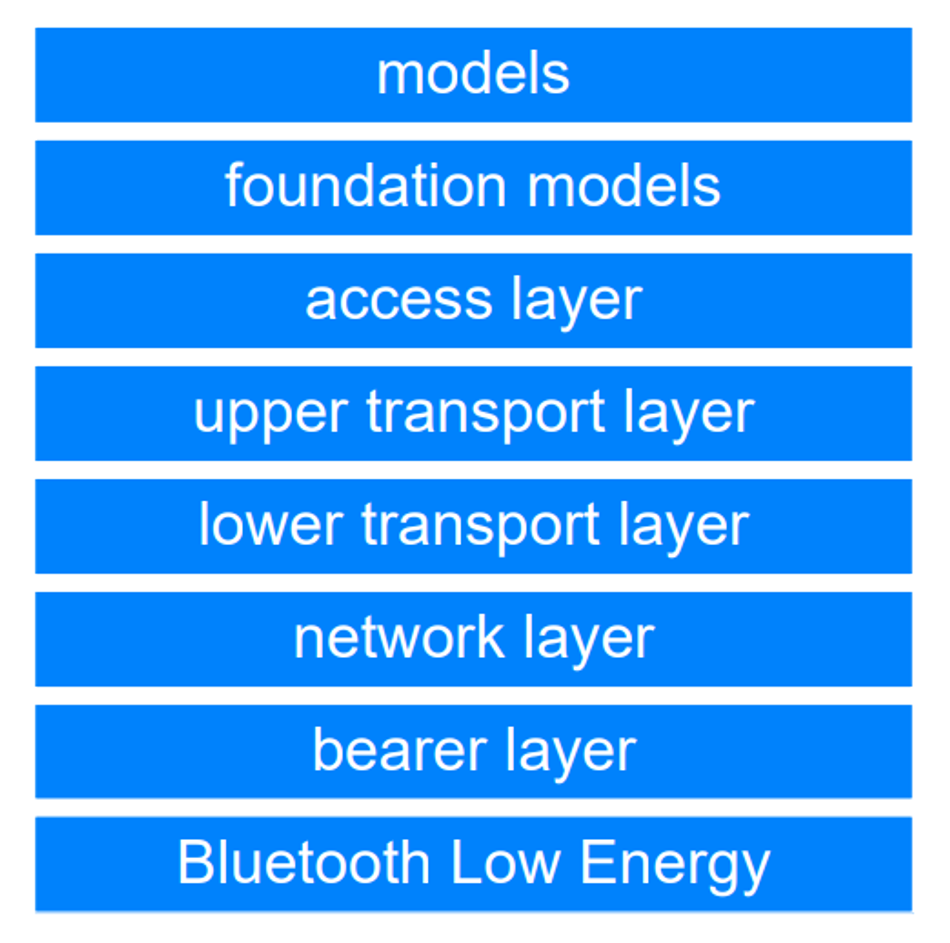
Bluetooth mesh adds seven layers on top of a complete Bluetooth LE stack. All seven sit in the host rather than the controller [22], which is why mesh is a firmware change and not new silicon.
Responsibility | Ref | |
Model Layer | Application behaviour: messages, states and state bindings | [1][12] |
Foundation model | The models that configure and manage the network | [1] |
Access | How models use the upper transport layer via the access layer, and the format of application data | [1] |
Upper transport | Encrypts, decrypts and authenticates application data. Carries transport control messages such as friendship and heartbeats | [1] |
Lower transport | Segmentation and reassembly, plus acknowledged or unacknowledged delivery | [1][16] |
Network | Address types, network message format, message filtering, and the Relay and Proxy features | [1] |
Bearer Layer | Carries mesh PDUs over the advertising bearer or the GATT bearer | [1] |
Bluetooth LE | The underlying radio and stack | [1] |
That table doubles as a debugging map. Relaying problems are at the network layer. Messages that will not fit are lower transport.
Why does Bluetooth mesh use such small packets?
The advertising bearer rides on Bluetooth LE’s non-connectable advertising PDU, which carries at most 31 octets of advertising data. After the mesh AD type overhead, 29 octets remain for a network PDU, and the unsegmented transport payload inside that runs 1 to 16 octets. Each advertising event sends the same PDU on all three advertising channels, 37, 38, and 39. [1][2][3][15]
That ceiling is why the SIG says mesh is built for exchanging small messages and not for media streaming. [9]
Bluetooth 5 added extended advertising with payloads up to 254 octets, but mesh still uses legacy advertising. Vendors who want larger packets ship it as a non-compliant extension. [15]
Longer messages get segmented instead. The lower transport layer splits an access message into 12-octet segments, up to 32 of them, for a maximum of 384 octets including the integrity check. The receiver acknowledges segmented messages so the sender can retransmit whatever was lost. Unsegmented messages are not acknowledged. [2][13][16]
The GATT bearer exists for devices that cannot use the advertising bearer at all. It carries the Proxy Protocol over a GATT connection, which is how a phone reaches the network. [1][32]
How does Bluetooth mesh provisioning work?
Provisioning is the five-step process that turns an unprovisioned device into a node, driven by a provisioner that is usually a phone or tablet app. [1][2]
Beaconing. The device advertises using the Mesh Beacon AD type, often after a set sequence of button presses.
Invitation. The provisioner sends a Provisioning Invite PDU over the PB-ADV or PB-GATT bearer. The device replies with a Provisioning Capabilities PDU.
Exchange public keys. The provisioner generates an ephemeral key pair and sends its public key. The device returns its own over the same link, or more securely out of band by QR code or NFC.
Authentication. Both sides prove nobody is in the middle, using the agreed out-of-band method.
Distribution of provisioning data. Each side derives a session key from its own private key and the peer’s public key. That session key protects everything that follows, including the network key.
The node ends up holding the NetKey, the IV Index, a unicast address, and a device key derived from the ECDH shared secret that is never transmitted. The provisioner can then leave, and the network keeps running at the same level of security. [1][5]
Which provisioning method is actually secure?
The out-of-band choice decides whether provisioning resists a man-in-the-middle attack.
Setup | MITM resistance | Ref |
Out-of-band public key, Mesh Protocol 1.1 | No known vulnerability | [5] |
In-band public key on 1.1, with static, output or input OOB carrying enough entropy | No known vulnerability | [5] |
In-band public key, no OOB authentication | No protection | [5] |
Mesh Profile 1.0 or 1.0.1, in-band public key | Vulnerable to active MITM regardless of the OOB method | [5][19] |
That last row is not theoretical. On 24 May 2021, CERT/CC published VU#799380, covering four mesh provisioning flaws found by ANSSI. CVE-2020-26560 let a device reflect a provisioner’s own authentication evidence back at it, completing provisioning without ever knowing the AuthValue and walking away with a NetKey and possibly an AppKey. The SIG then reclassified the low-entropy out-of-band actions, Blink, Beep, Vibrate, Push and Twist, as insecure in erratum 16350, because the AuthValue can be brute-forced in real time. [19][20][36]
Mesh 1.1 answers this in three ways. It adds BTM_ECDH_P256_HMAC_SHA256_AES_CCM alongside the renamed original algorithm, raising authentication data to 256 bits. Certificate-based provisioning uses manufacturer certificates and a public key infrastructure to authenticate a device’s public key and UUID, which also suits bulk commissioning. Remote provisioning carries the exchange over mesh hops, so the provisioner no longer needs radio range of every device. [5][13]
Use an out-of-band public key where the hardware allows it, prefer the newer algorithm and fall back only for legacy devices, and note that input and output OOB need physical access, so neither works with remote provisioning. [5]
How does Bluetooth mesh security work?
Security in Bluetooth mesh is mandatory and cannot be switched off or reduced. The specification does not allow an unencrypted message. Everything is encrypted and authenticated twice with AES-128-CCM, once at the network layer and once at the application layer, under different keys. [1][5]
Three key types do the work:
Key | Held by | Protects | Ref |
NetKey | Every node in a network, or every node in one subnet | The network layer, so a node can relay. Holding it alone does not let a node read application data | [1][6] |
AppKey | Nodes taking part in one application, such as lighting | Application data, decrypted in the upper transport layer. Each AppKey binds to one NetKey | [1][6] |
DevKey | One node and its provisioner | Configuration traffic between a configuration manager and that node | [5] |
The SIG’s own example is a light that must relay traffic for a door and window security system and has no business reading it. A network can hold up to 4,096 subnets and 4,096 application keys, because both are indexed by a 12-bit value. [1][5]
How does Bluetooth mesh stop replay attacks?
Every encrypted message needs a nonce that has never been used before. Bluetooth mesh builds one from the source address, a 24-bit sequence number, and a 32-bit IV Index shared across the network. [2][5]
The sequence number is the tight part. 24 bits gives 16,777,216 messages per element, which sounds generous until you divide by your message rate:
Message rate | Sequence space lasts |
1 every 10 seconds | about 5.3 years |
1 per second | about 194 days |
10 per second | about 19 days |
The IV Index rescues it. A node that expects to exhaust its sequence numbers within 96 hours starts the IV Update procedure, after which counters reset to zero. Because the IV Index is 32 bits, the spec reckons a network can run roughly 5 trillion years before it wraps. [2][6]
Two things to plan for. Only nodes holding the primary network key can start an IV Update, so nodes on other subnets wait for one begun elsewhere. And a new IV Index can take up to 96 hours to spread, because low-power nodes receive so rarely. [5]
Replay protection falls out of the same fields. Each node keeps a Replay Protection List holding the highest sequence number seen from every source address, and discards anything at or below it. [2]
Privacy and Obfuscation
More than most mesh standards. The payload and the destination address are both encrypted, and header fields such as the source address and sequence number are obfuscated using a privacy key derived from the NetKey. Only two things travel in clear: the least significant bit of the IV Index, and a 7-bit network identifier called the NID, which lets a node work out quickly whether a packet belongs to a network it knows. [2][5]
The encrypted destination address is the unusual part. Other mesh standards leave it readable because routing needs to see it. Flooding does not, so mesh encrypts it and denies an eavesdropper that handle on traffic analysis. Obfuscation adds nothing to confidentiality on its own; it only makes analysis harder. [5]
Mesh 1.1 adds private beacons, which stop static beacon data leaking outside the network. That matters most for wearables, which would otherwise be trackable as they move in and out of range. [13]
Node removal and key refresh
Throw away a faulty node and its keys go in the bin with it, where they can be harvested. The SIG calls this a trash can attack. [5][6]
The defence is node removal. The provisioner excludes the node and runs the Key Refresh procedure, which issues new network and application keys to every node except the excluded one, across three phases. Dispose of the hardware only once key refresh has completed for every key it held. [1][5]
Two practical notes. Key refresh takes a long time on a large network, and longer still with low-power nodes in it. And subnets limit the blast radius: put garden lights on their own subnet and a stolen outdoor fitting never yields the primary subnet’s network key. [5]
What Mesh 1.1 added
Mesh 1.1 was announced on 19 September 2023. Most of its features appear in the sections above where they belong: directed forwarding, remote and certificate-based provisioning, enhanced provisioning authentication, private beacons, subnet bridging and the on-demand private GATT proxy. Four have not come up yet. [13]
Feature | What it adds | Ref |
Device firmware update | Firmware distribution across the network, with parameters controlling message cadence and size so transfers run in the background. It lives in separate Device Firmware Update and BLOB Transfer model specifications, not in Mesh Protocol 1.1 itself | [13] |
SAR configuration | Segmentation and reassembly timing and retransmission become configurable over the network, through SAR Transmitter and SAR Receiver states | [2][13] |
Opcodes aggregator | A sequence of access messages bundled into one request with one response | [2][13] |
Large composition data | Support for devices with complex composition. A DALI bus takes up to 128 components, and each becomes an element in one large node | [13] |
The same announcement brought the first mesh device profiles, which fix the mandatory features for a product type. Six Networked Lighting Control profiles shipped at 1.0: occupancy sensor, ambient light sensor, energy monitor, basic scene selector, dimming control and basic lightness controller. A seventh, HVAC Integration, standardises how occupancy data reaches HVAC systems. [13][21]
Bluetooth Mesh Limits and Performance
What are the published limits of a Bluetooth mesh network?
Parameter | Published limit | Ref |
Elements per network | 32,767 | [2][6] |
Relays per message | 126, which the SIG’s glossary describes as 127 hops | [2][6] |
Group addresses | 16,384, of which 256 are reserved | [2] |
Virtual addresses | 16,384 hash values, each standing for millions of Label UUIDs | [2] |
Subnets | 4,096 | [5] |
Application keys in use | 4,096 | [5] |
Scenes | 65,535 | [12] |
Largest segmented message | 32 segments, 384 octets | [2] |
Network PDUs per node | No more than 100 in any 10-second window | [2] |
The SIG’s own FAQ is candid about the gap. It says the specification allows up to 32,000 nodes to be provisioned, that it does not expect those numbers soon, and that it already sees representative networks well over 1,000 nodes. [9]
Real stacks stop far sooner. Silicon Labs caps a node at 7 network keys and 8 application keys, and its mesh SDK 1.7.x supported a maximum network size of 512 nodes.[23]
The SIG also argues that node count is the wrong question [34]. A better measure of scalability is how many mesh messages per second a network can carry, since messages are how work actually gets done.
How much latency does Bluetooth mesh add?
A single hop is fast, and the hops add up. The 2023 review puts a typical hop between 1 ms and 20 ms, with extra delay whenever the destination is a low-power node waiting to poll its Friend. [18]
Baert and colleagues measured an average round trip of 23.653 ms between two nodes, and found a three-hop round trip took roughly three times as long as a single hop. The random back-off, not the radio, contributed most of that delay. [17]
At the far end, Rondón and colleagues report an average delay around 250 ms over more than ten hops under the worst simulated conditions. [3]
Payload matters more than distance. Silicon Labs found latency stays under 200 ms even at six hops, provided the payload fits inside a single packet under 16 bytes, and concluded that network size affects latency less than payload size does. Their advice follows directly: keep the payload in one packet, and never use segmented messages for multicast. [7][8]
Why do Bluetooth mesh networks congest?
Adding relays helps until it does not. Rondón and colleagues simulated a grid in which every device relayed, at 52, 68, 86 and 106 devices. Loss fell as paths multiplied, then rose again at 106. Their conclusion is that past a certain point, too many relays hinder transmission. With only 10% of devices sending their own traffic, just the sparsest grid held loss below 10%. [3]
Timing is the lever. The specification recommends randomising the gap between the three transmissions of an advertising event, which may be spaced up to 10 ms apart. Shortening and randomising that gap cut end-to-end packet loss by up to 20% in simulation, because a relay can do nothing else until its advertising event finishes. [2][3]
Read Silicon Labs’ numbers with their configuration in mind. In the 192-node test, Bluetooth mesh latency peaked at 60 ms but spread past 250 ms, and all 192 of those nodes were relays with no relay optimisation applied. The SIG’s own guidance is around five percent. [7][8]
Bluetooth Mesh vs Zigbee vs Thread
All three run low-power meshes in the 2.4 GHz band. They differ in how a message gets from one end to the other.
Bluetooth mesh | Zigbee | Thread | |
Radio | Bluetooth LE advertising on channels 37, 38 and 39 | IEEE 802.15.4, 250 kbps | IEEE 802.15.4, designed for IP transport |
Delivery | Managed flooding, plus directed forwarding since Mesh 1.1 | Routers provide routing services; routes are discovered, then used | Mesh Extenders forward packets for other devices |
Payload | 29 octets per network PDU | 127-byte 802.15.4 packets | 127-byte 802.15.4 frames |
Published scale | 32,767 elements | Several devices to thousands | 32 Mesh Extenders, 511 End Devices each, so roughly 16,000 devices |
Battery devices | Low Power Node polls its Friend | Sleepy end device powers down its radio and polls its parent | Sleepy End Device wakes on occasion to poll its parent |
Under load | Largest latency increase of the three as networks grow | Carries larger payloads at lower latency | Carries larger payloads at lower latency |
Role in Matter | None | None | The low-power mesh Matter supports |
[2][3][6][7][8][25][26][27][28]
The payload row explains most of the rest. A Bluetooth mesh network PDU carries 29 octets, while Zigbee and Thread run 127-byte 802.15.4 frames. Anything bigger than a light switch command gets segmented on mesh and does not on the other two, which is why Silicon Labs found payload size mattered more than network size.
Thread also self-regulates, keeping its Mesh Extender count between 16 and 23, and renamed that role from Router in Thread 1.4. [28]
Recommended Reading: Wireless Technologies Reshape Industrial Automation
Does Bluetooth mesh work with Matter?
Not as a transport. The Matter Handbook names three link layers: Ethernet, Wi-Fi and Thread, with Thread as the low-power mesh. Bluetooth LE has a job, but only during commissioning, where it passes Wi-Fi or Thread credentials. It is required for Thread devices and optional for Wi-Fi ones, and it cannot be a Matter device’s sole transport. [27]
Matter 1.6, released on 17 June 2026, added full NFC commissioning as an alternative to Bluetooth LE, aimed at devices that must be configured before installation. Matter has since moved to 1.6.1. [29]
So if your product has to live in a Matter ecosystem, Bluetooth mesh is not an option. The same radio may still commission the device.
Two things to weigh beyond the table. Silicon Labs recommends moving larger networks to a routing solution, and says its comparison covers performance only, not battery life, ecosystem or connectivity preference. And Bluetooth mesh keeps one advantage the others lack: a phone reaches its nodes directly through a proxy node, and provisioners are expected to be phone or tablet apps. [1][6][7]
Using Bluetooth Mesh in Practice
Where is Bluetooth mesh used?
Building automation and commercial lighting above all. The SIG reports significant activity in building automation, especially commercial lighting solutions, and in sensor networks across several markets, and names networked lighting control as the use case that has most rapidly embraced the technology. [9]
The deployments are real and sizeable. Silvair has run a Bluetooth mesh network of more than 3,500 nodes across 17 floors of an office building [24], which is well past the “well over 1,000 nodes” the SIG describes as representative.
Beyond lighting, the 2023 review classifies published work into smart buildings, smart lighting, disaster communication, and smart parking. [18]
Three poor fits are worth naming. Asset tracking belongs to Bluetooth LE’s broadcast topology, which the SIG positions for item and asset tracking rather than mesh. Continuous indoor positioning runs into the limited number of PDUs per second, which one experimental setup found insufficient for the measurement rate it needed. And a network built entirely on batteries will not work, because relays and Friends have to stay powered. [10][14][18]
How do you build a Bluetooth mesh network?
Pick a qualified stack. Use LE hardware on core specification 4.0 or later and an SDK from a mesh solution provider, as the SIG recommends. Check which specification version it is certified against, not only which features it advertises. [9]
Plan a powered backbone. Relays and Friends go on mains-powered devices such as light fittings, and battery sensors run as low-power nodes. A relay on a 2,400 mAh battery lasts 7.2 days, so there is no version of this where the backbone runs on cells. [10][17]
Relay sparingly. Around five percent of nodes is the SIG’s figure. Enabling relay everywhere is the most common mistake in the field, and simulation shows loss climbing once relay density passes a point. [3][4]
Map group addresses to rooms. Switches publish, lights subscribe. Adding a fitting then needs no change anywhere else. [1]
Partition the keys. Give exposed devices their own subnet and each security domain its own application key, so one compromised outdoor fitting never yields the primary network key. [5]
Provision securely. Use an out-of-band public key where the hardware allows it, with the HMAC-SHA-256 algorithm. For large sites, consider remote and certificate-based provisioning, remembering that input and output OOB need physical access and so cannot be combined with remote provisioning. [5][13]
Align SAR across vendors. Differing segmentation defaults make transfers inefficient in a mixed-vendor network. Mesh 1.1’s SAR Configuration models let you set them over the network. [13][16]
Tune TTL and timing. Set TTL from heartbeat hop counts rather than guessing, and keep transmission timing randomised. [1][2][3]
Design for unacknowledged messages. Most traffic should be unacknowledged, with reliability coming from retransmission rather than responses. Do not trust acknowledgments in group messaging. [1][18]
Plan maintenance. Schedule key refresh and IV Update. Nodes outside the primary subnet cannot start an IV Update, and discarding hardware before key refresh completes leaves its keys live. [5]
Qualify the product. Every Bluetooth product must complete the Bluetooth Qualification Process on or before the date it is first sold or distributed. The fee applies to the first product using a given design, and later products on the same design are not charged again. [30][31]
For a first prototype, Espressif’s getting-started guide builds a three-node network from ESP32 boards running the onoff_server example, provisioned with the nRF Mesh app on Android or iOS. [32]
Should you use Bluetooth mesh?
Use it when you have mains power in the ceiling and small messages to send. Commercial lighting and building sensors are what it was built for, and the Networked Lighting Control profiles give you interoperable device types to specify against.
Look elsewhere when any of three things is true. If the payload will not fit a single packet, Thread and Zigbee carry it with less latency. If the whole network has to run on batteries, no amount of configuration will save you. And if the product must join a Matter ecosystem, Thread is the low-power mesh Matter uses.
FAQs
Why use Bluetooth mesh instead of Wi-Fi?
Wi-Fi is a star. Everything runs through a router, which is a single point of failure. Bluetooth mesh has no hub and no routing nodes. The trade is throughput: a mesh network PDU carries 29 octets, and the SIG says mesh is not built for streaming. [1][9]
How far does one Bluetooth mesh hop reach?
Silicon Labs puts a single hop anywhere from 30 to 200 metres [35], depending on link budget, antenna and enclosure. Indoors in a lighting installation, 30 to 50 metres is more typical. Range past that comes from relaying, not radio power.
Does a Bluetooth mesh network need a hub or gateway?
Not for the mesh itself. There are no centralised hub or routing nodes, and a phone app can commission and control nodes with no internet involved. A gateway is only required to reach the internet. [9]
Can Bluetooth mesh stream audio?
No. The SIG states it is optimised for exchanging small messages between many devices and not for media streaming. [9]
Can I upgrade an existing Bluetooth product to mesh?
Only if it was designed to be upgradable, Mesh runs on core specification 4.0 and higher, but adding it in the field depends on factors such as the memory available in the Bluetooth chip. [9]
References
[1] M. Woolley, Bluetooth Mesh Networking: An Introduction for Developers, Version 1.0.1, Bluetooth SIG, Dec. 2, 2020. [Online]. Available: https://www.bluetooth.com/wp-content/uploads/2019/03/Mesh-Technology-Overview.pdf
[2] Bluetooth SIG Mesh Working Group, Mesh Protocol, Version 1.1.1, Nov. 3, 2025. [Online]. Available: https://www.bluetooth.com/specifications/specs/html/?src=mshprt_v1-1-1_1761227399/MshPRT_v1.1.1/out/en/index-en.html
[3] R. Rondón, A. Mahmood, S. Grimaldi, and M. Gidlund, “Understanding the performance of Bluetooth mesh: Reliability, delay, and scalability analysis,” IEEE Internet of Things Journal, vol. 7, no. 3, pp. 2089–2101, Mar. 2020, doi: 10.1109/JIOT.2019.2960248. [Online]. Available: https://arxiv.org/abs/1910.03345
[4] M. Woolley, S. Slupik, and P. Winiarczyk, Bluetooth Mesh Directed Forwarding, Version 1.0, Bluetooth SIG, Sep. 19, 2023. [Online]. Available: https://www.bluetooth.com/mesh-directed-forwarding/
[5] Bluetooth SIG Mesh Working Group, Mesh Security Overview, Informational Publication v2, Oct. 13, 2025. [Online]. Available: https://www.bluetooth.com/wp-content/uploads/2025/10/MeshSecurityOverview_INFO_v2.pdf
[6] Bluetooth SIG, “Bluetooth mesh networking glossary of terms.” [Online]. Available: https://www.bluetooth.com/learn-about-bluetooth/feature-enhancements/mesh/mesh-glossary/ [Accessed: Nov. 19, 2026].
[7] Silicon Labs, “Mesh network performance comparison: Summary,” Documentation v8.2.2. [Online]. Available: https://docs.silabs.com/zigbee/8.2.2/mesh-network-performance-comparison/03-summary [Accessed: Nov. 19, 2026].
[8] Silicon Labs, “Mesh network performance comparison: Comparison of results,” Documentation v8.2.2. [Online]. Available: https://docs.silabs.com/zigbee/8.2.2/mesh-network-performance-comparison/02-comparison-of-results [Accessed: Nov. 19, 2026].
[9] Bluetooth SIG, “Bluetooth mesh networking FAQs.” [Online]. Available: https://www.bluetooth.com/mesh-faq/ [Accessed: Nov. 19, 2026].
[10] S. M. Darroudi, R. Caldera-Sànchez, and C. Gomez, “Bluetooth mesh energy consumption: A model,” Sensors, vol. 19, no. 5, p. 1238, Mar. 2019, doi: 10.3390/s19051238. [Online]. Available: https://pmc.ncbi.nlm.nih.gov/articles/PMC6427208/
[11] Bluetooth SIG, “Mesh Protocol 1.1.1,” specification page. [Online]. Available: https://www.bluetooth.com/specifications/specs/mesh-protocol-1-1-1/ [Accessed: Nov. 19, 2026].
[12] Bluetooth SIG Mesh Working Group, Mesh Model, Version 1.1.1. [Online]. Available: https://www.bluetooth.com/specifications/specs/mesh-model-1-1-1/
[13] M. Woolley, S. Slupik, O. Kulkarni, H. Mallet, and D. Barnes, Bluetooth Mesh Feature Enhancements Summary, Version 1.0, Bluetooth SIG, Sep. 19, 2023. [Online]. Available: https://www.bluetooth.com/mesh-feature-enhancements-summary/
[14] Bluetooth SIG, “Topology options.” [Online]. Available: https://www.bluetooth.com/learn-about-bluetooth/topology-options/ [Accessed: Nov. 19, 2026].
[15] Á. Hernández-Solana, D. Pérez-Díaz-de-Cerio, M. García-Lozano, A. Valdovinos Bardají, and J.-L. Valenzuela, “Bluetooth mesh analysis, issues, and challenges,” IEEE Access, vol. 8, pp. 53784–53800, 2020, doi: 10.1109/ACCESS.2020.2980795. [Online]. Available: https://zaguan.unizar.es/record/89860/files/texto_completo.pdf
[16] Zephyr Project, “Segmentation and reassembly (SAR),” Zephyr Project documentation. [Online]. Available: https://docs.zephyrproject.org/latest/services/connectivity/bluetooth/api/mesh/sar_cfg.html [Accessed: Nov. 19, 2026].
[17] M. Baert, J. Rossey, A. Shahid, and J. Hoebeke, “The Bluetooth mesh standard: An overview and experimental evaluation,” Sensors, vol. 18, no. 8, p. 2409, Jul. 2018, doi: 10.3390/s18082409. [Online]. Available: https://pmc.ncbi.nlm.nih.gov/articles/PMC6111614/
[18] I. Natgunanathan, N. Fernando, S. W. Loke, and C. Weerasuriya, “Bluetooth Low Energy mesh: Applications, considerations and current state-of-the-art,” Sensors, vol. 23, no. 4, p. 1826, Feb. 2023, doi: 10.3390/s23041826. [Online]. Available: https://pmc.ncbi.nlm.nih.gov/articles/PMC9965677/
[19] CERT Coordination Center, “VU#799380: Devices supporting Bluetooth Core and Mesh Specifications are vulnerable to impersonation attacks and AuthValue disclosure,” May 24, 2021, revised Jul. 13, 2023. [Online]. Available: https://kb.cert.org/vuls/id/799380
[20] Zephyr Project, “Provisioning,” Zephyr Project documentation. [Online]. Available: https://docs.zephyrproject.org/latest/services/connectivity/bluetooth/api/mesh/provisioning.html [Accessed: Nov. 19, 2026].
[21] Bluetooth SIG, “Specifications,” specification list. [Online]. Available: https://www.bluetooth.com/specifications/specs/ [Accessed: Nov. 19, 2026].
[22] M. Woolley, The Bluetooth Mesh Networking Primer, Version 1.1.0, Bluetooth SIG, May 16, 2024. [Online]. Available: https://www.bluetooth.com/bluetooth-mesh-networking-primer/
[23] Silicon Labs, UG366: Bluetooth Mesh Node Configuration User’s Guide. [Online]. Available: https://www.silabs.com/documents/public/user-guides/ug366-bluetooth-mesh-node-configuration-users-guide.pdf
[24] “Demystifying the performance of Bluetooth mesh: Experimental evaluation and optimization,” arXiv:2106.04230, Jun. 2021. [Online]. Available: https://arxiv.org/abs/2106.04230
[25] Silicon Labs, “Zigbee fundamentals: Overview,” Documentation v8.2.2. [Online]. Available: https://docs.silabs.com/zigbee/8.2.2/zigbee-fundamentals/01-overview [Accessed: Nov. 19, 2026].
[26] Silicon Labs, “Zigbee fundamentals: Network node types,” Documentation v8.2.2. [Online]. Available: https://docs.silabs.com/zigbee/8.2.2/zigbee-fundamentals/03-network-node-types [Accessed: Nov. 19, 2026].
[27] Matter Handbook, “Connectivity transports.” [Online]. Available: https://handbook.buildwithmatter.com/how-it-works/connectivity-transports/ [Accessed: Nov. 19, 2026].
[28] OpenThread, “Node roles and types,” Thread Primer, Oct. 15, 2026. [Online]. Available: https://openthread.io/guides/thread-primer/node-roles-and-types
[29] Connectivity Standards Alliance, “Matter 1.6 enables more intuitive setup, multi-ecosystem experiences, and context-driven control,” Jun. 17, 2026. [Online]. Available: https://csa-iot.org/newsroom/matter-1-6-enables-more-intuitive-setup-multi-ecosystem-experiences-and-context-driven-control/
[30] Bluetooth SIG, “Qualify your product.” [Online]. Available: https://www.bluetooth.com/develop-with-bluetooth/qualify/ [Accessed: Nov. 19, 2026].
[31] Nordic Semiconductor, “Bluetooth qualification,” nRF Connect SDK documentation. [Online]. Available: https://nrfconnectdocs.nordicsemi.com/ncs/latest/nrf/protocols/bt/bt_qualification/index.html [Accessed: Nov. 19, 2026].
[32] Espressif Systems, “ESP-BLE-MESH,” ESP-IDF Programming Guide v5.4, ESP32-S3. [Online]. Available: https://docs.espressif.com/projects/esp-idf/en/v5.4/esp32s3/api-guides/esp-ble-mesh/ble-mesh-index.html [Accessed: Nov. 19, 2026].
[33] M. Woolley, O. Kulkarni, and P. Winiarczyk, Bluetooth Mesh Subnet Bridging, Version 1.0, Bluetooth SIG, Sep. 19, 2023. [Online]. Available: https://www.bluetooth.com/mesh-subnet-bridging/
[34] Bluetooth SIG, “How Bluetooth mesh networking puts the ‘large’ in large-scale wireless networks.” [Online]. Available: https://www.bluetooth.com/blog/mesh-in-large-scale-networks/ [Accessed: Nov. 19, 2026].
[35] Silicon Labs, “Q&A for tech talk topic: Bluetooth mesh.” [Online]. Available: https://www.silabs.com/documents/public/presentations/q-a-tech-talks-bluetooth-mesh-software-and-tools.pdf
[36] Silicon Labs, “Bluetooth mesh provisioning security best practices.” [Online]. Available: https://docs.silabs.com/btmesh/latest/btmesh-provisioning-security-best-practices/ [Accessed: Nov. 19, 2026].