Mesh Network: How It Works, Protocols, and Trade-offs
How a mesh network works: node roles, routing vs managed flooding, the multi-hop throughput cost, and Wi-Fi mesh, Thread, Zigbee and LoRa compared.

13 Nov, 2026. 26 minutes read

Mesh networks connect devices across space without a cable running to every one.
Key Takeaways
A mesh network is a self-healing set of nodes that forward packets for each other, so traffic can be rerouted when one node goes down.[1][2] In home Wi-Fi mesh, the primary point connected to the modem is still a single point of failure.[2]
Mesh protocols either route along a chosen next hop (OLSRv2, AODV, Babel, Thread) or use managed flooding with a hop limit (Bluetooth Mesh, and Meshtastic for broadcasts).[5][7][8][9][12][23]
On a shared channel, throughput falls as hop count grows: in MIT's Roofnet (2005, 802.11b), average TCP throughput was 2,451 kbit/s on one-hop routes, 771 kbit/s on two-hop and 362 kbit/s on three-hop routes.[11]
Keep hop counts low, limit relays to what reliability needs, and move backhaul onto Ethernet or a dedicated radio band.[13][17][18][26]
A mesh Wi-Fi system runs one network across several access points; a traditional dual-band extender repeats the signal on one channel, which Netgear says may cut available bandwidth by half.[17]
Introduction
Mesh networks turn up in places that look nothing alike: a set of Wi-Fi points covering a house that one router cannot, Thread devices in a smart home, WirelessHART instruments bolted to pipework in a processing plant, and LoRa radios on a mountainside with no cable within a mile.
What they share is a bargain. Coverage stops depending on how far one radio can reach and starts depending on how many nodes there are. In exchange, every relayed packet spends the shared airtime twice and picks up delay along the way.
Whether that bargain is worth taking depends on the job, and getting it wrong is the difference between a network that works and one that merely covers. This guide works through what a mesh is, how it decides where packets go, how it behaves when a node drops out, what each hop costs, and how the five main technologies compare.
What Is a Mesh Network?
A mesh network is a network in which nodes relay traffic for one another, so data can reach a destination the sender cannot reach directly. Instead of every device reporting back to one central box, messages travel hop by hop across the network until they arrive. The research literature defines it the same way: each node acts not only as a host but as a router, forwarding packets for nodes that sit outside direct transmission range of their destinations.[1] Relaying is the defining behavior.
A mesh also builds its own connections. Nodes establish and maintain mesh connectivity among themselves, which is what makes these networks dynamically self-organized and self-configured.[1] The phrase promises less than it sounds like. What the nodes organize is the links between them. Getting a device into the network in the first place is a separate and deliberate step: in Bluetooth Mesh it is called provisioning, and a device is only counted as a node once a provisioner has added it.[5] A mesh organises itself once you have built it, not before.
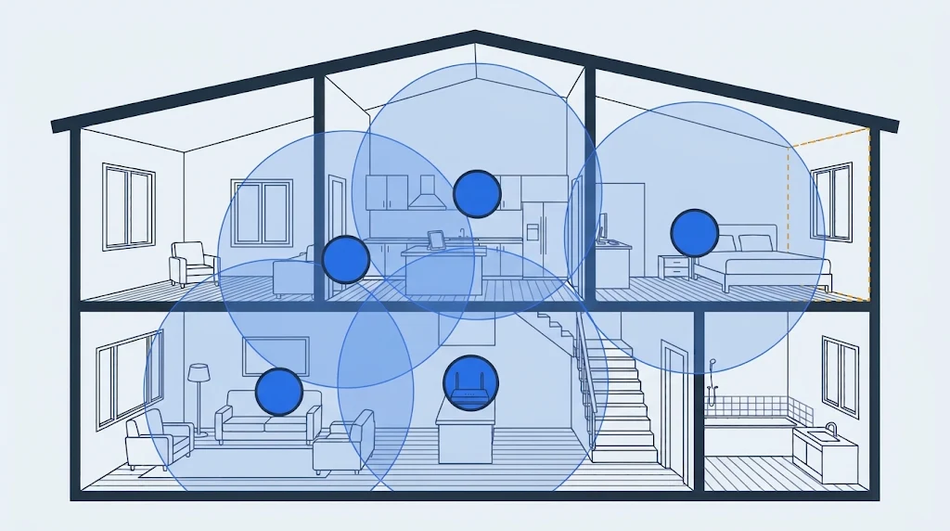
The home Wi-Fi version is the one most people have seen. Google describes it as a group of connectivity devices that act as a single network, with several points spread through a home in place of one central router.[2] The points connect to each other wirelessly and can communicate once they are within range, with no extra hardware needed to route traffic between them.[2]
Mesh Topology vs. Mesh Network
Topology is the shape. A mesh network is the working system built in that shape.
Mesh topology describes which nodes have a direct link to which. In a full mesh, every node links directly to every other node, which takes n(n-1)/2 links. That is 45 links for 10 nodes, and 190 for 20. The count climbs far faster than the node count, so doubling a 10-node full mesh to 20 nodes more than quadruples the links it needs.
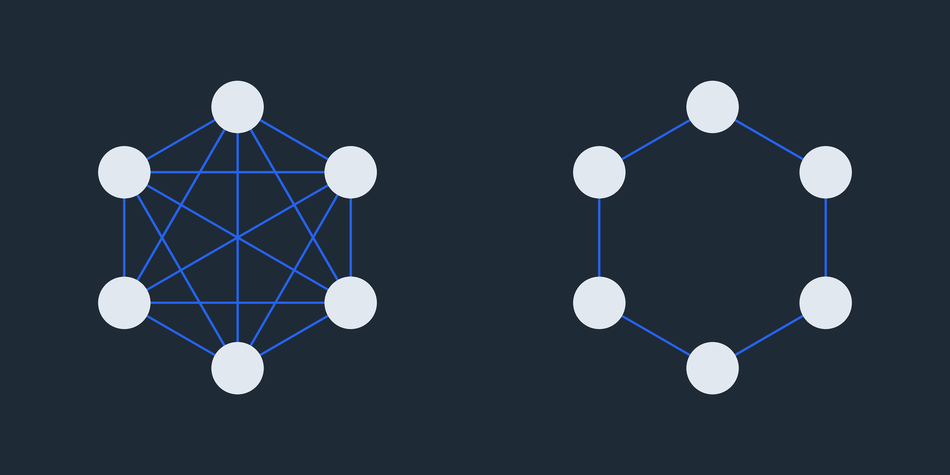
A partial mesh links only some pairs. Anything a node cannot reach directly, it reaches by orwarding through the nodes in between.
Most practical wireless meshes are partial. Radio range decides which pairs can hear each other, and in a real building or across open ground most pairs cannot. Forwarding is what covers the gap, with each node passing packets on behalf of others that sit outside direct transmission range of their destinations.[5]
Throughout this guide, “mesh network” means the whole working system sitting on that topology: the radios, the protocol that decides where packets go, and, where the network has to reach beyond itself, a gateway.
Recommended Reading: Mesh Topology: Full vs Partial Mesh, Pros, Cons, Examples
Mesh Network Architecture and Node Roles
Early work on wireless mesh split the field three ways: a backbone of fixed routers that clients attach to, client devices meshing peer to peer with no routers, and a hybrid of both.[1] The first is the one that lasted. Every technology in this guide puts always-on forwarding nodes in the middle and hangs everything else off them. The survey also identified why the shape works: through multi-hop communication, a mesh router reaches the same coverage as a conventional wireless router at much lower transmit power.[1] The cost is forwarding overhead.
Common Node Roles in Mesh Networks
Standards use different names for the same jobs. One naming note before the table: the Thread specification and most vendor documentation call the forwarding role a Router, while OpenThread’s primer now calls it a Mesh Extender.[3] Both names refer to the same device, and you will meet both.
Role | What it does | Examples |
Gateway or border router | Connects the mesh to another network | Thread Border Router,which forwards between a Thread network and a non-Thread network, and a network may have several;[3] WirelessHART gateway, which enables communication between wireless field devices and host applications;[6] Wi-SUN Border Router, which provides wide area network connectivity to the sub-network ;[20] mesh routers with gateway functionality[1] |
Router or relay | Forwards traffic for other nodes and usually stays powered | Thread Router,which forwards packets for network devices and keeps its transceiver on ,;[3] Zigbee router, should generally remain on ;[4] Bluetooth Mesh Relay node;[5] Wi-SUN Router node, which provides upward and downward packet forwarding [20] |
Coordinator, leader or manager | Forms the network, manages membership, or schedules traffic and routes | Thread Leader, a Mesh Extender responsible for managing the set of Mesh Extenders and distributing network-wide configuration;[3] Zigbee coordinator;[4] Wi-SUN Border Router, which also maintains source routing tables for its sub-network and handles authentication and key management;[20] Wi-Fi EasyMesh Multi-AP Controller, a logical entity that implements the logic controlling the operation of the Multi-AP network[13] |
End device or leaf | Talks through a parent and does not forward for others | Thread End Device, which communicates primarily with a single Mesh Extender, and a Minimal Thread Device forwards all messages to its parent;[3] Zigbee end device, which communicates only through its parent;[4] Wi-SUN Leaf node, which discovers and joins a sub-network and sends and receives IPv6 packets[20] |
Low-power or sleepy node | Powers its radio down when idle and polls a parent or Friend for incoming messages | Zigbee sleepy end device;[4] Thread Sleepy End Device, which wakes on occasion to poll its parent;[3] Bluetooth Mesh Low Power Node, whose Friend node stores messages for it and delivers them when it polls[5] |
Proxy | Bridges devices that cannot use the mesh bearer directly | Bluetooth Mesh Proxy node, which receives and retransmits mesh messages between GATT and advertising bearers[5] |
Not every technology fills every row. WirelessHART has no dedicated router role, because any wireless field device can pass messages on by hopping through its neighbours, and a device added specifically to create extra paths is called a repeater.[25]
How a Mesh Network Works: Routing vs. Managed Flooding
When a node needs to send a packet beyond its direct communication range, the network must forward it through other nodes. There are two main approaches. Routing sends the packet along a selected path, with each node forwarding it to the next hop. Flooding broadcasts the packet to neighboring nodes, which can retransmit it so it spreads through the network. Some mesh technologies combine these approaches, using flooding to discover routes and routing to deliver data. Others support both methods for different types of messages.
Routed meshes keep a map
A routed mesh maintains information about available links and paths, then uses that information to decide where to forward each packet. One major difference between routing protocols is when they discover and maintain routes.
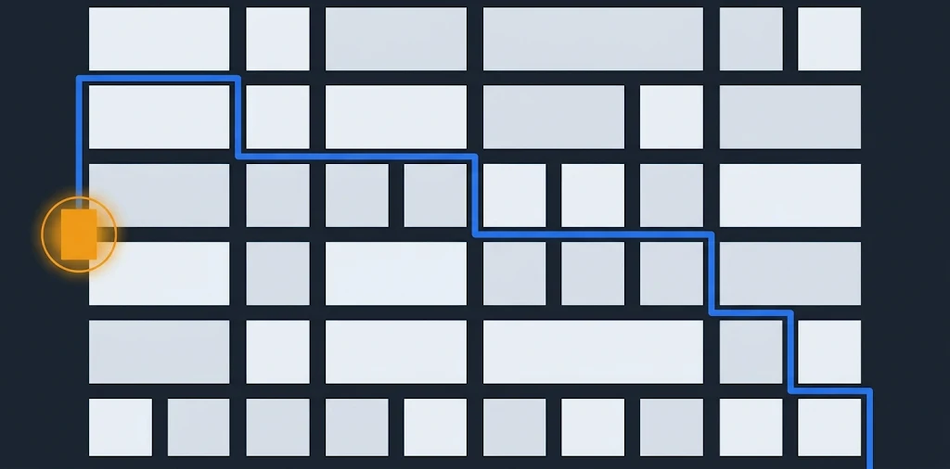
Proactive protocols maintain routing information before a node needs to send data. OLSRv2 is one example. Each router selects two sets of multipoint relays (MPRs): one for flooding control messages and another for distributing routing topology information. Each MPR set must cover the router’s symmetric two-hop neighbors. When a router floods a control message, only neighbors that it has selected as flooding MPRs retransmit it, reducing redundant transmissions. Routing MPRs serve a different purpose: they reduce the amount of topology information that routers need to advertise.[7]
Reactive protocols discover routes when a node needs to reach a destination for which it has no valid route. In Ad hoc On-Demand Distance Vector (AODV), the source broadcasts a Route Request (RREQ). The destination, or an intermediate node with a sufficiently fresh route, can respond with a Route Reply (RREP), which travels back by unicast.[8]
The trade-off is straightforward. Proactive protocols generate periodic background traffic to keep routing information current, but routes are generally available when data needs to be sent. Reactive protocols avoid discovering routes to destinations before they are needed, but the first packet may be delayed while the network finds a path.
Some protocols combine periodic and event-driven updates. Babel is a loop-avoiding distance-vector protocol that periodically advertises routes and also sends triggered updates when significant changes occur in the network topology.[9] Its specification identifies a limitation: in large, stable networks, periodic updates generate more traffic than protocols that send updates only when the topology changes. It names OSPF, IS-IS and EIGRP as potentially more suitable alternatives for those environments.[9]
Flooded meshes spread messages through the network
In managed flooding, the sender does not need to establish a specific end-to-end route before transmitting a message. Instead, it broadcasts the message to neighboring nodes, and relay-enabled nodes retransmit it. This allows messages to travel through multiple available paths without requiring each node to maintain a route to the destination.[5]
Bluetooth Mesh uses managed flooding and controls unnecessary retransmissions through three mechanisms:
Time to live (TTL): Each message carries a counter that limits how many times it can be relayed. Every relay decrements the value, and a message is no longer forwarded when the limit is reached.[5]
Message cache: Nodes keep a record of recently received messages and discard duplicates instead of relaying them repeatedly.[5]
Relay configuration: Only nodes with the Relay feature enabled retransmit messages through the relay mechanism.[5] In practice it is common for no more than around five percent of nodes in a Bluetooth Mesh network to act as relays.[26]
Managed flooding avoids the need to discover and maintain a specific route for every message. Because messages can travel through multiple relay paths, the failure of one relay does not necessarily interrupt delivery. Other relays may still forward the message if an alternative path exists.
However, flooding cannot direct traffic. A node may retransmit a message even when it is not on a useful path to the intended destination, so relays on a floor above or across a large room forward messages toward devices that were never the target. Each message occupies the channel only briefly, but that capacity is finite and eventually limits how far the network can scale.[26]
The approaches increasingly overlap
Bluetooth Mesh and Meshtastic illustrate how mesh technologies can combine flooding with more selective forwarding.
Bluetooth Mesh added Directed Forwarding in version 1.1 of its protocol specification.[26] Unlike managed flooding, which spreads messages through relay-enabled nodes within range, directed forwarding establishes a path between a source and its destination. Nodes on that path keep a forwarding table recording which paths they belong to, and relay messages only when they can move them closer to their destination.[5][26]
A Directed Publish Policy state determines which of the two methods is used, so access messages can be delivered by either managed flooding or directed forwarding. A path can also contain multiple lanes, providing redundant forwarding routes if one becomes unavailable. These additional lanes improve resilience but can increase the number of transmissions required.[26] Notably, a node’s forwarding table records the paths it belongs to but not the next or previous node in the sequence.[26] Bluetooth Mesh therefore supports both approaches rather than replacing flooding with conventional routing.
Meshtastic, a LoRa-based mesh networking project, takes a different approach. Its broadcast messages use managed flooding with a listen-before-rebroadcast mechanism. Before retransmitting a packet, a node waits briefly to determine whether another node has already forwarded it. The waiting period depends on the received signal-to-noise ratio (SNR). Nodes with lower SNR, which are often farther from the sender, are more likely to retransmit first. Nearby nodes that hear this retransmission can suppress their own, reducing duplicate traffic. The ROUTER and ROUTER_LATE roles are exceptions: these nodes rebroadcast even when they hear another node forwarding the same packet.[12]
Meshtastic also limits how far messages travel. Its configurable maximum hop count defaults to three and cannot exceed seven.[13]
Direct messages use a different forwarding mechanism. When no next hop is known, a direct message can initially travel through managed flooding. If a successful response returns through a node that also relayed the original message, that node is recorded as the next hop. Subsequent transmissions can then use that specific relay instead of allowing every node to forward the packet. This decision is made separately at each hop. If the next-hop relay is unavailable, the sender falls back to managed flooding on its final retransmission attempt.[12]
Why hop count alone can pick the wrong path
Counting hops treats a long, unreliable wireless link the same as a short, reliable one. It also ignores differences in link throughput and the retransmissions needed to deliver packets successfully. A route with more hops can therefore perform better than a shorter route.
Roofnet, an experimental 802.11b mesh network developed by MIT researchers, demonstrated this with its routing metric. Its Source Routing (Srcr) protocol used Expected Transmission Time (ETT), derived from Expected Transmission Count (ETX), to select routes. ETT estimates the time required to deliver a packet across a link using its highest-throughput transmission rate and delivery probability, including expected retransmissions. The route’s ETT is the sum of the ETT values of its individual links.[11]
Roofnet’s measurements illustrate why this matters. Most available links were between 500 and 1,300 metres long and delivered about 500 kbit/s at their best transmission rates. A smaller number of links, only a few hundred metres long, achieved throughputs of 2 Mbit/s or more.[11]
The paper gives a useful example: four 250-metre hops, each operating at 3 Mbit/s, produce an estimated route throughput of 750 kbit/s. This is faster than most single 1,000-metre links in the network.[11] A route selected purely by hop count would favor the single-hop connection, even though the four-hop route offers better throughput.
What happens when a link breaks
When a wireless link fails, a routed mesh must detect the failure, update its routing information and find another path if one is available. The exact recovery process depends on the routing protocol.
In AODV, the process is explicit. When a node detects that a link in an active route has failed, it invalidates the affected route and sends a Route Error (RERR) message to notify nodes that may be using it. A node that still needs the destination can then initiate a new route discovery by broadcasting an RREQ. A new route is established when a Route Reply returns by unicast.[8]
Recovery does not always mean immediately finding the best possible route. Babel’s specification describes two stages of convergence. After a topology change, the network generally remains loop-free and quickly reaches a connected configuration, although it may not be optimal. It then takes longer, potentially on a timescale of minutes, to converge on the optimal routing configuration.[9]
Thread uses a proactive distance-vector approach instead. Its routers periodically exchange link-quality, link-cost and path-cost information through Mesh Link Establishment (MLE) messages, where path cost is the minimum sum of link costs to reach a node. If a route becomes unusable, routers select the next most suitable available route.[23] Thread also elects a Leader to perform specific network-management functions, such as assigning Router addresses and allowing REEDs to upgrade to Routers. If the Leader fails, another Router is dynamically elected to take over. This election is separate from packet forwarding and route repair.[23]
Recovery can still fail if no usable path exists or route-discovery messages do not reach the necessary nodes. In Roofnet’s multi-hop TCP measurements, about 10% of node pairs failed to find a working route. The researchers attributed this to flooded route queries that sometimes failed to reach distant nodes because broadcast packets were not retransmitted at the link layer. Srcr repeated its queries every five seconds, but this was not always enough to establish a route.[11] This was a result from Roofnet’s particular experimental deployment, not a general failure rate for mesh networks.
Where you will meet each approach
Technology | How it moves a packet |
Thread | Proactive distance-vector routing similar to RIPng. Routers periodically exchange link-quality, link-cost and path-cost information through MLE messages to maintain next-hop routes. Those messages are forwarded using controlled flooding as specified by the Multicast Protocol for Low-power and Lossy Networks (MPL).[23] |
Wi-Fi mesh (IEEE 802.11s) | Uses the Hybrid Wireless Mesh Protocol (HWMP), based on the reactive AODV protocol. Every mesh point must support HWMP and the Airtime Link Metric as the mandatory default profile for mesh routing.[24] |
Bluetooth Mesh | Uses managed flooding, with Directed Forwarding available as an alternative path-based forwarding mechanism in protocol version 1.1.[5][26] |
Meshtastic | Uses managed flooding for broadcasts and learned next-hop forwarding for direct messages, with flooding as a fallback when the next hop is unavailable.[12] |
batman-adv | Operates at Layer 2 rather than routing IP packets at Layer 3. It forwards or bridges Ethernet frames and emulates a virtual network switch, making participating nodes appear to share a link-local network segment.[10] |
Mesh Network Performance: Throughput, Latency and Scale
Every hop a packet takes costs something. A relay has to receive a packet in full before it can send it again, and on a shared channel it cannot do both at once, so the same data occupies the air twice. Nearby nodes compete for that same channel, which means consecutive hops end up waiting for each other.[14] This is the most important thing to understand about mesh performance, and it has been measured carefully enough that we can say roughly what it costs.
How much a chain of hops can carry
Researchers at MIT ran this down in simulation. In a chain of nodes relaying for one another, an ideal MAC that interfered only within communication range would reach a channel utilisation of one third, since a node three hops along can transmit at the same time but its two nearer neighbours cannot.[14] Real radios interfere further than they can be heard. In their ns simulations, nodes could receive packets from 250 metres away but interfere at 550 metres, which brings the expected ceiling down to one quarter.[14]
The 802.11 MAC did considerably worse than either figure. A two-node chain carried about 1.7 Mbit/s with 1,500-byte packets against a nominal 2 Mbit/s, the gap being header and control-packet overhead. Long chains settled at around 0.25 Mbit/s, about one seventh of that two-node figure, and chains of 20 and 50 nodes performed no worse than a chain of 10.[14]
What it looks like in a real deployment
Roofnet, a 37-node 802.11b network deployed over about four square kilometres of Cambridge, Massachusetts, found the same pattern in the field. Volunteers hosted the nodes, so the locations followed no particular plan.[11]
Hops in typical path | Node pairs | Average TCP throughput (kbit/s) | Average round-trip latency (ms) |
1 | 158 | 2,451 | 14 |
2 | 303 | 771 | 26 |
3 | 301 | 362 | 45 |
4 | 223 | 266 | 50 |
5 | 120 | 210 | 60 |
6 | 43 | 272 | 100 |
7 | 33 | 181 | 83 |
8 | 14 | 159 | 119 |
9 | 4 | 175 | 182 |
10 | 1 | 182 | 218 |
No route | 132 | 0 | Not applicable |
All pairs (average 2.9 hops) | 1,332 | 627 | 39 |
These are 2005 802.11b figures, so read the trend rather than the absolute numbers. Throughput falls steeply across the first four hops, which the authors attribute largely to hop count, because successive nodes in a multi-hop route usually must defer to each other’s transmissions.[11] Beyond four hops the sample thins out badly, from 120 pairs at five hops to a single pair at ten, and the averages stop falling in any orderly way. The all-pairs average counts the 132 pairs that found no route at all as zero.[11]
Estimating throughput across hops
Roofnet’s routing assumed that a route’s end-to-end throughput t relates to the throughput tᵢ of each hop as t = 1 / Σ(1/tᵢ).[11] The authors describe this as reasonably accurate for short routes where at most one hop can transmit at a time. It underestimates long routes, where distant hops can send concurrently without interfering, and overestimates when transmissions on different hops collide and are lost.[11]
Under that model two equal hops halve throughput and three cut it to a third. At the 11 Mbit/s 802.11b rate with 1,500-byte packets, the loss-free maximum falls from 5,013 kbit/s over one hop to 2,506 kbit/s over two and 1,671 kbit/s over three.[11]
Measured routes fell off faster than that. Roofnet’s single-hop routes averaged 2,451 kbit/s, so two-hop routes would be expected to deliver about 1,225 kbit/s. They averaged 771 kbit/s. The authors attribute the gap to inter-hop collisions, where concurrent transmissions on different hops of a route collide and cause packet loss, leaving multi-hop routes below what the formula predicts.[11]
A modern example makes the arithmetic concrete. Suppose an 800 Mbit/s link from a satellite unit to the main router, and an 800 Mbit/s link from your laptop to that satellite, both on the same channel. The model gives 1 / (1/800 + 1/800) = 400 Mbit/s. Move the backhaul onto Ethernet or a separate radio band and the two hops stop taking turns, so your laptop’s own link becomes the limit instead. That is the trade-off behind the backhaul choices in home Wi-Fi systems.
Which Mesh Technology Does What?
Not all mesh networks are designed for the same purpose. A home Wi-Fi mesh needs to move large amounts of data, while a sensor network may need to operate for years on a small battery. Industrial networks have different requirements again, including predictable communication and reliable delivery in difficult environments.
The following technologies illustrate how mesh networking adapts to these different requirements.
Wi-Fi Mesh: Extending Home Network Coverage
Wi-Fi mesh systems connect multiple access points to extend wireless coverage across a home or building. Instead of relying on one router to reach every room, additional access points relay traffic between devices and the network.
Home mesh products can follow the Wi-Fi Alliance’s EasyMesh specification, which it also calls Multi-AP, or a vendor’s own proprietary implementation.[16]
EasyMesh uses a Controller to manage the network and one or more Agents that provide access points. The Controller handles device onboarding and provisioning and collects information about access points, connected clients and backhaul links.[16]
An important distinction is that EasyMesh uses a tree topology for connections between Multi-AP Agents. Each Agent has a single established backhaul path, potentially through several hops, rather than multiple redundant paths as in a full mesh.[16] EasyMesh also allows compatible access points from different manufacturers to work on the same network.[15]
Thread: Connecting Low-Power Smart-Home Devices
Thread is designed for smart-home and building devices such as sensors, locks and other battery-powered equipment. It uses IPv6 over IEEE 802.15.4, allowing connected devices to communicate using IP networking while consuming relatively little power.[19]
Its mesh structure allows devices with routing capabilities to forward traffic for other devices. If a connection fails, the network can find another available path, helping devices remain connected without relying on a single central access point.[19] One naming point worth knowing: the Thread Group calls the forwarding role a Router, while OpenThread’s current documentation calls the same device a Mesh Extender.[3]
Thread also accommodates battery-powered devices that spend much of their time asleep and wake periodically to communicate. This makes it suitable for devices that need to operate for years without frequent battery replacement.[19]
Zigbee: Building Large, Low-Power Device Networks
Zigbee is another widely deployed technology for home and building automation. It connects devices such as lighting controls, sensors and switches over low-power wireless links.
A Zigbee network supports at most one Coordinator, which establishes the network and is itself a router with some additional functionality, so it forwards traffic as well. Alongside it, a network can include multiple Routers and End Devices. Routers forward messages between devices, while End Devices communicate through a parent device and do not relay traffic for other nodes.[4]
This distinction matters when designing a Zigbee network. Adding more routers does not automatically improve connectivity. Silicon Labs advises against making every line-powered device a router in very dense deployments because too many nearby routers can increase interference. The objective is to provide alternative paths without creating unnecessary radio congestion.[4]
Bluetooth Mesh: Coordinating Many Devices
Bluetooth Mesh is designed for networks containing many devices that need to exchange control messages, particularly in applications such as building automation and lighting control.
Unlike conventional routing protocols that select a specific next hop for each packet, Bluetooth Mesh primarily uses managed flooding. Devices that receive eligible messages can relay them, allowing messages to reach their intended destinations through the network.[5]
Devices communicate using a publish-subscribe model: a device publishes messages to an address, and other devices subscribe to that address to receive them. This allows one command to control multiple devices without establishing a separate connection to each one.[5]
Bluetooth Mesh also accommodates battery-powered devices through its Friend and Low Power Node features. A Friend node stores messages for a Low Power Node and delivers them when the latter wakes up and polls for data. This reduces the time a battery-powered device needs to keep its radio receiver active.[5]
Recommended Reading: Bluetooth Mesh: A Glossary for Developers
WirelessHART: Reliable Communication in Industrial Plants
WirelessHART brings wireless networking to industrial process monitoring and control. It extends the HART communication standard to wireless devices while maintaining compatibility with existing HART commands, devices and tools. It is standardized as IEC 62591.[6][25]
In a WirelessHART network, devices can forward messages for other devices rather than requiring every instrument to communicate directly with the gateway. This allows data to travel through multiple devices, providing alternative communication paths in environments where machinery, metal structures and other obstacles can disrupt radio signals.[6]
A Network Manager coordinates this process. It configures the network, schedules communication between devices, manages routes and monitors network health. Devices can also be installed specifically as repeaters to provide additional communication paths.[6][25]
The focus here is not simply extending wireless coverage. WirelessHART is designed to support reliable, scheduled communication in industrial environments. FieldComm Group reports installation cost savings of 30% to 60% compared with adding traditional wired instruments.[6]
Wi-SUN: Connecting Utility and City Infrastructure
Wi-SUN is designed for large outdoor networks, particularly utility field area networks (FANs). Typical applications include smart electricity meters, distribution automation and other infrastructure that requires communication across wide geographic areas.
Its network uses three main device roles. Border Routers connect the field network to external networks and manage routing and security. Router nodes forward packets across the network, while Leaf nodes connect to the network but do not forward traffic for other devices.[20]
This division of responsibilities allows large networks to combine devices that need to relay traffic with simpler endpoints that only need to send and receive data.
Recommended Reading: How Wi-SUN FAN Improves Connected Infrastructures
LoRa Mesh: Long-Range Communication Without Infrastructure
LoRa mesh networks target applications where conventional network infrastructure is unavailable, unreliable or impractical. One example is Meshtastic, an open-source project that uses inexpensive LoRa radios for off-grid messaging.[22]
Each participating radio can receive and rebroadcast messages, allowing them to travel across multiple devices instead of requiring a direct connection between the sender and recipient. The network does not need a dedicated router or central access point to coordinate message forwarding.[22]
A smartphone can connect to a Meshtastic radio to provide a messaging interface, but the phones themselves do not need to participate in the mesh. The radios handle communication between nodes.[22]
The trade-off is configurable. Meshtastic’s modem presets set both message speed and range together, running from fastest with the shortest range to slowest with the longest. Faster settings also mean less radio time per device, which helps with congestion on a busy mesh.[13]
Recommended Reading: Wireless Technologies Reshape Industrial Automation
Home Mesh Wi-Fi: Setup and Backhaul
In a traditional Wi-Fi network your phone or laptop connects to one router, and the farther you are from it the weaker the signal.[2] A mesh system replaces that router with a mesh router and one or more satellites that share the same network name,[17] or adds mesh units to a router you already have.[18] Either way, your devices see one network.
Backhaul decides performance
Backhaul is how data moves between the access points themselves.[18] It matters more than anything else in a home mesh, for the reason established earlier in this guide: a relayed packet occupies the channel twice, so if the satellites talk to each other over the same airwaves your laptop is using, everything competes for the same airtime.
eero puts the practical version plainly. When nodes communicate over Wi-Fi they share bandwidth with all your other devices, so congestion can slow things down, whereas connecting them with Ethernet cables creates a dedicated, high-speed pathway.[18]
Vendors work around the wireless case by adding radios rather than removing the problem. Netgear’s Orbi line uses tri-band or quad-band designs with specific backhaul channels,[17]
The newer Wi-Fi generations matter here mainly because of where they let you put the backhaul. Wi-Fi 6E and Wi-Fi 7 opened the 6 GHz band, which gives a mesh system somewhere to move node-to-node traffic off the channels your devices are using. That is the gain worth paying for. Faster links raise what each hop can carry, but they do not change the arithmetic when backhaul and client traffic share one channel.
Recommended Reading: The Evolution of Wi-Fi networks: from IEEE 802.11 to Wi-Fi 6E
Setting one up
If you plan to use Ethernet backhaul, check your system supports it. Not all mesh networks do.[18]
Connect the primary unit, the one that will serve as the route to the internet, to your modem.[2]
Place additional points where coverage is weak, such as hallways and other hard-to-cover areas.[2]
Where a cable run exists, connect the satellites using Ethernet. Use Cat5e or better for Gigabit Ethernet, or Cat6/Cat6A for higher-speed links, depending on the port capabilities and cable length.[18]
Check port speeds end to end. For a device communicating through a wired chain, the slowest link along that path limits its maximum throughput. This includes the ports at both ends, intermediate switches and cabling.[18]
Follow the manufacturer's instructions for activating Ethernet backhaul. Some systems detect wired connections automatically, while others require configuration. Confirm in the management app that each satellite is using its wired connection, then run speed tests to check performance.[18]
Mesh, Extender or neither
An extender and a mesh system solve the same problem differently, and the difference is mostly in the backhaul.
Wi-Fi extender | Mesh system | |
How it works | Receives and retransmits the router's wireless signal to extend coverage | Uses multiple coordinated access points to extend coverage across the home, managed as one network[16] |
Network name | May broadcast a separate SSID or use the router's existing SSID, depending on configuration | Typically uses one shared SSID across its nodes[17] |
Roaming | Client devices may need to switch connections manually; roaming support varies by product | Coordinated roaming and access-point steering help clients move between nodes |
Cost of relaying | A single-radio, same-channel extender consumes additional airtime when receiving and retransmitting traffic, which under Roofnet's model halves the throughput of two equal hops[11] | Wireless backhaul consumes airtime the same way; a separate backhaul radio reduces competition with client traffic,[18] while Ethernet removes backhaul traffic from Wi-Fi airtime altogether[17] |
These are common differences rather than absolute rules, and extender capabilities in particular vary by product. The constraint underneath them does not vary: relaying over a shared wireless channel consumes additional airtime. Node placement and channel selection can improve how well a wireless backhaul performs, but neither changes that sharing.
Common Mistakes Across Mesh Networks
Too many hops. More hops on a shared channel mean less throughput and more latency, which Roofnet measured directly: average TCP throughput fell from 2,451 kbit/s over one hop to 362 kbit/s over three, while latency rose from 14 ms to 45 ms.[11] Meshtastic’s own documentation on its default of three is blunt about it: “Really, 3 is fine.”[13]
Relaying everything in Bluetooth Mesh. Only a small share of nodes needs to forward. It is common for no more than around five percent of nodes in a Bluetooth Mesh network to act as relays, and although each message occupies the channel only briefly, that capacity is finite and eventually limits how far the network scales.[26]
Backhaul on the client channel. When the nodes relay over the same channel your devices use, the backhaul and your own traffic compete for the same airtime. Where you can, give the nodes their own path. Connecting them with Ethernet creates a dedicated, high-speed pathway and leaves the wireless bandwidth for your devices.[18]
Long, slow links. Short fast hops beat long slow ones. In Roofnet, four 250-metre hops at 3 Mbit/s each produced an estimated route throughput of 750 kbit/s, faster than most single 1,000-metre links in the network.[11]
Crowded Zigbee routers. Silicon Labs advises that in a very dense network it is not always advantageous for all line-powered nodes to be routers, and that the aim is a balanced network where all nodes have redundant paths, without too many routers in close proximity to create interference.[4]
Sleepy devices with unreliable parent or Friend links. A sleeping device relies on another node to maintain communication while its radio is inactive. A Thread Sleepy End Device periodically wakes to poll its parent,[3] while a Bluetooth Mesh Low Power Node retrieves stored messages from its Friend node when it polls.[5] If that relationship fails, communication can be interrupted until the device establishes a working connection again.
Expecting instant healing. After a topology change a Babel network reconverges quickly to a connected configuration that may not be optimal, then takes a time on the scale of minutes to reach the optimal one.[9] Discovery can also fail outright: about 10% of Roofnet node pairs never found a working route.[11]
Ignoring duty-cycle rules. Meshtastic’s EU_433 and EU_868 regions are limited to a 10% duty cycle, calculated every minute over a rolling hour, and a node that reaches the limit stops transmitting until it is allowed again.[13]
When a mesh underperforms, check the topology before anything else: which nodes are wired, and the slowest link in any wired chain.[18] In Bluetooth Mesh you can measure hop distance directly, because heartbeat messages contain and retain unchanged the initial TTL set by the originator, which lets a recipient work out how many hops the message took to arrive.[5]
Are Mesh Networks Legal?
Yes. Running a mesh network is legal. What the rules govern is the radio inside each node: which frequencies it uses, how hard it transmits, and how often.
For most people that is settled before the box is opened. Equipment sold to you is certified to those limits, and nothing in the settings menu lets you exceed them.
Three things put it back in your hands.
You turn up the power yourself. Some firmware lets you. Meshtastic says outright that the figure in its settings is the ceiling the firmware applies, not your national limit, and tells you to check your national band plan before transmitting.[13] In the United States the bands this equipment uses fall under 47 CFR 15.247, which limits peak transmit power to 1 watt for digitally modulated radios.[21]
You fit a bigger antenna. Most people do not know this one. That 1 watt assumes an antenna of no more than 6 dBi. Go above it and you have to cut your transmit power by however much extra the antenna gives you, apart from a few fixed point-to-point cases.[21] A bigger antenna is not free range. You pay for it in power.
You pick a setting that needs a licence. LoRa itself is open in most regions, with no extra licence or certification, unlike ham radio.[22] But Meshtastic’s ITU region settings are amateur radio allocations. Its documentation says not to use them without an amateur licence, and under one you cannot encrypt anything and you must transmit your call sign.[13] Choosing one of those regions to get more range, without a licence, is the easiest way for a reader of this article to break the law.
Rules differ by country. Check your own regulator for your band and power.
Advantages and Disadvantages of Mesh Networks
Advantages | Disadvantages |
Redundant paths around a failed node;[2] Thread is designed with no single point of failure[19] | The home Wi-Fi primary point remains a single point of failure[2] |
Coverage grows by adding nodes, with lower transmit power per link[1] | Throughput falls as hop count grows on a shared channel[11] |
Self-organizing, self-configuring operation[1] | Latency rises with hop count[11] |
With five or fewer gateways, even randomly chosen multi-hop gateways outperformed carefully chosen single-hop ones, though the comparison reverses above that[11] | Flooded relaying consumes finite channel capacity, which ultimately limits how far the network scales[26] |
Battery devices can sleep behind always-on parents[4][5] | Zigbee and Thread routers are not designed to sleep[3][4] |
No dedicated router is needed in a client mesh such as Meshtastic[1][22] | Optimal routes can take minutes to settle (Babel)[9] |
Conclusion
A mesh network trades forwarding overhead for coverage and resilience. Keep hops short and few, give the network redundant paths without crowding it with relays, and get backhaul off the client channel.
Then match the technology to the job: Wi-Fi mesh for whole-home broadband coverage, Thread or Zigbee for low-power smart home devices, WirelessHART for process plants, Wi-SUN for field area networks, and LoRa mesh where there is no infrastructure at all.
FAQ
What is a mesh network used for?
Mesh networks extend coverage and add redundancy without a cable to every node: home Wi-Fi coverage,[17] Thread and Zigbee smart home devices,[19]WirelessHART process instruments,[6] Wi-SUN field area networks,[20] and off-grid LoRa messaging.[22]
What is the main disadvantage of a mesh network?
Forwarding cost: on a shared channel, throughput falls and latency rises as hop count grows, and in Roofnet's 2005 802.11b network, average TCP throughput was 2,451 kbit/s on one-hop routes and 771 kbit/s on two-hop routes.[11] In home Wi-Fi mesh, the primary point connected to the modem is also a single point of failure.[2]
Is a mesh Wi-Fi system better than a single router?
Yes, when one router cannot cover your space: a single router's signal weakens with distance,[2] while a mesh system spreads access points under one network name.[17] Where one router already covers the space, mesh hops add overhead without a coverage gain.
What is the difference between a Wi-Fi extender and mesh?
An extender receives and retransmits the router’s signal, often as a separate network you switch to manually, and a single-radio extender spends airtime twice on the same traffic. A mesh system runs one network with coordinated roaming between nodes,[17] and can move the node-to-node traffic onto a separate backhaul band or onto Ethernet, which takes it off Wi-Fi airtime altogether.[18]
Does a mesh network need an internet connection?
No. In a client mesh, devices route among themselves without a mesh router,[1] and Meshtastic is built for areas without existing or reliable communications infrastructure.[22] Internet access comes through a node with gateway functionality.[1]
References
[1] I. F. Akyildiz, X. Wang, and W. Wang, “Wireless mesh networks: a survey,” Computer Networks, vol. 47, no. 4, pp. 445–487, Mar. 2005.
[2] “What is a mesh network?,” Google Home and Nest Help, Google. [Online]. Available: https://support.google.com/googlenest/answer/7182746. [Accessed: Oct. 2026].
[3] “Node Roles and Types,” OpenThread Thread Primer, Google, Oct. 15, 2026. [Online]. Available: https://openthread.io/guides/thread-primer/node-roles-and-types
[4] “Network Node Types,” Zigbee Fundamentals, Silicon Labs Zigbee SDK 8.2.2 documentation. [Online]. Available: https://docs.silabs.com/zigbee/8.2.2/zigbee-fundamentals/03-network-node-types. [Accessed: Oct. 2026].
[5] “Bluetooth Mesh Networking glossary of terms,” Bluetooth SIG. [Online]. Available: https://www.bluetooth.com/learn-about-bluetooth/feature-enhancements/mesh/mesh-glossary/. [Accessed: Oct. 2026].
[6] “WirelessHART,” FieldComm Group. [Online]. Available: https://www.fieldcommgroup.org/technologies/wirelesshart. [Accessed: Oct. 2026].
[7] T. Clausen, C. Dearlove, P. Jacquet, and U. Herberg, “The Optimized Link State Routing Protocol Version 2,” RFC 7181, IETF, Apr. 2014.
[8] C. Perkins, E. Belding-Royer, and S. Das, “Ad hoc On-Demand Distance Vector (AODV) Routing,” RFC 3561, IETF, Jul. 2003.
[9] J. Chroboczek and D. Schinazi, “The Babel Routing Protocol,” RFC 8966, IETF, Jan. 2021.
[10] “batman-adv,” Linux kernel documentation. [Online]. Available: https://kernel.org/doc/Documentation/networking/batman-adv.rst. [Accessed: Oct. 2026].
[11] J. Bicket, D. Aguayo, S. Biswas, and R. Morris, “Architecture and evaluation of an unplanned 802.11b mesh network,” in Proc. ACM MobiCom, 2005.
[12] “Mesh Broadcast Algorithm,” Meshtastic documentation, v2.8. [Online]. Available: https://meshtastic.org/docs/overview/mesh-algo/. [Accessed: Oct. 2026].
[13] “LoRa Configuration,” Meshtastic documentation, v2.8. [Online]. Available: https://meshtastic.org/docs/configuration/radio/lora/. [Accessed: Oct. 2026].
[14] J. Li, C. Blake, D. S. J. De Couto, H. I. Lee, and R. Morris, “Capacity of ad hoc wireless networks,” in Proc. ACM MobiCom, Rome, Italy, 2001, pp. 61–69.
[15] “Wi-Fi CERTIFIED EasyMesh,” Wi-Fi Alliance. [Online]. Available: https://www.wi-fi.org/discover-wi-fi/wi-fi-easymesh. [Accessed: Oct. 2026].
[16] Wi-Fi EasyMesh Specification, v6.1, Wi-Fi Alliance, Dec. 15, 2025.
[17] “WiFi extender vs. mesh WiFi: which is right for you?,” NETGEAR, Sep. 14, 2026. [Online]. Available: https://www.netgear.com/hub/technology/wifi-extender-vs-mesh-wifi-which-is-better/
[18] “Mesh wifi with Ethernet backhaul,” eero, May 19, 2026. [Online]. Available: https://eero.com/blog/articles/ethernet-backhaul-mesh-wifi
[19] “What is Thread?,” OpenThread Thread Primer, Google, Oct. 15, 2026. [Online]. Available: https://openthread.io/guides/thread-primer
[20] Wi-SUN FAN Technical Overview, r0, Wi-SUN Alliance, 2019. [Online]. Available: https://wi-sun.org/wp-content/uploads/Wi-SUN-FAN-Tech-Overview-r0.pdf
[21] “Operation within the bands 902–928 MHz, 2400–2483.5 MHz, and 5725–5850 MHz,” 47 C.F.R. § 15.247, Oct. 26, 2026. [Online]. Available: https://www.ecfr.gov/current/title-47/section-15.247
[22] “Introduction,” Meshtastic documentation, v2.8. [Online]. Available: https://meshtastic.org/docs/introduction/. [Accessed: Oct. 2026].
[23] Thread Network Fundamentals, rev. 3.0, Thread Group, May 2020.
[24] M. Rethfeldt, A. Wall, P. Danielis, B. Konieczek, and D. Timmermann, “AKadeMesh: software-defined overlay adaptation for the management of IEEE 802.11s networks,” Univ. of Rostock, Rostock, Germany, 2016.
[25] IEC 62591 WirelessHART System Engineering Guide, HCF_LIT-161, rev. 1.0, HART Communication Foundation (now FieldComm Group), May 5, 2013.
[26] Bluetooth Mesh Directed Forwarding Technical Overview, v1.0.0, Bluetooth SIG. [Online]. Available: https://www.bluetooth.com/mesh-directed-forwarding/. [Accessed: Nov. 2026].
in this article
1. Key Takeaways2. Introduction3. What Is a Mesh Network?4. Mesh Network Architecture and Node RolesHow a Mesh Network Works: Routing vs. Managed Flooding6. Which Mesh Technology Does What?7. Home Mesh Wi-Fi: Setup and Backhaul8. Mesh, Extender or neither9. Are Mesh Networks Legal?10. Advantages and Disadvantages of Mesh Networks11. Conclusion12. FAQ