Spine and Leaf Architecture: Design, Sizing, and Cabling
A practical engineering guide to spine-leaf data center fabrics: how every leaf connects to every spine, why the design replaced the three-tier network, how to size oversubscription and port counts, and which routing, cabling, and optics choices follow from it.

25 Oct, 2026. 24 minutes read
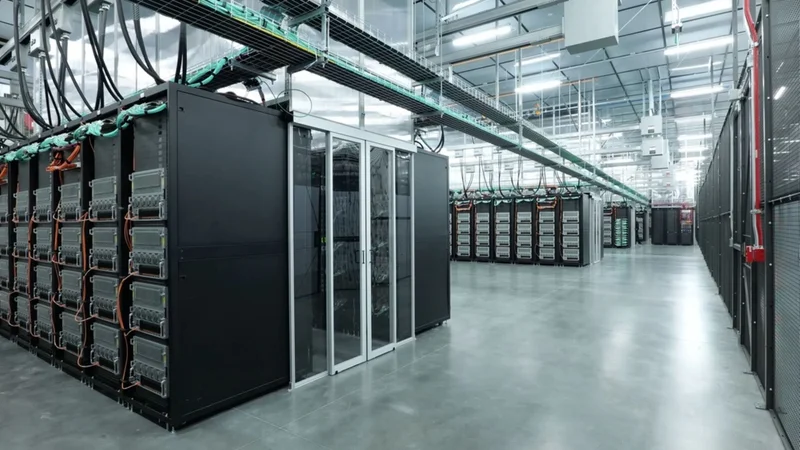
A data center aisle
Key Takeaways
In a spine-and-leaf architecture, every leaf switch connects to every spine switch, and the fabric has no leaf-to-leaf or spine-to-spine links.[1] Any two servers on different leaves are therefore the same number of hops apart.
The design replaced the classic three-tier architecture because a tree runs out of port density at the top and depends on Spanning Tree Protocol, which blocks redundant links.[2][3] A spine-leaf fabric keeps every path active with Equal-Cost Multi-Path (ECMP) routing.[3]
Port counts set hard limits: leaf uplinks cap the number of spines, spine port density caps the number of leaves, and leaf downlinks plus the oversubscription ratio cap the number of servers.[1] Arista's rule of thumb is to start at 3:1 oversubscription.[4]
Past the port limit of one pod, a super-spine layer turns the fabric into a 5-stage Clos network. Cisco's worked example reaches 147,456 servers that way, and RFC 7938 notes that designs with more than 5 stages are very uncommon.[5][2]
The price is physical: a spine-leaf fabric means more cabling to purchase and manage than a tree.[3]
What Is Spine and Leaf Architecture?
Spine and leaf architecture is a data center network topology built from two switching layers, a spine and a leaf.[3] The leaf layer consists of access switches that aggregate traffic from servers, and the spine switches interconnect all of the leaf switches, with every leaf linked to every spine.[3] You will also see this network architecture called leaf-spine architecture, spine-leaf architecture, or a folded Clos fabric.
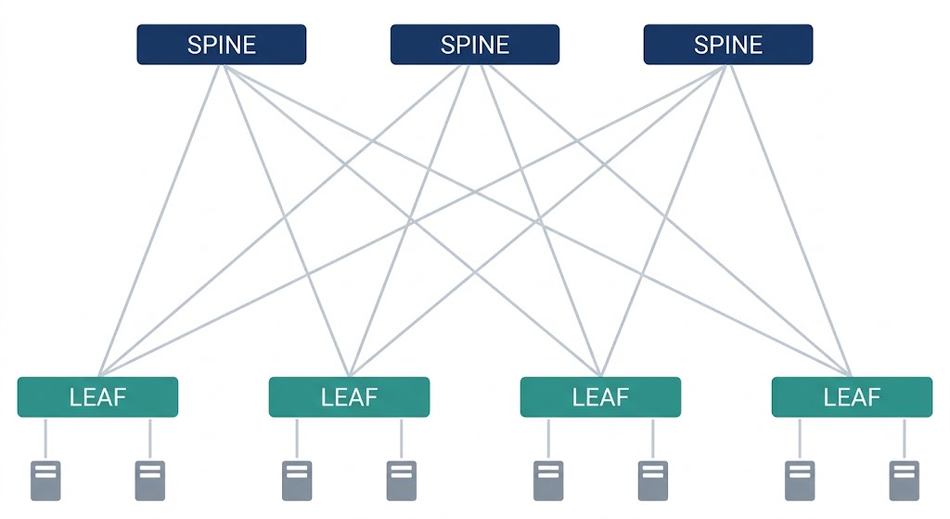
Three rules define the wiring:[1]
Each leaf switch connects to every spine switch.
Leaf switches do not connect to other leaf switches.
Spine switches do not connect to other spine switches.
The leaf switch is where servers, storage, and WAN or internet devices attach.[1] Leaves are also called top-of-rack (ToR) switches, although they often route rather than switch packets.[6] In a pure Clos design, the spine switches are purely transit devices: the leaves accept traffic, apply any policies, and select a spine for each flow, while the spines apply no policies and accept no externally sourced traffic.[6]
Two Layers, Three Stages
A packet between servers on different leaves enters at a leaf, is handed to a spine switch, and then moves back down to a leaf to exit.[6] That is why the design is described as three stages even though it has two layers. RFC 7938 calls it a folded 3-stage Clos topology, "counting Tier 2 stage twice," with the spine as the middle stage (Tier 1) and the leaves as the input and output stage (Tier 2).[2]
The name goes back to Charles Clos, whose 1953 paper in The Bell System Technical Journal set out a way to build telephone switching systems in which any free line could always reach any free line, no matter how busy the system was. [7] His aim was to do this with fewer than the N² cross-points of a simple square array.[7] Data center fabrics adopted the three-stage Clos design for its simplicity, its support for east-west traffic flows between edge devices, and its flexible scale-out characteristics.[6]
For the wider family of topologies (star, mesh, tree, and hybrid), see Wevolver's guide to network topology. The spine-leaf interconnect is a full mesh between the two layers, not within them.
Recommended Reading: Mesh Topology: A Deep Dive into Principles and Applications
Three-Tier Architecture vs Spine-Leaf: Why Data Centers Changed
The Three-tier Architecture
Traditional data center networks followed a three-tier model. In the access layer, access switches connect to servers, aggregation or distribution switches provide redundant connections to the access switches, and core switches provide fast transport between aggregation switches, typically as a redundant pair for high availability.[3] RFC 7938 describes the same design as an upside-down tree with redundant uplinks and three layers of hierarchy: core, aggregation/distribution, and access.[2]
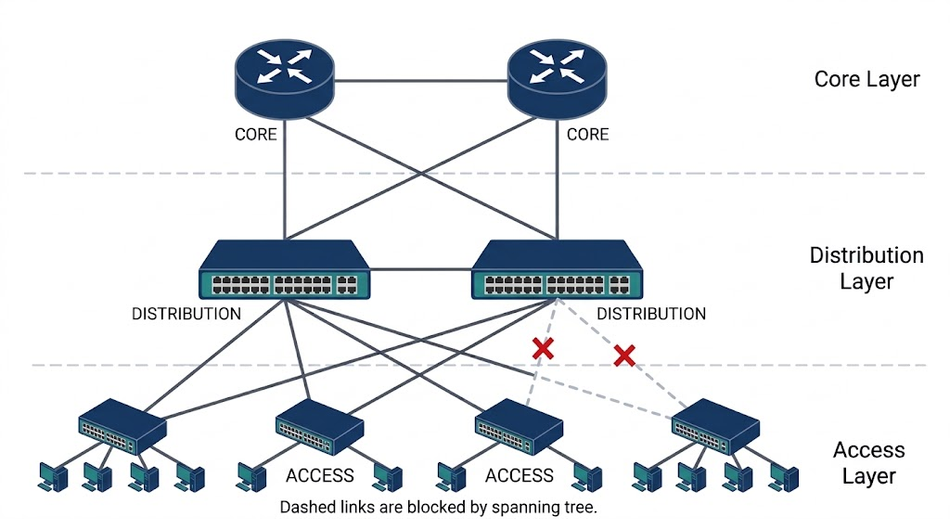
Cisco's campus design guide uses the same three roles. The access layer "provides endpoints and users direct access to the network," the distribution layer "aggregates access layers and provides connectivity to services," and the core layer "provides connectivity between distribution layers for large LAN environments."[8]
Recommended Reading: WAN vs LAN: How do they differ?
Where the Tree Runs Out
Blocked links. For a Layer 2 Ethernet network to work, only one active path can exist between any two stations, so the spanning tree protocol (STP) forces redundant paths into a standby, blocked state.[9] RFC 7348 notes that some data center operators see it this way: with STP they , "are effectively paying for more ports and links than they can really use."[10] Corning describes the price of that resiliency as half the utilization of the available bandwidth.[11]
Large failure domains. Improper cabling, misconfiguration, or flawed software on a single device regularly affected the entire spanning-tree domain, and those failures were very hard to troubleshoot.[2] Multi-chassis link aggregation (MLAG) made active-active Layer 2 paths possible, but most implementations cannot scale linearly past two devices.[2]
A ceiling at the top. A tree cannot scale to large designs because you cannot buy Tier 1 devices with enough port density to scale Tier 2, and growth forces continual upgrades of the upper tier.[2] In 2015, Arista described many legacy designs as oversubscribed "upwards of 20:1," with the Layer 3 gateway in the core or aggregation layer, which forces traffic between VLANs to traverse all tiers.[4]
The shift to East-west Traffic
North-south traffic enters or leaves the data center, while east-west traffic moves between devices inside it.[4] A client-server application that mostly answers users generates north-south traffic. Modern applications instead have components distributed across more servers or VMs, which HPE gives as the main reason east-west traffic keeps growing.[3]
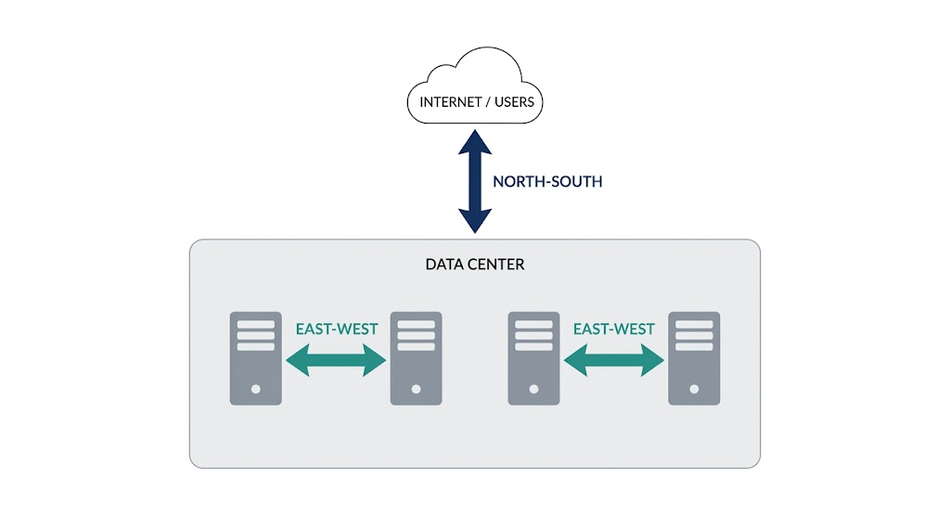
The scale of that shift can be large. At Facebook in 2014, "machine to machine" traffic inside the data centers was "several orders of magnitude larger than what goes out to the Internet."[12] Arista names multi-core CPUs, server virtualization, flash storage, big data, and cloud computing as the drivers behind the demand for lower oversubscription.[4]
Characteristic | Three-tier architecture | Spine-leaf architecture |
Layers | Access layer, aggregation (distribution) layer, core layer[3] | Leaf layer and spine layer[3] |
Server-to-server path | Varies with where the servers sit; same access switch, same aggregation block, or across the core[1] | Leaf, one spine, leaf; the same every time between any two leaves [1] |
Redundant links | Blocked by STP; the standby path is activated after a failure[9] | All active, with traffic load balanced over all paths by ECMP[2] |
How it grows | Upgrades or replacement of upper-tier devices[2] | Add spines for capacity, leaves for ports[3] |
Top-layer failure | STP recalculates and activates a standby path; with the default timers (15 + 15 + 20) that is up to 50 seconds in classic 802.1D[9] | Surviving paths keep forwarding; capacity drops by one spine’s share; a quarter with four spines, half with two [6] |
Backbone hardware | More often modular chassis[3] | Increased use of fixed-port switches[3] |
Cabling | Lower interconnection count[3] | More cabling to purchase and manage[3] |
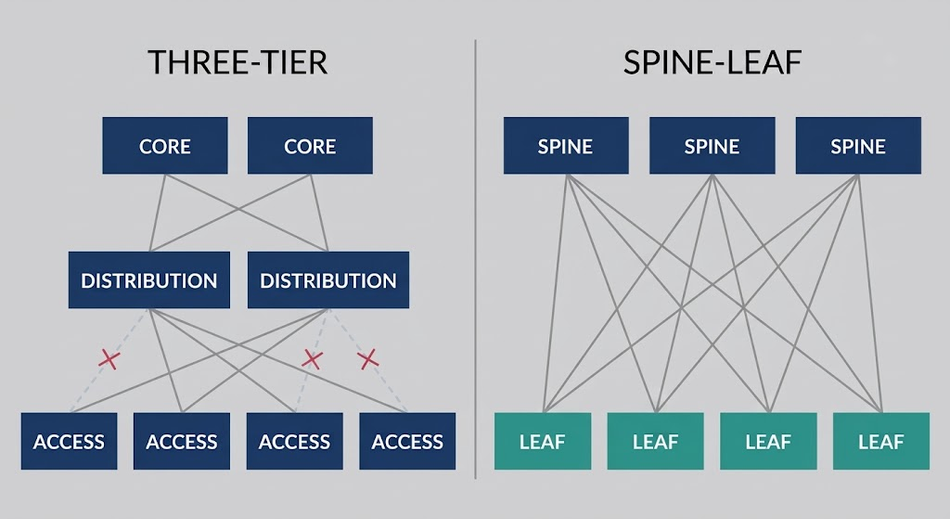 Three-Tier Architecture vs Spine-Leaf
Collapsed Core vs Spine-and-leaf
A collapsed core removes the separate core: the distribution switches take on Layer 3 aggregation for the whole site as well as aggregating the access layer.[8] HPE describes spine-leaf in similar terms, as collapsing one of the three tiers.[3] The difference is how the top layer behaves.
A collapsed core is still a hierarchy, and a Layer 2 design built on MLAG tops out at a non-blocking fan-out two switches wide.[4] A spine layer is a set of peers: Layer 3 designs with ECMP support 32 or more active spine switches, each connected to every leaf.[4]
How a Spine-Leaf Fabric Works
Roles in the Fabric
Role | Connects to | Job |
Leaf (ToR) switch | Servers, storage, WAN or internet devices, and every spine[1] | Accepts traffic, applies policies such as address filtering, and selects a spine for each flow[6] |
Spine switch | Every leaf; no spine-to-spine fabric links[1] | Transit only in a pure Clos design[6] |
Border leaf | Every spine (or a dedicated ToR if it lacks the ports), plus the WAN or core[6] | Carries traffic into and out of the fabric; most deployments use a dedicated pair[5] |
A border leaf should never connect to only some of the spines. Juniper warns that a partial connection unbalances traffic across the fabric and degrades performance, which is why a border leaf either reaches every spine or hangs off a ToR like any other workload.[6]
Two Hops and Predictable Latency
Because every leaf is wired to every spine, a host on any leaf reaches a host on another leaf in two switch-to-switch hops; the same three devices counted a different way, for example, leaf 1 to spine 1 and spine 1 to leaf 10.[11] From the outside, the fabric provides "consistent latency and delay (thanks to consistent hop counts through the fabric)."[6]
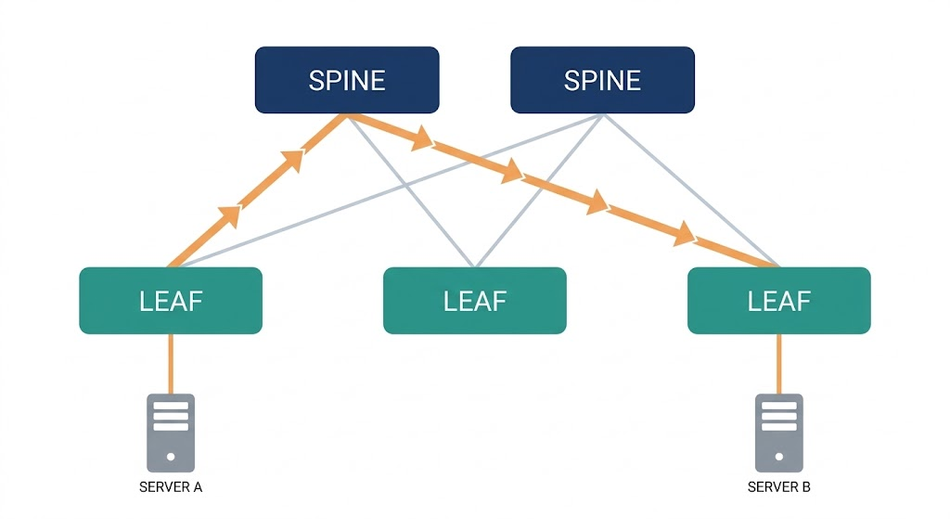
ECMP: Using Every Path at Once
In Cisco's reference design, the leaf layer and spine layer connect with Layer 3 IP links, and ECMP routing carries both east-west server-to-server traffic and south-north server-to-user traffic.[5] RFC 7938 notes that the topology requires ECMP support with a fan-out of M or more, where M is the number of uplinks on a leaf, and that server-to-server traffic is then load balanced over all available paths.[2]
Load balancing works per flow. For most traffic, Facebook’s fabric makes “heavy use of equal-cost multi-path (ECMP) routing, with flow-based hashing, and in Cisco's plane design a flow stays on the path its ToR switch selected.[12][5] For VXLAN overlays, RFC 7348 recommends deriving the outer UDP source port from a hash of the inner packet to give ECMP load balancing a level of entropy.[10]
What Happens when a Spine Fails
A spine failure costs capacity, not connectivity: the leaves keep communicating through the remaining spines.[1] Juniper's comparison: with two spines, losing one halves the bandwidth available to workloads; with four spines, a single failure reduces total bandwidth by one quarter.[6] With S spines and uplinks spread evenly, one failure removes about 1/S of the leaf-to-spine capacity.
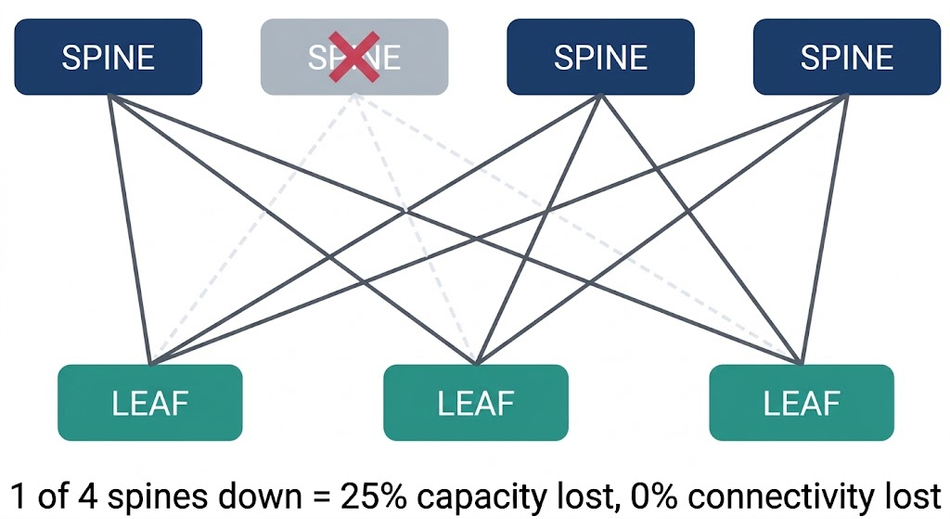
Detection speed matters too. Relying on BGP keepalives alone can delay convergence by multiple seconds, since many implementations cannot set a hold timer below three seconds.[2] Shutting the session on the interface's link-down event is faster: on point-to-point fiber, a physical failure is often detected in milliseconds and then triggers BGP reconvergence.[2]
Layer 2 vs Layer 3 Spine-Leaf Designs
A two-tier spine-leaf architecture can run at Layer 2 (VLAN everywhere) or Layer 3 (subnets), and each has trade-offs.[4]
Design | Strengths | Limits |
Layer 2 (one flat domain) | A server keeps its address wherever it moves in the fabric | A single, potentially large fault domain; scale limited by the smallest MAC table; non-blocking fan-out limited to two spines with MLAG, which needs a peer link between them[4] |
Layer 3 (a subnet per leaf) | Fastest convergence; ECMP across 32 or more spines[4] | VLANs and MAC mobility confined to one switch or pair, typically a rack or a few racks[4] |
Layer 3 underlay with VXLAN overlay | Layer 2 segments stretched across the routed fabric[4] | An encapsulation and, with EVPN, a BGP control plane to operate[10][13] |
In a Layer 3 fabric, the subnet where servers reside is local to a single leaf or a pair of leaves.[5] The spines only need IP forwarding for a subnet or two per leaf, and beyond its own hosts, the only routing prefix a leaf needs is a single default route toward the spines.[4] At Layer 2, by contrast, every switch learns every MAC address in the network, and server virtualization means at least one MAC address and one IP address per virtual server.[4]
VXLAN and EVPN Overlays
Some workloads still need Layer 2 adjacency: RFC 7348 cites "a need to preserve the Layer 2 model for inter-VM communication" even where operators route the physical infrastructure for ECMP.[10] VXLAN solves this by encapsulating Layer 2 frames in UDP, on IANA-assigned destination port 4789.[10]
Each VXLAN segment carries a 24-bit VXLAN Network Identifier (VNI), which allows up to 16 million segments.[10] Compare the 12-bit VLAN ID, which suits data centers that need fewer than 4094 VLANs.[10] EVPN adds a control plane. MAC and IP addresses are advertised through BGP rather than learned from traffic, which sharply reduces flooding of unknown unicast and ARP; and can suppress it entirely, since a leaf holding the mapping answers ARP locally.[19][13]
Arista recommends a Layer 3 ECMP design with a VXLAN overlay over a large Layer 2 design with spanning tree, citing the most flexibility, greatest scale, and traffic optimization.[4]
Cisco ACI: a Spine-leaf Fabric with a Controller
Cisco ACI turns two of the three wiring rules into hardware behavior. Run a cable between two spines, or between two leaves in the same tier, and ACI shuts those interfaces down rather than letting the link come up.[14] Until release 4.1, the product supported one topology only; a single tier of leaves beneath a single tier of spines.[14] The third rule is enforced more softly: Cisco permits designs where some leaves do not reach every spine, such as stretched fabrics, while warning that forwarding becomes suboptimal.[14]
Leaves provide the VXLAN tunnel endpoint (VTEP) function, and spines store the endpoint-to-VTEP mapping entries.[14] The Cisco Application Policy Infrastructure Controller (APIC) is the point of configuration for policies; Cisco's reference topology uses a cluster of three APICs dual-attached to a pair of leaves.[14] Routing in the infrastructure VRF is based on IS-IS, and because the fabric carries both Layer 2 and Layer 3 traffic in VXLAN, VLAN tags matter only on the front-panel ports facing servers and external switches.[14]
Release 4.1 added a second tier of leaves, giving the fabric a third layer. The driver is physical, not architectural: hosts spread across floors or separate buildings would otherwise need every leaf cabled back to every spine, and fiber is expensive over distance. Cisco also offers it as a migration path, since the shape maps onto the core-aggregation-access architecture many enterprises are moving off.[14]
Routing the Fabric: EBGP, OSPF, and IS-IS
Protocol | Where you see it | Argument for or against |
EBGP | RFC 7938 design; the only routing protocol in many massively scalable data centers[2][5] | Simpler state machine than link-state IGPs; a failure is masked locally when an alternate path exists. Against it: BGP is widely perceived as a WAN-only protocol with much slower convergence than an IGP, and it needs significant configuration since it has no neighbour auto-discovery[2] |
OSPF | Listed with BGP as a standard protocol for active/active leaf-spine paths[4] | Commonly used as the primary routing protocol in Layer 3-only data center designs, and familiar to most network teams; the cost is that a link-state failure event propagates across an entire area, whatever the failure type[2] |
IS-IS | Routing in the Cisco ACI infrastructure VRF[14] | Used inside ACI to carry VTEP reachability in the infrastructure VRF, where it is pre-configured rather than chosen[14] VTEP reachability; so it is an option in its own right, not only a vendor internal |
RFC 7938 documents an EBGP-only design for large Clos fabrics. BGP's internal data structures and state machine are simpler than those of most link-state IGPs such as OSPF, and because every BGP router propagates only its best path, a failure is masked as soon as a router finds an alternate path, which a symmetric Clos topology with an EBGP-only design provides.[2] In a link-state IGP, by contrast, "the event propagation scope ... is an entire area, regardless of the failure type."[2]
The RFC's example ASN scheme for a 5-stage Clos, where Tier 1 is the top layer and Tier 3 the ToR switches:[2]
EBGP single-hop sessions run over the direct point-to-point links, with no multi-hop or loopback sessions.
Private-use ASNs from 64512 to 65534 avoid conflicts.
All Tier 1 devices share a single ASN.
Each set of Tier 2 devices in the same cluster gets a unique ASN.
Every Tier 3 device (ToR) gets a unique ASN.
None of this makes BGP the obvious winner. RFC 7938 opens by acknowledging that BGP is not generally deployed inside the data center, and that the perceptions working against it; WAN-only reputation, slow convergence, configuration overhead- are part of why. The case for it rests on the specific fit between its behavior and a symmetric Clos topology, not on general superiority.[2]
Production fabrics follow the same pattern. Facebook built its fabric using "standard BGP4 as the only routing protocol," all Layer 3 from ToR uplinks to the edge, and Cisco reports that EBGP has been chosen by many massively scalable data centers as their only routing protocol.[12][5]
Sizing a Spine and Leaf Network
Sizing is where spine-leaf architecture turns into a system design problem: port counts, oversubscription, optics, and growth steps all constrain each other. Work through them in that order.
Three port-count Rules
The port density of each spine switch determines the maximum number of leaf switches.[1]
The number of uplink ports on each leaf switch determines the maximum number of spine switches.[1] Every leaf should have the same number of fabric-facing ports.[6]
The number of downlink ports on each leaf, together with the oversubscription ratio, determines the maximum number of end devices.[1]
Corning turns these into two formulas:[1]
Maximum leaves = (ports per spine × number of spines) / uplink ports per leaf
Servers or hosts = downlink ports per leaf × number of leaves
Oversubscription
Oversubscription is "the ratio of contention should all devices send traffic at the same time," and in a two-tier design Arista measures it as downlink ports (to servers and storage) against uplink ports (to spine switches).[4] RFC 7938 puts it the same way: the topology is non-interfering if M ≥ N and oversubscribed by N/M otherwise, where M is a leaf's uplink count and N its downlink count.[2]
Al-Fares, Loukissas, and Vahdat measure against what the fabric could theoretically carry: at 5:1, only 20% of host bandwidth is available for some traffic patterns. Formally, they define oversubscription as the worst-case achievable aggregate bandwidth among end hosts relative to the total bisection bandwidth.[15] Juniper writes the ratio fabric-first (1:3 instead of 3:1) and counts what workloads actually consume, so 8 × 100G uplinks serving 24 workloads that each use 25 Gb/s count as 1:1.[6] This article writes ratios as downlink: uplink. These sources do not measure the same thing. Al-Fares works from bisection bandwidth, Arista and Cisco from port counts, and Facebook’s figure is rack-to-rack across the whole fabric. Read the table for scale and direction of travel, not as like-for-like measurements.
Source and year | Ratio | Context |
Al-Fares et al., 2008 | 2.5:1 to 8:1 | Typical designs of the era, citing Cisco’s data center design guide[15] |
Arista, 2015 | Upwards of 20:1 | Many legacy data center designs[4] |
Arista, 2015 | 3:1 or less; start at 3:1 | Modern designs; rule of thumb[4] |
Facebook, 2014 | 4:1, with a path to 2:1 and 1:1 | Starting point, with 12 of 48 possible spines per plane[12] |
Cisco, 2026 | 1.5:1 | Leaf with 48 × 25G downlinks and 8 × 100G uplinks[5] |
Cisco, 2026 | 1:1 | Fabric switch in a hyperscale plane design[5] |
Where you put the oversubscription matters too. RFC 7938 notes that in practice it is introduced at the ToR tier, and that limiting it to that single layer spares application developers from accounting for separate bandwidth pools within the rack, between racks, and between clusters.[2]
Oversubscription is usually safe when applications load the network well below port speed, or when traffic patterns are cyclical and nonoverlapping.[6] It causes trouble when flows converge on a hot spot such as a database or backup server: queues deepen, adding delay and jitter, and eventually packets drop.[6] Arista's ideal is uplinks that run faster than downlinks, so that micro-bursts from one host at line rate cause no blocking.[4]
Even 1:1 is not a guarantee. Packet-switched fabrics have no admission control, so they are "noncontending rather than non-blocking": if two servers each send 100 Gb/s to the same destination, half of that traffic is dropped, most likely at the destination's leaf.[6] Al-Fares et al. also note that a 1:1 ratio may be difficult to achieve in practice, because packet reordering must be prevented for TCP flows.[15]
Worked example 1: One Pod at 1.5:1
These figures come from Cisco's first design example; the arithmetic is shown step by step.[5]
Each leaf has 48 × 25G downlinks: 48 × 25 = 1,200 Gb/s toward servers.
Each leaf has 8 × 100G uplinks, one to each spine: 8 × 100 = 800 Gb/s toward eight spines.
Oversubscription: 1,200 / 800 = 1.5:1.
Each spine has 288 × 100G downlinks, so the pod holds 288 leaves.
Servers: 288 leaves × 48 = 13,824 single-homed servers.
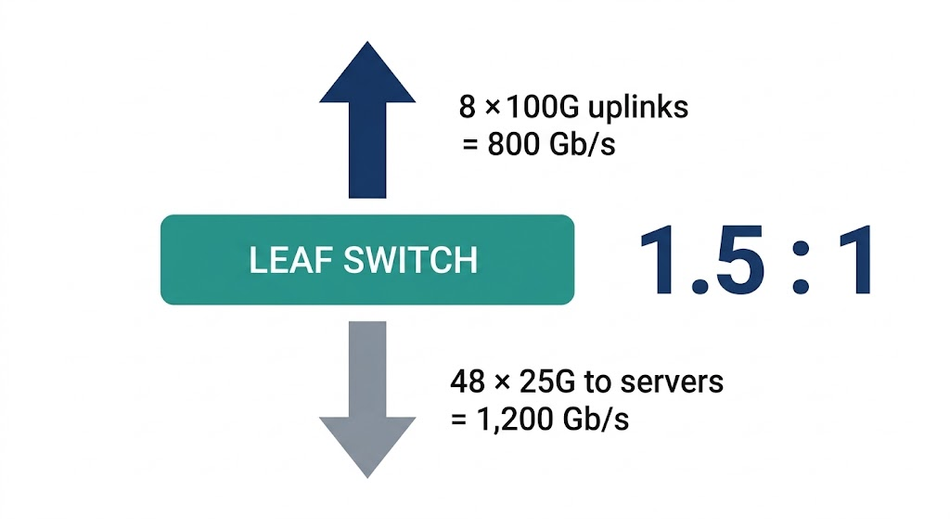
Worked example 2: Designing to a Workload Target
Juniper's design process has three steps: determine the maximum number of workloads when fully scaled out (plus a buffer), use it to find the number of leaves, then find the number of spines.[6] Its example targets 800 × 100G workload ports at 1:1 with 32-port and 64-port 100G switches:[6]
At 1:1, half of each leaf's ports face workloads and half face the fabric, so a 32-port leaf gives 16 workload ports.
800 / 16 = 50 leaves.
Each spine therefore needs at least 50 ports, which rules out the 32-port switch. Use 64-port spines.
With 64-port spines, the fabric tops out at 64 leaves × 16 = 1,024 workload ports at 100G.
With 16 fabric-facing ports per leaf, the fully built fabric has up to 16 spines.
You do not have to build the maximum on day one. The same fabric can grow in scale steps, as long as every fabric-facing leaf port stays connected to a spine at each step to preserve the oversubscription ratio:[6]
Spines | Leaves | Links from each leaf to each spine | 100G workload ports |
2 | 8 | 8 | 128 |
4 | 16 | 4 | 256 |
8 | 32 | 2 | 512 |
16 | 64 | 1 | 1,024 |
Not every intermediate size works. Three spines would need 16/3 = 5.34 links from each leaf, which is not possible.[6] Once the fabric reaches its maximum size based on port counts, it cannot scale out any further, so you must know the maximum projected fabric size up front.[6] At full scale, this example needs 64 × 16 = 1,024 leaf-to-spine links.
Scaling Beyond Two Tiers: Super-Spines, Pods, and Planes
When one spine layer runs out of ports, you add a tier above it. RFC 7938 uses the 5-stage Clos topology for its examples because designs with more than 5 stages are very uncommon, given the large number of interconnects they require.[2]
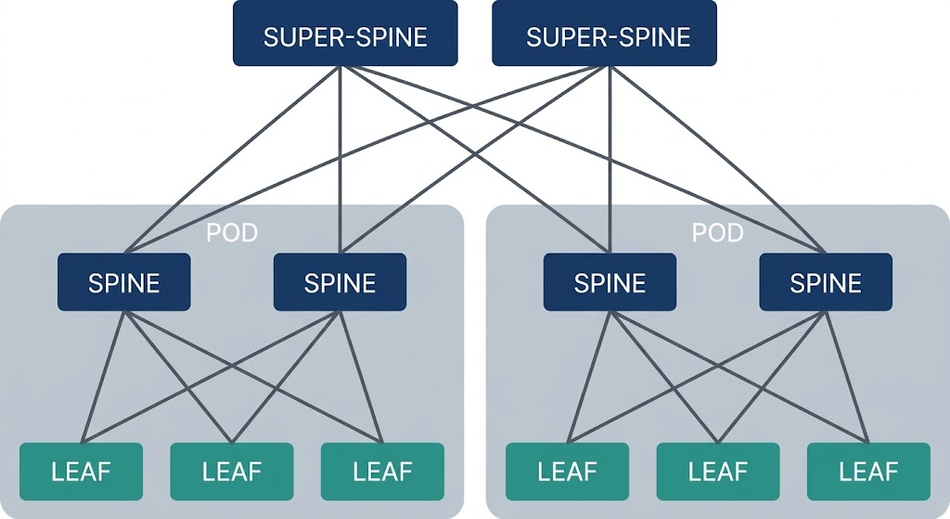
Cisco's second design example shows the pattern. Each server pod has 8 spines, 48 leaves, and 2,304 single-homed servers; each spine sends 48 × 100G down to leaves and 16 × 100G up to 16 super-spines, a 3:1 ratio.[5] With 64 pods, the cluster supports 147,456 servers.[5]
Tier numbers run in opposite directions in different documents. In RFC 7938, Tier 1 is the top (spine) layer and Tier 3 is the ToR layer, while Cisco's white paper calls the leaves Tier-1 and the super-spines Tier-3.[2][5] Check the convention before comparing two designs.
Planes
Another way to grow is to split the spine layer into independent planes. Facebook's 2014 fabric used pods of 48 server racks, each served by four fabric switches, and each ToR had 4 × 40G uplinks for 160G per rack of 10G servers.[12] Four independent planes of spine switches, each scalable to 48 devices, joined the pods; each fabric switch connects to every spine in its local plane.[12] Cisco's hyperscale plane example uses four spine planes of 64 spines each to interconnect 128 pods, for 393,216 servers at 1:1 on the fabric switch.[5]
AI and GPU clusters
GPU training clusters use the same building blocks with a twist. In NVIDIA's reference architecture for a 512-node DGX B300 SuperPOD, each group of 64 nodes is rail-aligned: traffic on a rail is always one hop away from the other 64 nodes in its scalable unit (SU) , while "traffic between nodes, or between rails, traverses the spine layer."[16] In rail-optimized designs, a rail generally ties the same-numbered GPU network port of every node in the unit to the same leaf switch.[5]
The compute fabric is twin-planar, with 2 × 400GbE per GPU through two different planes.[16] A single switch, transceiver, or cable failure does not abort the training job; the application continues on half of the original bandwidth.[16] Because the two planes are not joined at a core layer, twice as many nodes fit on a two-layer spine-leaf fabric.[16] NVIDIA also advises building the leaf switches and leaf-spine cables for a full SU even when fewer nodes are installed, to keep routing optimal and performance consistent.[16]
Data center network topology options at a glance
Topology | Structure | Where it fits |
Three-tier | Access, aggregation, core; STP blocks redundant links[3][9] | Legacy data center designs[4]; campus LANs[8] |
Collapsed core | Distribution doubles as the Layer 3 aggregation layer[8] | Campus networks[8] |
Two-tier spine-leaf | Every leaf to every spine; ECMP[1][2] | Single pods up to the spine port limit (13,824 servers in Cisco’s 288-leaf example; the same spine supports up to 1,152 leaves with breakout cables)[5] |
5-stage Clos (super-spine) | Pods of spine-leaf joined by super-spines[5] | Multi-pod clusters (147,456 servers in Cisco's example)[5] |
Fat-tree | A Clos built entirely from identical k-port switches — pods plus core; k³/4 hosts[15] | Commodity-switch designs aiming for the full aggregate bandwidth of large clusters[15] |
Multi-plane fabric | Independent spine planes; each pod connects to each plane[12][5] | Hyperscale and AI clusters[5][16] |
Physical Layer: Cabling, Optics, and Breakout
A full mesh between layers multiplies links. HPE lists "more cabling to purchase and manage" among the common differences from traditional designs, and the fat-tree paper warns that such topologies "can impose significant wiring complexity in large networks."[3][15] Facebook's fabric ran to hundreds of thousands of fiber strands, although the team found the physical plant far less complex than the logical drawings suggested.[12]
Choosing optics by reach
Link length decides the medium. Cisco’s 400G QSFP-DD data sheet gives these options (a reach ladder drawn from a longer portfolio):[17]
Module or cable | Media and connector | Reach or length |
Passive copper cable | QSFP-DD to QSFP-DD | 3 m (0.5 to 3 m lengths) |
Active optical cable (AOC) | QSFP-DD ends | 30 m (1 to 30 m lengths) |
QDD-400G-SR8-S | MPO-16 APC, OM4 multimode | 100 m |
QDD-400G-SR4.2-BD | MPO-12 UPC, OM4 multimode | 100 m |
QDD-400G-DR4-S | MPO-12 APC , parallel single-mode; 4 × 100G breakout | 500 m |
QDD-400G-FR4-S | Duplex LC, single-mode | 2 km |
QDD-400G-LR4-S | Duplex LC, single-mode | 10 km |
Power is the other variable. Cisco lists a maximum of 1.5 W per end for the passive copper cable against 12 W per end for the AOC and 12 W for the SR8, FR4, and LR4 transceivers.[17] A 400G optical link with 12 W modules at both ends can therefore draw up to 24 W, against 3 W for a passive copper link, and that difference scales with the link count from your sizing.
Breakout and Fan-out
Breakout lets one fast port serve several slower links. The most common splitters divide a 100G port into ten 10G, four 25G, or two 50G connections, although optical splitters bring their own cabling and troubleshooting challenges.[6] The DR4 module above can run as 4 × 100G breakout to 100G-DR optics at up to 500 m.[17] Arista notes that breaking 100G ports into 4 × 25G or 2 × 50G widens the fan-out for Layer 3 ECMP, allowing more spine switches and therefore more leaf switches.[4]
Spine chassis, Line cards, and Mesh Modules
On a modular spine, how you land the leaf uplinks matters. Corning recommends distributing each leaf’s uplinks evenly across the spine’s line cards. Two leaves landing on different cards send their traffic across the chassis backplane, which lengthens delivery times and forces you to buy additional fabric cards.[11] Spread across four line cards, losing one card costs 25% of the bandwidth.[11] This only holds at small spine counts. Corning notes that past a 4-way spine the technique loses its line-card-level redundancy and switching efficiency, and that at 16-way you should invest in fabric modules anyway, since different leaf switches will end up on different line cards in the same chassis.[11]
Corning calls the LC patch-cord way of doing that shuffle "building new networks using old tools" and offers mesh modules that do the shuffle internally: the spine side lands on individual line cards once, and each leaf port plugged into the other side is broken out and spread across them automatically, with no LC patching.[11] Juniper points out a deeper issue with chassis spines: the internal fabric turns the design from a Clos into a Benes network, adding one or two stages whose queuing and delay the operator typically cannot see.[6] Cisco's hyperscale plane design is typically deployed with fixed-format switches on all layers for deterministic latency, since modular switches add a forwarding layer inside the chassis.[5]
Recommended Reading: What is an Edge Data Center: A Comprehensive Guide for Engineering Professionals
Advantages and Disadvantages of Spine-Leaf Architecture
Advantages
Predictable latency. Every leaf-to-leaf path crosses the same number of devices.[1]
Every link active. ECMP spreads traffic over every path at once, and the routed design leaves no loops to block in the first place.[3]
Scalability. HPE credits spine-leaf topologies with better scalability: adding spines or leaves does not require re-architecting the network, and there is no downtime.[3]
Graceful degradation. With four spines, a spine failure costs one quarter of the bandwidth.[6]
Simpler spares. Correctly chosen devices let the whole fabric use a single SKU, apart from border leaves and other specialized nodes.[6]
Smaller failure domains. Layer 3 designs minimize fault domains instead of sharing one spanning-tree domain across the network.[4][2]
Disadvantages
More cabling and optics. The higher interconnection count means more to buy, install, and manage.[3]
A hard size ceiling. Spine ports and leaf uplinks fix the maximum fabric size, and once it is reached the fabric cannot scale out any further.[6]
Limited Layer 2 mobility. A routed fabric confines VLANs to a rack or a few racks, unless you add an overlay such as VXLAN.[4]
Hot spots. Oversubscribed fabrics can drop packets or add jitter when flows converge, and those problems are generally difficult to diagnose.[6]
Weak external edge. Fabric switches usually lack deep queues and strong QoS, so external connections need a border leaf router.[6]
Higher skill floor. A routed fabric needs Layer 3 and overlay expertise, plus more sophisticated management tools and planning, than a switched three-tier network did.[3]
Common Mistakes and Troubleshooting Tips
Leaving leaf uplinks unconnected in a partial build. All fabric-facing ports on each leaf must connect to a spine at every scale step, or the oversubscription ratio changes.[6]
Choosing a spine count that does not divide the leaf uplinks. Sixteen uplinks work with 2, 4, 8, or 16 spines, not with 3.[6]
Connecting a border leaf to only some spines. This unbalances fabric traffic flows and degrades performance.[6]
Using a standard ToR port for core or WAN links. Attaching a pair of 10G core connections to a 32 × 100G or 64 × 100G fabric switch "will generally result in large amounts of dropped traffic."[6]
Summarizing routes at the spine. Each spine has exactly one path to every server, which makes route summarization dangerous in this topology.[2]
Relying on BGP keepalives for failure detection. Use link-down triggers to avoid multi-second convergence.[2]
Adding spine-to-spine or leaf-to-leaf fabric links "for redundancy". Apart from the MLAG peer links of Layer 2 designs, they break the topology rules, and Cisco ACI disables such interfaces.[1][4][14]
Running uplinks no faster than downlinks. Arista's ideal is faster uplinks, so that micro-bursts from a single host at line rate cannot cause blocking.[4]
Sizing a GPU fabric for today's node count. Build leaf switches and leaf-spine cables for the full scalable unit.[16]
When users report intermittent slowness on an oversubscribed fabric, look first for flows converging on one destination, such as a backup server, and for rising queue depths.[6] Congestion telemetry can catch these hot spots before they show up as packet drops; Arista cites its Latency Analyzer (LANZ) for this purpose.[4]
Conclusion
Spine and leaf architecture replaces the tree with a two-layer Clos fabric in which every leaf connects to every spine. That gives you equal hop counts, active use of every link through ECMP, and growth by adding switches instead of replacing them. It removes the blocked links, large failure domains, and top-tier port ceilings that limited the three-tier architecture in modern data center networks.
The design work is mostly arithmetic. Leaf uplinks cap the spine count, spine ports cap the leaf count, and the oversubscription ratio you choose decides how many servers each leaf can carry. Settle the maximum size first, pick a routing design (RFC 7938 documents EBGP for large fabrics), and budget early for the cabling and optics that the full mesh requires.
FAQs
What is leaf and spine architecture?
It is a two-layer data center switching fabric. Leaf switches connect servers, storage, and external devices, and spine switches interconnect all of the leaves.[3][1] Every leaf connects to every spine, and there are no leaf-to-leaf or spine-to-spine fabric links.[1]
How many tiers are there in a spine and leaf network architecture?
Two: the leaf layer and the spine layer.[3] In Clos terms, it is a folded 3-stage network, because a packet passes a leaf, a spine, and a leaf.[2] Large deployments add a super-spine tier, which makes a 5-stage Clos.[2][5]
Why do we need leaf-spine architecture?
East-west, server-to-server traffic keeps growing as applications spread across more servers and VMs.[3] Tree designs handle it poorly: STP blocks redundant links, a fault on a single device can affect the entire spanning-tree domain, and the top tier runs out of ports.[9][2] Spine-leaf answers with active ECMP paths, routed links, and scale-out growth.[3][4]
How does spine and leaf architecture improve network performance?
It gives every pair of leaves the same hop count, so latency is consistent.[6] ECMP spreads traffic across all spines instead of leaving backup links idle, and a spine failure only removes one spine's share of capacity.[3][6]
What are the disadvantages of spine and leaf architecture?
The main costs are more cabling and optics, a maximum size fixed by port counts, limited Layer 2 mobility in routed designs, and congestion hot spots when oversubscribed.[3][6][4] External connections also need a border leaf router, because fabric switches have shallow queues.[6]
What are the key differences between collapsed core and spine-and-leaf network architectures?
A collapsed core merges the core into the distribution layer, which then handles Layer 3 aggregation for everything in the network.[8] It stays hierarchical, and a Layer 2 design built on MLAG cannot offer a non-blocking fan-out wider than two switches.[4] Spine-leaf uses a layer of peer spines, each connected to every leaf, and routed designs support 32 or more of them.[4]
How many spine switches do I need?
Start from capacity and resilience. The maximum is the number of uplinks on each leaf, and the count should divide those uplinks evenly.[1][6] Breaking uplink ports out into lower-speed links raises the maximum, which is how Arista widens the ECMP fan-out.[4] More spines means a smaller loss per failure: one quarter of the bandwidth with four spines, half with two.[6]
Does a spine-leaf fabric use BGP or OSPF?
Both appear. RFC 7938 documents an EBGP-only design for large fabrics, partly because a link-state IGP such as OSPF propagates every failure event across an entire area.[2] Arista lists both BGP and OSPF for leaf-spine ECMP, and Cisco ACI uses IS-IS inside its fabric.[4][14]
Is spine-leaf the same as a Clos network or a fat-tree?
A two-tier spine-leaf fabric is a folded 3-stage Clos topology.[2] A fat-tree is a variant of Clos built entirely from identical switches, so every box in the fabric is the same part number.[15]
Is spine-leaf only for large data centers?
No. A fabric can begin with a single pair of spines and however many leaves you need on day one, and it does not have to be built to its maximum size at first.[4][6] What you must decide on day one is the maximum projected size, because the switch port counts you choose fix how far the fabric can grow.[6]
References
[1] Corning Optical Communications, “Spine-and-leaf architecture 101.” Corning, Oct. 5, 2025. [Online]. Available: https://www.corning.com/data-center/worldwide/en/home/solutions/spine-and-leaf-architecture-101.html. [Accessed: Sep. 29, 2026].
[2] P. Lapukhov, A. Premji, and J. Mitchell, Ed., “Use of BGP for routing in large-scale data centers,” RFC 7938, Internet Engineering Task Force, Aug. 2016. [Online]. Available: https://www.rfc-editor.org/rfc/rfc7938.html
[3] Hewlett Packard Enterprise, “What is spine-leaf architecture?” HPE Glossary, Mar. 27, 2026. [Online]. Available: https://www.hpe.com/us/en/what-is/spine-leaf-architecture.html. [Accessed: Sep. 29, 2026].
[4] Arista Networks, “Cloud networking: Scaling out data center networks,” White Paper, Sep. 2015. [Online]. Available: https://www.arista.com/assets/data/pdf/Whitepapers/Cloud_Networking__Scaling_Out_Data_Center_Networks.pdf
[5] Cisco Systems, “Cisco massively scalable data center network fabric design and operation,” White Paper, Oct. 20, 2026. [Online]. Available: https://www.cisco.com/c/en/us/products/collateral/switches/nexus-9000-series-switches/white-paper-c11-743245.html. [Accessed: Oct. 25, 2026].
[6] Juniper Networks, “Design considerations for spine-and-leaf IP fabrics,” White Paper 2000751-001-EN, May 2020. [Online]. Available: https://www.juniper.net/content/dam/www/assets/white-papers/us/en/design-considerations-for-spine-and-leaf-ip-fabrics.pdf
[7] C. Clos, “A study of non-blocking switching networks,” Bell Syst. Tech. J., vol. 32, no. 2, pp. 406–424, Mar. 1953, doi: 10.1002/j.1538-7305.1953.tb01433.x.
[8] Cisco Systems, “Campus LAN and wireless LAN solution design guide,” Cisco Validated Design, May 4, 2020. [Online]. Available: https://www.cisco.com/c/en/us/td/docs/solutions/CVD/Campus/cisco-campus-lan-wlan-design-guide.html. [Accessed: Sep. 29, 2026].
[9] Cisco Systems, “Configuring spanning tree protocol,” in Layer 2 Configuration Guide, Cisco IOS XE 17.17.x (Catalyst 9300 Switches), Mar. 31, 2025. [Online]. Available: https://www.cisco.com/c/en/us/td/docs/switches/lan/catalyst9300/software/release/17-17/configuration_guide/lyr2/b_1717_lyr2_9300_cg/configuring_spanning_tree_protocol.html. [Accessed: Oct. 25, 2026].
[10] M. Mahalingam et al., “Virtual eXtensible Local Area Network (VXLAN): A framework for overlaying virtualized Layer 2 networks over Layer 3 networks,” RFC 7348, Independent Submission, Aug. 2014. [Online]. Available: https://www.rfc-editor.org/rfc/rfc7348.html
[11] M. Keskin, “Cabling the spine-and-leaf network switch fabric architecture,” Corning Optical Communications, Oct. 5, 2025. [Online]. Available: https://www.corning.com/data-center/worldwide/en/home/knowledge-center/cabling-the-spine-and-leaf-network-switch-fabric.html. [Accessed: Sep. 29, 2026].
[12] A. Andreyev, “Introducing data center fabric, the next-generation Facebook data center network,” Engineering at Meta, Nov. 14, 2014. [Online]. Available: https://engineering.fb.com/2014/11/14/production-engineering/introducing-data-center-fabric-the-next-generation-facebook-data-center-network/
[13] A. Sajassi, Ed., J. Drake, Ed., N. Bitar, R. Shekhar, J. Uttaro, and W. Henderickx, “A network virtualization overlay solution using Ethernet VPN (EVPN),” RFC 8365, Internet Engineering Task Force, Mar. 2018. [Online]. Available: https://www.rfc-editor.org/rfc/rfc8365.html
[14] Cisco Systems, “Cisco Application Centric Infrastructure (ACI) design guide,” Jun. 6, 2024. [Online]. Available: https://www.cisco.com/c/en/us/td/docs/dcn/whitepapers/cisco-application-centric-infrastructure-design-guide.html. [Accessed: Oct. 25, 2026].
[15] M. Al-Fares, A. Loukissas, and A. Vahdat, “A scalable, commodity data center network architecture,” in Proc. ACM SIGCOMM, Seattle, WA, USA, Aug. 2008, pp. 63–74, doi: 10.1145/1402958.1402967.
[16] NVIDIA, “Network fabrics,” in NVIDIA SuperPOD DGX B300 Systems, Spectrum-4 Ethernet and DC Busbar Power Reference Architecture, Nov. 19, 2025. [Online]. Available: https://docs.nvidia.com/dgx-superpod/reference-architecture/scalable-infrastructure-b300/latest/network-fabrics.html. [Accessed: Oct. 25, 2026].
[17] Cisco Systems, “Cisco 400G QSFP-DD cable and transceiver modules,” Data Sheet, Mar. 3, 2026. [Online]. Available:https://www.cisco.com/c/en/us/products/collateral/interfaces-modules/transceiver-modules/datasheet-c78-743172.html. [Accessed: Oct. 25, 2026].
[18] Cisco Systems, “Cisco Nexus 9000 VXLAN BGP EVPN data center fabrics: Fundamental design and implementation guide.” [Online]. Available: https://www.cisco.com/c/en/us/td/docs/dcn/whitepapers/cisco-vxlan-bgp-evpn-design-and-implementation-guide.html. [Accessed: Oct. 25, 2026]
[19] A. Sajassi, Ed., R. Aggarwal, N. Bitar, A. Isaac, J. Uttaro, J. Drake, and W. Henderickx, “BGP MPLS-based Ethernet VPN,” RFC 7432, Internet Engineering Task Force, Feb. 2015. [Online]. Available: https://www.rfc-editor.org/rfc/rfc7432.html
in this article
1. Key Takeaways2. What Is Spine and Leaf Architecture?3. Three-Tier Architecture vs Spine-Leaf: Why Data Centers Changed4. How a Spine-Leaf Fabric Works5. Layer 2 vs Layer 3 Spine-Leaf Designs6. Routing the Fabric: EBGP, OSPF, and IS-IS7. Sizing a Spine and Leaf Network8. Scaling Beyond Two Tiers: Super-Spines, Pods, and Planes9. Physical Layer: Cabling, Optics, and Breakout10. Advantages and Disadvantages of Spine-Leaf Architecture11. Common Mistakes and Troubleshooting Tips12. Conclusion13. FAQs14. References