Network Topology: 7 Types and How to Choose One
Network topology is the shape of a network: which nodes connect to which, and which paths data can take between them. This guide covers the seven types, how they compare, why the physical and logical views differ, and how to choose one for IoT and industrial systems.

Last updated on 12 Oct, 2026. 16 minutes read
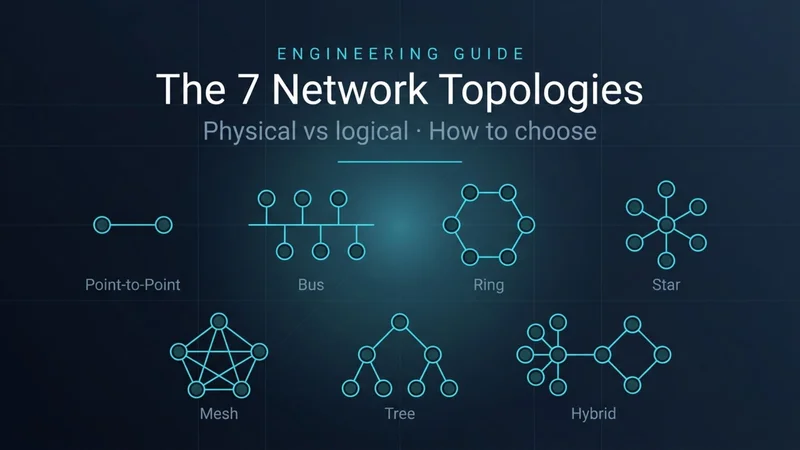
Seven Network Topologies
Key Takeaways
A topology is the physical or logical arrangement of the elements of a network.[1] One set of cables can carry a very different logical design: an MRP ring is wired as a ring, but the Media Redundancy Manager keeps one ring port blocked, so it runs as a logical stub. [1][7]
The seven common types are point-to-point, bus, ring, star, mesh, tree, and hybrid. Industrial networks in particular tend to become hybrids, accumulating topologies as they grow.[2]
Backup paths cost links: a fully connected mesh of n nodes needs n(n−1)/2 direct paths, while a ring of n nodes needs only n, each node connecting to exactly two neighbors. [1]
In IoT and industrial systems, topology also sets power budgets and recovery times, from sleeping LoRaWAN end devices in a star-of-stars to Ethernet rings where Cisco's IE3500 defaults to a 200 ms maximum recovery time for rings of up to 50 nodes. .[11][7]
Choose a topology by working back from failure tolerance, distance, node count, and power, then document the physical and logical views separately.
What Is Network Topology?
Network topology is the physical or logical arrangement of a network's elements — the real layout, the virtual one, or both. The ATIS Telecom Glossary defines it this way, and the distinction matters more than it sounds. In a computer network, those elements are the devices (computers, switches, routers, sensors, controllers) and the links between them.
Topology describes shape, not medium. A link may be twisted pair, coaxial cable, or optical fiber — topology describes only the shape. [2] ATIS adds that two networks have the same topology if their connection configuration is the same, even when distances, transmission rates, or signal types differ.[1]
Topology matters because it shapes a network's failure behavior: what happens when a link or device goes down. It also decides how many cables or radio links you need, how easily the network grows, and how devices share the medium. The sections below cover those trade-offs type by type.
Physical Topology vs Logical Topology
Physical topology is the real layout of cables, radios, and devices. Logical topology is the path data actually takes, which configuration and protocols can change without touching a cable. The ATIS definition covers both explicitly: "physical, i.e., real" and "logical, i.e., virtual". [1]
Two principles explain why engineers keep the physical and logical views apart. They pull in opposite directions.
1. One physical topology can host several logical ones at once.
A campus LAN is cabled as a star: every endpoint runs back to an access-layer switch. But PCs, IP phones, wireless APs, and IP cameras all land on that same hardware, and they have different performance, management, and security needs.[3] The access layer splits that single physical star into separate logical networks — voice, data, surveillance and guest traffic over shared cabling. [3] As Cisco puts it, "the access layer can support many logical networks". [3] Nothing about the physical star changes; the separation is configuration.
2. A protocol can reduce a physical topology to a smaller logical one.
The reverse case. Redundant physical paths exist for survivability, but a Layer 2 network cannot use them all at once — "only one active path can exist between any two stations". [6] So a protocol blocks ports until the logical topology is loop-free, holding the blocked paths in reserve.
Enterprise: mesh becomes a tree. Spanning Tree Protocol selects one switch as the root, forces redundant paths into a blocked standby state, and activates a standby path when an active segment fails. [6]
Industrial: ring becomes a line. In a Media Redundancy Protocol (MRP) ring, the ring manager blocks one of its two ring ports, so that "the physical ring topology becomes a logical stub topology". [7] When a link between two ring members fails, both of the manager's ring ports move to forwarding, and frames are lost during the transition. [7]
The physical cabling is identical before and after the protocol converges. Only the logical topology changes — which is precisely why the two views have to be documented separately.
Aspect | Physical topology | Logical topology |
Describes | Where cables, radios, and devices actually connect | The paths data takes between nodes |
Changed by | Recabling, adding, or moving hardware | Configuration and protocols (subnets, STP, MRP, routing) |
Office LAN example | Every endpoint cabled to an edge switch | Several subnets sharing the same hardware |
Industrial ring example | Switches cabled in a closed ring | One blocked MRP port turns the ring into a stub |
The 7 Types of Network Topology
This guide covers seven types: point-to-point, bus, ring, star, mesh, tree, and hybrid. ATIS formally defines bus, fully connected, hybrid, mesh, ring, star, and tree, and treats "linear" as another name for bus.[1] Point-to-point is the two-node case.[2]
Wevolver has dedicated deep dives on four of these (star, ring, mesh, and bus), referenced in each section below. This overview keeps each type short and focuses on how they compare.
Point-to-Point Topology
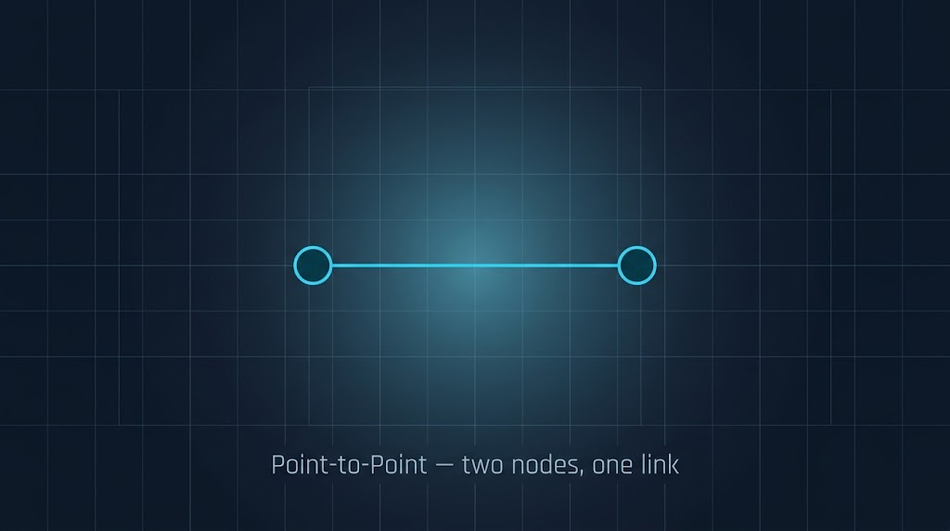
A point-to-point link connects exactly two nodes — the only option available when there are only two, as Kuphaldt notes. [2] Some standards assume it: RS-232C is almost exclusively point-to-point, just as token ring is implemented only as a ring. [2] Dedicated two-node links still matter in larger designs. NIST's OT security guide lists point-to-point as one of four SCADA communications topologies, alongside series, series-star, and multi-drop, noting it is the simplest of the four but costly, since every connection needs its own channel. [5]
 Point-to-point topology
Bus Topology
In a bus topology, all nodes connect to a single shared bus. [1] A bus network is simple to install and maintain, and nodes can be added or removed with minimal wiring changes. [2] The catch is that the one bus carries every signal, so only one node can talk at a time and every node hears every message, which limits data rates and raises security concerns. [2] A break in the bus wiring can leave nodes isolated in groups. [2]
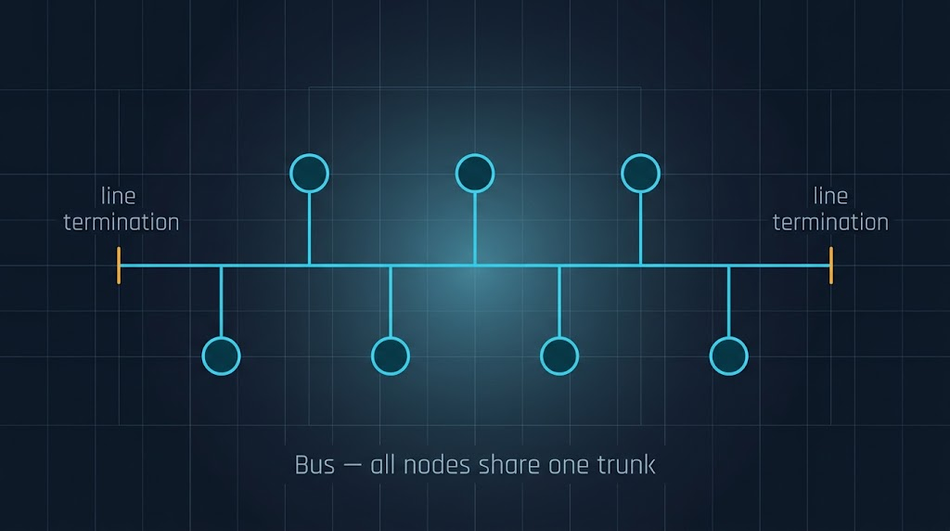
You still meet the bus topology in fieldbuses such as RS-485 Modbus, covered in the industrial section below. [8]
Recommended Reading: Bus Topology: The Backbone of Simple Network Design
Ring Topology
In a ring topology, every node connects to exactly two others. [1] Because each node has two connection points, a single break anywhere in the ring leaves every node still reachable. [2] The trade-offs: the devices must be designed for a ring, and the network must be interrupted to install or remove nodes. [2]
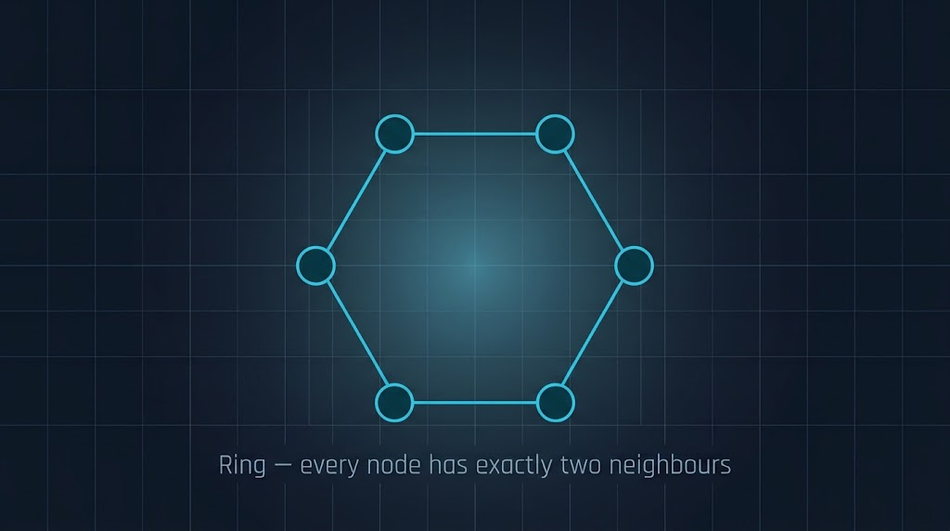
IEC 62439-2 standardizes a ring-based recovery protocol for industrial Ethernet that reacts deterministically to a single failure of an inter-switch link or switch. [9]
Recommended Reading: Understanding Ring Topology: A Detailed Exploration
Star Topology
In a star topology, peripheral nodes connect to a central node and communicate with each other only by transmitting to, and receiving from, that central node.[1] A failed link between one peripheral node and the center isolates only that device.[1] The weak points are the central and branching devices: if a gateway at a branching point fails, the branches behind it can be cut off from the rest of the network.[2]
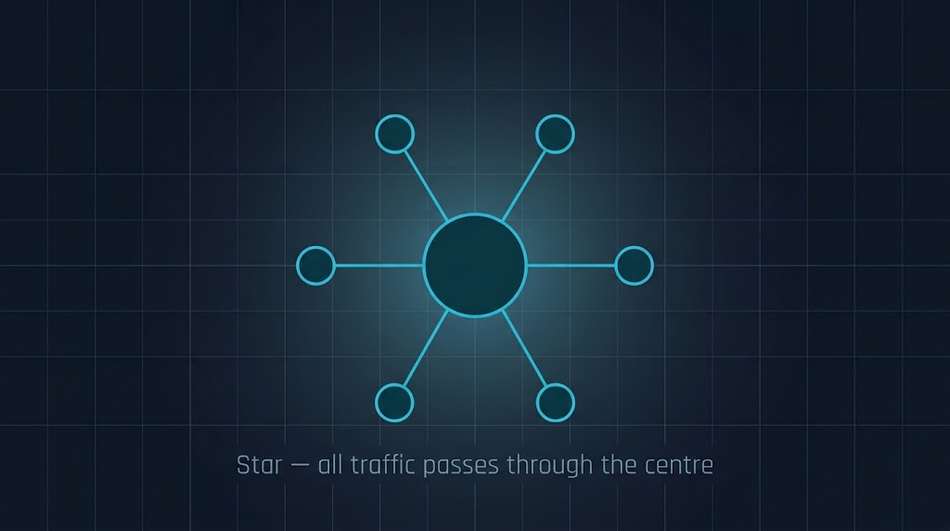
Switched Ethernet LANs typically follow this pattern, with each endpoint cabled to a switch that acts as the central node of the star.[2][3] The cabling standard sets the radius: ANSI/TIA-568 limits a horizontal twisted-pair channel to 100 m, made up of a 90 m permanent link and a total of 10 m of patch cable.[4] That limit has carried over from Category 3 cabling at 10 Mbit/s to Category 6A at 10 Gbit/s.[4]
Infrastructure-mode Wi-Fi behaves as a star too: when one station sends to another, the frame goes first to the access point and then from the access point to the destination.[12]
Recommended Reading: A Comprehensive Guide to Understanding Star Topology in Computer Networks
Mesh Topology
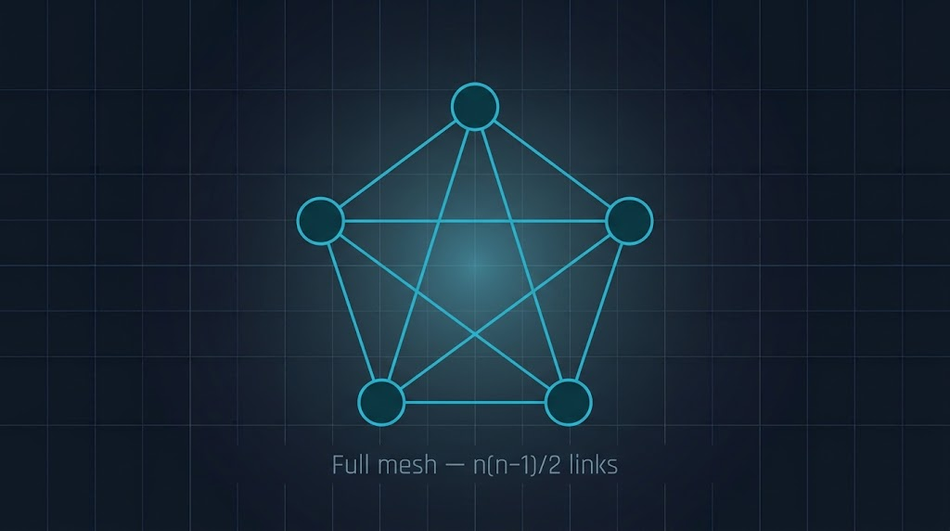
ATIS defines a mesh topology as one in which at least two nodes have two or more paths between them. [1] That definition includes partial meshes. A fully connected mesh has a direct path between every pair of nodes: with n nodes there are n(n−1)/2 direct paths. [1]
Nodes | Links in a full mesh |
5 | 10 |
10 | 45 |
20 | 190 |
50 | 1,225 |
That growth is why full meshes stay small. What you buy with those links is the absence of a single point of failure — every node has an alternative route when one fails. Partial meshes place extra paths only where they matter: Thread and WirelessHART devices relay traffic for one another, so a message has more than one route to its destination. [10][13]
Recommended Reading: Mesh Topology: A Deep Dive into Principles and Applications
Tree Topology
A tree topology resembles several star networks joined together: each peripheral node talks to one node above it, toward a central node, and doesn't have to relay traffic for others. [1] The central node's function can itself be spread across devices. [1] As in a star, a broken link isolates one node — but a break inside that distributed center cuts off a whole group. [1]
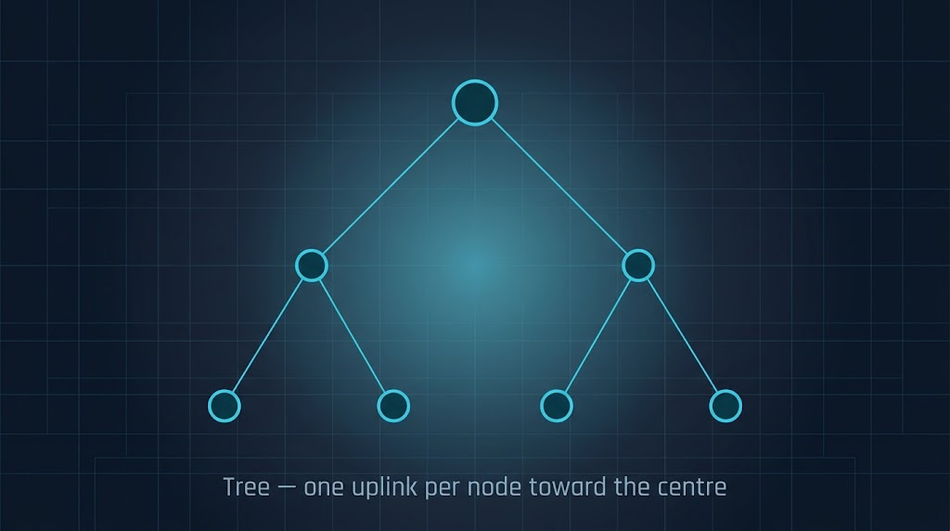
The hierarchical campus LAN is a practical tree. The access layer connects endpoints, the distribution layer aggregates access layers and provides connectivity to services, and the core layer connects distribution layers in large LANs. [3] In smaller LANs the distribution switch can also carry the WAN and Internet edge; Cisco calls this a collapsed core, since distribution then serves as the Layer 3 aggregation layer for all devices. [3] Add redundant uplinks to a tree and STP keeps the active topology loop-free. [6]
Hybrid Topology
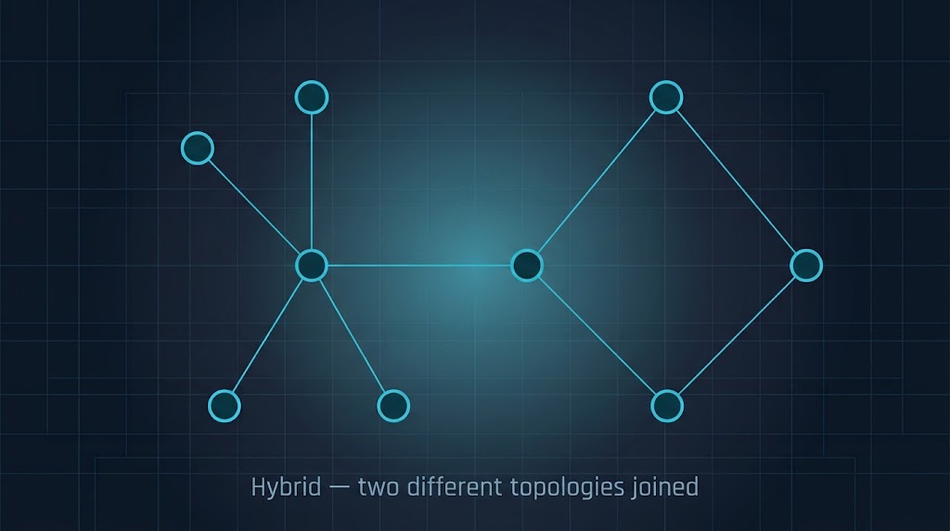
A hybrid topology combines two or more topologies. [1] ATIS adds a subtlety: a tree joined to a tree is still a tree, but joining two different topologies always makes a hybrid. [1]
Hybrids usually grow out of history, not design. Kuphaldt notes that industrial networks often end up combining rings over time, simply because engineers join networks together for plant-wide access. [2] The categories blur at the edges: ATIS says a tree resembles joined star networks, yet gives two joined stars as its example of a hybrid. [1]
Network Topology Comparison: Cabling, Fault Tolerance, Scalability, and Cost
The table compares the seven types on the criteria that usually decide a design: cabling, reliability, growth, and cost. Link counts follow from the ATIS definitions: every ring node has exactly two branches, so n nodes share n links, and every star peripheral has one link to the center.[1]
Topology | Links for n nodes | Fault tolerance | Scalability | Relative cabling cost | Typical use |
Point-to-point | 1 (two nodes only) | One link failure disconnects both nodes | Limited to two nodes | Lowest | RS-232C serial links, SCADA control-center-to-field-site links |
Bus | One shared trunk | A break can isolate groups of nodes | Easy to add taps; the Modbus serial spec guarantees at least 32 devices per segment without a repeater | Low | Fieldbuses such as RS-485 Modbus |
Ring | n | Survives a single break; MRP restores forwarding after one failure | Adding a node interrupts the ring | Low to moderate | Industrial Ethernet rings (MRP with PROFINET) |
Star | n−1 | A link failure isolates one node; a failed central or branching device cuts off the nodes behind it | One cable per new node, within the 100 m copper channel and available ports | Moderate | Switched Ethernet LANs, infrastructure Wi-Fi |
Mesh (full) | n(n−1)/2 | Every pair has a direct path plus alternates; survives multiple simultaneous link failures | Link count grows with the square of node count | Highest | Rare at full scale; partial meshes are the practical form (Thread, WirelessHART) |
Tree | n−1 | A link failure isolates a node or a branch | Grows by adding branches at each layer | Moderate | Campus LANs (access, distribution, core) |
Hybrid | Depends on the parts | Depends on how the parts are joined | Flexible | Varies | Plant networks, LoRaWAN star-of-stars |
Figures in this table are drawn from the sources cited in the sections above: ATIS link counts [1], ANSI/TIA-568 channel limits [4], the Modbus serial-line specification [8], and Cisco's MRP documentation [7].
Network Topologies in IoT and Industrial Networks
In IoT and industrial systems, topology decides more than the cable plan. It sets how long batteries last, how quickly the network recovers from a fault, and which single failure can stop a process.
Star and Star-of-Stars: LPWAN and Wi-Fi
LoRaWAN uses a star-of-stars topology in which gateways relay messages between end devices and a central network server. [11] The gateways connect to that server over standard IP connections and act as a transparent bridge, converting RF packets to IP packets and back. [11] Each end device reaches one or many gateways in a single hop. [11]
The device class sets the power budget. A Class A end device can stay in low-power sleep for as long as its own application requires, with no network requirement for periodic wake-ups. [11] A Class C device keeps its receiver open whenever it is not transmitting, at a receiver drain of up to about 50 mW, so it suits applications with continuous power. [11] Wi-Fi uses a similar idea: in an infrastructure network, the access point buffers traffic for a station while that station is in a very low power state. [12]
The cost of a star is the extra hop. In infrastructure Wi-Fi, a frame between two stations crosses the air twice, once to the access point and once to the destination, consuming twice the bandwidth of a direct transfer. [12]
Wireless Mesh: Thread, Zigbee, and WirelessHART
Wireless mesh networks trade power for resilience. A Thread router provides routing services to other Thread devices and is not designed to sleep. [10] Battery-powered devices join as Sleepy End Devices: they communicate only through a parent, cannot forward messages, and switch their radio off during idle periods. [10] If its parent becomes unavailable, a sleepy device selects another one. [10]
Thread is designed so that no device is a single point of failure, and even the Leader role is re-elected when the current Leader fails. [10] The Thread Group is candid about the limit: in a system with a single Border Router, a power loss at that device leaves no means to switch to an alternative. [10] The lesson applies to any mesh: backup paths exist only where you have built them.
Zigbee divides the roles similarly but handles failure differently. A Zigbee network has at most one coordinator, which forms the network, plus multiple routers and end devices — and unlike Thread's Leader, that coordinator role is not re-elected. [14] Routers provide routing services and should generally stay on while the network is established. End devices are leaf nodes that communicate only through a parent and cannot relay messages for other nodes, and sleepy end devices power down their radio when idle and poll their parent for incoming messages. [14] More routers is not automatically better: in a very dense network, making every line-powered node a router can cause interference, so the goal is a balanced network where all nodes have redundant paths. [14]
WirelessHART, standardized as IEC 62591, is a self-organizing mesh in which field devices form wireless networks that dynamically work around obstacles in the process environment. [13] Its system engineering guide turns that resilience into four concrete design rules, all of which follow: [13]
Rule of 5 minimum: place at least 5 devices within effective range of the gateway. A smaller network still works, but it does not benefit from the intrinsic redundancy of the mesh and may need repeaters.
Rule of 3: give every device at least 3 neighbors within effective range, which ensures at least 2 connections.
Rule of percentages: in networks of more than 5 devices, keep at least 25% of devices within effective range of the gateway (25 devices in a 100-device network). Networks can work with as little as 10%, but the guide calls 25% a practical number, and it raises the target to 50% if more than 20% of devices update faster than every 2 seconds.
Rule of maximum distance: keep devices updating faster than every 2 seconds within twice the effective device range of the gateway, which maximizes response speed for high-speed monitoring and control.
Industrial Ethernet Rings: MRP
An Ethernet ring gives plant networks a redundant path with n links instead of the n(n−1)/2 a full mesh needs.[1] IEC 62439-2:2021 (Edition 3.0) specifies the Media Redundancy Protocol, a ring-based recovery protocol under the control of a dedicated media redundancy manager node.[9] Cisco notes that MRP "is commonly used in conjunction with the PROFINET standard."[7]
Treat recovery time as a design parameter. Cisco's IE3500 platform defaults to a maximum recovery time of 200 ms for a ring of up to 50 nodes, with a 500 ms profile available; a 30 ms profile was added in IOS XE 26.1.1. [7] Because Layer 2 frames are lost while the ring changes state, check the recovery profile against the longest communication gap your control application can tolerate.[7]
Fieldbus: RS-485 Bus Networks (Modbus)
The Modbus serial-line specification describes the classic industrial bus network.[8] Devices connect along one trunk cable, either directly (daisy chaining) or through short derivation cables, and both ends of the trunk must have a line termination.[8] The key limits from the specification:[8]
Devices: 32 devices are always allowed without a repeater. More are possible without one when the devices are documented to allow it, or you can add a repeater.
Trunk length: at up to 9600 baud with AWG26 or wider gauge cable, the maximum length is 1,000 m.
Derivations: never longer than 20 m.
Termination: near each of the two ends of the bus, never on a derivation cable; a 150 Ω, 0.5 W resistor is one allowed value.
The maximum length also depends on the cable, the number of loads on the daisy chain, and whether the network configuration is 2-wire or 4-wire.[8]
Segmenting OT Networks: Topology as a Security Control
NIST's guide to operational technology security treats topology as part of security design. It recommends an OT network topology "that has multiple layers, with the most critical communications occurring in the most secure and reliable layer."[5] It also recommends a DMZ network architecture with firewalls, so that traffic cannot pass directly between the corporate and OT networks.[5]
Between network segments, NIST places boundary devices such as firewalls to control and monitor communications, and it defines a VPN as a restricted-use logical network built from the resources of a relatively public physical network such as the Internet, typically using encryption and tunneling. [5]
How to Choose a Network Topology
There is no single best topology. Work through these steps to narrow the choice:
Set a reliability target. If losing one device is acceptable but losing the center is not, a star needs a redundant central switch. If no single link may stop the process, plan a ring or mesh with a recovery protocol.[7]
Count nodes and measure distances. A copper Ethernet channel is limited to 100 m, an RS-485 Modbus trunk can reach 1,000 m at 9600 baud with AWG26 or wider cable, and full-mesh link counts grow as n(n−1)/2.[4][8][1]
Check the power budget. Battery devices favor a star, or a mesh role that can sleep, because the routing devices in a mesh must stay awake.[11][10]
Set a recovery-time target. Match it to a protocol profile, for example an MRP ring with a 200 ms maximum recovery time on Cisco's IE3500 platform.[7]
Plan for growth. A ring must be interrupted to add a node, a bus accepts new nodes with minimal wiring changes, and a growing WirelessHART mesh should keep at least 25% of its devices within range of the gateway.[2][13]
Separate security zones logically. Keep critical traffic in the most protected layer, segment the network into zones, and put a DMZ with firewalls between the corporate and OT networks. [5]
Document both views. Draw the physical and the logical topology separately (see the next section).
As a starting point, match the dominant requirement to a topology:
Dominant requirement | Starting topology |
Two devices with a dedicated link | Point-to-point |
Many low-rate devices along one long cable | Bus (RS-485) |
A backup path with minimal cabling and a defined recovery time | Ring with MRP |
Easy moves, adds, and changes inside a building | Star (switched Ethernet) |
Battery sensors that must sleep, reached in a single long-range hop | Star-of-stars (LoRaWAN) |
Wireless devices in a plant or building with many obstacles | Wireless mesh (WirelessHART, Thread, Zigbee) |
Large multi-building campus | Tree (access, distribution, core) |
Network Topology Diagrams: Documenting Physical and Logical Views
A network topology diagram is only useful if it matches the network. Keep two views: a physical diagram (cable runs, rooms, switch ports, ring paths) and a logical diagram (subnets, routing domains, firewalls, and the ports STP or MRP block in normal operation). Updating both after every network configuration change is what makes them trustworthy during an outage.
Treat those diagrams as sensitive data. NIST lists network diagrams among the critical files to protect at rest in OT environments, alongside electrical diagrams and PLC program code.[5]
Common mistakes that good diagrams help catch:
Hidden single points of failure. A mesh with one Border Router still depends on it.[10]
Misplaced terminations. RS-485 terminations belong at the two trunk ends, never on a derivation cable.[8]
Overlong copper runs. A horizontal twisted-pair channel beyond 100 m is outside the ANSI/TIA-568 limit.[4]
Untested failover. The logical topology changes when a link fails (MRP opens the ring, STP activates a standby path), so test failure scenarios before commissioning.[7][6]
Conclusion
Topology is a design decision about failure, cabling, power, and growth, and it has two layers. The physical topology is what you install. The logical topology is what the protocols make of it, and it can change the moment a link fails.
Point-to-point, bus, ring, star, mesh, tree, and hybrid each solve a different problem. Stars suit buildings because they are easy to grow, rings and meshes buy redundancy at the price of links or power, and trees and hybrid topologies are how large computer networks combine them. Start from your failure tolerance, distances, and power budget, pick the simplest topology that meets them, and document both views so the next engineer can see where the backup paths really are.
FAQs
What are the 7 types of network topology?
The seven types of network topology are point-to-point, bus, ring, star, mesh, tree, and hybrid. ATIS formally defines bus, hybrid, mesh, ring, star, and tree, plus the fully connected mesh, and a dedicated two-node link completes the set.[1][2]
What is the difference between physical and logical topology?
Physical topology is where the cables and radios actually connect. Logical topology is the path data takes over them. A ring of switches running MRP, for example, is physically a ring and logically a stub, because the ring manager blocks one port in normal operation.[7]
Which network topology is best?
The best topology depends on your failure tolerance, distances, and power budget. A star is easiest to grow, a ring gives redundancy with the fewest links, a mesh gives the most alternative paths, and a tree scales a star across a campus. No topology is best in general, so start from the constraint that matters most and pick the simplest option that meets it.
What topology does Wi-Fi use?
Infrastructure-mode Wi-Fi works as a star: traffic between two stations passes through the access point.[12] When stations form a network with no access point and no wired connection, the result is an independent BSS (ad hoc network).[12]
What is the difference between a hub and a switch in a star topology?
A hub repeats every transmission to all nodes, including the sender, while a switch forwards each frame only to its destination port. Both form a physical star, but only the switch restricts data flow between nodes, which allows private communication and addresses the speed and security limits of broadcast networking. [1][2]
Which topology is the most fault tolerant?
A full mesh is the most fault tolerant, because every pair of nodes has a direct path plus alternates — at a cost of n(n−1)/2 links for n nodes. [1] A ring is the practical compromise: n links for n nodes, and a single break still leaves every node reachable, with a recovery protocol such as MRP restoring forwarding after a failure. [2][9]
A star is the weakest, since the central node is a single point of failure unless you duplicate it. [2]
How many links does a full mesh network need?
A fully connected mesh of n nodes needs n(n−1)/2 direct links.[1] That is 45 links for 10 nodes and 1,225 for 50 nodes, which is why large networks use partial meshes, rings, or trees instead.
References
[1] ATIS, "Network topology," ATIS Telecom Glossary. [Online]. Available: https://glossary.atis.org/glossary/network-topology/ (accessed Oct. 7, 2026).
[2] T. R. Kuphaldt, "Network topology," in Lessons in Electric Circuits, Volume IV: Digital, sec. 14.6, rev. Nov. 6, 2021. CircuitBread. [Online]. Available: https://www.circuitbread.com/textbooks/lessons-in-electric-circuits-volume-iv-digital/digital-communication/network-topology (accessed Oct. 7, 2026).
[3] Cisco Systems, "Campus LAN and wireless LAN solution design guide," Cisco Validated Design, May 4, 2020. [Online]. Available: https://www.cisco.com/c/en/us/td/docs/solutions/CVD/Campus/cisco-campus-lan-wlan-design-guide.html (accessed Oct. 7, 2026).
[4] CCCA New Technology and Trends Committee, "Going the distance: What you need to know about breaking the 100-meter distance limitation," Cabling Installation & Maintenance, Sep. 20, 2022. [Online]. Available: https://www.cablinginstall.com/cable/article/14281909/going-the-distance-what-you-need-to-know-about-breaking-the-100-meter-distance-limitation (accessed Oct. 7, 2026).
[5] K. Stouffer, M. Pease, C. Tang, T. Zimmerman, V. Pillitteri, S. Lightman, A. Hahn, S. Saravia, A. Sherule, and M. Thompson, "Guide to operational technology (OT) security," National Institute of Standards and Technology, Gaithersburg, MD, USA, NIST SP 800-82r3, Sep. 2023. [Online]. Available: https://nvlpubs.nist.gov/nistpubs/SpecialPublications/NIST.SP.800-82r3.pdf
[6] Cisco Systems, "Configuring Spanning Tree Protocol," in Layer 2 Configuration Guide, Cisco IOS XE 17.17.x (Catalyst 9300 Switches). [Online]. Available: https://www.cisco.com/c/en/us/td/docs/switches/lan/catalyst9300/software/release/17-17/configuration_guide/lyr2/b_1717_lyr2_9300_cg/configuring_spanning_tree_protocol.html (accessed Oct. 7, 2026).
[7] Cisco Systems, "Media Redundancy Protocol," in Cisco IE3500 Series Switch Software Configuration Guide, Cisco IOS XE 17.18.x. [Online]. Available: https://www.cisco.com/c/en/us/td/docs/IIOT/switches/ie35xx/sw-config-guide/17-18/b_ie3500_1718-cg/m-media-redundancy-protocol.pdf (accessed Oct. 7, 2026).
[8] Modbus Organization, "MODBUS over serial line specification and implementation guide V1.02," Dec. 20, 2006. [Online]. Available: https://www.modbus.org/file/secure/modbusoverserial.pdf
[9] Industrial Communication Networks — High Availability Automation Networks — Part 2: Media Redundancy Protocol (MRP), IEC 62439-2:2021, Edition 3.0, International Electrotechnical Commission, Geneva, Switzerland, Dec. 15, 2021. [Online]. Available: https://webstore.iec.ch/en/publication/62849
[10] Thread Group, "Thread network fundamentals," v3, May 2020. [Online]. Available: https://www.threadgroup.org/Portals/0/documents/support/Thread%20Network%20Fundamentals_v3.pdf (accessed Oct. 7, 2026).
[11] LoRa Alliance, "What is LoRaWAN specification." [Online]. Available: https://lora-alliance.org/about-lorawan-old/ (accessed Oct. 7, 2026).
[12] M. Ergen, "IEEE 802.11 tutorial," Dept. Elect. Eng. Comput. Sci., Univ. California, Berkeley, CA, USA, Jun. 2002. [Online]. Available: https://ptolemy.berkeley.edu/projects/ofdm/ergen/docs/ieee.pdf
[13] HART Communication Foundation, "IEC 62591 WirelessHART system engineering guide," HCF_LIT-161, rev. 1.0, May 5, 2013. [Online]. Available: https://www.fieldcommgroup.org/sites/default/files/imce_files/technology/documents/WirelessHART_system_eng_guide.pdf
[14] Silicon Labs, "Network node types," in Zigbee Fundamentals, Zigbee SDK documentation v8.2.2. [Online]. Available: https://docs.silabs.com/zigbee/8.2.2/zigbee-fundamentals/03-network-node-types (accessed Oct. 7, 2026).
<style> li.li1 {margin: 0.0px 0.0px 8.0px 0.0px; text-align: justify; font: 11.0px Helvetica; color: #000000} ol.ol1 {list-style-type: decimal} </style>
in this article
1. What Is Network Topology?2. Physical Topology vs Logical Topology3. The 7 Types of Network Topology4. Network Topology Comparison: Cabling, Fault Tolerance, Scalability, and Cost5. Network Topologies in IoT and Industrial Networks6. How to Choose a Network Topology7. Network Topology Diagrams: Documenting Physical and Logical Views8. Conclusion9. FAQs10. References