Understanding Nvidia CUDA Cores: A Comprehensive Guide for 2026
CUDA cores are Nvidia GPUs' core FP32/INT32 processing units, powering parallel computing across HPC, gaming, and graphics rendering tasks.

Last updated on 27 Jun, 2026. 25 minutes read
Introduction
In high-tech computing, CUDA cores emerge as pivotal components, revolutionizing how complex tasks are processed. These cores, embedded within modern GPUs, accelerate computing performance in ways previously unimagined, catering to the intensive demands of today’s technological advancements.
This article aims to demystify CUDA cores, elucidating their architecture, functionality, and the vital role they play in various computing tasks. We will explore how they differ from traditional CPU cores, delve into their application in diverse industries, and examine their impact on the future of computing, offering insights for both technical professionals and enthusiasts.
Recommended reading: Autonomous Vehicle Technology Report
What is a CUDA core?
The term CUDA stands for Compute Unified Device Architecture, a proprietary parallel computing platform and application programming interface (API) model created by NVIDIA. CUDA cores are designed to handle multiple tasks simultaneously, making them highly efficient for tasks that can be broken down into parallel processes. CUDA cores are grouped into Streaming Multiprocessors (SMs). Each SM executes threads in groups of 32 called warps — the fundamental unit of GPU parallel execution.
In the realm of modern computing, CUDA cores have become increasingly relevant for significantly speeding up programs by harnessing GPU power. Unlike a central processing unit (CPU) that has a few cores optimized for sequential serial processing, a GPU has a massively parallel architecture consisting of thousands of smaller, more efficient cores designed for handling multiple tasks simultaneously.
This architecture allows CUDA cores to execute tens of thousands of threads concurrently, leading to significant performance improvements in applications that are designed to take advantage of parallel processing. This is particularly beneficial in fields such as gaming, scientific computing, and artificial intelligence, where large amounts of data need to be processed simultaneously.
For instance, in gaming, CUDA cores can render graphics more quickly and efficiently, leading to smoother gameplay and more realistic visuals. In scientific computing, they can process large datasets and perform complex calculations at a much faster rate than traditional CPUs. In artificial intelligence, CUDA cores can accelerate machine learning algorithms, enabling faster data analysis and decision-making.
Further reading: TPU vs GPU in AI: A Comprehensive Guide to Their Roles and Impact on Artificial Intelligence
The Evolution of GPU Architecture and the Rise of CUDA Cores
The architecture of Graphics Processing Units (GPUs) has undergone significant changes over the years. Initially, GPUs were designed for a single purpose - to accelerate the creation of images intended for output to a display. They were equipped with fixed-function pipelines, a type of architecture where each stage in the pipeline has a fixed function, and the data moves sequentially from one stage to the next.
Fixed-function pipelines were highly efficient at performing specific tasks related to rendering graphics. However, they lacked flexibility. Each stage in the pipeline was designed to perform a specific task, and it couldn't be used for anything else. This meant that if a new feature or functionality needed to be added, it often required a complete redesign of the GPU architecture.
The limitations of fixed-function pipelines led to the development of programmable shaders. Shaders are small programs that run on the GPU and can be programmed to perform a wide range of tasks related to rendering graphics. This marked a significant shift in GPU architecture, as it allowed developers to have more control over the rendering process and enabled the creation of more complex and realistic graphics.
The GPGPU Revolution and the Birth of CUDA
The introduction of programmable shaders paved the way for the development of CUDA cores. Shaders are nothing but programs that dictate how pixels and vertices are processed on the GPU. With programmable shaders, developers could write code that would run directly on the GPU. This opened up a whole new world of possibilities, as it meant that the GPU could be used for more than just rendering graphics. Developers began to realize that the parallel processing capabilities of the GPU could be harnessed for a wide range of computationally intensive tasks.
This led to the concept of General-Purpose computing on Graphics Processing Units (GPGPU), which is the practice of using a GPU to perform computations traditionally handled by the CPU. NVIDIA productized this concept in 2006 with the launch of CUDA (Compute Unified Device Architecture), and in 2007 with the Tesla architecture — the first of many NVIDIA GPU architecture designed explicitly for general-purpose parallel computing alongside graphics.
CUDA cores emerged from this transition: unified, programmable arithmetic units (FP32/INT32 ALUs) that replaced the separate vertex and pixel shader processors of earlier GPUs, creating a single flexible pool of parallel compute resources.
The next major leap came with the Volta architecture (2017), which introduced Tensor cores alongside CUDA cores — purpose-built matrix-multiply units that accelerated AI training by orders of magnitude. Turing (2018) added RT cores for real-time ray tracing. These weren't replacements for CUDA cores — they were additions, making the GPU a multi-engine compute platform.
Modern GPU Architecture: 2017–2025
Today's architectures carry this multi-core philosophy to its extreme:
Architecture | Year | Key Addition |
Tesla | 2007 | First unified CUDA shader architecture |
Kepler | 2012 | Dynamic parallelism, GPU-to-GPU communication |
Pascal | 2016 | NVLink, HBM2, FP16 compute |
Volta | 2017 | Tensor cores for AI acceleration |
Turing | 2018 | RT cores for real-time ray tracing |
Ampere | 2020 | 2nd gen Tensor cores, sparsity support |
Ada Lovelace | 2022 | 4th gen Tensor cores, DLSS 3, RTX 40 series |
Hopper | 2022 | H100, Transformer Engine, FP8 training |
Blackwell | 2024 | GB200, 5th gen Tensor cores, 18,432+ CUDA cores [4] |
| Blackwell Ultra | 2026 | 288 GB HBM3e, 15 PFLOPS FP4, 8 TB/s bandwidth, 35% faster training vs B200 |
| Rubin (Vera) | 2026 (H2) | 336B transistors, HBM4 (22 TB/s bandwidth), 50 PFLOPS FP4, 5× faster inference vs Blackwell |
The Role of CUDA in GPU Architecture
The CUDA platform gives developers direct access to the PTX (Parallel Thread Execution) virtual instruction set, specific compute capability versions, and the memory of the parallel computational elements in CUDA GPUs [3]. With CUDA, GPUs can be leveraged for computationally intensive tasks, freeing up the CPU to handle other tasks. This is a significant shift from the traditional GPU function of rendering 3D graphics.
CUDA cores are the heart of the CUDA platform. They are the parallel processors within the GPU that carry out computational tasks. The more CUDA cores a GPU has, the more tasks it can handle concurrently, leading to improved performance in parallel processing tasks, though real-world performance also depends on memory bandwidth, clock speed, SM count, and workload type
In the context of GPU architecture, CUDA cores are the equivalent of cores in a CPU, but there is a fundamental difference in their design and function. While a CPU core is designed for sequential processing and can handle a few software threads at a time, a CUDA core is part of a highly parallel architecture that can handle thousands of threads simultaneously.
This architectural design is particularly beneficial for tasks that can be broken down into parallel processes. For example, in image processing, each pixel of an image can be processed independently. This means that the task can be divided among many CUDA cores, with each core processing a different pixel simultaneously, leading to a significant reduction in processing time.
In essence, CUDA has expanded the role of the GPU in computing and opened up new possibilities for computational science and other fields that require high-performance computing. Today, architectures like Hopper (H100) and Blackwell (GB200) push this further — combining CUDA cores with Tensor cores and RT cores to serve AI training, scientific simulation, and real-time graphics from a single unified platform.
CUDA Core Architecture
From the Ampere architecture onwards, each CUDA core is capable of executing a floating point and an integer operation concurrently, a design choice that significantly enhances computing efficiency for graphics rendering and other parallel tasks. CUDA cores are grouped into larger units called streaming multiprocessors (SMs), and each SM can execute up to 1,024–2,048 threads concurrently, depending on the architecture. This is a key aspect of the CUDA architecture that enables it to achieve high computational performance.
The architecture of a CUDA core includes several key components:
Arithmetic Logic Units (ALUs): Responsible for executing arithmetic and logical operations, ALUs are the workhorses of CUDA cores, enabling the fast processing of mathematical calculations required for graphics rendering and simulation physics.
Register File: A small, high-speed storage area within each CUDA core, the register file stores variables and temporary data needed during computations. The size and efficiency of register files play a critical role in the performance of CUDA cores.
Shared Memory: CUDA cores within the same streaming multiprocessor (SM) share a common memory space known as shared memory, which facilitates fast data exchange and synchronization among cores, reducing the need for slow global memory accesses.
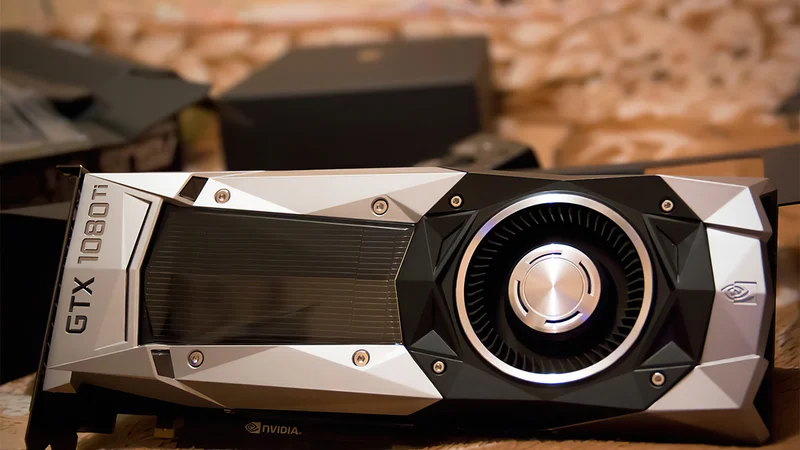
The CUDA core count in a GPU can vary greatly depending on the model. For example, the Nvidia GeForce GTX 1080 Ti, a high-end gaming GPU from 2017, had 3584 CUDA cores, while the subsequent GeForce RTX 2080 Ti featured 4352 cores; meanwhile, Nvidia Tesla V100, a GPU from the same year, designed for data centers and artificial intelligence applications, had 5120 CUDA cores.
More recent GPUs scale significantly higher —the GeForce RTX 3090 Ti reached 10,752 cores, while the RTX 4090 (Ada Lovelace, 2022) carries 16,384 CUDA cores, the H100 SXM5 (Hopper, 2022) 16,896, and the GeForce RTX 5090 (Blackwell, 2024) 21,760.
The number of CUDA cores in a GPU is often used as an indicator of its computational power, but it's important to note that the performance of a GPU depends on a variety of factors, including the architecture of the CUDA cores, the generation of the GPU, the clock speed, memory bandwidth, etc.
While the CUDA cores are capable of executing integer and floating-point operations, they also have support for more complex mathematical functions such as trigonometric functions, exponentials, and logarithms. This makes them highly versatile and capable of handling a wide range of computational tasks.
In addition to their computational capabilities, CUDA cores also have access to different types of memory within the GPU. Each type of memory has its own characteristics in terms of size, latency, and bandwidth, and understanding how to use these different types of memory effectively is a key aspect of optimizing CUDA applications.
GPU Memory Architecture and the CUDA Memory Model
At first glance, GPUs may seem like clusters of tiny units, but they pack a punch when it comes to computational power. The Nvidia RTX 4090, for instance, boasts over 16,384 cores and 24 gigabytes of GDDR6X VRAM with a total memory bandwidth of 1,008 GB/s. [2]
Yet, delving deeper into the world of GPU programming reveals a complex landscape. The key to harnessing the full potential of these GPU powerhouses lies in meticulous memory management. Think of it as managing a large team of low-skilled workers—you need strict guidelines and a well-structured approach. The CUDA memory model plays a crucial role in this endeavor [1]
This memory model organizes GPU threads into interchangeable blocks, each with up to 1,024 workers, akin to teams in a vast state department. But what sets GPUs apart is their finely-grained memory hierarchy. They utilize four types of memory:
Host Memory: This is the main system RAM, managed by the CPU. It's physically separate from the GPU, necessitating specific mechanisms to facilitate data transfer between the CPU and GPU for processing.
Device Memory: Serving as the GPU's onboard RAM, this memory tier stores data awaiting processing. Consumer GPUs typically carry 8–24 GB GDDR6X; data center GPUs scale far higher — the H200 carries 141GB HBM3e, and the GB200 carries 192GB HBM3e. It's crucial for handling large datasets in GPU-accelerated applications.
Shared Memory: A limited-capacity buffer — up to 96KB per SM on Ampere/Ada Lovelace, and up to 228KB per SM on Hopper, that is accessible by all threads within a CUDA block. Its lower latency compared to Device Memory makes it ideal for storing frequently accessed data, significantly speeding up data retrieval and computation.
Register Memory: The fastest form of memory available to CUDA cores, assigned to individual threads. It's used for storing variables that require rapid access. When the allocation exceeds the limit, excess data is moved to the slower, high-latency Local memory.
Each serves a unique purpose in the scheme of GPU processing. To make the most of GPUs, efficient algorithms must adhere to four guiding principles:
Promote block-wise parallelism, where threads collaborate within their CUDA block.
Minimize Host-to-Device memory transfers to avoid bottlenecks.
Reduce Device-to-Shared/Register memory transfers for optimal performance.
Encourage block-wise memory access patterns to align with GPU memory architecture.
GPUs are a powerhouse, but tapping into their potential requires a nuanced understanding of memory management.
CUDA Cores vs CPU Cores
While both CUDA cores and CPU cores are responsible for executing computational tasks, they differ significantly in their design, architecture, and intended use cases. Understanding these differences is crucial for determining the most suitable processing unit for a specific task.
Design and Architecture
CUDA cores are part of a GPU's highly parallel architecture, designed to handle multiple tasks simultaneously. They are optimized for executing thousands of threads concurrently, making them well-suited for tasks that can be broken down into parallel processes. In contrast, CPU cores are designed for sequential processing**, with modern CPUs supporting 2 threads per core via SMT (Simultaneous Multi-Threading — Intel's Hyperthreading or AMD's equivalent).** CPUs are optimized for tasks that require complex branching and decision-making.
This comes down to a fundamental design tradeoff — CPU cores are large, complex, and fast, built to minimize latency on sequential tasks. GPU cores are small and simple, with that die area instead used to pack in thousands of parallel execution units
A high-end CPU like the AMD Ryzen Threadripper 7980X has 64 cores at up to 5.1GHz. The RTX 4090 has 16,384 CUDA cores at 2.52GHz. Fewer, faster cores vs thousands of simpler, parallel ones
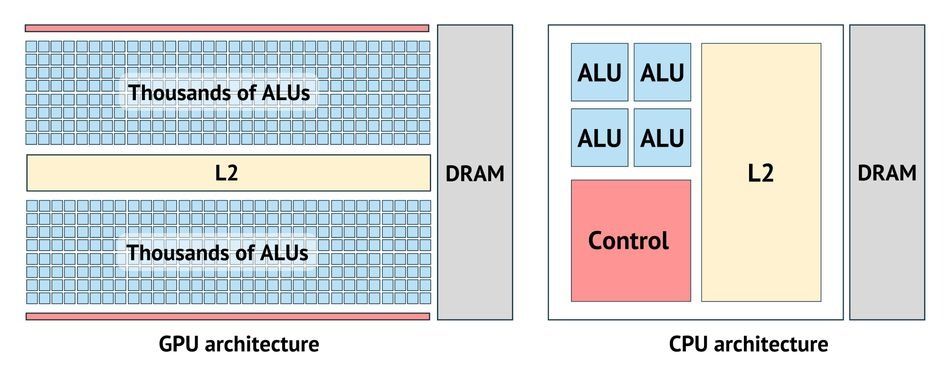
High-level overview of GPU and CPU architectures
Performance and Efficiency
Due to their parallel architecture, CUDA cores can achieve high performance in tasks that can be parallelized, such as image processing, scientific simulations, and machine learning. For AI training and inference specifically, Tensor cores — not CUDA cores — carry the primary workload in modern Nvidia GPUs, with CUDA cores handling the surrounding general-purpose compute.
However, they may not be as efficient in tasks that require complex branching or decision-making, which are better suited for CPU cores. On the other hand, CPU cores are more versatile and can handle a wider range of tasks, but they may not be as efficient as CUDA cores in parallelizable tasks.
Memory Access
CUDA cores and CPU cores also differ in their memory access patterns. CUDA cores have access to various types of memory within the GPU – register memory, shared memory, local memory, and global device memory (GDDR6X or HBM, depending on GPU class). Efficient use of these memory types is crucial for optimizing CUDA applications. CPU cores, by contrast, rely on a deep cache hierarchy — typically L1 (per-core, ~32–64KB), L2 (per-core, 512KB–1MB), and L3 (shared, 32–128MB) — designed to minimize latency on sequential memory access patterns. Understanding the memory hierarchy and optimizing data access patterns are essential for achieving high performance in CPU-based applications.
Programming and Software
Programming for CUDA cores requires specific knowledge of parallel programming. NVIDIA provides CUDA, a parallel computing platform and programming model that allows developers to use C, C++, Python (via CuPy and Numba), and framework-level abstractions like PyTorch and TensorFlow that run on CUDA without requiring developers to write raw GPU code. CPU cores, on the other hand, can be programmed using a wide range of programming languages and paradigms. They are more flexible in terms of software compatibility and are supported by a broad range of operating systems and software tools.
Quick Comparison
CUDA Cores | CPU Cores | |
Count | Thousands (up to 21,760 on RTX 5090) | 4–96 (consumer to server) |
Clock Speed | 1.5–2.8GHz | 3.0–5.5GHz |
Thread Model | Tens of thousands concurrent | 1–2 threads per core (SMT) |
Optimized For | Parallel throughput | Sequential latency |
Cache | Small per-SM, throughput-optimized | Large L1/L2/L3, latency-optimized |
Best Workloads | ML, rendering, simulation, HPC | OS, branching logic, general apps |
While CUDA cores excel in parallel processing tasks, CPU cores are more versatile and can handle a wider range of applications. Choosing the right processing unit depends on the specific requirements of the task at hand and the desired performance characteristics.
CUDA Cores and High-Performance Computing
High-performance computing (HPC) is a field that focuses on aggregating computing power to solve complex problems in science, engineering, or business more quickly. CUDA cores, with their parallel processing capabilities, play a significant role in HPC.
High-performance computing often requires the execution of a large number of mathematical operations, a task well-suited to the parallel architecture of CUDA cores. Each CUDA core can execute a single instruction at a time, but organized into warps of 32 threads executing in lockstep across thousands of cores simultaneously, modern GPUs deliver tens of petaflops of FP32 throughput, processing large datasets in parallel and significantly reducing computation time.
For instance, in scientific simulations — such as molecular dynamics, climate modeling, and computational fluid dynamics, which often involve solving complex mathematical models, the parallel processing capabilities of CUDA cores can be leveraged to perform calculations on large data sets simultaneously. This can lead to a significant reduction in the time required to complete the simulation, enabling scientists to carry out more complex and detailed simulations. DeepMind's AlphaFold2, which solved the protein folding problem, ran on clusters of Nvidia A100 GPUs — a landmark example of GPU-accelerated HPC.
In the field of machine learning, Tensor cores — purpose-built matrix-multiply units introduced in Volta (2017) — carry the primary workload for deep learning training, with CUDA cores handling surrounding general-purpose compute. Training these models involves performing a large number of matrix multiplications, a task that Tensor cores execute at dramatically higher throughput than CUDA cores alone. A deep learning model that might take weeks to train on a CPU could potentially be trained in days or even hours on a GPU — and on a Hopper H100 or Blackwell GB200 cluster, training runs that once took days can complete in hours.
Furthermore, since CUDA cores have access to different types of memory within the GPU, shared memory can be used to store frequently accessed data, reducing the need for time-consuming memory accesses and thus improving the performance of the application. At the system level, modern HPC deployments connect multiple GPUs via NVLink — Nvidia's high-bandwidth GPU interconnect — enabling DGX systems and GB200 NVL72 racks to scale compute across dozens of GPUs as a unified resource.
CUDA cores, with their parallel processing capabilities and access to various types of memory, play a crucial role in high-performance computing. They enable the execution of large-scale scientific simulations and the training of complex machine learning models, among other tasks, contributing significantly to advancements in these fields.
CUDA Cores in Gaming
In the world of gaming, graphics quality and FPS (Frames Per Second) are king. As gamers constantly seek more immersive experiences, the specs of NVIDIA graphics cards that drive these experiences become increasingly important. CUDA cores contribute to a game's overall performance by rendering graphics via rasterization — the primary rendering pipeline in which geometry is converted to pixels on screen — and by running shader programs that determine lighting, color, and surface detail.
Graphics rendering in games often involves complex tasks such as shading, texture mapping, and anti-aliasing. These tasks can be parallelized and executed efficiently on CUDA cores. In shading, each screen fragment is processed by an independent shader thread — thousands of which run simultaneously across CUDA cores, dramatically accelerating frame output.
Beyond rasterization, Tensor cores power DLSS (Deep Learning Super Sampling), Nvidia's AI-based upscaling technology — now at DLSS 3.5 with Frame Generation — which uses a trained neural network to reconstruct high-resolution frames from lower-resolution inputs, delivering higher frame rates without proportional rendering cost. On an RTX 4090, DLSS 3 Frame Generation can effectively double or triple frame rates in supported titles.
GPU-accelerated physics via Nvidia PhysX was a significant feature through the 2010s, offloading collision detection and fluid simulations to CUDA cores. NVIDIA deprecated GPU PhysX support for most titles in 2020, with modern game physics now handled primarily by the CPU. GPU compute does still contribute to particle systems and certain simulation effects in titles built on modern engines like Unreal Engine 5.
Real-Time Ray Tracing
One of the most demanding graphics rendering techniques is real-time ray tracing, which simulates the physical behavior of light to bring real-time, cinematic-quality rendering to games. NVIDIA's RTX series GPUs achieve this through dedicated RT cores — purpose-built hardware units that handle the most computationally expensive parts of ray tracing: bounding volume hierarchy (BVH) traversal and ray-triangle intersection testing. CUDA cores handle shading calculations after RT cores determine ray-surface intersections — the two work in tandem, not interchangeably.
RT cores were first introduced with the Turing architecture (RTX 20 series, 2018) and have improved with each subsequent generation — 2nd gen in Ampere (RTX 30 series), 3rd gen in Ada Lovelace (RTX 40 series), and 4th gen in Blackwell (RTX 50 series) — each bringing higher throughput and more accurate intersection testing.
This results in stunningly realistic lighting effects in games that support this technology. Because ray tracing is inherently performance-intensive, Nvidia pairs RT cores with DLSS — Tensor core-powered AI upscaling that recovers frame rates lost to ray tracing overhead. The combination of RT cores, CUDA cores, and DLSS working together is what makes real-time ray tracing viable at playable frame rates.

Ray Tracing brings cinematic-quality reflections to life. Source: Marvel's Spider-Man: Miles Morales PC Game
Optimizing Gaming Performance with CUDA Cores
Game developers are constantly seeking ways to push the boundaries of gaming performance and visual fidelity. A critical aspect of achieving these goals lies in optimizing the use of CUDA cores within Nvidia GPUs. This section expands on the key strategies that game developers can employ to harness the full potential of CUDA cores, ensuring games not only look stunning but also run smoothly across a wide range of hardware configurations.
Dynamic Load Balancing Across CUDA Cores
One of the foundational techniques in optimizing gaming performance is dynamic load balancing. CUDA cores excel in parallel processing, but to fully leverage this capability, workloads must be evenly distributed across the cores. Game engines are designed to dynamically allocate tasks such as rendering, physics calculations, and AI computations across available CUDA cores. This ensures that no single core is overwhelmed, which can lead to bottlenecks and reduced performance. Techniques such as workload splitting and task prioritization are essential in achieving efficient load balancing.
Employing Asynchronous Compute for Efficiency
Asynchronous compute is a technique that allows multiple tasks to be processed simultaneously on a GPU, without having to wait for each task to complete before starting the next. This is particularly useful in gaming, where tasks like rendering graphics, computing physics, and handling user inputs must occur seamlessly and without delay. By employing asynchronous computing, developers can make better use of CUDA cores, executing parallel tasks more efficiently and improving game responsiveness.
Leveraging CUDA for Physics and Simulations
CUDA cores are not just about rendering pixels; they also play a crucial role in simulating complex physical phenomena in games, such as fluid dynamics, cloth simulation, and particle effects. For these specific workloads, offloading to CUDA cores frees CPU resources and allows for more detailed effects without compromising frame rates. Broad GPU-accelerated physics (as in Nvidia PhysX) has largely moved back to CPU in modern titles since 2020, but GPU compute remains relevant for particle and simulation-heavy effects in engines like Unreal Engine 5. This approach requires careful optimization to ensure that physics calculations are suitably balanced with graphical rendering tasks.
Optimizing Shader Performance
Shaders are programs that dictate how pixels and vertices are processed on the GPU. By optimizing shader code, developers can significantly reduce the processing load on CUDA cores, allowing for more complex effects and higher frame rates. Techniques such as minimizing memory accesses, using efficient mathematical operations, and leveraging built-in functions can help optimize shader performance. Ada Lovelace introduced Shader Execution Reordering (SER) — a hardware feature that reorganizes incoherent shader workloads on the fly, improving CUDA core utilization by up to 2x in ray tracing workloads.
Profiling and Debugging with Nvidia Tools
NVIDIA provides a suite of tools designed to help developers profile and debug their games, identifying performance bottlenecks and optimizing the use of CUDA cores. NVIDIA Nsight Systems and Nsight Graphics allow developers to see how their game performs at the hardware level, providing insights into how tasks are being distributed across CUDA cores and where optimizations can be made. NVIDIA Reflex further helps developers minimize input latency by optimizing the CPU-GPU render queue — a critical tool for competitive gaming titles.
Implementing Advanced Rendering Techniques
Advanced rendering techniques such as real-time ray tracing and deep learning super sampling (DLSS) represent the cutting edge of gaming visual fidelity — powered by RT cores and Tensor cores respectively, with CUDA cores handling the surrounding rasterization and shader workloads. By implementing these techniques, developers can achieve photorealistic graphics and superior image quality. Optimizing the use of these hardware resources for these tasks involves careful management of resources and leveraging Nvidia's SDKs — including the DLSS SDK and DirectX Raytracing (DXR) — to ensure games fully utilize the available hardware.
CUDA Cores in Machine Learning and AI
Machine learning and artificial intelligence (AI) are fields that require high computational power due to the complexity of the algorithms and the size of the data sets involved. CUDA cores, with their parallel processing capabilities, play a significant role in these fields, working alongside Tensor cores, which carry the primary matrix computation workload in modern Nvidia GPUs.
Training
Machine learning algorithms, particularly deep learning algorithms, involve performing a large number of matrix multiplications. In modern Nvidia GPUs, these operations are handled primarily by Tensor cores — purpose-built matrix-multiply-accumulate units introduced in Volta (2017) that deliver dramatically higher throughput than CUDA cores for this specific workload. CUDA cores handle surrounding general-purpose operations within the training pipeline. Modern deep learning frameworks like PyTorch and TensorFlow access this hardware through cuDNN — Nvidia's GPU-accelerated deep learning library — which automatically routes matrix operations to Tensor cores and other workloads to CUDA cores. This parallel processing leads to a significant reduction in training time, enabling the training of more complex models or the use of larger data sets. Today's frontier AI training runs on H100 and GB200 clusters — the Hopper H100 delivers 3.9 petaFLOPS of FP8 Tensor core throughput; the Blackwell GB200 NVL72 rack scales to 1.4 exaFLOPS.
Inference
In addition to accelerating the training of machine learning models, CUDA cores also play a role in the inference phase. Inference involves using a trained model to make predictions on new data. On modern Nvidia hardware, inference is heavily optimized through TensorRT — Nvidia's inference optimization SDK — which uses INT8 and FP8 quantization to maximize Tensor core throughput while minimizing memory footprint. This leads to faster response times in applications that require real-time predictions — from autonomous driving and voice recognition to LLM inference, where models like GPT-4 class architectures run on H100 clusters serving millions of requests per day.
Artificial intelligence, particularly in areas like natural language processing and computer vision, also benefits from the parallel processing capabilities of CUDA cores. Tasks such as image recognition or language translation involve performing a large number of calculations simultaneously, a task well-suited to the capabilities of CUDA cores and the broader CUDA platform ecosystem.
Recommended reading: A Look at What's Next in AI, Deep Learning and Beyond
How to Determine the Number of CUDA Cores You Need
Determining the number of CUDA cores you need depends on the specific requirements of your applications. Different applications have different computational demands and thus require different numbers of CUDA cores for optimal performance.
For gaming applications, the number of CUDA cores you need can depend on the complexity of the game's graphics and physics. Games with more complex graphics and physics require more GPU cores for smooth gameplay. For instance, modern AAA games with high-definition graphics and realistic physics simulations may require a GPU with a high number of CUDA cores to render the game smoothly. However, less demanding games or older games may not require as many CUDA cores.
The architecture of the GPU, the efficiency of its cores, and the balance between its various components, like Tensor and Ray Tracing cores, also play crucial roles. Different architectures may utilize CUDA cores more efficiently, meaning a GPU with fewer CUDA cores but a newer, more advanced architecture could outperform an older GPU with a higher core count. Additionally, gaming performance is influenced by other factors such as memory bandwidth, clock speeds, and the presence of specialized cores that handle tasks like AI-driven enhancements and real-time ray tracing. Therefore, while CUDA core count is an important metric, it must be considered within the broader context of the GPU's overall design and technological ecosystem to accurately gauge gaming performance.
For machine learning and AI applications, the number of CUDA cores you need can depend on the complexity of the models you are training and the size of your data sets. For deep learning specifically, Tensor core count and VRAM capacity matter more than CUDA core count — matrix multiplications that dominate training workloads run on Tensor cores, while VRAM determines the maximum model size and batch size you can fit on a single GPU. Simpler machine learning models or smaller datasets may not require as many compute resources, but large language models and diffusion model training demand GPUs like the H100 (80GB HBM2e) or H200 (141GB HBM3e) where memory capacity is often the primary constraint.
As a general guide:
Use Case | Recommended Tier | Key Spec Priority |
Casual / older games | RTX 3060 (3,584 cores) | CUDA cores, VRAM |
Modern AAA gaming | RTX 4070–4080 (5,888–9,728 cores) | CUDA + RT cores, DLSS |
4K gaming/content creation | RTX 4090 (16,384 cores) | CUDA + RT + Tensor cores, 24GB VRAM |
ML research / small models | Quadro RTX 5000 or A6000 | Tensor cores, 24–48GB VRAM |
LLM / large model training | H100 / H200 | Tensor cores, 80–141GB HBM |
Frontier AI / HPC | GB200 NVL72 | Full Blackwell stack, 192GB HBM3e |
In this light, benchmarks emerge as essential tools, providing a practical assessment of how a GPU performs under real-world conditions. Benchmark tests GPUs across a variety of tasks, including gaming, rendering, and computational workloads, offering insights into their efficiency, thermal management, and power consumption. They translate the theoretical capabilities of a GPU, such as CUDA core count and architectural advancements, into tangible performance metrics. This helps consumers and professionals alike to make informed decisions based on actual game frame rates, rendering times, and other critical performance indicators.
Leveraging CUDA for Parallel Programming
CUDA programming is a specialized skill set enabling developers to directly harness the computational power of Nvidia GPUs for a broad spectrum of applications beyond traditional graphics rendering. It involves writing code that executes across thousands of threads simultaneously, making it ideal for tasks that can be parallelized effectively.
The CUDA platform provides a comprehensive ecosystem, including a toolkit with compilers, libraries, and debuggers, designed to facilitate the development of high-performance GPU-accelerated applications. A CUDA program typically involves defining kernels, which are functions executed in parallel by multiple threads on the GPU.
Kernels: The core of CUDA programming, kernels, allow for the execution of parallel code on the GPU. They are defined using standard C++ syntax with some extensions and are launched from the host (CPU) code.
Thread Hierarchy: CUDA introduces a flexible hierarchy of thread blocks and grids, enabling efficient organization and coordination of parallel tasks. This hierarchy allows developers to tailor the execution configuration to the specific needs of their application [3].
Memory Management: Effective use of the GPU's memory hierarchy, including global, shared, and local memory, is vital for optimizing performance. CUDA provides explicit control over memory allocation, movement, and management, enabling sophisticated optimization strategies.
To embark on the journey of CUDA programming, developers require an Nvidia GPU that is CUDA-capable, coupled with the most recent iteration of the CUDA Toolkit. This toolkit runs on Windows and Linux, on systems with either AMD or Intel CPUs — though an Nvidia GPU is required regardless of host CPU vendor, since CUDA only runs on Nvidia hardware. Nvidia discontinued macOS support for CUDA in 2021.
A robust foundation in C++ is paramount, given that CUDA extends C++ with constructs designed for parallel programming. Developers looking for a gentler entry point can also access CUDA through Python via libraries like Numba and CuPy, or through high-level frameworks like PyTorch, without writing raw CUDA C++. NVIDIA aids in this learning curve by providing extensive documentation, sample code, and tutorials, all aimed at helping developers quickly become proficient in CUDA programming.
The Synergy of CUDA, Tensor, and Ray Tracing Cores in Nvidia GPUs
In the advanced landscape of Nvidia GPUs, alongside the versatile CUDA cores which serve as the foundation for graphics and computational tasks, lie two other specialized core types: Tensor cores and Ray Tracing (RT) cores. These cores are designed to augment the capabilities of CUDA cores, pushing the boundaries of what's achievable in gaming and AI applications.
Tensor Cores: AI Acceleration Powerhouses
Tensor cores are engineered specifically to boost deep learning and artificial intelligence computations. These cores excel at performing complex matrix operations, a cornerstone of neural network processes, at astonishing speeds. This specialization enables features like DLSS (Deep Learning Super Sampling), which uses AI to upscale images in real-time, delivering higher-resolution graphics without the traditional performance penalty. The introduction of Tensor cores marks a significant leap forward in AI-driven graphics enhancements, allowing for more immersive gaming experiences with crisper visuals and smoother frame rates. Each architecture generation has expanded Tensor core precision support — from FP16 at launch in Volta, to FP8 in Hopper, and FP4 in Blackwell — enabling progressively faster AI training and inference with lower memory overhead.
Recommended reading: Revolutionizing Edge AI Model Training and Testing with Nvidia Omniverse's Virtual Environments
Ray Tracing Cores: Masters of Light Simulation
With the advent of RT cores in the Turing architecture and beyond, Nvidia GPUs took a significant step forward in rendering technology. Ray Tracing cores are dedicated to handling the computationally intensive process of simulating how light interacts with objects in a digital environment. This technology enables the rendering of complex visual effects, including realistic reflections, refractions, and shadows, in real time. The result is a level of visual fidelity and immersion that was previously achievable only in pre-rendered scenes, bringing gamers closer to a true-to-life experience.
Synergizing for Better Performance
While CUDA cores provide the general-purpose muscle for a wide array of tasks from 3D rendering to scientific computations, Tensor and Ray Tracing cores offer specialized capabilities that elevate gaming and AI applications to new heights. Tensor cores transform the landscape of AI-enhanced features, making real-time upscaling and improved frame rates a reality, whereas RT cores unlock the potential for cinematic-quality visuals in real-time gaming.
Feature | CUDA Cores | Tensor Cores | Ray Tracing Cores |
Primary Function | General-purpose parallel processing for graphics and computation | Accelerating deep learning and AI computations | Accelerating real-time ray tracing calculations |
Applications | 3D rendering, scientific computing, video processing | AI model training and inference, DLSS | Realistic lighting and shadows, reflections, refractions |
Performance | High efficiency in parallel processing tasks | Optimized for high-throughput matrix operations | Optimized for ray/path tracing algorithms |
Introduced in | GeForce 8 series (2006) | Volta architecture (2017) | Turing architecture (2018) |
Precision | Floating point and integer | Mixed-precision — FP16/FP32 at launch, expanded to FP8 (Hopper) and FP4 (Blackwell) | Specialized for ray tracing computations |
Impact on Gaming | Improves overall graphics rendering and compute tasks | Enhances AI-driven features like image upscaling (DLSS) | Enables realistic lighting and visual effects in real-time |
Current Gen — Consumer (2026) | Blackwell (RTX 50 series) — up to 21,760 cores (RTX 5090) | 5th gen (Blackwell) | 4th gen (Blackwell) |
Current Gen — Data Center (2026) | Rubin — now shipping | 6th gen (Rubin), 50 PFLOPS FP4 [5] | 5th gen (Rubin) |
This trio of core types each plays a unique role in enhancing gaming realism and performance. By leveraging the combined strengths of CUDA, Tensor, and RT cores, Nvidia GPUs deliver an unparalleled experience, setting a new standard for what gamers and developers can expect from their hardware.
Note: Rubin-based consumer GPUs (RTX 60 series) are expected in late 2026 on TSMC's 3nm process — until launch, Blackwell/RTX 50 series remains the current consumer reference point [6].
Recommended Reading: Tensor Cores vs CUDA Cores: The Powerhouses of GPU Computing from Nvidia
Parallel Processing Technologies Beyond CUDA: AMD Stream Processors
AMD Stream Processors serve as the core of AMD's approach to parallel computing, embedded within their Radeon Graphics Processing Units (GPUs). Functionally, they serve a similar role to Nvidia's CUDA cores — individual ALUs grouped into larger execution units (AMD calls these Compute Units, or CUs, the rough equivalent of Nvidia's Streaming Multiprocessors). These processors are the workhorses behind AMD's capability to perform a wide array of parallel computations simultaneously, making them essential for tasks ranging from complex scientific calculations to rendering high-definition video games.
AMD Stream Processors operate based on a scalable architecture that allows them to handle multiple operations concurrently. This architecture is optimized to exploit the parallel nature of computing tasks, significantly reducing the time required to process large data sets or perform complex calculations. AMD's current gaming architecture, RDNA (RDNA 3 in the RX 7000 series, RDNA 4 in the RX 9000 series), scales stream processor counts similarly to how Nvidia scales CUDA cores — the RX 7900 XTX carries 6,144 stream processors, for comparison against Nvidia's RTX 4090 at 16,384 CUDA cores. Direct core-count comparisons between AMD and Nvidia aren't apples-to-apples, however, since the two architectures handle parallel work differently per core.
One of the key advantages of AMD Stream Processors is their support for open standards like OpenCL (Open Computing Language). OpenCL provides a framework that allows developers to write programs that can run across different types of hardware platforms. This openness ensures that applications developed for AMD's GPUs are not only portable across different AMD devices but can also be run on devices from other manufacturers that support OpenCL.
Furthermore, AMD's commitment to open-source development is evident in its support for the Radeon Open Compute Platform (ROCm). ROCm is a platform that provides the necessary tools and resources for developers to leverage the full potential of GPU computing in their applications. ROCm has matured into a more direct CUDA alternative for AI workloads, with native support for PyTorch and TensorFlow, and AMD's CDNA architecture (used in data center accelerators like the MI300X) is purpose-built to compete with Nvidia's H100/H200 in AI training and inference, separate from the gaming-focused RDNA line. It aims to foster innovation and accelerate the development of high-performance, energy-efficient computing systems.
In comparison to other parallel processing technologies, AMD Stream Processors offer a blend of performance, flexibility, and open ecosystem support. This makes them an attractive option for developers looking to push the boundaries of what's possible with parallel computing, without being locked into a proprietary technology stack.
Conclusion
The role of CUDA cores in various applications, from gaming to machine learning and AI, is significant. Their parallel processing capabilities enable them to perform a large number of calculations simultaneously, leading to faster processing times and improved performance in applications that require high computational power.
However, the performance of a GPU is not determined by the number of CUDA cores alone. Other factors, such as the clock speed of the GPU, the memory bandwidth, and the architecture of the CUDA cores, also play a crucial role. Therefore, when choosing a GPU for specific needs, it's important to consider all of these factors.
Frequently Asked Questions (FAQs)
What are CUDA cores?
CUDA cores are parallel processors in Nvidia's GPUs that perform computations. They are designed to handle multiple tasks simultaneously, making them ideal for applications that require high computational power, such as gaming, machine learning, and AI.How do CUDA cores affect gaming performance?
CUDA cores contribute to gaming performance by rendering graphics and processing game physics. Their parallel processing capabilities enable them to perform a large number of calculations simultaneously, leading to smoother and more realistic graphics and more immersive gaming experiences.How do CUDA cores impact AI performance?
CUDA cores support AI performance by handling general-purpose compute alongside Tensor cores, which carry the primary workload for accelerating model training and inference. Together, they enable faster training times and quicker response times in applications that require real-time predictions.How do I determine the number of CUDA cores I need?
The number of CUDA cores you need depends on the specific requirements of your applications and other factors such as the clock speed of the GPU, the memory bandwidth, and the architecture of the CUDA cores. It's important to consider all of these factors when choosing a GPU for your specific needs.What's the difference between CUDA cores and Tensor cores?
CUDA cores handle general-purpose parallel computing, while Tensor cores are specialized for matrix multiplication, making them far faster at AI training and inference tasks.How many CUDA cores does the RTX 4090 have?
The RTX 4090 has 16,384 CUDA cores, built on Nvidia's Ada Lovelace architecture.Are more CUDA cores always better?
Not necessarily. Performance also depends on architecture, clock speed, memory bandwidth, and how efficiently software uses the available cores.Can AMD GPUs use CUDA?
No. CUDA is proprietary to Nvidia. AMD GPUs use open alternatives like OpenCL and ROCm instead.What's the difference between CUDA cores and Stream Processors?
They serve similar roles — CUDA cores are Nvidia's parallel processing units, while Stream Processors are AMD's equivalent. They aren't directly comparable core-for-core due to architectural differences.
References
[1] "What is a GPU? - KeOps," Kernel-Operations.io. [Online]. Available: https://kernel-operations.io/keops/autodiff_gpus/what_is_a_gpu.html
[2] "GeForce RTX 4090 Specs," TechPowerUp. [Online]. Available: https://www.techpowerup.com/gpu-specs/geforce-rtx-4090.c3889
[3] NVIDIA Corporation, "CUDA C++ Programming Guide," NVIDIA Developer Documentation. [Online]. Available: https://docs.nvidia.com/cuda/cuda-c-programming-guide/
[4] R. Smith, "NVIDIA Unveils Blackwell, Its Next GPU," IEEE Spectrum, 2024. [Online]. Available: https://spectrum.ieee.org/amp/nvidia-blackwell-2667535060
[5] "NVIDIA Readies Vera Rubin to Replace Blackwell," TechTarget, 2025. [Online]. Available: https://www.techtarget.com/searchenterpriseai/news/366621003/Nvidia-readies-Vera-Rubin-to-replace-Blackwell
[6] "Desktop GPU Roadmap: NVIDIA Rubin, AMD UDNA & Intel Xe3 Celestial," Tom's Hardware, 2025. [Online]. Available: https://www.tomshardware.com/pc-components/gpus/desktop-gpu-roadmap-nvidia-rubin-amd-udna-and-intel-xe3-celestial
in this article
1. What is a CUDA core?2. The Evolution of GPU Architecture and the Rise of CUDA Cores 3. The Role of CUDA in GPU Architecture4. CUDA Core Architecture 5. CUDA Cores vs CPU Cores6. CUDA Cores and High-Performance Computing7. CUDA Cores in Gaming8. Real-Time Ray Tracing9. Optimizing Gaming Performance with CUDA Cores10. CUDA Cores in Machine Learning and AI11. Leveraging CUDA for Parallel Programming12. The Synergy of CUDA, Tensor, and Ray Tracing Cores in Nvidia GPUs13. Parallel Processing Technologies Beyond CUDA: AMD Stream Processors14. Conclusion15. Frequently Asked Questions (FAQs)16. References